

Improve your WordPress SEO: Write better content and have a fully optimized WordPress site using the Yoast SEO…
About Post Types Order
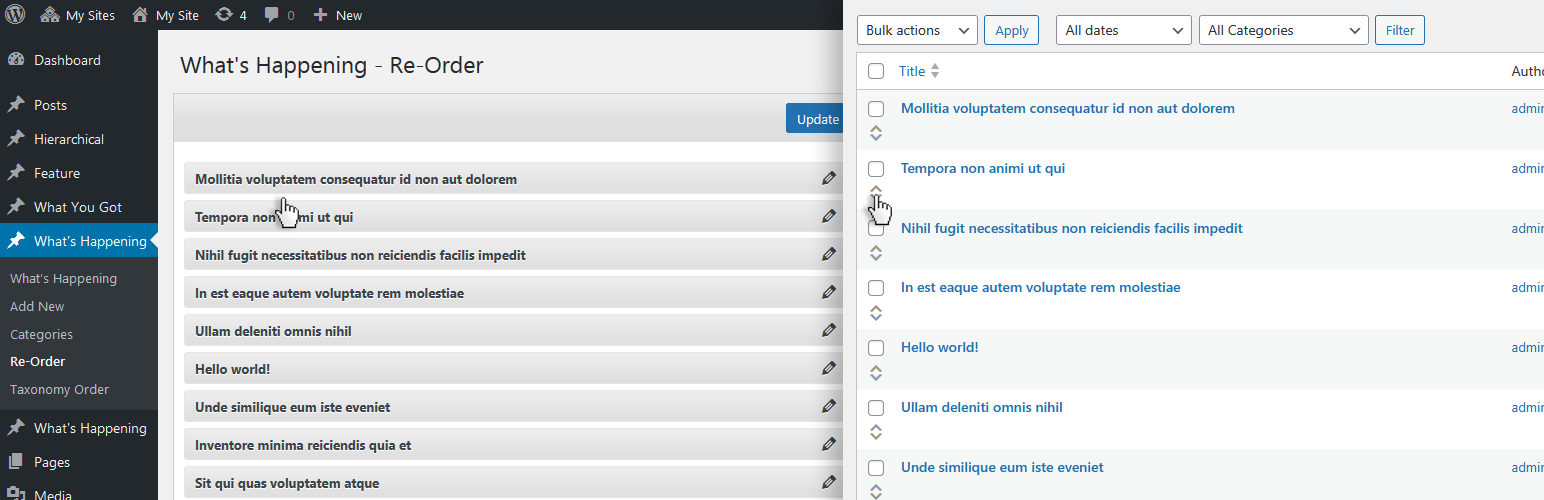
This plugin allows you to easily reorder posts and custom post types using a simple drag-and-drop interface. It is user-friendly and can be installed and activated quickly, with options to customize post order easily. For more advanced features, there is an extended version of the plugin available with additional functionalities.Screenshots


Frequently asked questions
How do I install the Post Order plugin?
Install the plugin through the Install Plugins interface or by uploading the post-types-order folder to your /wp-content/plugins/ directory.
How do I activate the Post Order plugin?
Activate the Post Order plugin.
How do I change the post order using the Re-Order interface?
Use the Re-Order interface which appears to every custom post type (non-hierarchical) to change the post order to a new one.
How do I apply the sort through code?
If prefer sort apply through the code, include 'orderby' => 'menu_order' within custom query arguments, more details at http://www.nsp-code.com/sample-code-on-how-to-apply-the-sort-for-post-types-order-plugin/
Is there an advanced version of this plugin available?
Check out the advanced version of this plugin at http://www.nsp-code.com/premium-plugins/wordpress-plugins/advanced-post-types-order/ which include Hierarchically post types order, Manual / Automatic Sorting, Individual Categories Order, Conditionals to apply, Paginations for large list, Mobile ready, Enhanced Interface, Plugins compatibility (MultiSite Network Support, WPML, Polylang, WooCommerce, WP E-Commerce, Platform Pro, Genesis etc), font side re-order interface, ... and many more !!
Changelog
2.3.7
- Code improvements.
- Reduce the outputted HTML for the ReOrder interface to avoid memory limitation on very long lists.
- Re-Order interface style updates.
- WordPress 6.82 compatibility check and tag update.
2.3.5
- WordPress 6.8 compatibility check and tag update.
2.3.4
- PHP 8.3.4 tag and compatibility check.
- WordPress 6.7.2 compatibility check and tag update.
- Readme revision.
2.3.3
- Add version to the plugin assets to avoid caching issues.
- Improve the options description for easier understanding.
- New filter pto/interface/table/tbody
- WordPress 6.7 compatibility check and tag update.
2.3.2
- Fix: Change the CPT_VERSION constant to avoid conflict with CPT UI plugin.
2.3.1
- Improve the descriptions in the readme.txt file for better clarity and user understanding.
- Add a version number to the CSS file to ensure that browsers load the latest version correctly and avoid caching issues.
2.3
- Enhanced re-order interface to better align with the default WordPress styling.
- Added additional object actions (e.g., Edit, View) directly within each item row. New setting to control the visibility of actions.
- Introduced new filters for extending the re-order table: pto/interface/table/thead, pto/interface/table/tfoot, and pto/interface/table/tbody.
- Completed compatibility check and tagged update for WordPress 6.6.2.
2.2.6
- Remove boolval on the filter ‘pto/posts_orderby’ to avoid returning wrong FALSE.
- FlyingPress cache lear method update.
2.2.4
- Add code comments hints for easier understanding and follow.
- Use strval when comparing strings using ===
- Use additional sanitize_text_field and isset checks to avoid PHP notices.
- Use === “strict equality” comparison operator instead simple
- Include the check for JetPack mobile, if plugin is active.
- Check if there is a post_status filter and if set to ‘all’ to continue scripts enqueue.
- New filter pto/interface/query/args to allow adjustments for the re-order interface query arguments.
- WordPress 6.6.1 compatibility check and tag update.
2.2.3
- When order update, attempt to clear the site / server caches.
- Set Yes as default for the option to Enable sortable drag-and-drop functionality within the default WordPress post type archive.
- WordPress 6.5.3 compatibility tag.
2.2.1
- Options interface layout updates.
- Code cleanup
- Remove unused svg icon file.
2.2
- Formidable style fix when Autosort is active.
- Plugin headers format update.
- WordPress 6.5 compatibility check and tag update ( RC1 )
2.1.8
- Fix: Media/images order, retrieve the items per page from user upload_per_page
2.1.4
- PHP Deprecated fix: Constant FILTER_SANITIZE_STRING is deprecated
- WordPress 6.4.3 compatibility check and tag update
2.1.2
- PHP 8.2.4 check for compatibility
- WordPress 6.4.2 compatibility check and tag update
2.1
- Trigger wp_cache_flush when saving the order to clear the internal caches
- WordPress 6.3 compatibility check and tag
- Compatibility update for lite speed cache
2.0.9
- Fix: is_plugin_active
2.0.7
- Compatibility class re-build
- Fix: Enfold templates when using Admin Sort
2.0.5
- Merge the “default archive&drop” option and keep the individual menu Yes/No for the default WordPress interfaces, to avoid confusion.
2.0.2
- The Archive drag & drop is disabled by default
- Small layout changes
- WordPress 6.2 compatibility tag
2.0
- Update cmoposer.json to use the wpackagist.org
- New option to select the drag & drop available for post types.
- The drag & drop within the default WordPress interfaces can be done now through the new icon, under the checkbox, for each item.
- Check if ajax call to avoid applying the order when autosort is disabled.
- Update plugin header image
1.9.9.2
- WordPress 6.1.1 compatibility tag
1.9.9.1
- WordPress 6.0 compatibility tag
1.9.9
- Fix layout change when sorting by drag&drop within default WordPress interface.
- Add placeholder row size by setting a tr colspan of the dragable element.
1.9.8
- Readme file updates, typos fixes.
- WordPress 5.9 compatibility tag
1.9.7
- Remove Twitter button
- Remove unused gif image
- HTPML and CSS cleanup
1.9.5.7
- Code cleanup
- WordPress 5.8.1 compatibility tag
1.9.5.6
- Fix PHP implode() notice
1.9.5.5
- Fix PHP implode() notice
1.9.5.4
- Fix PHP implode() notice
- Ensure the drag & drop interface show for correct post types, non hierarchically to ensure correct functionality
- WordPress 5.6 compatibility tag
1.9.5.2
- Clean post cache on order update to allow menu_order to change on cached data
- WordPress 5.5 compatibility tag
1.9.5.1
- Fix: Outputs the admin save notice through admin_notices filter
1.9.5
- Fix: disable drag & drop within taxonomies interfaces; fix WooCommerce attributes sort issue
- Reorder interface slight styles improvements
- Compatibility tag update for WordPress 5.4.2
1.9.4.3
- Option text translation update
- Changed the posts class to to wp-list-table when applying sortable for better compatibility
- Compatibility tag update for WordPress 5.4
1.9.4.2
- Compatibility tag update for WordPress 5.3
1.9.4.1
- Ignore the Events Calendar posts
- Filter typo fix
1.9.3.9
- Ignore sorting when doing Search and there’s a search key-phrase specified.
- Ignore sorting when doing Search within admin dashboard
- Removed Google Social as it produced some JavaScript errors
- WordPress 4.9.7 tag update
1.9.3.6
- Clear LiteSpeed Cache on order update to reflect on front side
- WordPress 4.9.1 tag update
1.9.3.5
- Fix: updated capability from switch_theme to manage_options within ‘Minimum Level to use this plugin’ option
- Default admin capability changed from install_plugins to manage_options to prevent DISALLOW_FILE_MODS issue. https://wordpress.org/support/topic/plugin-breaks-when-disallow_file_mods-is-set-to-true/
- Prepare plugin for Composer package
1.9.3.3
- Plugin option to include query argument ASC / DESC
1.9.3.2
- Include ASC / DESC if there is a query order argument
- Avada fix ‘product_orderby’ ignore
1.9.3.1
- WordPress 4.8 compatibility notice
- Slight code changes, remove unused activate / deactivate hooks
- Updated po translation file
- Updated assets
1.9.3
- Fix for custom post type objects per page when using default archive interface drag & drop sort
- Plugin code redo and re-structure
- Improved compatibility with other plugins
- Security improvements for AJAX order updates
1.9
- Remove translations from the package
- Remove link for donate
- Wp Hide plugin availability notification
- New Filter pto/get_options to allow to change default options; Custom capability can be set for ‘capability’
- New Filter pto/admin/plugin_options/capability to allow custom capability option to be inserted within html

