

Advanced Custom Fields (ACF) helps you easily customize WordPress with powerful, professional and intuitive fields. Proudly powering over…
About PNG to JPG
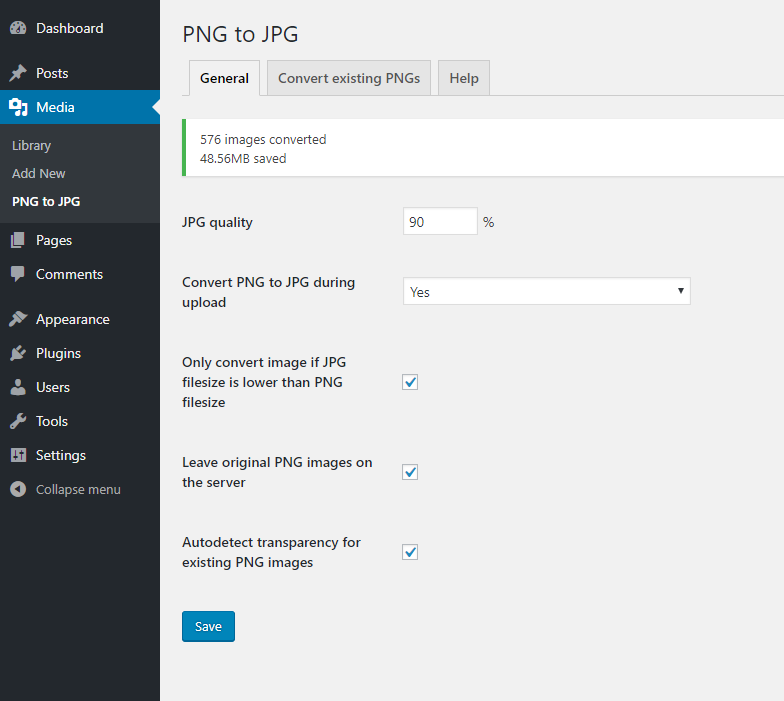
This service allows you to convert PNG images to JPG format, which can help save space and improve the speed of your webpage. You can set the quality of the converted JPG, automatically convert images on upload, and also convert existing PNG images to JPG in bulk.Screenshots


Frequently asked questions
What does the PNG to JPG plugin do?
The PNG to JPG plugin converts PNG images to JPG format, which helps free up web space and speed up your webpage.
Can I control the quality of the converted JPG images?
Yes, you can set the quality of the converted JPG images. This allows for optimization based on your needs.
Does the plugin automatically convert images upon upload?
Yes, the plugin offers an auto-convert on upload feature. You can also configure it to auto-convert only when the PNG has no transparency.
Will the plugin convert all PNG images to JPG?
The plugin can be set to only convert an image if the JPG filesize is lower than the PNG filesize. It also offers options to convert existing PNG images individually or in bulk.
Does the plugin keep the original PNG images?
Yes, you have the option to leave the original PNG images on the server after conversion.
Changelog
4.4
- tested on WP 6.5
- convert individual PNG images directly in the Media library
- new column in Convert existing PNGs tab showing the filesize
4.3
- add notice for Yoast SEO users and button to reindex database after conversion
4.2
- tested on WP 6.4
- continue converting images after one of them fail
- added pagination to Convert existing screen
4.1
- added nonce and security checks
- added button to stop transparency detection or conversion process
- removed DB prefix from notice table names to make it more readable
- remove preview box flex centering to make it works with bigger images
- auto delete PNG backup when JPG deleted in admin
4.0
- replace images also in post_excerpt
- separate SQL queries
- added support for FV Player plugin
3.9.1
- tested on WP 5.9
- check if file really exists and if has .png extension
3.9
- fix transparency default state
3.8
- tested on WP 5.4
- save transparency meta and load it instantly next time
- image viewer – background switch
- image viewer – centered image
- image viewer – highlight image borders and show image size on hover
3.7
- do not run second transparency detection if first one return true
3.6
- metadata update fix
3.5
- added support for Broken Link Checker plugin ( blc_instances, blc_links )
3.4
- replace image url also in these database tables: yoast_seo_links, revslider_static_slides
3.3
- tested on WP 5.2
- handle duplicate names like WP – adding increment
- optimizing code for faster processing
3.2
- added support for Fancy Product Designer plugin
3.1
- tested on WP 5.0
- small cosmetic code changes
3.0
- new option: convert only if JPG will have lower filesize then PNG
- new feature: show converted images statistics
- fix: conflict when there is already JPEG with a same name as PNG
- fix: conflict when PNG name is part of another PNG name ( eg. ‘xyz.png’ can rename also ‘abcxyz.png’ )
- optimized for translations
2.6
- rename PNG image if JPG with the same name already exists
2.5
- BUG FIXED – disabled checkboxes when autodetect is disabled
2.4
- now you can disable autodetect PNG transparency
2.3
- WP 4.9.1 compatibility check
- new compatibility with Toolset Types
2.2
- Repair revslider database table detection
2.1
- Added option to leave original PNG image on server after conversion
- Repair SQL replacement query
2.0
- Replace image and thumbnails extension in database tables
- Moved from Settings to Tools submenu
- Some small fixes
1.2
- Fix generating background for transparent images (thanks @darkcobalt)
1.1
- Fix PNG transparency detection
1.0
- First version

