
Import your demo content, widgets and theme settings with one click. Theme authors! Enable simple theme demo import…
About One Click Close Comments
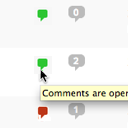
The One Click Close Comments plugin allows admins and post authors to easily open or close comments on posts and pages from the admin listing. The plugin uses a color-coded indicator to show the current comment status, and the change is submitted in the background without requiring a page reload. It is important to note that this plugin is only available for admin users with JavaScript enabled.Screenshots

Frequently asked questions
What is the purpose of the One Click Close Comments plugin?
The purpose of the One Click Close Comments plugin is to allow users with sufficient privileges to close or open comments on posts and pages in the WordPress admin area. This can be done via an AJAX-powered color-coded indicator.
Who can use the One Click Close Comments plugin?
The One Click Close Comments plugin can only be used by administrative users in the WordPress admin area who have JavaScript enabled.
Where can I find more information about the One Click Close Comments plugin?
You can find more information about the One Click Close Comments plugin on the following links: Plugin Homepage, Plugin Directory Page, GitHub, and Author Homepage.
Are there any hooks available for the One Click Close Comments plugin?
Yes, the One Click Close Comments plugin exposes one filter for hooking. The filter is called 'c2c_one_click_close_comments_click_char' and it allows you to use an alternative character, string, or markup as the plugin's indicator in the posts listing tables.
Can you provide an example of how to use the 'c2c_one_click_close_comments_click_char' hook?
Here is an example of how to use the 'c2c_one_click_close_comments_click_char' hook to change the character used as the one-click link to a bullet (solid circle):nn```phpn/**n * Changes the character used as the one-click link to a bullet (solid circle).n *n * @param string $char The default character.n * @return stringn */nfunction custom_one_click_char( $char ) {nreturn '•';n}nadd_filter( 'c2c_one_click_close_comments_click_char', 'custom_one_click_char' );n```
Changelog
2.7.1 (2021-04-01)
- New: Add a unit test
- Change: Note compatibility through WP 5.7+
- Change: Update copyright date (2021)
2.7 (2020-08-02)
Highlights:
- This recommended release updates its JavaScript, streamlines markup output, adds unit testing, adds a TODO.md file, updates a few URLs to be HTTPS, notes compatibility through 5.4+, and other minor behind-the-scenes improvements.
Details:
- New: Extract code for determining click character into new
get_click_char() - New: Add unit tests
- New: Add
reset()for resetting memoized variables - New: Add TODO.md and move existing TODO list from top of main plugin file into it (and add items to it)
- Change: Improve output of markup
- Remove encompassing
spanonly shown for users authorized to toggle comment status - Add ‘title’ attribute to primary span to indicate current state
- Change text to not indicate that comment staus can be toggled when user does not have that capability
- Remove encompassing
- Change: Update JavaScript
- Change: Migrate use of deprecated
.live()to.on() - Change: Handle removal of a previously encapsulating
span - Change: Remove unused code
- Change: Update code syntax
- Change: Migrate use of deprecated
- Change: Allow class to be defined even when loaded outside the admin
- Change: Return ‘-1’ to Ajax requests that don’t result in the comment status being toggled
- Change: Add
$and_exitargument totoggle_comment_status()to prevent exiting in order to facilitate unit testing - Change: Refactor
add_post_column()to be more concise - Change: Add inline docs for deprecated filter
one-click-close-comments-click-char - Change: Switch to use of strict equality operator instead of simple equality operator
- Change: Note compatibility through WP 5.4+
- Change: Update links to coffee2code.com to be HTTPS
2.6.1 (2019-11-24)
- New: Add additional FAQ items
- Change: Note compatibility through WP 5.3+
- Change: Update copyright date (2020)
Full changelog is available in CHANGELOG.md.

