

Improve your WordPress SEO: Write better content and have a fully optimized WordPress site using the Yoast SEO…

About Omnibus — show the lowest price
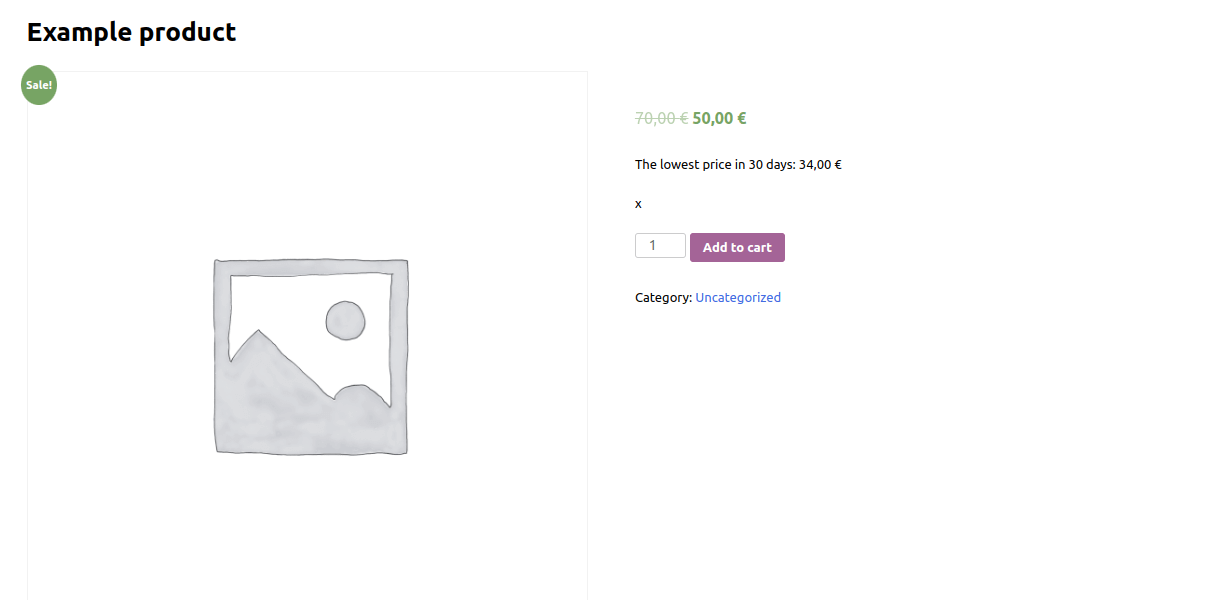
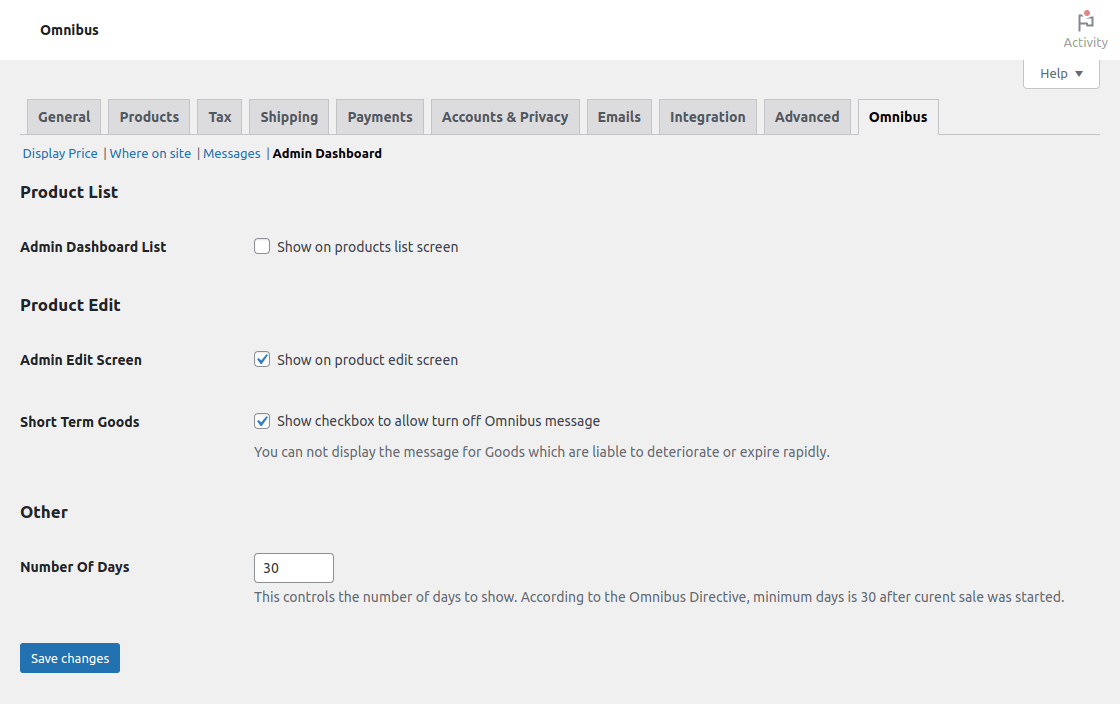
This plugin ensures that your website is compliant with the EU Directive 2019/2161, also known as the "Omnibus Directive." It allows you to save and display the current price of your products or courses, as well as add additional fields for the lowest price and effective date. The plugin is compatible with popular plugins like WooCommerce, Easy Digital Downloads, LearnPress, Tutor LMS, YITH WooCommerce Product Bundles, and Debug Bar. If you have any issues or suggestions for improvement, you can report them or contribute to the development on the plugin forum or GitHub.Screenshots


Frequently asked questions
What is the purpose of the Omnibus plugin?
The Omnibus plugin helps your site comply with the EU Omnibus Directive (Directive 2019/2161). It saves current prices, keeps them, and adds fields for the lowest price and effective date.
What information does the plugin display?
The plugin displays information on the item, such as a product or course. This includes the lowest price applied by the trader during a period of time not shorter than 30 days prior to a price reduction.
Which other plugins does Omnibus support?
Omnibus supports WooCommerce, Easy Digital Downloads, LearnPress, Tutor LMS with WooCommerce, YITH WooCommerce Product Bundles, and Debug Bar.
How does the Omnibus Directive define 'prior price'?
The Omnibus Directive defines 'prior price' as the lowest price applied by the trader during a period of time not shorter than 30 days prior to the application of the price reduction.
How can I contribute to the Omnibus plugin?
You can contribute by reporting bugs, suggesting new features in the plugin forum, or issuing pull requests on GitHub if you are a developer.
Changelog
Project maintained on github at iworks/omnibus.
3.0.3 (2024-08-09)
- The omnibus price for variant in admin panel has been fixed.
- Error calling
wp_rand()function has been fixed. Props for mcdeth.
3.0.2 (2024-03-14)
- The general omnibus price for variable products has been fixed. Props for Bartek Konopka.
- The translators strings where been added.
- The function
date()has been replaced by the functiongmdate(). - The output sanitization where been added.
- The iWorks Rate module has been updated to 2.1.9.
3.0.1 (2024-03-12)
- The zero variant price has been fixed.
3.0.0 (2024-01-19)
- A new way of logging changes – more efficient, faster, more flexible. Complete overhaul of the way changes are saved.
- A support for promotion schedule has been added.
- Price history chart has been added to [Debug Bar] panel.
- The iWorks Rate module has been updated to 2.1.8.
2.5.7 (2024-01-16)
- An extra check for the product has been added.
2.5.6 (2024-01-16)
- Issue with price display when tax rates are not defined has been fixed #24. Props for stalica.
- The iWorks Rate module has been updated to 2.1.7.
2.5.5 (2024-01-10)
- In some configurations with taxes, it was an issue to display the previous price with or without tax. Props for Agata Wiatrowska.
2.5.4 (2024-01-09)
2.5.3 (2024-01-05)
- Fixed problem on quick edit screen. #21. Props for Igorjup.
- Names of integration classes has been changed.
2.5.2 (2024-01-03)
- Extra admin CSS has been improved.
- Handling “Short Term Products” has been fixed. Props for Mychal.
- The action
iworks_omnibus/wc/save_price_history/actionhas been added. It can be used to insert a price history change element. - The option “I don’t have this type of products” for “Short Term Products” has been added.
- The “Short Term Product” for variants has been added.
2.5.1 (2024-01-02)
- Checking before price comparison has been added. #17. Props for Niko Vittaniemi.
- The
data-iwo-product_idfor the price message has been added. #14. - The
data-iwo-variation_idfor the price message has been added. #14. - The function
check_ajax_referer()has been added for checking expanded variant edits. - The function
strip_tags()has been replaced by the functionwp_strip_all_tags(). - The integration with the [Debug Bar] for variants has been improved.
- The iWorks Rate module has been updated to 2.1.6.
2.5.0 (2023-11-19)
- The ability to show the regular price as the last one available before the promotion was introduced.
- The check for function
get_current_screen()has been added. Props for mic22info. - The integration with the [Debug Bar] plugin has been added.
2.4.1 (2023-11-09)
- The critical error on product edit page has been removed.
2.4.0 (2023-11-09)
- Visibility of very old price has been fixed.
- Prices changes logging has been added.
- The iWorks Rate module has been updated to 2.1.3.
2.3.9 (2023-06-22)
- Proper handling of the
$contentparam has been added to theomnibus_price_messageshortcode. - The data
date-iwo-diff-in-dayshas been added. - A warning during editing has been removed. Props for slkaz.
2.3.8 (2023-06-14)
- The product check added in version 2.3.5 has been removed.
2.3.7 (2023-06-13)
- The issue with missing Omnibus price has been fixed. Props for Adrian.
2.3.6 (2023-06-13)
- The unnecessary extra argument from the
get_price()function has been removed.
2.3.5 (2023-06-12)
- A full log of price changes has been added.
- An extra check for WooCommerce integration has been added to avoid critical errors when a shortcode is called with the wrong post type. Props for (wapozon11)[https://wordpress.org/support/users/wapozon11/].
- The critical error for old PHP has been fixed. Props for mlodyno. Issue #2.
- The deprecated
get_productfunction has been updated with thewc_get_productfunction. Props for kanlukasz. - The handling of products in the shortcode has been improved.
- The iWorks Rate module has been updated to 2.1.2.
- The settings link on the plugins screen has been changed.
- The user ID has been added to the price log.
- Unnecessary use of the function
sprintf()has been fixed. Props for Aleksander Mirecki.
2.3.4 (2023-02-04)
- Checking for the WooCommerce version has been added. The minimum WooCommerce version required is 5.5.0.
2.3.3 (2023-02-03)
- The fatal error on the options page has been fixed. Props for nekodo88.
2.3.2 (2023-01-27)
- The
iworks_omnibus_add_price_log_datafilter has been added to allow for the modification of logged data. - The
iworks_omnibus_wc_get_lowest_pricefilter has been added to allow getting the lowest price log entry. - The
strip_tagsparam has been added to theomnibus_price_messageto allow stripe HTML tags. - The
templateparam has been added to theomnibus_price_messageto allow users to use their own message template.
2.3.1 (2023-01-25)
- An issue with the inform message when taxes are enabled has been fixed. Props for Niko Vittaniemi.
- The
_iwo_price_last_changecustom field has been added.
2.3.0 (2023-01-24)
- The configuration for WooCommerce has been heavily remodeled.
- The plugin configuration has been moved from “WooCommerce/Settings/Products/Omnibus Directive” to “WooCommerce/Settings/Omnibus.”
- The
iworks_omnibus_message_templatefilter has been added to allow changing the message template. - The
iworks_omnibus_add_price_log_skipfilter has been added to allow skip logging of prices. - The short format for the admin products list page has been added.
- An issue with the shortcode ignoring configuration settings has been fixed. Props for marktylczynski.
- The integration with the “Tutor LMS” plugin has been improved.
2.2.3 (2023-01-12)
- To avoid incorrect filter calls without a second parameter, the
woocommerce_duplicate_product_exclude_metafilter function now has a default value for the second parameter. - Unquoted attribute values in HTML have been fixed. Props for Michał.
2.2.2 (2023-01-10)
- When browsing the products, the plugin will try to complete the data; if it is missing, it will save the current price with the date of the last modification of the product.
- The filter
orphan_replacefrom the Orphans plugins has been added to the price message.
2.2.1 (2023-01-10)
- An issue with ignoring taxes by price is replaced by a placeholder. Props for Agniesz Kalukoszek.
2.2.0 (2023-01-09)
- Placeholders:
{price},{timestamp},{days}and{when}has been added to the price message. - A few new message display positions have been added.
- An issue with saving the last price change has been fixed. It was saved only when the sale price was changed, not always when the price was changed. Props for Rafał Bieleniewicz.
2.1.6 (2023-01-08)
- In order to reduce confusion, the default displayed data for a product in the admin panel that does not have a previous price saved has been changed.
- Resolved an issue with retrieving Omnibus price for variant. Props for Mychal.
- The ability to toggle the Omnibus message when we do not have enough previous data available has been added. By default, it shows the current price.
2.1.5 (2023-01-08)
- Resolved an issue with retrieving Omnibus price for variants. Props for Mychal.
- The ability to toggle the Omnibus message on WooCommerce Cart Page has been added. By default is hidden.
- The settings screen has been slightly improved.
2.1.4 (2023-01-07)
- Missing check for content has been fixed. Props for kowaliix.
- Resolved an issue with retrieving Omnibus data for variants. Props for Mychal.
- The action
omnibus/loadedhas been added. It is fired at the and ofplugins_loadedaction. - The “do not show” option has been added for anybody who wants to use the action or the shortcode.
2.1.3 (2023-01-05)
- Fixed issue with getting ID. Props for shamppi.
2.1.2 (2023-01-05)
- Fixed typo.
2.1.1 (2023-01-05)
- The wrong default for the “Display only for the product on sale” field has been fixed. Props for krzyszt.
2.1.0 (2023-01-05)
- Default values from the LearnPress configuration have been added.
- Exclude meta keys from WooCommerce product duplication has been added.
- The LearnPress plugin configuration has been added.
- The LearnPress plugin configuration has been removed from the WooCommerce configuration.
- The link to the LearnPress Omnibus configuration has been added to the plugin row actions.
- The link to the WooCommerce Omnibus configuration has been added to the plugin row actions.
2.0.2 (2023-01-04)
- Price-checking so as not to log it if it’s not there has been added.
- The regular price is saved now when the on-sale price is empty.
2.0.1 (2023-01-04)
- Resolved a problem with empty prices in history.
2.0.0 (2023-01-04)
- Adequate implementation of Directive (EU) 2019/2161 – Article 6a.
- Custom tax-related messages have been removed.
- Data saving has been restricted to only published items.
- The
get_sale_price()function has been used instead ofget_price().
1.2.6 (2023-01-03)
- Renamed the plugin “Omnibus — show the lowest price” instead of “Omnibus — Show the lowest price of a product.”
- The ability to configure custom messages has been added.
- The options have been reordered.
1.2.5 (2023-01-03)
- The ability to handle product prices with or without taxes has been added.
- The ability to toggle the Omnibus message only for products on sale has been added. This is turned off by default.
- Two tax-related versions of the message have been added.
1.2.4 (2023-01-02)
- Clarified the meaning of the “Shop Page” setting.
- The ability to toggle the Omnibus message in any other place has been added. By default is hidden.
- The
is_main_query()function check has been added to checkingis_single().
1.2.3 (2023-01-02)
- The ability to toggle the Omnibus message on any loop has been added. By default is hidden.
- The
omnibus_price_messageshortcode has been added.
1.2.2 (2023-01-02)
- A warning in the related products loop check has been fixed. Props for pietrzyk25.
- If no data is available, displaying the current price as the lowest has been added.
1.2.1 (2023-01-02)
- Corrected a critical error that occurred while adding a new product. Props for rask44.
1.2.0 (2023-01-02)
- Added support for the “Easy Digital Downloads” plugin.
- Renamed the plugin “Omnibus — Show the lowest price of a product” instead of “Omnibus.”
- The
iworks_omnibus_daysfilter has been added to the number of days amount. - The
iworks_omnibus_integration_woocommerce_price_lowestfilter has been added. - The
iworks_omnibus_messagefilter has been added to the message. - The
iworks_omnibus_showfilter has been added. - The
iworks_omnibus_wc_lowest_price_messageaction has been added to show the Omnibus message by product ID. - The ability to toggle the Omnibus message on the taxonomy page has been added. By default is hidden.
- The ability to toggle the Omnibus message when the price was not changed has been added. By default is shown.
1.1.1 (2022-12-31)
- The ability to toggle the Omnibus message in related products has been added. By default is hidden.
- On the shop page, you can now toggle the Omnibus message. By default is hidden.
- Fixed a typo in the “Where to display” option.
1.1.0 (2022-12-30)
- Control over where Omnibus messages appear has been added. By default is after the price.
- Added the ability to toggle the Omnibus message when editing an admin product. By default is shown.
- Added the ability to toggle the Omnibus message on the admin products list. By default is shown.
- The ability to toggle the Omnibus message on a single product has been added. By default is shown.
- The ability to toggle the Omnibus message on variable products has been added. By default is shown.
- The ability to toggle the Omnibus message on the variant has been added. By default is shown.
- Added support for the “YITH WooCommerce Product Bundles” plugin.
1.0.1 (2022-12-29)
- Support for the “Tutor LMS” plugin has been added.
- Support for the “LearnPress” plugin has been added.
1.0.0 (2022-12-29)
- Support for the “WooCommerce” plugin has been added.
- Init.

