

YITH WooCommerce Wishlist add all Wishlist features to your website. Needs WooCommerce to work. WooCommerce 8.1.x compatible.
About Menu Icons by ThemeIsle
This plugin allows you to add icons to your menu items, similar to the dashboard menu. It supports various icon types including Dashicons, Elusive Icons, Font Awesome, and more. It is compatible with most themes and is actively developed on GitHub.Screenshots


Frequently asked questions
What does the Menu Icons plugin do?
The Menu Icons plugin allows you to add icons to your WordPress navigation menu items, similar to the style of the WordPress dashboard menu.
How do I use Menu Icons after activation?
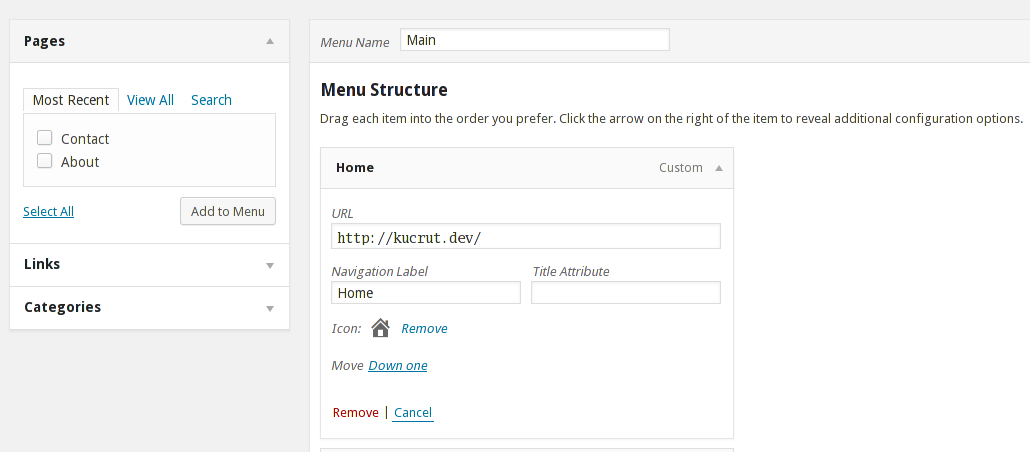
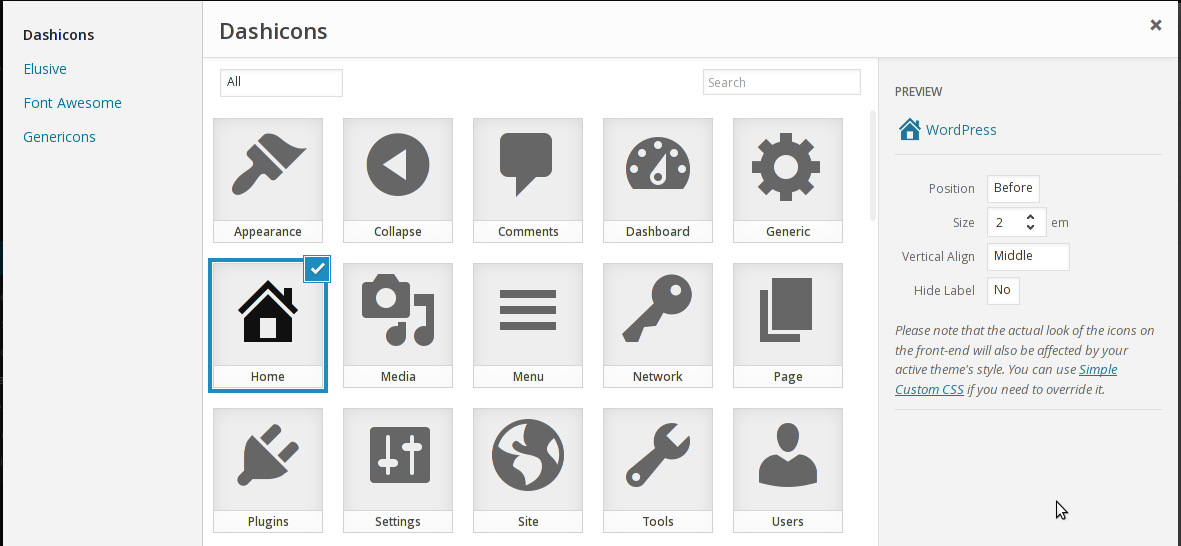
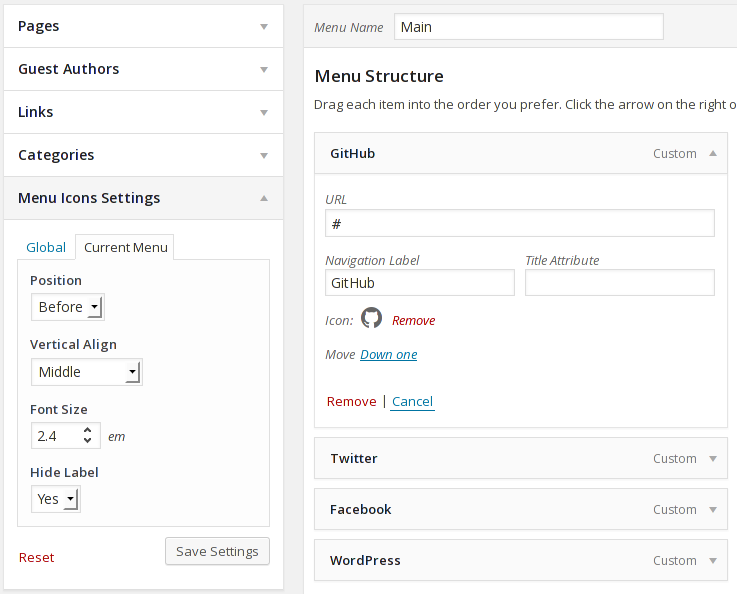
After activating the plugin, go to Appearance > Menus. You can then enable/disable icon types in the "Menu Icons Settings" meta box, set default settings, and select icons for your menu items.
What icon types are supported by Menu Icons?
Menu Icons supports Dashicons, Elusive Icons, Font Awesome, Foundation Icons, Genericons, Fontello icon packs, TI Icons, and image/SVG attachments.
Is Menu Icons compatible with popular WordPress themes?
Yes, Menu Icons works with most themes, including popular ones like Twenty Seventeen and Hestia.
Where can I find more information or contribute to the plugin's development?
The development of this plugin is done on GitHub. You can find issues reported there and submit pull requests.
Changelog
Version 0.13.16 (2024-11-07)
- Updated dependencies
Version 0.13.15 (2024-07-10)
- Removed recommendations of unsupported plugins
- Fixed conditions for theme recommendation
Version 0.13.14 (2024-05-14)
- Enhanced security
Version 0.13.13 (2024-04-18)
Improvements
- Updated internal dependencies: Enhanced performance and security.
Version 0.13.12 (2024-04-01)
Improvements
- Updated internal dependencies
Version 0.13.11 (2024-03-29)
Fixes
- Updated internal dependencies
- Enhanced security
Version 0.13.10 (2024-03-26)
Improvements
- Updated internal dependencies
- Improved readme to link to the public source files
- Filter promotions
Version 0.13.9 (2024-02-23)
Fixes
- Updated dependencies
- Harden security
Version 0.13.8 (2023-12-19)
- SDK Updates
- Fixed global hide label issue
Version 0.13.7 (2023-08-17)
- Updated dependencies
- Fixed broken button layout issues in other languages
Version 0.13.6 (2023-07-07)
- Updated composer dependencies to address warning in the widgets section
Version 0.13.5 (2023-03-30)
- Updated Dependencies and WordPress core tested up to version 6.2
Version 0.13.4 (2023-03-01)
Update dependencies
Version 0.13.3 (2023-02-25)
- Fix img width/height value, props @Htbaa
- Update dependencies
Version 0.13.2 (2022-11-24)
- Fix – update dependencies
Version 0.13.1 (2022-11-04)
Tested with the WordPress 6.1 version
Version 0.13.0 (2022-08-23)
- Fix Neve upsells showing up inconsistently on edge cases
- Fix inconsistency with Font Awesome 5 and adds compatibility with 6th version
- Fix compatibility with JupiterX
- Update dependencies
Version 0.12.12 (2022-05-27)
- Fix the style handler conflict issue which breaks the arrow icon of the submenus on some themes
- Fix dismiss dashboard notice issue on some edge cases
- Fix compatibility with the Max Mega Menu plugin
Version 0.12.11 (2022-03-16)
Add font awesome 5 support
Enhance compatibility with Otter/Neve
Version 0.12.10 (2022-02-07)
- [Fix] Add support for alt attribute for SVG icons
- Tested up with WordPress 5.9
Version 0.12.9 (2021-08-04)
- Tested compatibility with WordPress 5.8
Version 0.12.8 (2021-05-12)
- Fix issue when the image is not accessible to fetch the width/height metadata.
Version 0.12.7 (2021-05-07)
Fix PHP fatal error when uploading SVG with the image uploader
Version 0.12.6 (2021-05-05)
- Adds explicit width/height to icons to prevent layout shifts issues
0.12.4 – 2020-07-13
- Fix Font Awesome not loading
0.12.3 – 2020-07-13
- Fixed Menu Icons in Block Editor not working
- Fixed CWP links.
0.12.2 – 2019-11-15
0.12.1 – 2019-11-15
- Improve legacy compatibility
0.12.0 – 2019-11-15
- Fix issues with WordPress 5.3.
0.11.5 – 2019-05-23
- Sync composer dependencies with the latest version
0.11.4 – 2018-12-10
- fix issue with composer libraries.
0.11.3 – 2018-12-10
- Tested with WP 5.0
0.11.2 – 2018-03-05
- Improve popup sidebar layout.
0.11.1 – 2018-02-24
- Add recommendation boxes in the menu icon popup.
0.11.0 – 2018-01-05
- Change ownership to ThemeIsle.
- Improves compatibility with various ThemeIsle products.
0.10.2
- Compatibility with WordPress 4.7.0, props Aaron K.
0.10.1
- Support RTL, props ybspost.
0.10.0
- Icon Picker 0.4.0
- Font Awesome 4.6.1
- Introduce
icon_picker_icon_type_stylesheet_urifilter hook.
- Add
aria-hidden="true"attribute to icon element
0.9.3
- Fix CSS conflicts
0.9.2
- Update Icon Picker to 0.1.1.
0.9.1
- Fix support for Composer.
0.9.0
- Performance optimization.
- Modularisation. Developers: Take a look at the Icon Picker library.
- Bug fixes.
- Removed
menu_icons_{type_id}_propsfilter.
0.8.1
- Fix disappearing icons from front-end when not logged-in, props jj9617
0.8.0
- Update Dashicons
- Update Genericons to 3.4
- Update Font Awesome to 4.4.0
- Allow the plugin to be disabled for a certain menu
- Add new icon type: SVG, props Ethan Clevenger
- Add new filter:
menu_icons_hidden_label_class - Add new filter:
menu_icons_item_title
0.7.0
- Update Dashicons
- Fix annoying browser popup when navigating away from Nav Menus screen
- Work-around settings update with ajax
0.6.0
0.5.1
- Update Menu Item Custom Fields to play nice with other plugins.
- Add missing Foundation Icons stylesheet, props John
- JS & CSS fixes
0.5.0
- New Icon type: Foundation Icons
- Add new Dashicons icons
- Various fixes & enhancements
0.4.0
- Fontello icon packs support
- New icon type: Image (attachments)
0.3.2
- Add missing minified CSS for Elusive font icon, props zazou83
0.3.1
- Fix fatal error on outdated PHP versions, props dellos
0.3.0
- Add Settings meta box on Menu screen
- New feature: Settings inheritance (nav menu > menu items)
- New feature: Hide menu item labels
- New Icon type: Elusive Icons
- Update Font Awesome to 4.1.0
0.2.3
- Add new group for Dashicons: Media
0.2.1
- Fix icon selector compatibility with WP 3.9
0.2.0
- Media frame for icon selection
- New font icon: Font Awesome
0.1.5
- Invisible, but important fixes and improvements
0.1.4
- Fix menu saving
0.1.3
- Provide icon selection fields on newly added menu items
0.1.2
- Improve extra stylesheet
0.1.1
- Improve icon selection UX
0.1.0
- Initial public release

