

Site Kit is a one-stop solution for WordPress users to use everything Google has to offer to make…
About Gravity Forms + Custom Post Types
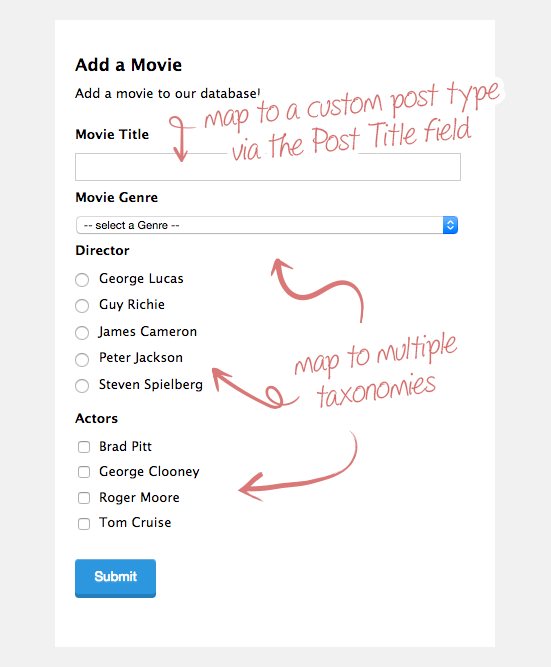
This plugin is an add-on for Gravity Forms that allows you to map your form submissions to a custom post type and/or custom taxonomies. It also provides additional features such as populating a dropdown with posts and assigning a parent post for the generated post. No coding is required to use this plugin.Screenshots
Frequently asked questions
How to map a form to a custom post type
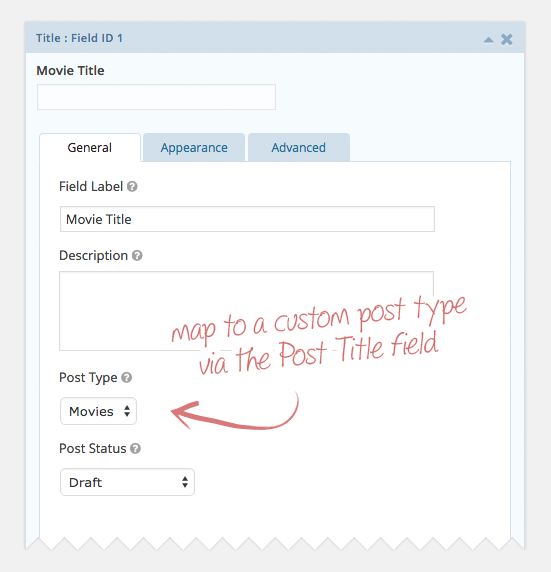
Add a Post Title field to your form and click on it to open the field settings. Below the “Description” field setting, you will find the “Post Type” setting. Select the desired post type from the drop down (default is “Posts”).
How to link a field to a custom taxonomy
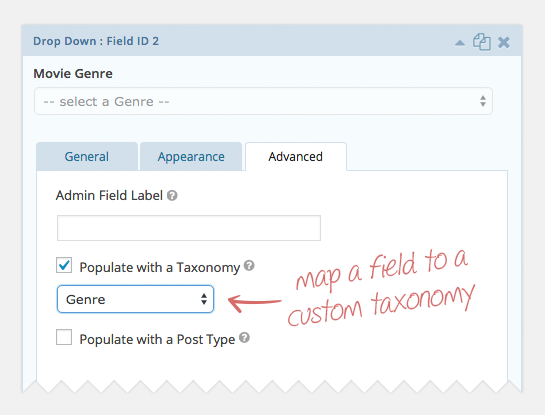
Add the desired field to which the custom taxonomy should be mapped. Drop Down, Multi Select, Radio Buttons and Checkboxes fields are current supported. Open the field settings by clicking on the field and click on the “Advanced” tab. Check the “Populate with a Taxonomy” checkbox. Select the desired taxonomy from the drop down that appears.
How to link the saved post to taxonomies using a single line text field
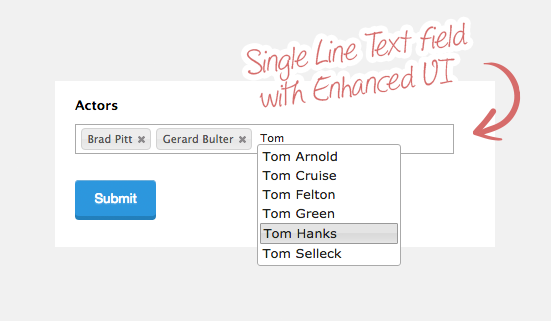
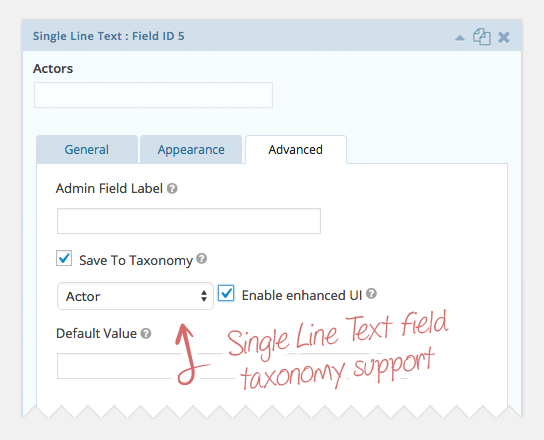
Single Line Text fields are a great way to allow users to select existing taxonomy terms and to also add new terms. Add a Single Line Text field to your form. Open the field settings by clicking on the field and click on the “Advanced” tab. Check the “Save to Taxonomy” checkbox. Select the desired taxonomy from the drop down that appears. (optional) Check the “Enable Enhanced UI” checkbox to enable an awesome tag-input style UI (see screenshots).
How to set a parent post with the drop down field
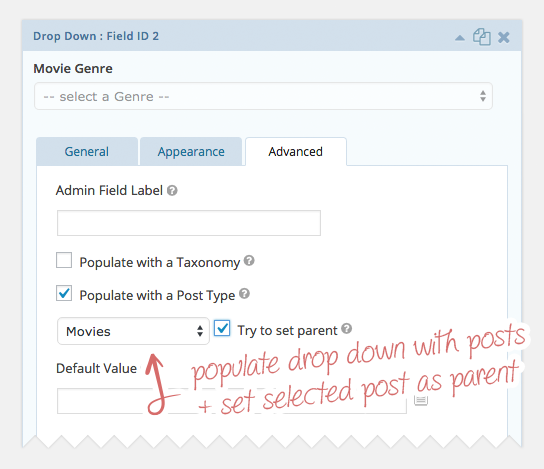
When populating a Drop Down field with a post type, you may wish to set the selected post as the parent post for the generated post. Add A Drop Down field to your form. Click on the field to open the field settings. Then click on the “Advanced” tab. Check the “Populate with Post Type” checkbox. Select the desired post type from the drop down that appears. Be sure to select the <strong>same post type</strong> for which the post is being generated.
What are the features of this plugin?
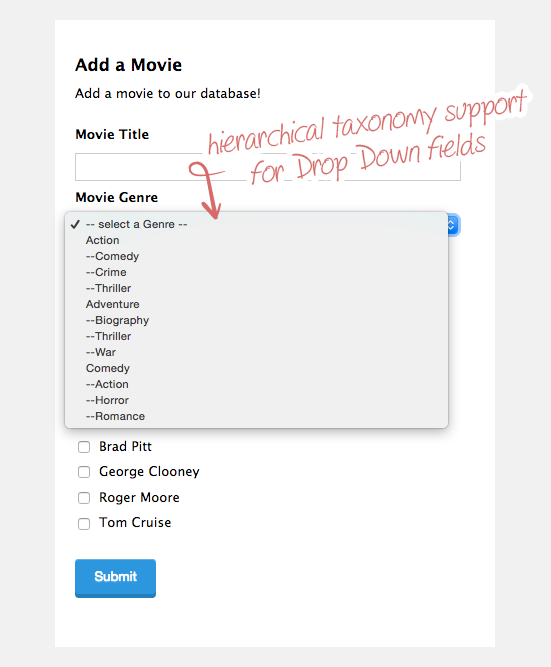
Map posts to a custom post type, Map posts to a custom taxonomy (via Drop Down, Multi-select, Radio Button or Checkbox field), Map posts to multiple taxonomies, Visual hierarchy support for hierarchical taxonomies (Drop Down field only), Populate a Drop Down with posts, Assign parent post for generated post (Drop Down field only), Single Line Text field support for taxonomies (enter as a comma-delimited list: term a, term b, term c), Enhanced UI support for Single Line Text fields (see screenshots)
Changelog
3.1.29
- Fixed PHP warning.
3.1.28
- Fixed potential PHP warning.
- Updated “Tested up to” to WordPress 6.0.2.
3.1.27
- Fixed an issue where term names were not displayed for multi-value fields like Checkboxes and Multi-selects in the Entry List and Entry Detail views.
3.1.26
- Updated “Tested up to” to WordPress 5.9.
3.1.25
- Fixed PHP 8 deprecation notices about required parameters after optional parameters.
3.1.24
- Fixed an issue where taxonomy terms may be saved as choices on non-choice based fields.
3.1.23
- Fixed a compatibility issue with GF 2.5.5.4+ which converted default values to the term ID when displayed/stored.
- Added taxonomy name (in addition to label) to Taxonomy dropdowns. Credit: @grapplerulrich
3.1.22
- Added post name (in addition to label) to Post Type dropdowns in Form Editor. Credit: @grapplerulrich
- Fixed issue where
gfcpt_taxonomy_argsfilter was not used for non-hierarchical terms. Credit: @grapplerulrich
3.1.21
- Fixed a compatibility issue with Gravity Forms 2.5 and Enhanced UI.
3.1.20
- Fixed PHP notice on Gravity Forms Coupons Add-On page.
- Fixed PHP warning when populating taxonomies.
- Updated formatting of PHP files in plugin to better conform to the WordPress Coding Standards.
3.1.19
- Bumped plugin version.
3.1.18
- Fixed issue with “Save To Taxonomy” setting not properly saving the entered taxonomy.
3.1.17
- Readme updates.
3.1.16
- Readme updates.
3.1.15
- Fixed issue when exporting taxonomy-and-post-type-populated Checkbox fields.
- Updated how scripts are enqueued.
- Tested with 5.5.1.
3.1.14
- Updated how taxonomy enhanced UI script and data were loaded.
3.1.13
- Added ‘gfcpt_hierarchical_display’ filter to allow filtering whether to display choices hierarchically.
3.1.12
- Fixed issue with GF 2.3 where taxonomies were not correctly saved on submission.
3.1.11
- Fixed issue where dynamic placeholder was duplicated in some instances.
3.1.10
- Fixed issue where dynamic placeholder was added even when default placeholder was specified.
3.1.9
- Added support for displaying Post Title on entry list, detail and export for fields populated with a post type.
- Updated default sort order for pages to “menu_order”.
3.1.8
- Fixed issue mapping taxonomies for Single Line Text fiela and Multi Select fields. Thanks, Cameron!
3.1.7
- Added support for displaying term label on Entry List and Export views (rather than term ID; does not work with Checkbox and Multi-select on Entry List).
3.1.6
- Added support for displaying term label on Entry Detail view (rather than term ID)
3.1.5
- Fixed issue with populating Drop Down & Multi Selects
- Fixed issue when saving Multi Select taxonomies
3.1.4
- Updated plugin header information.
3.1.3
- Fixed compatibility issue with Gravity Forms: Post Updates plugin; custom taxonomies were not being saved.
3.1.2
- Fixed issue where setting first option was not possible due to typo in property name
- Updated how GFCPTAddon::get_base_path() method retrieves the base path
3.1.1
- Updated all calls to get_post_types() to use plugin-specific version which applies the ‘gfcpt_post_type_args’ filter. Props: mgratch
- Updated all calls to get_taxonomies() to use plugin-specific version which applies the ‘gfcpt_tax_args’ filter. Props: mgratch
- Fixed issue where missing script dependency caused tag-style entry of terms was not working. Props: mgratch
- Fixed issue where plugin’s registration of GF preview styles was overwriting all other preview styles
- Fixed issue where taxonomies were not saved for delayed payment entries
- Updated Tag init JS to be bound to the ‘gform_post_render’ JS event which better supports other plugin integrations
- Updated Tag init JS file to be loaded in the footer
- Added ‘gfcpt_get_posts_args’ filter to allow modifying the posts that are populated into a field
3.1
- Added “gfcpt_taxonomy_args” filter to allow modifying the arguments used to retrieve taxonomy terms
- Added “gfcpt_post_type_args” filter to allow modifying the arguments used to retrive post types for selection in field settings
- Updated verbiage throughout plugin and readme.txt file
- Updated minimum required version of Gravity Forms to 1.9.3
- Updated “Save As Post Type” to be “Post Type” and moved location to standard settings tab
- Updated jQuery UI enqueue to use version from WP core
- Updated GFCPTAddonBase::load_taxonomy_hierarchical() method to support only displaying children of a parent term (requires “gfcpt_taxonomy_args” filter)
- Fixed styling issues with Enhanced-UI-enabled Single Line Text fields
- Fixed notice where get_base_path() was called statically by changing function to be static
- Fixed issue where taxonomy select on Drop Down field settings would not populate the selected taxonomy correctly
- Fixed issue with GF 1.9 where indirect modfiication of $field[‘inputs’] property had no effect; resolves issues using custom taxonomies with Checkbox fields
3.0.1
- Fixed minor bug causing a PHP warning (FILE)
- removed the restriction of not including scripts when a call is ajax
3.0
- Removed support for Gravity Forms v1.4.5. Now supports v1.5 and up (including 1.6)
- Added support for single line text fields
- Added ability to populate a dropdown with posts
- Added ability to set a parent post when saving a post form
- Multiselect control now supports “populate with taxonomy” too
- “first value” default overriden when populating with a taxonomy
- Shows taxonomy selections when designing the form
- Fixed support for conditional logic
- Previews now load taxonomy terms
- Previews can show enhanced UI (only in V1.6 and above)
2.0
- Added support for both Gravity Forms v1.5 beta and v.1.4.5
- Now supports linking taxonomies to Drop Downs, Multiple Choice or Checkboxes
- Integrated with GF v1.5 hooks for easier configuration (thanks to Alex and Carl from RocketGenius)
- Support linking more than 1 taxonomy to a form
- To keep in line with the GF standards, mapping a form to a CPT in GF v1.4.5 can now be done via the ‘post title’ field
1.0
- Initial Relase. First version.

