

Improve your WordPress SEO: Write better content and have a fully optimized WordPress site using the Yoast SEO…
About Geolocation IP Detection
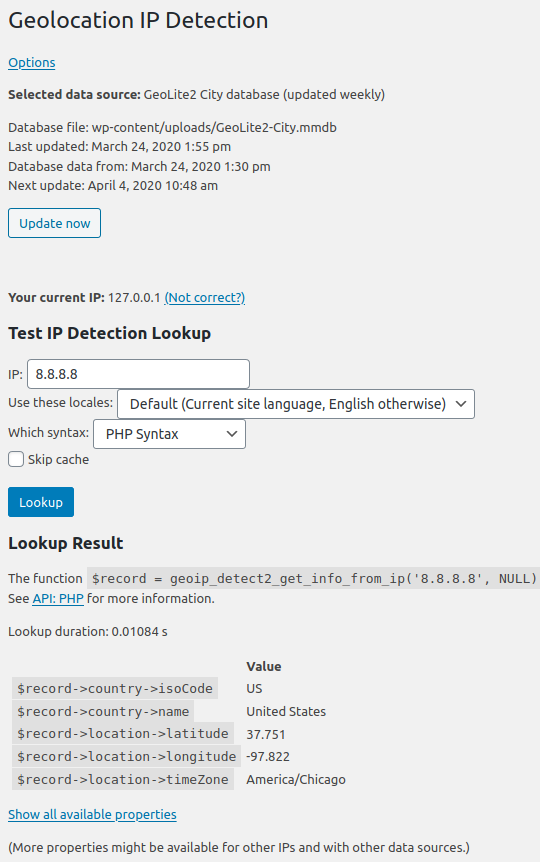
This plugin provides geographic information based on the IP address of a user. It offers various data sources and functions that can be used to customize content or display information based on the user's location. It requires PHP 7.2.5 and is compatible with WooCommerce 3.9.0.Screenshots
Frequently asked questions
What is Geolocation IP Detection?
Geolocation IP Detection is a WordPress plugin that provides geographic information based on an IP address. This information can be used in themes, other plugins, as a shortcode, or via CSS body classes. City and country names are translated into different languages.
What data sources does Geolocation IP Detection support?
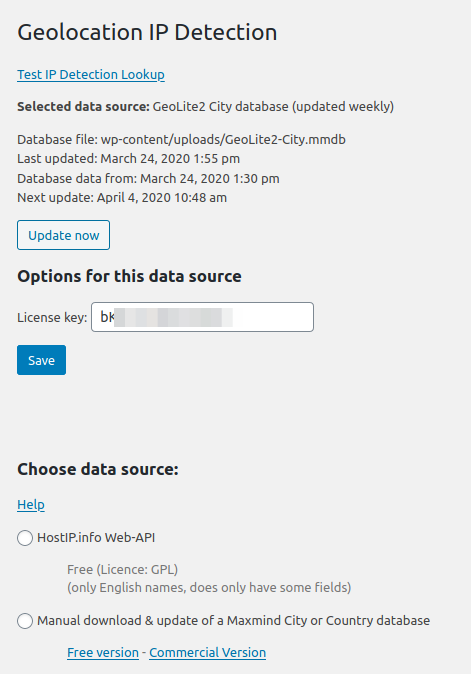
The plugin supports various data sources including free options like HostIP.info and Maxmind GeoIP2 Lite City, commercial options like Maxmind GeoIP2 City, and web-API options such as Maxmind GeoIP2 Precision, Ipstack, and Fastah. It also supports hosting-provider dependent sources like Cloudflare or Amazon AWS CloudFront.
How can I use the geographic information in my content?
You can include geographic properties in your posts and pages using a shortcode like [geoip_detect2 property="country.name" default="(country could not be detected)" lang="en"]. The 'property' attribute can be set to various geographic details, and 'default' and 'lang' are optional.
What functions does the plugin provide for developers?
The plugin provides five main functions for developers: geoip_detect2_get_info_from_ip() to look up geo-information for a specified IP, geoip_detect2_get_info_from_current_ip() for the current user, geoip_detect2_get_current_source_description() to get the current source label, geoip_detect2_get_external_ip_adress() to fetch the webserver's internet address, and geoip_detect2_get_client_ip() to get the client's IP even behind a reverse proxy.
Changelog
5.5.0
- FIX [!]: In the datasource “hostip.info”, the region code (i.e. CA) is now correctly moved to the property
mostSpecificSubdivision(previously, it was part of the propertycity) - Library updates
5.4.1
- NEW: JS now emit events ‘geoip-detect-shortcodes-done’ and ‘geoip-detect-body-classes-done’, see https://github.com/yellowtree/geoip-detect/wiki/API:-AJAX#events
- FIX: Remove Fatal Error in check_requirements (“Undefined constand GEOIP_DETECT_DEBUG”)
5.4.0
- NEW: Infos can be added to a mail sent by WPForms (with Smart Tag
{geoip_detect2_user_info}) - FIX: Remove Fatal Error on uninstall (“Undefined constand GEOIP_DETECT_DEBUG”)
- Library updates
5.3.2
- FIX: Some country codes such as “PT” were missing in the (deprecated) legacy API mapping.
- FIX: Maxmind compatibility does not show a notice anymore when the plugin folder is non-standard (e.g. due to symlinks) or the Filename ends with Reader.php
- Library updates
5.3.1
- FIX: Respect JS file variant
- UI: Show selected file variant in backend options
- Library updates
5.3.0
- NEW: You can now specify to use a JS file variant if you are only using a subset of the features (see https://github.com/yellowtree/geoip-detect/wiki/API:-AJAX#js-variants)
- Note[!]: frontend.js has now been renamed to frontend_full.js
- Library updates
5.2.2
- FIX: The format for new Maxmind licence keys has changed. (Existing licence keys will continue to work.)
(5.2.1 was a broken release)
5.2.0
- NEW: The list of reverse proxies of AWS CloudFront or CloudFlare can now be added as “known proxy”
- FIX [!]: AWS Cloudfront header name changed to HTTP_CLOUDFRONT_VIEWER_COUNTRY
- Reduced JS size (AJAX mode)
- Library updates
5.1.1
- NEW: For the reverse proxy configuration, internal adresses (such as 10.0.0.0/8) are now whitelisted by default. You can override this behaviour by using the wordpress filter
geoip_detect2_client_ip_whitelist_internal_ips. - NEW: Body classes now include the city name in English (e.g. geoip-city-Munich)
- FIX: Some server configurations showed this warning: Use of undefined constant CURL_HTTP_VERSION_2_0
5.1.0
New Datasource: Fastah Web API (beta), see https://aws.amazon.com/marketplace/pp/prodview-k5gjowexrefl2
AJAX mode:
* NEW: The JS function geoip_detect.set_override_with_merge can modify the override record in one property, merging it with the currently saved property
Other minor changes:
* FIX: In non-AJAX mode, properties such as “extra.original.zip” can be accessed again
* FIX: Automatic download of Maxmind database now also works when the temp folder is group/world writeable (as in AWS configurations)
* If you want to enable more Warnings (e.g. while debugging), you can add define('GEOIP_DETECT_DEBUG', true) to your wp-config.php or so.
* Library updates
5.0.0
In this release, there a small breaking changes marked by [!].
AJAX mode:
* FIX [!]: Empty attribute values such as [geoip_detect2_show_if country=""]Country was not detected[/geoip_detect2_show_if] are now working (they were ignored before)
* FIX [!]: Shortcodes that have an invalid value for the property ajax (e.g. [geoip_detect2_text_input ajax="invalid"]) are now using the AJAX option instead of always disabling AJAX
* FIX: In CF7, the country selector can now be used in AJAX mode
* FIX: In AJAX mode, the shortcode [geoip_detect2_show_if] renders as a <div> if it detects that the containing content has HTML block level elements
* NEW (Beta): In AJAX mode, the new property autosave saves the user input as local override for this browser. [geoip_detect2_countries mycountry autosave] and [geoip_detect2_text_input city property:city autosave]. (Please give feedback if this works as expected!)
* FIX: In AJAX mode, calling the method set_override(record, duration_in_days) now refreshes the AJAX shortcodes and CSS body classes.
-> Thus, it is now possible to quickly implement different content for different countries with an autodetected default country, see https://github.com/yellowtree/geoip-detect/wiki/API-Usage-Examples#country-selector-that-can-be-overridden-by-the-user
Other changes:
* NEW: Drastically improving performance if the lookup is performed for the current IP more than once (e.g. because of shortcodes without AJAX mode)
* UI: Showing the time for the subsequent lookup on the Test Lookup page
* FIX: Maxmind Datasource: Check if the database file is really a file, not a directory
* NEW: Header Datasource: Now a custom HTTP header can be used via the wordpress filter geoip_detect2_source_header_http_key
Other minor changes:
* Update the list of available APIs for getting the external IP (as whatismyip went down)
* Minimum WordPress version is 5.4 now.
* Update some internal libraries & dev tools
* Checked compatibility with PHP 8.1
The code of the plugin has not changed much, I have named this version 3.0 to indicate the major change on Maxmind’s side of things. They explain it in this blog post:
https://blog.maxmind.com/2019/12/18/significant-changes-to-accessing-and-using-geolite2-databases/

