

Improve your WordPress SEO: Write better content and have a fully optimized WordPress site using the Yoast SEO…

About GAinWP Google Analytics Integration for WordPress
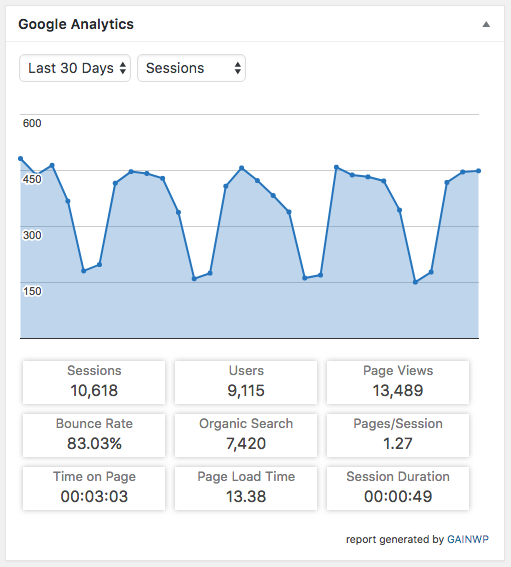
The GAinWP Google Analytics Integration for WordPress plugin allows you to easily integrate Google Analytics tracking and dashboard reporting into your website. It offers a range of features such as real-time stats, in-depth reports, customizable tracking code, and privacy-oriented options. The plugin is compatible with multisite network installs and has a long-term goal of providing an open Google Analytics WordPress API for integration with other plugins and themes.Screenshots


Frequently asked questions
What does the GAinWP plugin do?
The GAinWP Google Analytics Integration for WordPress plugin easily integrates Google Analytics tracking and dashboard reporting into your website.
Why was GAinWP created?
GAinWP was created from the excellent Google Analytics Dashboard for WordPress (GADWP) plugin to maintain a simple, direct Google Analytics integration for those concerned about data privacy.
What are the features of GAinWP?
GAinWP provides a set of general Google Analytics stats, in-depth page reports, in-depth post reports, and customizable tracking code. It also has user privacy oriented features and supports custom dimensions and events.
What can you track with GAinWP?
GAinWP allows you to easily track various events like downloads, emails, outbound links, affiliate links, fragment identifiers, telephone, and page scrolling depth. It also supports custom event categories, actions, and labels using annotated HTML elements.
Is GAinWP compatible with multisite network installs?
Yes, GAinWP is fully compatible with multisite network installs and offers three setup modes for different configurations.
Changelog
5.4.5
- Verified support for WP 5.4
- Bug Fixes:
- fix js events calling non existent ga object after diabled user login
- Enhancements:
- Added Authors (user login) custom dimension
5.4.3
- Verified support for WP 5.2
5.4
- Enable direct Google API auth process to prevent access keys and Google Analytics data sharing with 3rd parties
- Enabled Google Analytics tracking without requiring GAPI authentication
- Consolidate settings
5.3.2
- Bug Fixes:
- fixes for user opt-out feature
- Enhancements:
- use gainwp_useroptout shortcode to easily generate opt-out buttons and links
- adding gainwp_gtag_commands and gainwp_gtag_script_path hooks to allow further gtag (Global Site Tag) code customization
- adds opt-out and DNT support for Google Tag Manager
5.3.1.1
- Bug Fixes:
- avoid tracking issues by not clearing the profiles list on automatic token resets
5.3.1
- Bug Fixes:
- frontend_item_reports PHP notice when upgrading from a version lower than v4.8.0.1
5.3
- Enhancements:
- adds full support for Global Site Tag (gtag.js)
- remove Scroll Depth functionality, since this is now available as a trigger on Google Tag Manager
- adds custom dimensions support for AMP pages with Google Tag Manager tracking
- adds support for button submits
- Bug Fixes:
- form submit events were not following the non-interaction settings
5.2.3.1
- Bug Fixes:
- fixing a small reporting issue
5.2.3
- Enhancements:
- add Google Analytics user opt-out support
- add option to exclude tracking for users sending the Do Not Track header
- add System tab to Errors & Debug screen
- check to avoid using a redeemed access code
- Bug Fixes:
- remove a debugging message
- cURL options were overwritten during regular API calls
5.2.2
- Enhancements:
- more informative alerts and suggestions on the authorization screen
- disable autocomplete for the access code input field to avoid reuse of the same unique authorization code
- GAINWP Endpoint improvements
- Error reporting improvements
- introducing the gainwp_maps_api_key filter
- Bug Fixes:
- use the theme color palette for the frontend widget
5.2.1
- Enhancements:
- avoid submitting empty error reports
- Bug Fixes:
- fixes a bug for custom PHP cURL options
5.2
- Enhancements:
- improvements on exponential backoff system
- introduces a new authentication method with endpoints
- multiple updates of plugin’s options
- code cleanup
- improvements on error reporting system
- option to report errors to developer
- move the upgrade notice from the Dashboard to plugin’s settings page
- enable PHP cURL proxy support using WordPress settings, props by Joe Hobson
- hide unusable options based on plugin’s settings
- Bug Fixes:
- some thrown errors were not displayed on Errors & Debug screen
- analytics icon disappears from post list after quick edit, props by karex
- fix for inline SVG links, props by Andrew Minion
- fixes a bug on affiliate events tracking

