

Advanced Custom Fields (ACF) helps you easily customize WordPress with powerful, professional and intuitive fields. Proudly powering over…
About FancyBox for WordPress
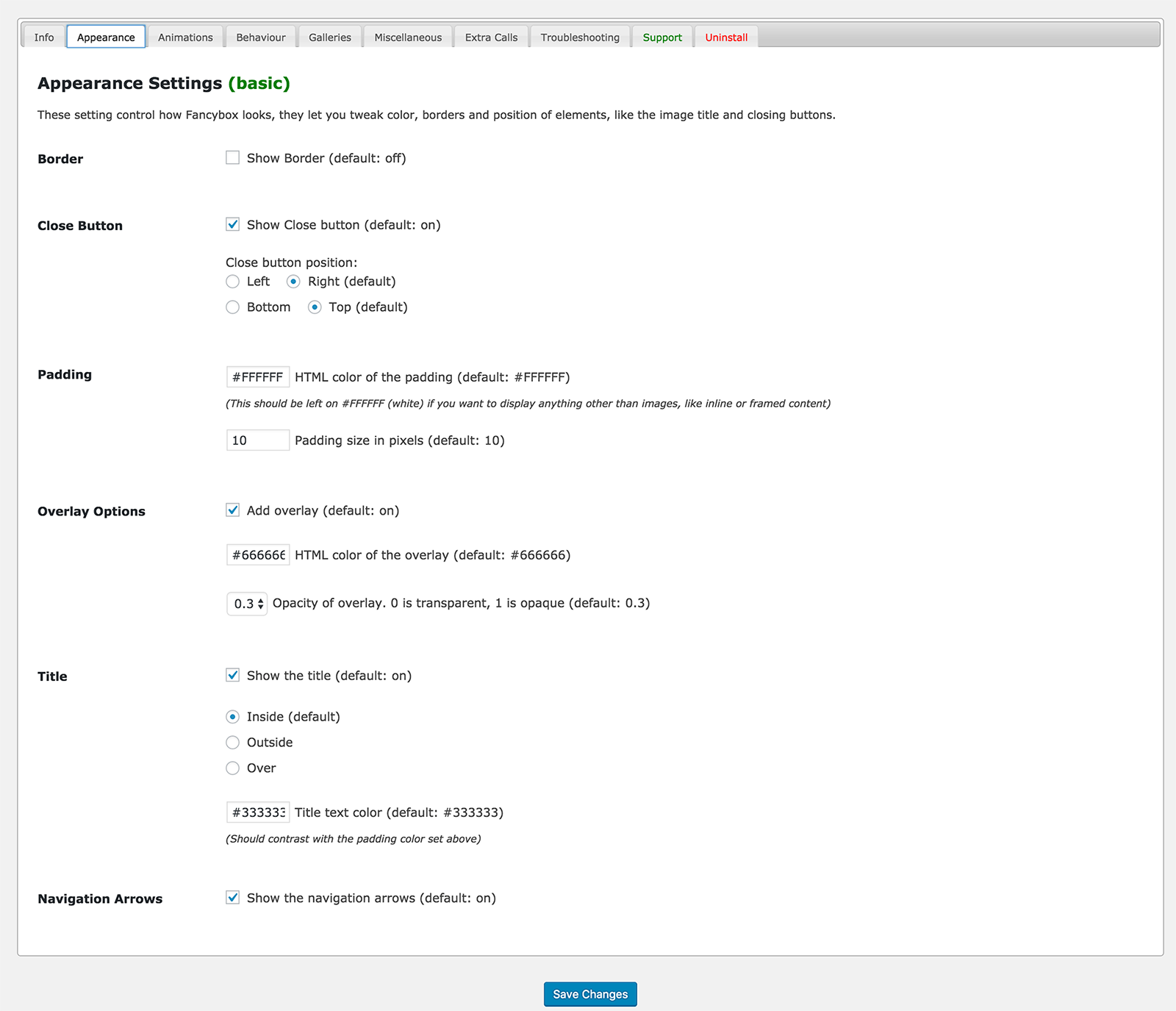
This plugin seamlessly integrates FancyBox into your blog, allowing you to easily customize the appearance and functionality of the lightbox. It automatically applies FancyBox to any thumbnails that link directly to an image.Screenshots
Frequently asked questions
How do I integrate FancyBox into my blog?
Seamlessly integrates FancyBox into your blog: Upload, activate, and you're done. Additional configuration optional.
What can I customize in FancyBox lightbox?
You can easily customize almost anything you can think about fancybox lightbox: the border, margin width and color, zoom speed, animation type, close button position, overlay color and opacity and even more advanced option like several options to group images into galleries, and more...
Which thumbnails does the plugin apply FancyBox to by default?
By default, the plugin will use jQuery to apply FancyBox to ANY thumbnails that link directly to an image. This includes posts, the sidebar, etc, so you can activate it and it will be applied automatically.
Where can I see a demo of the plugin?
You can see the plugin working on a this blog although there's nothing amazing to see, just a FancyBox simple implementation, that's the point ? You can take a look at the code if you're curious, though.
Who developed and maintains the FancyBox lightbox plugin?
This plugin is developed and maintained by Colorlib. Which is well know for their free WordPress themes. However, now they are looking to extend their presence in plugin development and believe that FancyBox lightbox is a great way to start.
Changelog
3.3.5 – 12.11.2024
Fixed: Security issue
3.3.4 – 22.03.2024
Fixed: Security issue
3.3.3 – 11.05.2021
Fixed : Issue with padding and border ( https://github.com/ColorlibHQ/fancybox-for-wordpress/issues/86 )
3.3.2 – 05.03.2021
Changed: Upgrade Fancybox to latest version ( https://github.com/ColorlibHQ/fancybox-for-wordpress/issues/95 )
Fixed: Close button not showing up although option is enabled
3.3.1
Compatibility with jQuery 3.0
3.3.0
Fixed compatibility issue with WordPress 5.6
3.2.9
- Added Zoom on Click functionality
3.2.8
- Fix property ‘title’ of undefined when using newer versions of jQuery
- Add option to disable FancyBox on mobile view
3.2.7
- Fix for separate gutenberg blocks
- Personalize script handles
- Review dismiss fix
3.2.6
- Admin bar overfloat fix
- Tooltip description bug fix
- Add option for caption hide/show
3.2.5
- Fix title hide/show option
- Fix extra height on lightbox image wrapper
3.2.4
- Removed dashboard news widget
3.2.3
- Fix for mobile close on content click
- Fix for mobile close on overlay click
3.2.2
- Fix for padding issue when title inside position
- Fix for title color when title is set to inside position
3.2.1
- Update toggles
- Added new option to make a gallery for each gutenberg gallery block
3.2.0
- Admin UI minor update
- Removed unneeded ie css file
- Added option in Behaviour tab to exclude links that target .pdf files from being displayed in the lightbox
3.1.9
- Replace $.fancebox with $.fancyboxforwp.
3.1.8
- Fixed “Click to Hide on Overlay only works with Images”
- Fixed “The requested content cannot be loaded” when trying to view page/post in fancybox
3.1.7
- Fixed incompatibilty with Envira Gallery
- Fixed incompatibilty with NextGen Gallery
3.1.6
- Removed rollback functionality
3.1.5
- Added support for mp4 and webp files
3.1.4
- Made it work with query string and without query strings.
3.1.3
- Fixed “Parse error” – https://wordpress.org/support/topic/no-backend-after-fancybox-update/
- Fixed “Breaks on query strings” – https://wordpress.org/support/topic/url-with-ssl1-fancybox-doesnt-open/
- Fixed “Caption problems” – https://wordpress.org/support/topic/border-not-fitting-and-strange-white-line/
3.1.2
- Fixed “All links get the fancybox class”
3.1.1
- Removed print_r from fancybox.php
3.1.0
- Updated FancyBox library to the latest version
- Changed Admin UI
3.0.12
Fixed errors causes by WordPress SVN.
3.0.7
- Updated Fancybox library
- Updated other libraries this plugins depends on such as jQuery easing and jQuery Mousewheel
- Tested plugin with WordPress 4.6
3.0.6
- Fixes to JavaScript code for showing and hiding elements as they are needed in Settings page. (Thanks to jono55 for reporting)
3.0.5
- Fixed the Revert Options button.
- Fixed wrong version number being shown on the plugin’s settings page.
- Updated plugin and author links in readme and settings page.
- Updated localization catalog (POT file).
- Updated Spanish translation with minor updates.
- Updated Frequently Asked Questions in readme file.
- Removed version number from printed html source code.
- Removed outdated/incomplete translation binaries.
3.0.4
- Renamed the setting affected by the security issue mentioned in 3.0.3. This should stop the malicious code from appearing on sites where the plugin is updated without removing the malicious code.
3.0.3
- Fixed a security issue. (Thanks to mickaelb for reporting and Konstantin Kovshenin for providing the fix)
3.0.2
- Added support for disabling fancybox on individual hyperlinked images by adding class=’nolightbox’. (Thanks to Artem Russakovskii)
- Added a link to the github project page in the info tab in the settings page.
- Fixed and cleaned the installation code, new installations of the plugin should work now without need to go to the settings page.
- Fixed false positives in filenames. (Thanks to Artem Russakovskii)
- Fixed incompatibility with wordpress installations where the wp-content directory had been renamed.
- Fixed an issue that could cause the version of the plugin to be removed from settings when deactivating the plugin.
- Improved HTTPS support by using better code to retrieve the plugin url and load files.
- Removed legacy code to suport upgrading settings from 2.x versions of the plugin. This was done to avoid possible issues with clean installations of the plugin.
- Updated some CSS rules in jQuery UI
- Some minor reformatting and cleanup of code (PHP comments, empty lines, )
3.0.1
- Updated: Localization catalog updated.
- Updated: Spanish localization.
- Fixed: Minor change in settings page that may fix options page being invisible in some cases.
3.0.0
- New: Fancybox v1.3.4 support This includes many new options, like title position.
- New: Additional FancyBox Calls option that lets the user write their own additional code to use FancyBox on specific areas of the blog, like email subscription buttons, login, etc.
- New: Revert settings button added to options page. When pressed, a confirmation dialog will appear.
- New: Improvements in options page, irrelevant settings (settings that depend on a disabled setting) will hide on real time, meaning a cleaner look in the options page.
- Updated: New cleaner code to select thumbnails on which to apply the fancbox script.
- Updated: Many parts of plugins rewriten with many improvements in code.
- Updated: Options are now serialized into a single row in the database.
- Fixed: Plugin should be SSL friendly from now on.
- Fixed: Do not call jQuery option in troubleshooting section didn’t work if easing was enabled.
- Fixed: Load at footer options should work better now.
- Fixed: CSS external files now addded with wp_enqueue_style().
- Fixed: has_cap error: User level value for options page removed, using role now instead. Thanks to vonkanehoffen.
- Removed: jQuery “noConflict” Mode option removed bacause jQuery bundled with WordPress always used noConflict.
- Removed: Base64 data (“data:image/gif;base64,AAAA”) in left and right fancybox link’s backgrounds: It didn’t seem to be working and it is usually regarded as suspicious code, so it has been removed.
2.7.5
- Fixed: Callback arguments are no longer added as “null” when they are not set in options page.
2.7.4
- Fixed: Little error tagging 2.7.3, a file didn’t upload and broke options page.
- Update: Language POT file
2.7.3
- Fixed: Settings not saving in some browsers. Thanks to supertomate
- Fixed: JS being added to other plugins’ configuration pages. Thanks to Brandon Dove
- Added: Support section in options page with better information
2.7.2
- Fixed: Layout problem in options page in WordPress 2.9
2.7.1
- Fixed: Z-index issue was left out in previus release
- Fixed: Setting to close fancybox when clicking on the overlay wasn’t available in the menu
- Fixed: Frame width and height options are now in the “Other” tab
- Fixed: Tabs now translated in Spanish localization
2.7.0
- New: Fancybox v1.2.6 support
- New: New Admin page with tabs for better organization of all the options
- Added: Setting to change the speed of the animation when changing gallery items
- Added: Setting to enable or disable Escape key to close Fancybox
- Added: Setting to show or hide close button
- Added: Setting to close fancybox when clicking on the overlay
- Added: Setting to enable or disable callback function on start, show and close events
- Added: Italian translation
- Added: Russian translation
- Added: “Load JS at Footer” option
- Added: New Changelog tab in WordPress Plugin Directory
- Fixed: Some typos in Spanish translation
- Fixed: FancyBox not showing above some elements (those with zindex higher than 90)
- Fixed: JavaScript code being included in all admin pages instead of just the plugin’s options page.
- Fixed: noClonflict preventing frames to work in Fancybox
- Fixed: Custom frame width and height not being applied
- Updated: Japanese translation
- Updated: JS is now Minified instead of Packed
2.6.0
- Optimized the JavaScript code used to apply FancyBox
- Updated Custom Expression section in Options Page
- Fixed uppercase image extensions not being recognized
- CSS is now loaded before the JavaScript for better parallelization
- jquery.easing.1.3.js compressed (from 8,10kb to 3,47kb) and renamed to jquery.easing.1.3.pack.js
- Added Turkish translation (some strings missing)
- Added Japanese translation (some strings missing)
- Updated Spanish translation
- Updated to use new Plugin API in WP2.7 for better forward compatibility
- Removed /wp-content/ reference in fancybox.php for better WP2.8 support
- Optimized some code readability
2.5.1
- Fixed the plugin not working when selecting Gallery Type “By Post”
- Fixed a bug that would prevent the title in the IMG tag from being copied to the A tag in some cases
- Fixed the Custom Expression showing in the Admin panel when other gallery types are selected
2.5
- Support for localizations (Spanish and German localizations included)
- Some parts of the code completely rewritten
- Fixed fancybox files being loaded on the admin pages
- New options for close button position, custom jquery expressions, iframe content
- Options page mostly rewritten, better organized
- Medium/advanced, troubleshooting/uninstall options collapsable, hidden by default
- Better support guidelines and links on options page
- Settings link on the Manage plugins page
- Custom expression hidden when not used
- Title atribute on IMG tags is now copied to its parent A tag for better caption support
- New uninstall options and better handling of new options when installing/updating
- Cleans any old options no longer needed when plugin is activated/updated
2.2
- Updated to FancyBox 1.2.1
- Added new settings to Options Page: Easing, padding size, border color
- Tweaked CSS to prevent some themes from adding unwanted styles to fancybox (especially background colors and link outlines)
- Options Page reorganized in three sections: Appearance, Behaviour and Troubleshooting Settings, to make settings easier to find
2.1.1
- Fixed a new bug introduced in 2.1 that prevented options from being saved. Sorry about the mess ?
2.1
- Fixed a major bug in 2.0 that prevented it from working until plugin’s options page was visited
- Added two options for troubleshooting that might help in some cases if the plugin doesn’t work: disable jQuery noConflict and skip jQuery call
- Additional fixes to caption CSS: Captions should look better now in Hybrid theme, child themes, and other situations where general table elements are improperly styled
2.0
- Brand new Options Page in Admin Panel lets you easely customize many options: fancybox auto apply, image resize to fit, opacity fade while zooming, zoom speed, overlay on/off, overlay color, overlay opacity, close fancybox on image click, keep fancybox centered while scrolling
- CSS completely updated for FancyBox 1.2.0
- Captions fixed in IE
1.3
- Shadows and Close button should be fixed now
1.2
- Updated to FancyBox 1.2.0
- Uses packed version of the JavaScript file (8kb instead of 14kb)
1.1
- Fixed FancyBox not being applied to .jpeg files
- Fixed “Click to close” overlay text
- Moved images to /img/ folder

