

Improve your WordPress SEO: Write better content and have a fully optimized WordPress site using the Yoast SEO…
About WooODT Lite – Delivery & pickup date time location for WooCommerce
WooODT Lite is a WooCommerce extension that allows customers to select delivery/pickup dates and time slots on the checkout page, with the option to choose between delivery or self-pickup and select from multiple pickup points. The plugin comes with a widget and short code for easy placement on any page to collect user preferences before checkout. For additional support, customers can reach out via chat on the website, email, or a dedicated support forum. In addition to the Lite version, the Pro version offers advanced features like lead time for same-day delivery, custom time slots, separate store closing times for each location, and product category-based pickup/delivery options. The Pro version also supports multi-vendor platforms and provides various customization options to meet specific business needs.Screenshots






Changelog
2.5.2(01/03/2025)
i) Security patch: Direct access blocked for few included files.
2.5.1(08/07/2024)
i) New feature: Same day delivery charge.
2.5.0(22/04/2024)
i) Deactivation loading gif added.
2.4.9(20/04/2024)
i) Text fixed on order complete page.
2.4.8(15/03/2024)
i) Possible vulnerability fixed during deactivation.
2.4.7(25/12/2023)
i) Vulnerability fixed.
2.4.6(31/08/2023)
i) Undefined index notice resolved on checkout page when “Time field validation” checkbox is unchecked on “ODT Settings” tab on backend at “ODT Management” menu settings page.
2.4.5(10/08/2023)
i) Compatibility test with WordPress version 6.3 and WooCommerce version 8.0.1.
ii) Fix: WordPress version 6.3 generates header already sent notice.
2.4.4(14/11/2022)
i) Fix: Legacy widget error when placing on any sidebar.
2.4.3(10/11/2022)
i) Fix: Pickup and delivery time not showing at frontend, backend & on order notes.
ii) Fix: Pickup location name missing on order note.
2.4.2(9/11/2022)
Fix: Pickup location info missing on order meta info at admin and frontend also on order note.
2.4.1(05/11/2022)
Fix: Order note with date time info does not show order type text.
2.4.0(04/11/2022)
Fix: Widget labels not showing on newer versions(since new settings page introduced).
2.3.9(03/11/2022)
i) Code redundancy removed (Old architecture code disabled)
ii) Widget logical conditions are calculated according to new settings data.
2.3.8(12/10/2022)
i) Fix: Scheduled delivery pickup calendar freezes sometimes.
ii) Fix: Upcoming delivery pickup calendar broken layout.
2.3.7(07/10/2022)
Fix: E_ERROR on holiday settings page(reported by @loralora).
2.3.6(29/09/2022)
Fix: Some browser does not pick the date on first click.
2.3.5(28/09/2022)
Tweaks: Set default value on the fly if no value set for new settings pages.
2.3.4(27/09/2022)
Tweaks: error handling if WooCommerce is not installed.
2.3.3(17/09/2022)
Pickup hours default settings updated as per new settings page.
2.3.2(17/09/2022)
Default settings updated as per new settings page.
2.3.1(15/09/2022)
PHP notice fixed.
2.3.0(15/09/2022)
PHP warning fixed.
2.2.9(13/09/2022)
Statistical data improvement.
2.2.8(25/07/2022)
Minor CSS glitch fix on checkout page.
2.2.7(25/07/2022)
i) Delivery date time section can be placed at any of these positions as before billing address, after billing address, before shipping address, after shipping address, before order notes, after order notes, before order summary section.
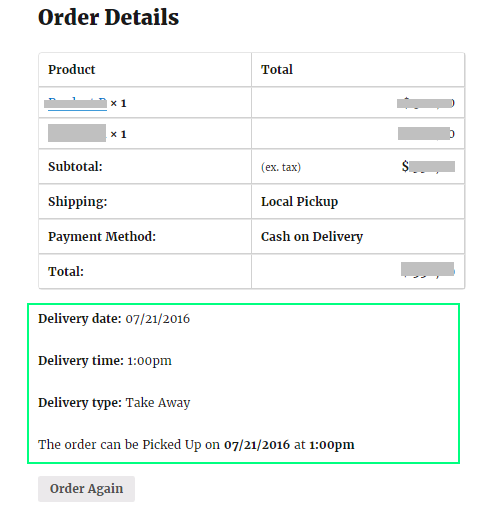
ii) On order completed/thank you page show order delivery/pickup date time info at top of item box or at after item box.
iii) Admin side user interface updated.
2.2.6(16/02/2022)
i) Default order type got blank due to previous update, so customers were able to choose any date without choosing an order type(delivery/pickup) and regardless of delivery and pickup day off settings in admin(if any).
ii) Plugin code structure updated.
iii) WooCommerce 6.2.0 compatibility checked.
2.2.5(28/01/2022)
i) WooCommerce App Support Using Order Note: This plugin adds delivery & pickup information in order note. This feature is super handy as WooCommerce app doesn’t allow any custom information. So if you control your order using the WooCommerce app, you don’t need to worry about Delivery & Pickup details.
ii) Compatibility checked and confirmed with WordPress version 5.9.
2.2.4(22/01/2022)
i) Delivery calendar issue fixed(not showing orders on calendar).
2.2.3(22/01/2022)
i) Delivery & pickup calendar added. Now you can see all upcoming deliveries & pickups in a monthly calendar on admin dashboard.
2.2.2(19/10/2021)
i) Option added not to ask for tips to delivery person.
ii) Option provided to edit “No tips” texts on tips drop-down.
2.2.1(15/09/2021)
i) Tips to delivery person added(Optional).
ii) Time slot set to default choice if no time option is chosen on settings page.
iii) Time unit added after slot timings, default is hrs(put your own text if your store is on another language rather than English)
2.2.0(10/04/2021)
Time slot feature added, now you have option to offer service time as 30 minutes slots instead of fixed/dot time. If you choose time slot it will create 30 minutes slot automatically and offer customers to choose one.
2.1.7(20/05/2020)
i) Option to set no restriction on pre-order days(in previous 2.1.6 version you have to put a pre-order days).
ii) Translation settings added for “Select pickup location” label
2.1.6(10/01/2020)
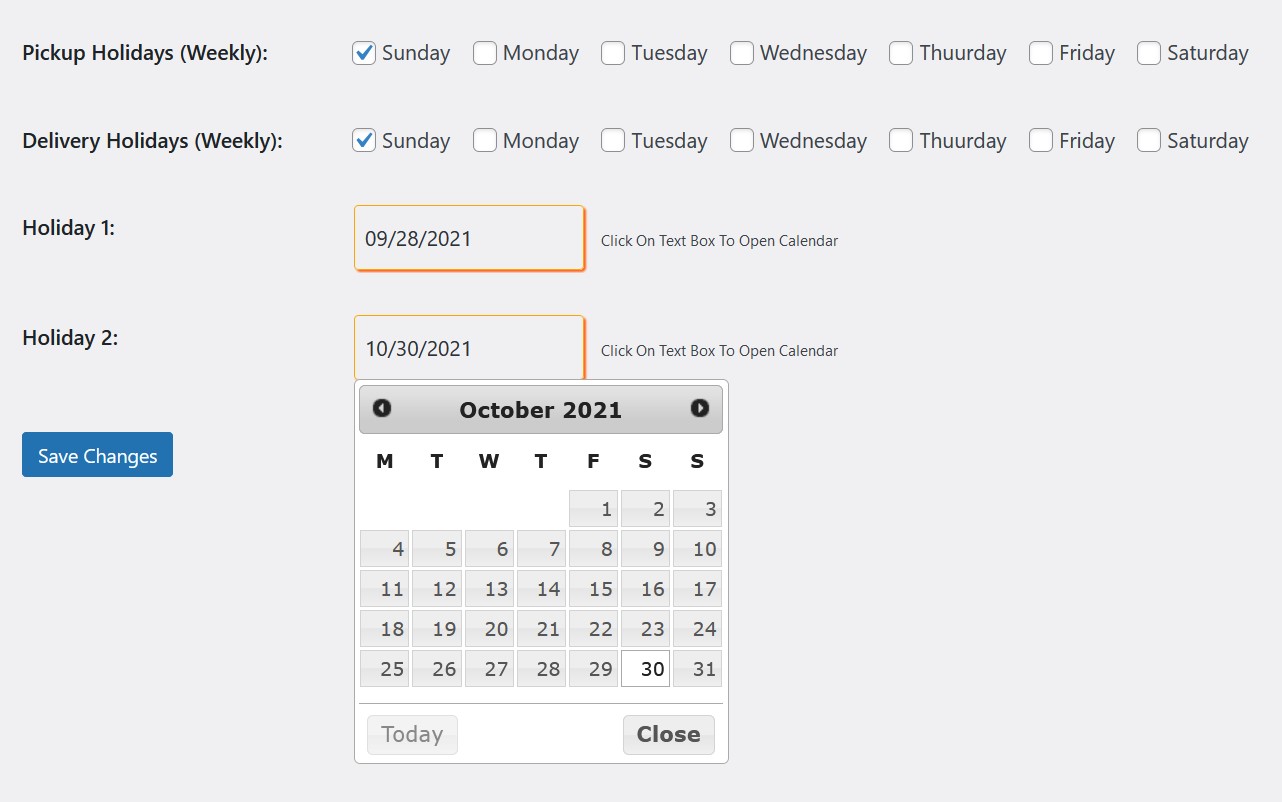
Calendar holiday dates are added, now you can add up to two calendar holiday dates. Those dates will not be available for booking a delivery & pickup.
2.1.5(21/11/2019)
Weekly off days glitch fixed, previously it was problematic when only one day is marked as weekly off day.
2.1.4(30/10/2019)
Warning(“Invalid argument supplied”) fixed.
2.1.3(18/10/2019)
Added default configuration upon activation of the plugin.
2.1.2
i) Default fall back functionality added for older version those who update the plugin but don’t configure new settings fields added in updated version.
2.1.1
i) Bug fix for v2.1.0, where order type button on checkout page always get to set as delivery. Fixed in this v2.1.1
2.1.0
i) Pickup location added
ii) Minor bug fix from v2.0.7, where date saved on other pages by widget/short code was not reflecting on checkout page automatically.
2.0.7
Minor bug fix, when available order type is changed in settings panel, it does not update holidays instantly according to available order type on front-end. Fixed in this v2.0.7
2.0.6
Bug fix for v2.0.5. weekly off days for pickup/delivery was swapped with weekly service on days, fixed int his version.
2.0.5
i) Weekly delivery off day(s) functionality added
ii) Weekly pickup off day(s) functionality added
2.0.0
i) Order type can be delivery only or pickup only or both, options provided in plugin settings page
ii) Time format added for 24 hrs with AM/PM
1.1.9
i) Functionality added to accept order without asking for delivery/pickup time.
ii) Short code added for collecting required date time before going to checkout page. Place the short code on any page/template, Short code is as “[ByConsole_WooODT]”
1.1.8
i) After updates of 1.1.7 when time is set as optional, if a order has no time selected, then it does not show ODT data at all, like order type, delivery/pickup date and time on order complete page, order details page at admin side and even in email for customer and admin. – It has been fixed now in version 1.1.8
ii) If time is set as optional in settings page, yet it was showing as required field on version 1.1.7, its fixed in version 1.1.8
iii) Regardless of selected order type(delivery/pickup) on order confirmation/completed page on front end, order edit page in admin and on emails it show as delivery date, delivery time as label for date and time, its fixed in this version 1.1.8, where it show date label as “Delivery date: when order type is delivery and show date label as “Pickup date” when order type is as pickup, same is fixed for pickup type order as well.
1.1.7
i) Warning fixed on support request form.
ii) Delivery/pickup time can be optional.
iii) Time selection on checkout page is optional now.
1.1.6
i) Security increased.
1.1.5
i) Security increased
ii) Now you can request support directly from your dashboard.
1.1.0
i) Order type label and input selection style updated. Previously styled label and radio input got similar style after WC updated to 3.6.2, so it looked like order type label is also an input choice! This version has updated structure to separate order type label from order type inputs for newer version of WC.
1.0.4.2
i) Past time blocking when pre-order days is set in settings page(previously there was a glitch).
1.0.4.1
i) Same day delivery and pickup issue fixed for IE (Previously showing past times for the same day date in IE )
1.0.4.0
i) Date and time option is removed when all products in cart are as virtual product.
1.0.3.7
i) Label text “(optional)” removed and marked as required for order type, delivery/pickup date and delivery/pickup time input fields on checkout page. This label texts were added for latest version of WooCommerce as 3.4.x and WP 4.9.x.
ii) [deliver_date] and [deliver_time] short code like phrase has been changed to [byc_delivery_date] and [byc_delivery_time] respectively as well as [pickup_date] and [pickup_time] is now as [byc_pickup_date] and [byc_pickup_time] respectively. Please check plugin settings page and update accordingly.
1.0.3.6
i) Deprecated hook “woocommerce_order_items_table” (applied from WooCommerce version 3.0.0) is now replaced with “woocommerce_order_details_after_order_table_items”.
ii) Undefined index notice appear on some server – fixed it in this version.
1.0.3.5
i) Widget issue fixed (Select date first alert box was appearing in version 1.0.3.4 widget)
ii) Automated shipping selection fixed(existing customers issue), previously existing customers need to change zip code again on checkout page to make automated shipping selection effected.
iii) New time format added (previously there was only one variation of 24 hours format and appeared as hh:mm:ss, now new option added as 24 hours(without seconds) that will appear as hh:mm )
1.0.3.4
i) Same date past time issue fixed for languages other than English
ii) Translation files added for Spanish, Dutch, German, Portuguese, Danish and French
1.0.3.3
i) Edge/IE browser support increased
ii) ODT widget moved at top of checkout page
iii) Optimized to work with old PHP version
iv) ODT widget visually customized
v) Rectification of minor bugs on previous version those were reported by users of this plugin
1.0.3.2
i) Translator option added for Take Away and Delivery.
ii) Translator options added for select time and select date input box place holder texts.
iii) Order meta fetch process updated as per WooCommerce 3.0 standard.
iv) Bug fixing – widget activated on other pages (date, time was not working on checkout page).
1.0.3.1
i) Calendar issue fixed in case of pre-order days settings field leaved as empty
ii) Possible error for new/next year date selection has been fixed
1.0.3.0
i) Delivery time for other than current day bug fixed
ii) structure updated
1.0.2.2
Header output warning fixed
1.0.2.1
Restricted of selection past time of the day in time drop-down on widget and checkout page
1.0.2.0
i) Language support added
ii) Settings provided for customization of heading, labels and texts.
1.0.1.6
Fixed: Make automated shipping selection work on checkout page without having to have the widget
1.0.1.5
Fixed: Warning: Cannot modify header information
1.0.1.4
i) Date picker and time drop-down added on checkout field too, so update to avoid manual/invalid date/time input on checkout page(Previously it was only on widget)
ii) Some text changed

