The Gutenberg plugin provides editing, customization, and site building features to WordPress. This beta plugin allows you to…

About AccessibleWP – Accessibility Toolbar
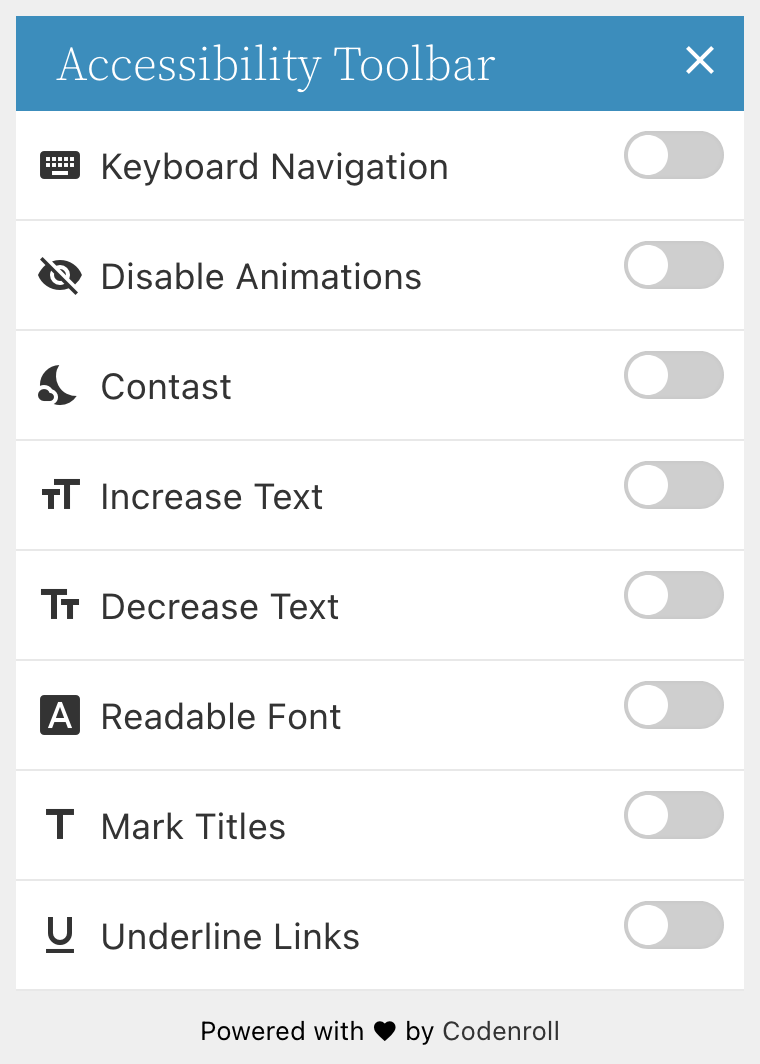
This plugin adds an accessibility toolbar to your WordPress site, allowing users with disabilities to navigate and customize their experience. Please note that while the plugin aims to improve accessibility, it may not cover all guidelines required. For full accessibility compliance, it is recommended to consult an accessibility expert.Screenshots


Frequently asked questions
What does the AccessibleWP plugin do?
The AccessibleWP plugin adds a professional accessibility toolbar to your WordPress site. It aims to make your site easier for users with disabilities.
What accessibility features does the toolbar offer?
The toolbar includes options for keyboard navigation, disabling animations, dark contrast, changing font size, and readable fonts. It also allows users to mark titles and highlight links.
Does this plugin make my website fully WCAG compliant?
No, this plugin does not cover all the guidelines required according to the WCAG. It helps to reach compliance, but you should consult an accessibility expert for full compliance.
Changelog
5.1.4
- Adds an option to stick the toolbar and the button to the bottom.
- Fix broken social links on the plugin dashboard.
5.1.3
- Fix issue with the last version where the user need to click twice on each option.
5.1.2
- Saves user actions in cookies for reuse on other pages.
- Adds an option to disable the use of cookies.
- Fixes incompatibility with NextGen gallery.
- Does not load Material Icons font face when icons are disabled.
- Improves admin style.
- Merge style tags.
- Remove unnecessary wp_enqueue_media callback.
5.1.1
- Replaces h1 tag appears on the toolbar with p tag.
- Makes the toolbar heading text color more compatible.
- Fixes spelling error on the Contrast toggle button.
- Fixes the border color of the main toggle button when user set to custom color.
- Adds a checkbox to validate if we really want to use the toolbar custom color, this fixes an issue of the toolbar getting a black color.
5.1.0
- Add an option to exclude items from contrast mode
- Add an option to exclude items from the font-size changer
- Improve admin panel style
- Improve admin panel accessibility
- Fix the option to positioning the icon from side and from top
- Remove plugin settings data from WordPress REST API
- Add an option to connect with our server for further features
5.0.3
- Toggle icon design improvement
- Fix visual issue with the toggle button on contrast mode
- Update admin menu icon
- Upgrade the Underline Links option to Highlight Links with a background color
- Fix the position of the toggle buttons on the toolbar
- New option in the Additional Links for Site Map
- Fix accessibility issues on the administration side
- Improve the translation to Hebrew
5.0.0
- All strings is now translatable!
- 2 toolbar styles!
- Option to hide the accessibility icons
- Removal of the React base code
- Adding option to disable the draggable button
- Removal of monochrome option
- Adding option to disable toolbar animation
- Adding option to change the header and the button blue color
4.0.2
- Fix route issue
4.0.0
- An entirely new version where React replace the old php templates.
- All options that unrelated to the toolbar were removed from this plugin and launched in separate plugins.
- All saved settings from previous version will be reset.
3.0.2
- Added the ability to include and exclude objects with the font size modifier.
- Changed the use of the class “label” to “acp-label” to avoid conflicts.
- Fixed issue of icons with the Readable button of the toolbar.
- Improved the design of the toolbar.
- New toolbar skin: Smooth.
- Add more ARIA support for the toolbar buttons.
2.1.1
- New Option: Choose 1 of 2 different skins for the Toolbar
- New Option: Change the side of the Toolbar
- New Option: Change the size of the Toolbar icon
- New Option: Change the position of the Toolbar icon
- New Option: Replace HTML tags with other tags and keep attributes (up to 3 replacement tags)
- New Option: Add extra information to the logo with ARIA-LABEL attribute
- New Option: Remove unnecessary tabindex attributes
- Restore Option: Load Toolbar with AJAX + Add more validation for the process
- Restore Option: Load Skiplinks with AJAX + Add more validation for the process
- New Option: Change the side of the Skiplinks
- Option removed: Add Tabindex to heading tags
- Option replaced: Change the TITLE attribute to ARIA-LABEL or the add extra ARIA-LABEL attribute with the value of the TITLE attribute is added instead of the option to only replace the TITLE attribute
- Redesign options panel
- Code performance
2.0
- core change
- more options added
1.3.3
- Add option to disable the toolbar.
- Add option to hide toolbar on mobile.
- Fix tbindex issue of toolbar inner links.
1.3.2
Update assets admin name to match Avada theme.
1.3.1
- Remove the button to affect all elements with the font-size
- add defaults for the font-size buttons
- Improve toolbar styling for LTR users
- Add Feedback button to the toolbar with options to hide it and to change the Text & the URL address.
- Add Accessibility declaration button to the toolbar with options to hide it and to change the Text & the URL address.
1.3.0
- minify js
- code improvement
- Included Images missing ALT’s platform
- The z-index of the toolbar got higher
- a Conflict with Jetpack fixed
- a Conflict with Contact form 7 fixed
- The readable font option improved
- aria-hidden rules added to the accessibility toolbar
- Make elements linked with the skiplinks focusable
1.2.5
- Fix font-size issue
- Added buttons to set the minimum and the maximum for the increment & the decrement font-size buttons
1.2.4
- The design of the toolbar changed
- Added new option to disable toolbar buttons animations
- Readable font button was added to the toolbar
- All toolbar buttons now have icons
- The option to affect everything with the Contrast become default and the button for it removed
- The option to remove Skiplinks buttons underline removed
- The Skiplinks style changed
- fixed issue with keyboard navigation
1.2.3
- fix the z-index of the toolbar
- fix the text appear below the small icon
- add option to use attachment description in images ALT who don’t have an alt
- changing toolbar tabindex when it’s close or open
- improving skiplinks script
- improve toolbar as ajax
- improve skiplinks as ajax
1.2.2
- add option to affect the whole site with the contrast modes
- hide the toolbar when user scroll
1.2.1
- remove shortcodes.
- add option to use attachment title in images ALT who don’t have an alt.
1.0.2
- The Skiplinks moved below the Fixed Toolbar so the user could land first on them
- A new option was added to the Skiplinks that gives the ability to use different links for the Skiplinks on the Home Page.
- Fixing the shortcode so they will be return at the exact place.
- Some CSS Styles was given to the shorted buttons.
- The plugin was translated to Hebrew.
1.0.1
- Adding screenshots
- Fixing jQuery issue with the Font-Sizer script
- Add a cookie so the browser will remember if the user press on one of the Contrast options