Connecting an AI agent to WordPress used to mean writing your own REST API wrapper. There are now at least ten ways to do it, and most of the lists ranking them still recommend software nobody has touched in a year.
If you want a working agent today, InstaMCP is the shortest path: it is built into every InstaWP site, so there is no plugin to install and no separate server process to keep alive. If you would rather track whatever WordPress core settles on, the official WordPress MCP Adapter is the one to follow.
This guide compares ten WordPress MCP servers and plugins on the four things that decide whether one will work for you: authentication, transport, tool surface and maintenance. Six of the ten have shipped no code since 2025. That includes Automattic’s own plugin, archived since August 2025, which still carries more stars than every maintained server here bar the official adapter, and that star count is exactly how it keeps ending up at the top of everyone else’s list.
New to the protocol? The InstaWP WordPress MCP overview covers the concept. This guide assumes you already know what MCP is and just want to pick a server.
Table of Contents
Key Takeaways
- Three of the best-known WordPress MCP projects are now archived. Automattic/wordpress-mcp, mcp-wp/mcp-server, and mcp-wp/ai-command are all read-only. Most “best of” lists still recommend them.
- The official path is now the WordPress MCP Adapter, which bridges the WordPress 6.9 Abilities API to MCP and is the successor to Automattic’s plugin.
- Hosted beats self-hosted for teams. A remote HTTP endpoint is authenticated and revoked centrally. STDIO servers multiply credentials by every user and every site.
- InstaMCP is the fastest route from zero to a connected site, with one toggle, 43 tools, and 13 supported AI clients, and no server process to run.
- Security is the real decision. Grant least privilege, keep write and PHP tools off by default, and test on staging before pointing an agent at production.
Which Type of WordPress MCP Server Do You Need?
A WordPress MCP server exposes your site to AI agents through the Model Context Protocol, advertising tools such as “create post” or “activate plugin” that an AI client can call on your behalf. For the full explanation of how that works, read the InstaWP WordPress MCP guide. The rest of this section is only what you need to choose between them.
Two questions separate every server on this list. The first is architecture, and it decides most of your operational cost:
- Plugin or hosted (Streamable HTTP). The server lives on or in front of your WordPress site and is reached at a URL. Authentication and revocation are centralised, so one person can cut off every agent at once. This is where the WordPress MCP server model has converged.
- Standalone (STDIO). A local Node.js or Python process runs on each developer machine and talks to WordPress over the REST API. That is fine for one developer on one site. For an agency doing site management across dozens of client installs, every teammate needs their own copy, their own credentials and their own updates, and that credential sprawl becomes the job.
The second question is scope. A general WordPress MCP server, an Elementor server and a WooCommerce server are not competing products, and picking the wrong family is the most common mistake people make with this list:

Pro tip: start with an all-purpose WordPress MCP server to test AI workflows in a safe sandbox, then extend into Elementor or WooCommerce servers for niche use cases. Point your first agent at a throwaway staging WordPress site , never production.
Related: WordPress MCP: How Agencies Can Use it to Build AI-First Sites
WordPress MCP Servers Compared at a Glance
“Last activity” is the most recent push to each project’s default branch, and it is the single most useful signal when picking an MCP server. An unmaintained server that talks to your database is a liability rather than a tool.
| Server | Type | Auth | Transport | Tools | Last activity | Best for |
|---|---|---|---|---|---|---|
| InstaMCP (InstaWP) | Hosted, built in | API token with scopes | Streamable HTTP | 43 | Active | Fastest setup, agencies |
| WordPress MCP Adapter | Official plugin | Application passwords | Streamable HTTP | Whatever abilities you register | Active, 1,692 stars | Core-aligned builds on WP 6.9+ |
| WordPress.com MCP | Hosted endpoint | OAuth 2.1 with PKCE | Streamable HTTP | Core content set | Active | WordPress.com sites |
| docdyhr/mcp-wordpress | Standalone | Application passwords | STDIO | Multi-site content set | Active, 107 stars | Self-hosted multi-site |
| woocommerce-mcp-server | Standalone | Woo keys plus WP credentials | STDIO | Hundreds of Woo methods | Stale Nov 2025, 102 stars | WooCommerce operations |
| Elementor-MCP | Standalone | Application passwords | STDIO | Elementor CRUD | Stale May 2025, 67 stars | Elementor page edits |
| prathammanocha | Standalone | Application passwords | STDIO | Broad REST CRUD | Stale May 2025, 48 stars | Wide REST coverage |
| stefans71 | Standalone | Application passwords | STDIO | Posts only | Stale Jan 2025, 81 stars | Minimal publishing |
| Utsav-Ladani | Standalone | Application passwords | STDIO | Posts plus block schema | Stale May 2025, 10 stars | Block-aware drafting |
| rmcendarfer2017 | Standalone (Python) | Application passwords | STDIO or FastAPI | Publishing plus taxonomy | Stale Apr 2025, 2 stars | Python-first teams |
Source: the GitHub API, September 2026. “Stale” means no commit to the default branch in more than six months.
Did you know? Three servers that still appear on most “best WordPress MCP server” lists are archived and no longer accept fixes: Automattic/wordpress-mcp, mcp-wp/mcp-server, and mcp-wp/ai-command. We cover what to use instead in the section below.
The Best WordPress MCP Server for Your Situation
Most of this decision is settled by one fact about your setup. Find your row, then read that entry below.
How We Evaluated These WordPress MCP Servers
MCP moves quickly, and a comparison written from README files alone ages badly. Each server here was assessed against five criteria:
- Maintenance status. Archived or stale repositories were separated out rather than quietly ranked. A server with database access that stopped receiving security fixes is not a recommendation.
- Authentication model. OAuth 2.1 and scoped tokens rank above raw application passwords stored in a local config file, because they can be revoked centrally without touching every machine.
- Transport. Streamable HTTP means one endpoint your whole team shares. STDIO means one process and one credential set per person, per site.
- Tool surface. More tools is not automatically better. What matters is whether destructive tools can be switched off and whether write access is opt-in.
- Real setup cost. How long from nothing to a connected agent, including credential creation and client config.
Tool counts and supported-client counts are the figures each project publishes. Star counts, last-push dates and archive status come from the GitHub API and will drift, so treat them as a snapshot rather than a live score.
Maintenance is where this list parts company with most others. Of the nine repositories behind these ten entries, three have shipped code in the last 90 days: WordPress/mcp-adapter, docdyhr/mcp-wordpress and InstaWP/mcp-wp. Six have shipped nothing since 2025. Star counts point the other way, which is how the other lists go wrong. Automattic/wordpress-mcp sits at 941 stars, more than every maintained server on this page except the official adapter, and it has been archived since August 2025.
The Best WordPress MCP Servers in 2026
These are the servers worth connecting to a real site today, ordered by how quickly they get a working agent against how much control they give you.
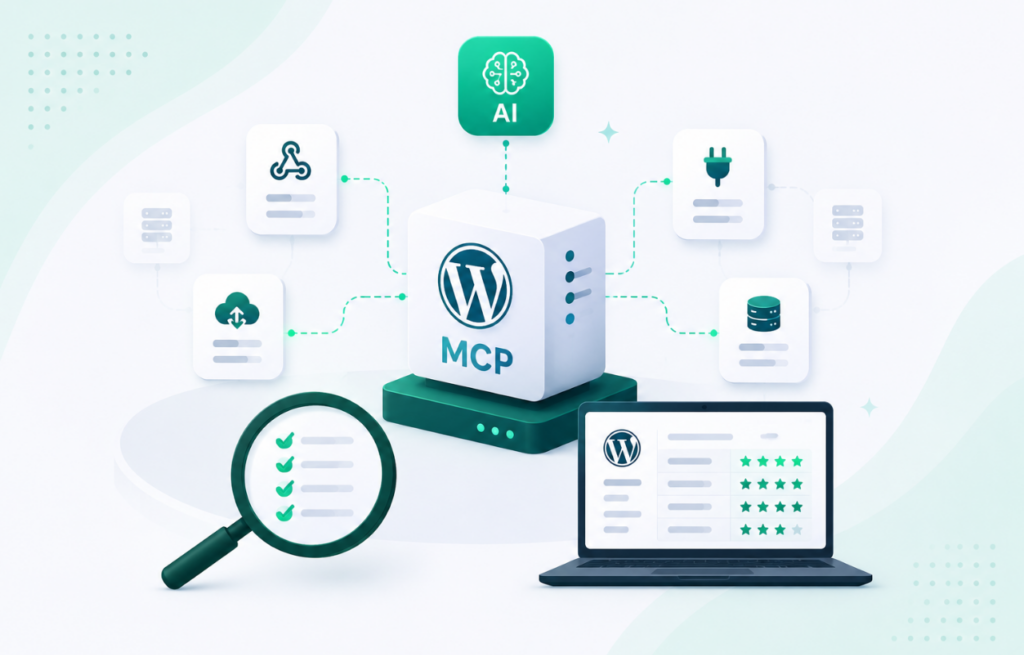
1. InstaMCP by InstaWP

If you are comparing WordPress MCP servers, InstaMCP is one of the strongest options for developers who want to connect AI agents to WordPress without maintaining another server process.
InstaMCP is InstaWP’s MCP implementation, and it is available in two ways:
- Built into InstaWP sites: If you are building, testing, or hosting a WordPress site on InstaWP, MCP is integrated directly at the site level. Enable it with a toggle, copy the generated MCP URL, and connect your AI client.
- Open-source WordPress MCP server: If your WordPress site is not running on InstaWP, you can use InstaWP’s standalone open-source MCP server from GitHub and connect it to virtually any WordPress installation.
This makes InstaMCP particularly useful if you are looking for the best WordPress MCP server without wanting your workflow locked to a single hosting setup.
Rather than running a separate server process for an InstaWP site, you enable MCP with a single toggle, copy the generated MCP URL, and paste it into your AI client. There is no separate Node.js service to keep alive, no application password to distribute, and no additional MCP host to patch.
That matters more than it sounds. Many WordPress MCP servers have capable toolsets, but their real cost is operational: something has to run the server, store credentials, stay available, and remain updated. InstaMCP removes most of that infrastructure when you use it with an InstaWP site, making it one of the shortest paths from “I want to try WordPress MCP” to an AI agent actually working on a site.
What it exposes
- 43 tools spanning posts, pages, media, users, taxonomies, plugins, themes, and database operations.
- An
execute_phptool with full$wpdbaccess for cases where a dedicated tool does not exist. - On WordPress 6.9 and later, tools are also registered through
wp_register_ability(), allowing them to participate in WordPress’s Abilities API rather than existing as an entirely separate tool layer.
Supported AI clients
InstaMCP 1.1 documents configuration for 13 AI clients: Claude Desktop, Claude Code, Claude.ai, Cursor, Windsurf, Cline, Roo Code, GitHub Copilot, Zed, Gemini CLI, OpenAI Codex CLI, ChatGPT, and Continue.dev.
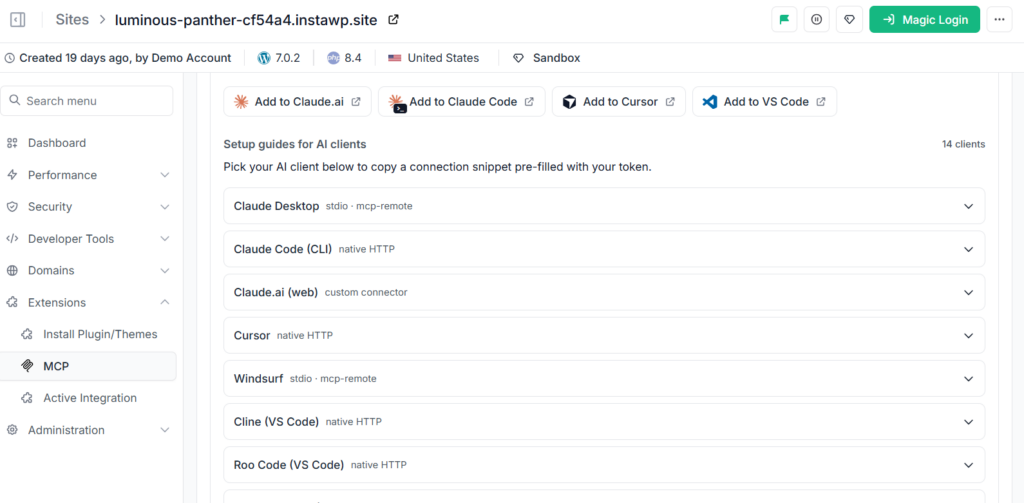
In practice, clients capable of connecting through Streamable HTTP can also work with the endpoint, while those 13 have documented configuration paths.
Security model
Access is controlled through API tokens with configurable scopes. The more powerful execute_php capability is disabled by default and protected behind multiple permission checks. An administrator must explicitly enable it, the token needs the required administrative MCP scope, the WordPress user must have the necessary capability, and execution is time-limited.
That provides a more deliberate permission model than simply handing an AI client a broad WordPress application password.
Best for
- Developers looking for the best WordPress MCP server with minimal setup.
- Agencies that want AI-assisted WordPress workflows without distributing site credentials across multiple machines.
- Teams already building or testing on InstaWP.
- Developers who want an MCP environment they can test safely on disposable WordPress sandboxes.
- Developers running WordPress elsewhere who still want to use InstaWP’s open-source MCP implementation.
Why InstaMCP is a strong WordPress MCP server choice
The main advantage is not simply the number of tools. It is the choice between zero-setup managed MCP and open-source self-hosted MCP.
Build on InstaWP and the MCP layer is already there. Build elsewhere and you can take the open-source server from GitHub and run it against your own WordPress environment.
For developers comparing the best WordPress MCP servers, that combination gives InstaMCP an unusual balance of fast setup, WordPress-specific tooling, permission controls, AI-client compatibility, and deployment flexibility.
It also pairs naturally with InstaWP’s disposable sandboxes: create a temporary WordPress site, connect your AI agent, experiment with real tools, and discard the environment when you are done instead of giving an untested agent immediate access to production.
Honest limitation
InstaMCP is tied to sites running on InstaWP. If your production site lives elsewhere and you are not planning to move it, you would use InstaMCP for building and testing and one of the plugin-based servers below on the destination host. InstaWP also maintains a separate open-source standalone server, the InstaWP WordPress MCP Server, which you can self-host against any WordPress install via npx -y @instawp/mcp-wp if you want the code rather than the hosted path.
This pairs naturally with instant sandboxes: spin up a throwaway site, let an agent loose on it, and throw it away. That is also the safest way to learn what an agent will do to a WordPress multisite setup before it touches anything real.
Verdict: the fastest route to a working agent, and the only option here where setup is a toggle rather than a config file. Pick InstaMCP if your build and staging work already happens on InstaWP, or if you want InstaWP’s open-source server on a site hosted elsewhere. Skip it if your production site lives somewhere else and is staying there.
Try a WordPress MCP server without setting one up
Create a free WordPress sandbox on InstaWP, switch on InstaMCP, and connect Claude or Cursor in a couple of minutes.
Explore InstaMCP →2. WordPress MCP Adapter (Official)
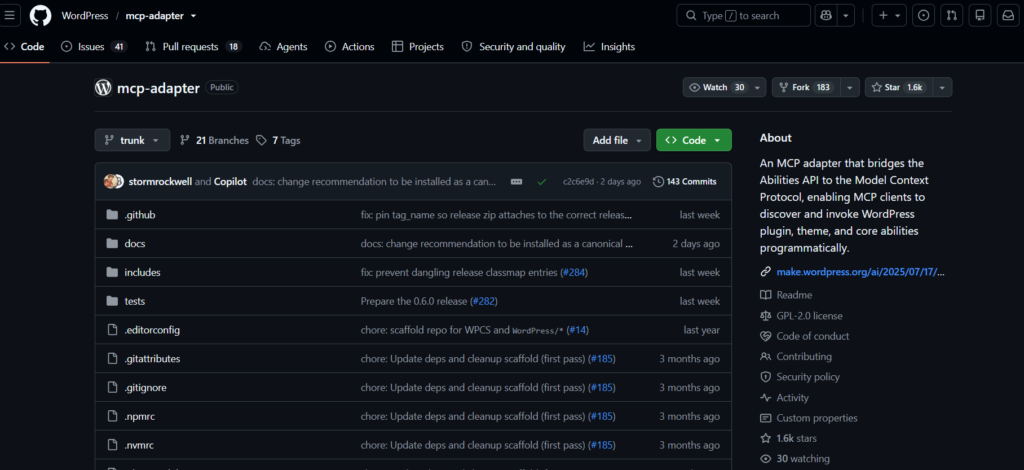
The WordPress MCP Adapter is the closest thing to an official answer. It lives in the WordPress GitHub organisation, carries 1,692 stars as of September 2026, and was pushed the same week. Crucially, it is the project that replaced Automattic’s archived plugin, so this is where that ecosystem moved.
InstaWP’s full WordPress MCP adapter review covers installation, the default permission callback and what the adapter actually exposes on a real site. What follows is the part that matters when you are choosing between servers.
The design is different from every standalone server here. The adapter does not define its own catalogue of WordPress tools. It bridges the Abilities API introduced in WordPress 6.9, which is a core registry where any plugin or theme can declare a capability using wp_register_ability(). The adapter takes whatever is in that registry and exposes it over MCP.
The consequence is worth spelling out: your MCP surface becomes whatever your site actually does. A plugin that registers three abilities gets three tools, automatically, without anyone writing MCP code. That is a far better long-term model than a fixed tool list maintained by one vendor.
What it does
- Bridges the WordPress 6.9 Abilities API to the Model Context Protocol.
- Exposes registered abilities as MCP tools, resources, and prompts.
- Supports Streamable HTTP transport, so one endpoint serves the whole team.
- Lets you scope exactly which abilities are exposed instead of publishing everything.
Best for
- Teams that want to stay aligned with WordPress core rather than a third-party tool list.
- Plugin developers who want their own features to be AI-callable without building a server.
- Anyone who was running Automattic/wordpress-mcp and needs the supported migration path.
Honest limitation
It requires WordPress 6.9 or later, because the Abilities API does not exist before that. It also does less out of the box than the standalone servers: if nothing on your site registers abilities, you get very few tools. Read the WordPress Developer Blog introduction to the MCP Adapter before committing, because the mental model is genuinely different.
Verdict: the right long-term bet and the wrong first experiment. It is still pre-1.0 (v0.6.1, August 2026) and gives you almost nothing until something on your site registers abilities. Pick it if you are on WordPress 6.9 or later and building for the next three years rather than this afternoon.
3. WordPress.com MCP
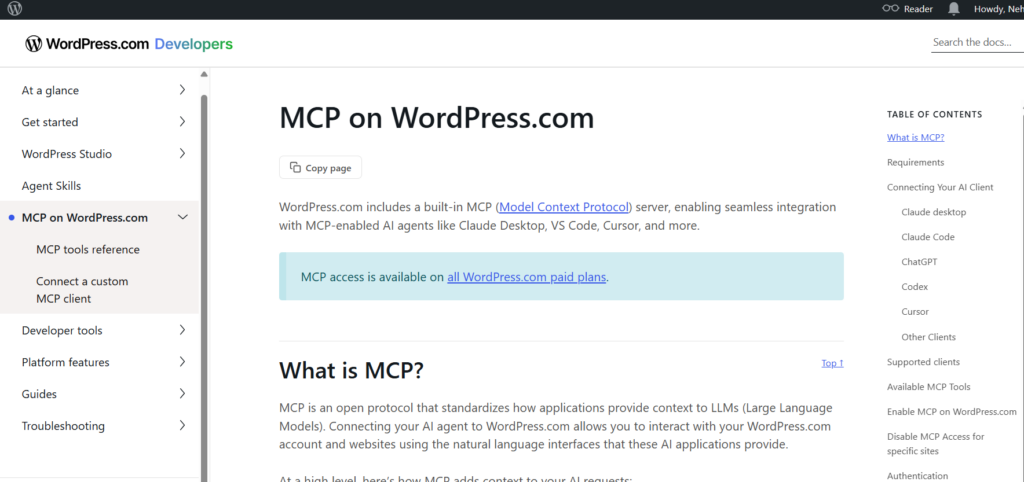
WordPress.com runs a hosted MCP endpoint at https://public-api.wordpress.com/wpcom/v2/mcp/v1, protected by OAuth 2.1 with Dynamic Client Registration and PKCE. It is the strongest authentication model in this comparison, and there is nothing to install, patch, or run.
The OAuth flow is the point. Instead of pasting a long-lived application password into a config file on every machine, the user signs in through a browser consent screen and the client holds a revocable token. Revoking access is one action in account settings rather than a hunt through developer laptops.
Connecting it to Claude Code takes one command:
claude mcp add --transport http wpcom-mcp https://public-api.wordpress.com/wpcom/v2/mcp/v1Then run /mcp inside Claude Code to complete the sign-in.
Best for
- Sites hosted on WordPress.com.
- Teams whose security review will not approve shared application passwords.
- Anyone who wants a working reference implementation of OAuth 2.1 for MCP.
Honest limitation
It only works for WordPress.com-hosted sites, and the tool surface is scoped to core content operations. If you are self-hosted, this is a useful model to study rather than an option you can adopt. Full details are in the WordPress.com MCP documentation.
Verdict: the best option for WordPress.com sites and irrelevant for everyone else. OAuth 2.1 with PKCE is the strongest authentication model in this comparison, and it is also the one you cannot take with you if you move to self-hosted WordPress.
4. mcp-wordpress by docdyhr
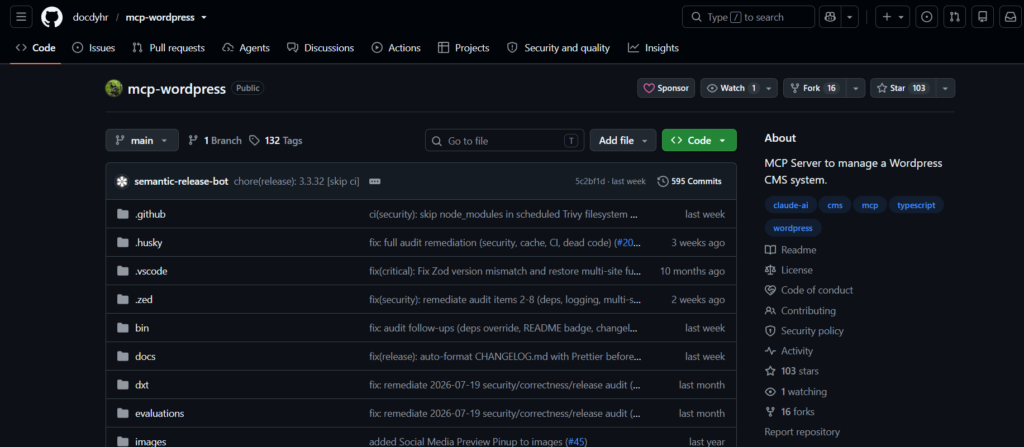
docdyhr/mcp-wordpress is the most actively maintained standalone server in this list, with commits landing in August 2026 and 102 stars. Where most community servers were written once in early 2025 and left alone, this one is still being worked on, which is the main reason it earns a place above several better-known projects.
It is a Node.js server that manages multiple WordPress sites from a single configuration file, which is the feature most of the single-site servers lack. You define your sites once, each with its own credentials, and address them by name in prompts.
What it does
- Manages several WordPress sites from one config rather than one server process per site.
- Covers posts, pages, media, users, comments, categories, and tags over the REST API.
- Authenticates with WordPress application passwords per site.
- Runs over STDIO, so it is configured per machine in your MCP client.
Best for
- Developers who want a self-hosted server they control, with an author who is still shipping fixes.
- Small agencies managing a handful of sites from one workstation.
Honest limitation
It is still STDIO. Every person who needs access runs their own copy and holds their own credentials for every site, which does not scale past a few people. Active maintenance solves the security-fix problem, not the credential-sprawl problem.
Verdict: the strongest maintained standalone server on this list. It was pushed on 10 September 2026, one of only three repositories on this page that shipped anything in the last 90 days. Pick it if you manage several self-hosted sites and accept a local process and local credentials on every machine.
5. woocommerce-mcp-server by Techspawn

The woocommerce-mcp-server by Techspawn is the most complete commerce-focused option in the ecosystem, and the only one here that treats WooCommerce as a first-class target rather than an afterthought. It exposes hundreds of methods across products, variations, orders, refunds, customers, coupons, shipping zones, tax classes, and reports, plus the standard WordPress content methods.
What it does
- Full CRUD on products, variations, attributes, and reviews.
- Order management including refunds, notes, and customer records.
- Shipping zone, payment gateway, tax class, and coupon configuration.
- Sales, stock, product, and customer reporting for AI-driven store analysis.
Best for
- Stores where an agent should handle bulk catalogue work, pricing updates, or stock reconciliation.
- Building an internal assistant that answers questions about orders and inventory from live data.
Honest limitation
Last pushed in November 2025, so it is quiet rather than dead. It authenticates with WooCommerce consumer keys alongside WordPress credentials, which means two sets of secrets in a local config. Given that this server can change prices and refund orders, restrict the key permissions and test everything on a staging copy of the store first.
Verdict: the only serious choice for WooCommerce operations, and one to check before you commit. The last push was November 2025, and a server with write access to orders and inventory that stops receiving fixes is a liability rather than a tool.
6. Elementor MCP Server by Aguaitech

Elementor MCP Server by Aguaitech is a small, purpose-built server for one job: letting an AI agent read and modify Elementor page content through the REST API. It is one of very few servers that is page-builder aware at all.
What it does
- CRUD operations on Elementor page and section structures.
- Reads and modifies widget and section content from AI prompts.
- Installs through the Smithery CLI or a manual
mcp.jsonentry. - Authenticates with application passwords via
WP_APP_USERandWP_APP_PASSWORD.
npx -y @smithery/cli install @aguaitech/Elementor-MCP --client claudeBest for
- Teams whose pages are built in Elementor and who want AI to adjust layouts and copy in place.
- Generating landing page variants from a prompt rather than duplicating templates by hand.
Honest limitation
Last pushed May 2025, and page-builder writes are the single riskiest category of MCP operation. Elementor stores its layout as serialised JSON in post meta. A generic content write that ignores that format will silently flatten a page. Always snapshot before letting an agent edit builder pages, and check the result visually rather than trusting a success response.
Verdict: narrow and stale. It does the one thing nothing else on this list does, and it has not been touched since May 2025. Use it read-only where you can, snapshot the page before every write, and check the result visually rather than trusting a success message.
7. wordpress-mcp-server by prathammanocha

wordpress-mcp-server by prathammanocha offers the widest plain-REST coverage of the community Node.js servers: posts, users, comments, categories, tags, site metadata, and a generic custom-request tool that can hit any REST endpoint with any HTTP method.
That custom-request escape hatch is the interesting part. It means the server is not limited to the endpoints its author thought of, so a custom post type or a plugin route is reachable without forking the code.
Best for
- Sites with custom post types or plugin REST routes that a fixed tool list would not reach.
- Bulk content and taxonomy work across an editorial library.
Honest limitation
Last pushed May 2025. The generic custom-request tool is powerful and correspondingly dangerous: it will happily issue a DELETE against any endpoint the credentials allow. Use a least-privilege user, not an administrator.
Verdict: broad REST coverage with no maintenance since May 2025. Reasonable to fork and adapt, hard to recommend as a dependency.
8. wordpress-mcp-server by stefans71

wordpress-mcp-server by stefans71 is the minimal option: create a post, list posts, update a post. Nothing else. It needs no plugin on the WordPress side, runs anywhere Node.js runs, and is small enough to read in full before you trust it.
Best for
- A first experiment with MCP, where a small tool surface is a feature rather than a limitation.
- Pushing AI-generated drafts into WordPress from a script or pipeline.
Honest limitation
Last pushed January 2025, which makes it the stalest server we still list, and it only handles posts. No media, no taxonomies, no users. It earns its place as a clean, readable reference implementation rather than a production tool.
Verdict: the simplest server here and the most dormant, with nothing shipped since January 2025. Fine for a personal publishing workflow, not for client work.
9. WordPress MCP by Utsav-Ladani

WordPress MCP by Utsav-Ladani is a TypeScript server with one genuinely distinctive feature: it exposes the WordPress block types schema to the AI client. The agent can therefore generate valid Gutenberg block markup rather than dumping raw HTML into a post.
If you have ever asked an AI to write a WordPress post and received a wall of unstructured HTML that renders as one giant classic block, this is the fix. Handing the model the block schema makes the difference between content that is editable in Gutenberg and content that is not.
Best for
- AI drafting workflows where the output has to be real, editable Gutenberg blocks.
- Enforcing a consistent post structure such as heading, image, body, call to action.
Honest limitation
Ten stars and last pushed May 2025, so this is a proof of concept rather than infrastructure. The block-schema idea is more valuable than the code: the official adapter and InstaMCP both reach the same outcome with more support behind them.
Verdict: interesting because it understands block schema, which most of these do not. Ten stars and a May 2025 last push make it a reference implementation rather than something to build on.
10. WordPress MCP Server by rmcendarfer2017

WordPress MCP Server by rmcendarfer2017 is the only Python implementation here, built on FastAPI. Its useful idea is metadata preparation: before publishing, it checks whether the required categories and tags exist and creates them if they do not, then passes the resulting IDs into the publish call.
Anyone who has automated WordPress publishing knows why that matters. Taxonomy assignment is where bulk publishing usually breaks, because the AI supplies a category name and the REST API expects an ID.
Best for
- Teams whose stack is Python rather than Node.js, including Python developers building custom content pipelines.
- News or syndication workflows where every article arrives with new categories and tags.
- Publishing with featured images supplied as URLs or base64 data.
python main.py --mcpHonest limitation
Two stars and last pushed April 2025. This is one person’s working project, and we include it because the Python and taxonomy angle is genuinely unserved elsewhere, not because it is battle-tested. Read the code before pointing it at anything you care about.
Verdict: the Python option, and effectively a solo project at two stars with a last push in April 2025. Pick it only if your team’s automation stack is Python and you intend to maintain the fork yourself.
Archived WordPress MCP Servers to Avoid in 2026
These three projects appear on almost every WordPress MCP comparison still published. All three are archived or gone. We are keeping them here, clearly labelled, because the useful information is not “these exist” but “these are dead, and here is where their users went”.
Why this matters: an archived repository accepts no security patches. A WordPress MCP server holds credentials and can write to your database. Running an abandoned one is a standing risk, not a minor tech-debt item.
MCP for WordPress (mcp-wp)

MCP for WordPress came out of the CloudFest Hackathon 2025 and was the most interesting early experiment in the space. It made WordPress itself the MCP server, added a /wp-json/mcp/v1/mcp route, and shipped a companion WP-CLI package so you could drive a site with wp ai from the terminal.
Both halves are now archived. The server repository was archived in December 2025, and the ai-command WP-CLI package was archived the same month. If you liked the CLI-native approach, the ideas survive in the official adapter, and standard WP-CLI remains the right tool for scripted site work.
Use instead: the WordPress MCP Adapter.
WordPress MCP by Automattic

MCP for WordPress by Automattic was the highest-profile WordPress MCP project of 2025, with 944 stars. It turned any WordPress site into an MCP server via a plugin and integrated with the WordPress Feature API.
It is now archived, with its last push in August 2025, and the repository description states the project is deprecated in favour of stable releases elsewhere. Its GitHub releases page still resolves, which is exactly why people keep installing it. The work moved to the WordPress MCP Adapter, which rebuilt the same idea on top of the core Abilities API instead of a bespoke feature registry.
Use instead: the WordPress MCP Adapter. If you are already running the Automattic plugin, this is the migration you should be planning.
WordPress MCP Server by Dmitrii Demenko

This TypeScript server offered post CRUD over JSON-RPC with optional OAuth token handling. As of August 2026 the repository returns a 404 and the project cannot be installed or audited. We have left the entry in place because the listing is widely mirrored and readers arriving from those copies deserve to know the source is gone rather than assume they mistyped the URL.
Use instead: docdyhr/mcp-wordpress for an actively maintained standalone server, or the WordPress MCP Adapter if you want OAuth-grade authentication.
How to Connect a WordPress MCP Server to Claude, Cursor, or ChatGPT
Connecting a WordPress MCP server to an AI tool is mostly about giving the client an MCP endpoint and the right permissions. With InstaWP, this is particularly simple because you can connect AI tools to WordPress in two ways: use the built-in InstaMCP endpoint on an InstaWP site, or run InstaWP’s open-source WordPress MCP server for a site hosted elsewhere.
If you are looking for the best WordPress MCP server setup with the least infrastructure to maintain, start with InstaWP’s built-in site-level MCP.
Option 1: Connect InstaWP’s Built-In WordPress MCP Server
For sites running on InstaWP, you do not need to install another plugin, configure a Node.js process, or deploy a separate MCP service.
The WordPress MCP server is integrated directly with the site. Open your site in the InstaWP dashboard and enable MCP for that site.
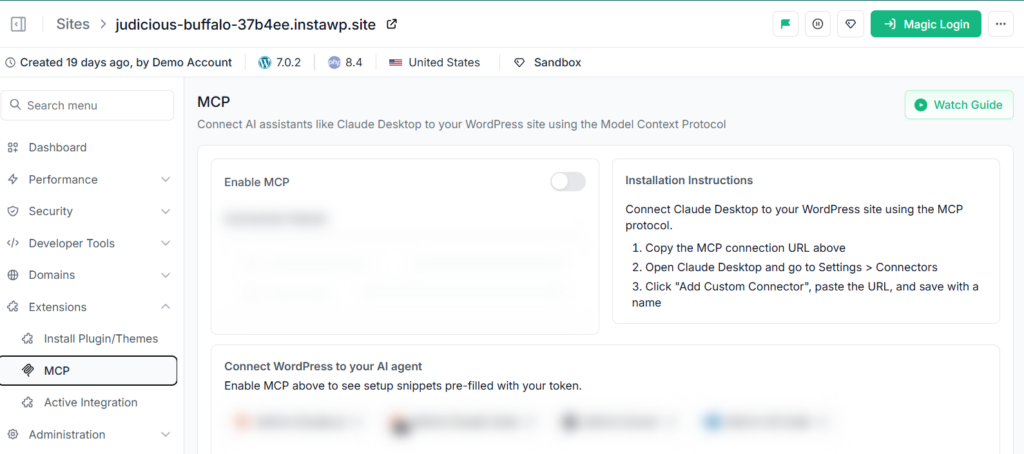
Configure the tools and permissions you want the AI agent to access. Copy the generated MCP URL.
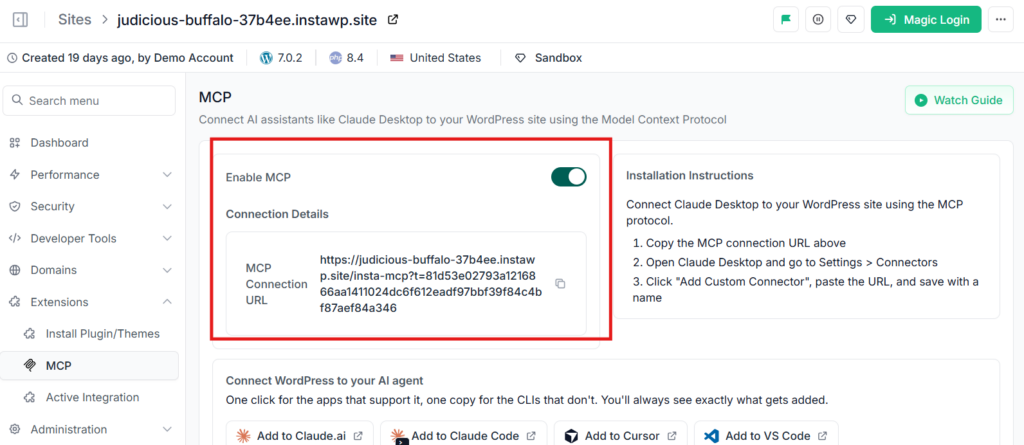
Add that URL to Claude, Cursor, ChatGPT, or another MCP-compatible AI client. Test the connection with a simple read-only request.
Watch the video tutorial to understand the process a better way.
For example, with Claude Code:
claude mcp add --transport http my-site https://your-site-mcp-url
Once connected, try:
List the five most recent posts on this WordPress site.
If the agent returns the posts, your WordPress MCP server is connected correctly. The important difference here is that the AI tool talks directly to the MCP endpoint attached to your InstaWP site. There is no local MCP process that must remain running in the background.
The flow looks like this:
Claude / Cursor / ChatGPT → InstaMCP endpoint → WordPress site
That makes InstaMCP one of the easiest WordPress MCP servers to connect when your development environment is already on InstaWP.
Option 2: Use InstaWP’s Open-Source WordPress MCP Server
You do not have to host the WordPress site on InstaWP to use InstaWP’s MCP implementation. If the site lives on another WordPress host, you can use InstaWP’s standalone open-source WordPress MCP server.
Run it with:
npx -y @instawp/mcp-wp
You then configure the server with the URL and credentials for the WordPress site and register that MCP process with your AI client.
A typical STDIO-style configuration follows this pattern:
{
  "mcpServers": {
    "wordpress": {
      "command": "npx",
      "args": ["-y", "@instawp/mcp-wp"],
      "env": {
        "WORDPRESS_SITE_URL": "https://example.com",
        "WORDPRESS_USERNAME": "agent-user",
        "WORDPRESS_APP_PASSWORD": "xxxx xxxx xxxx xxxx xxxx xxxx"
      }
    }
  }
}
The connection now looks like:
Claude / Cursor / other MCP client → InstaWP MCP server → Existing WordPress site
This gives InstaWP two practical paths compared with many other WordPress MCP servers:
Try a WordPress MCP server without setting one up
Create a free WordPress sandbox on InstaWP, enable InstaMCP, and connect it to Claude or Cursor in just a couple of minutes.
Explore InstaMCP →That flexibility is one reason InstaMCP is a strong candidate for the best WordPress MCP server for developers who work across both temporary development environments and existing production sites.
Option 3: Connect Another Plugin-Based WordPress MCP Server
Other WordPress MCP servers may require you to install a plugin and authenticate through a WordPress application password.
The general workflow is:
- Install and activate the MCP plugin.
- Create a dedicated WordPress user for the AI agent.
- Give that user the lowest permissions required for the task.
- Generate an Application Password.
- Configure the abilities or MCP tools that should be exposed.
- Add the endpoint and credentials to the AI client.
- Restart the client if required and test the connection.
Avoid using your main administrator credentials for an AI agent. A dedicated account makes permissions easier to restrict and revoke.
Which WordPress MCP Server Connection Method Should You Use?
If you are already building or testing with InstaWP, use the built-in InstaMCP endpoint. It removes most of the setup normally associated with WordPress MCP servers.
If WordPress is hosted somewhere else but you still want InstaWP’s MCP tooling, use the open-source @instawp/mcp-wp server.
So the decision is fairly simple:
For developers comparing the best WordPress MCP server options, InstaWP’s advantage is that you can start with a managed MCP endpoint when you want zero setup, while still having an open-source route for WordPress sites running outside InstaWP.
This is the step every comparison skips. Below are the three connection paths that cover almost every real setup, from least to most work.
Troubleshooting a connection that will not start
- The client shows no tools at all. Almost always malformed JSON in the config file. Paste it into a JSON validator and look for a trailing comma or an unclosed bracket.
- 401 or 403 responses. Wrong username format, a revoked application password, or a user role without the required capability.
- The server starts but every write fails. The tools are exposed read-only, or the WordPress user lacks the capability for that post type.
- It worked yesterday and not today. Check whether the repository was archived, or whether a security plugin started blocking REST API requests from unknown clients.
WordPress MCP Security: What You Are Actually Exposing
An MCP server is a remote write interface to your site, operated by a system that improvises. That is a genuinely new risk category, and it deserves more than a line about using HTTPS.
WordPress has been here twice before. XML-RPC opened remote writes in 2012 and became a standard brute-force target. The REST API arrived in 2017 and shipped a content-injection vulnerability that defaced sites at scale. Both followed the same arc: new remote surface, abuse wave, then hardening. MCP is early in that arc, which means the defaults you choose now matter more than they will in three years.
The five controls that actually reduce risk
- Least privilege, always. Create a dedicated WordPress user for the agent with the minimum role that completes the task. An Editor cannot install a backdoor plugin. An Administrator can.
- Read-only by default. Expose read tools first. Add write tools deliberately, one workflow at a time, once you have watched what the agent actually does.
- Treat PHP execution as a separate decision. A tool like
execute_phpis not “one more tool”, it is arbitrary code execution with database access. InstaMCP keeps it off by default behind an admin opt-in, a token scope, amanage_optionscapability check, and a 30-second limit. If your server offers PHP execution with fewer gates than that, leave it off. - Prefer revocable credentials. OAuth tokens and scoped API tokens can be killed centrally. An application password copied into five config files has to be hunted down on five machines.
- Stage before production. Point the agent at a copy of the site and run the real workflow. Page-builder edits especially: agents rewriting surrounding content while making a targeted change is a documented failure mode, not a hypothetical.
The transport question is a security question
STDIO servers require every user to hold credentials for every site locally. Ten people across thirty sites is three hundred credential copies, none of which you can revoke centrally. A hosted Streamable HTTP endpoint inverts that: one endpoint, authenticated once, revoked once. If you manage client sites, this is the difference that will matter during an offboarding.
When Should You Use an MCP Server with WordPress?
An MCP server pays for itself when the work is repetitive, structured, and high volume:
- You run content-heavy operations such as newsrooms, affiliate sites, or programmatic publishing, and editorial tasks repeat daily.
- Your agency builds and maintains WordPress sites in bulk and needs to manage multiple client sites without opening thirty dashboards.
- You want an internal assistant that answers questions from live site data instead of a stale export.
- You are building AI-assisted development workflows and want the agent to test its own changes on a real install.
- You need bulk taxonomy, metadata, or media work that would take hours by hand and seconds by tool call.
When Not to Use a WordPress MCP Server
Equally important, and absent from every other comparison we read:
- One site, occasional edits. If you publish twice a week, wp-admin is faster than configuring and securing an agent.
- Production with no staging copy. If you cannot test the workflow safely first, you are not ready to connect an agent to it.
- Compliance-bound sites. Where every content change needs an audit trail and named approver, an improvising agent creates a governance problem before it saves any time.
- Heavily page-built sites without snapshots. Elementor, Divi, and Bricks store layouts in formats a generic write can destroy. Without one-click rollback, the downside outweighs the speed.
- When a scheduled script would do. If the task is fully deterministic, WP-CLI and cron are cheaper, faster, and cannot hallucinate.
Common Mistakes When Running a WordPress MCP Server
- Connecting with an administrator account. The single most common mistake, and the one that turns a small incident into a large one.
- Choosing by star count. Stars measure 2025 attention, not 2026 maintenance. Check the last push date before the star count.
- Assuming a success response means a correct result. An agent can report a page updated while having flattened its layout. Verify visually on builder pages.
- Leaving every tool enabled. Most workflows need five tools. Exposing forty widens the blast radius for no benefit.
- Skipping the staging step. Reproducing an agent workflow on a throwaway WP staging environment costs minutes and catches the expensive mistakes.
Which WordPress MCP Server Should You Choose?
The WordPress MCP landscape consolidated sharply between 2025 and 2026. The experimental projects that defined the early ecosystem are archived, and the centre of gravity moved to two places: the official adapter built on the WordPress 6.9 Abilities API, and hosted endpoints that remove the server-operation problem entirely.
The practical decision comes down to three questions. Do you need this on one site or thirty? Can you accept a local process and local credentials per person, or do you need central revocation? And is your site running WordPress 6.9 with abilities registered, or do you need a server that brings its own tool list?
If you are evaluating rather than committing, do it on a disposable site. Spin up a sandbox, connect an agent, and watch what it does before any of this touches a client install.
Pick InstaMCP if you want an agent connected to a real WordPress site this afternoon and would rather not run a server. Pick the WordPress MCP Adapter if you are on WordPress 6.9 or later and want your MCP surface to grow with your site instead of with a vendor’s roadmap. Pick docdyhr/mcp-wordpress if you self-host several sites and a local process per developer is an acceptable trade. Everything else on this page is either tied to one platform, tied to one page builder, or no longer maintained.
Test your next AI workflow on InstaWP
Create a WordPress sandbox, enable InstaMCP, and connect Claude, Cursor, or ChatGPT to a real site in minutes. No server to run. No credentials to hand out.
Get started with InstaMCP →FAQs About WordPress MCP Servers
Which WordPress MCP server is best for most teams?
For most teams the choice is between two. InstaMCP is the fastest to a working agent, because enabling it is a toggle on the site rather than a server process you run and credentials you hand out. The official WordPress MCP Adapter is the better long-term bet on WordPress 6.9 and later, because it exposes whatever your site registers through the Abilities API instead of a fixed vendor tool list. Everything else on this list is either platform-specific or no longer maintained.
Do I need an MCP server to use Claude with WordPress?
Not always. You need an MCP server if you want Claude to read from or write to your site directly. If you only want Claude to draft content that you paste in yourself, no server is required. MCP is what turns Claude from a writing assistant into something that can operate the site.
Which WordPress MCP server is the official one?
The WordPress MCP Adapter, maintained in the WordPress GitHub organisation, is the closest to official. It bridges the Abilities API introduced in WordPress 6.9 to the Model Context Protocol, and it is the successor to the archived Automattic plugin. WordPress.com also runs its own hosted MCP endpoint for sites on that platform.
Is the Automattic WordPress MCP plugin still supported?
No. The Automattic wordpress-mcp repository is archived and its last push was in August 2025. It receives no fixes, including security fixes. Anyone running it should migrate to the WordPress MCP Adapter, which rebuilt the same capability on top of the core Abilities API.
Is it safe to use MCP with WordPress?
It is as safe as the permissions you grant. Create a dedicated user with the lowest role that does the job, expose read tools before write tools, keep any PHP execution tool disabled unless you specifically need it, and use credentials you can revoke centrally. The risk is not the protocol, it is connecting an improvising agent to an administrator account.
What is the difference between the WordPress REST API and an MCP server?
The REST API is a set of endpoints a developer has to know about and write code against. An MCP server sits on top and describes those capabilities in a way an AI can discover and use on its own. The REST API answers how to update a post. MCP tells the agent that updating a post is possible and what it needs to do so.
Do I need WordPress 6.9 to use MCP?
Only for the official adapter, which depends on the Abilities API added in WordPress 6.9. Standalone servers that talk to the REST API, and hosted options such as InstaMCP, work on earlier versions. If you are on 6.9 or later, InstaMCP also registers its tools through the Abilities API.
Can an MCP server edit Elementor or Divi pages?
Some can, but treat it as the riskiest operation in this space. Page builders store layouts in their own serialised formats, and a generic content write that ignores that format can flatten a page. Use a builder-aware server, snapshot before editing, and check the page visually rather than trusting a success message.
Can I build a custom MCP server for my WordPress use case?
Yes. You can fork any open-source server and adapt it to your custom post types and plugin endpoints. On WordPress 6.9 and later there is a cleaner route: register your capability with wp_register_ability() and let the official adapter expose it over MCP automatically, with no server code to maintain.
What is the best WordPress MCP plugin?
If you want a plugin you install on your own site, the WordPress MCP Adapter is the best-maintained option, and it needs WordPress 6.9 or later because it depends on the Abilities API. If your site runs on InstaWP, InstaMCP is already there and there is no plugin to download. Avoid the archived Automattic wordpress-mcp plugin and the mcp-wp plugins, which receive no fixes at all, security fixes included.