

Site Kit is a one-stop solution for WordPress users to use everything Google has to offer to make…
About Matterport Shortcode
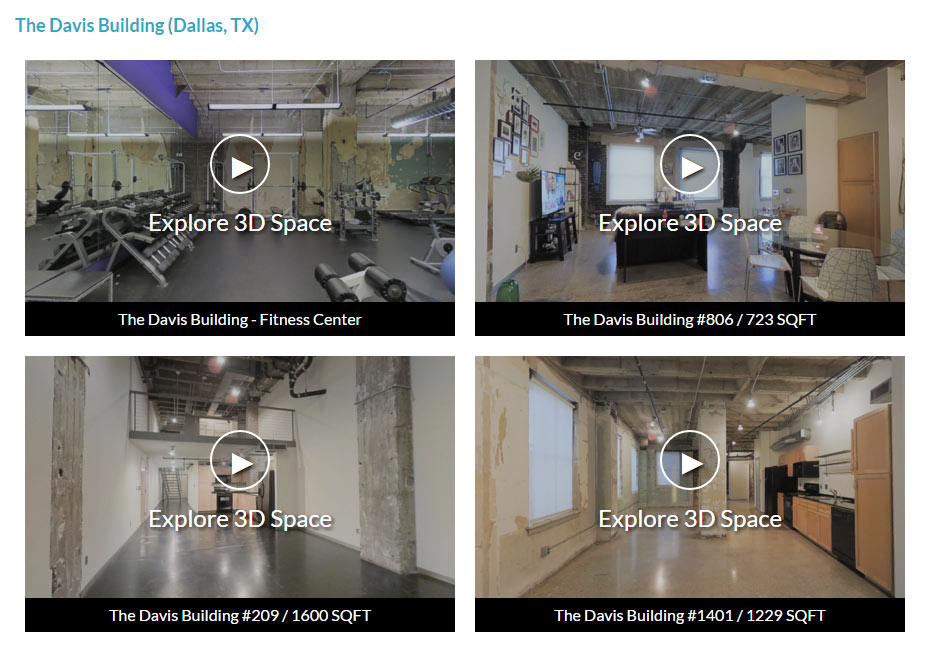
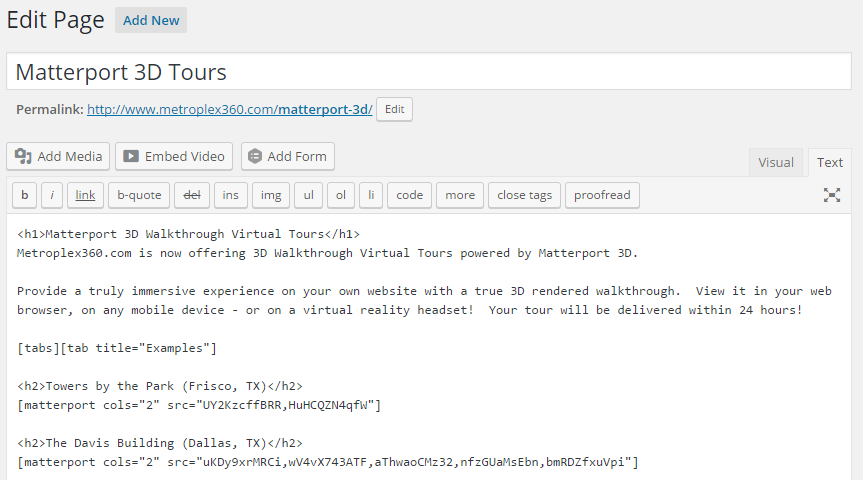
The Matterport Embed plugin allows you to easily add Matterport Spaces to your website. You can customize the display of the tours, including the number of columns, whether to embed or display a pop-up, and whether to show address information and the number of scans. The plugin also supports various parameters and integrates with MPEmbed features like Minimaps, Image Enhancement Filters, and Google Analytics.Screenshots
Changelog
2.2.2
- Bug fix for multi columns
2.2.1
- Added fixes to escape variable outputs
- Replaced cURL call with wp_remote_get
- Several minor fixes
2.2.0
- Added fix for Cross Site Request Forgery (CSRF) vulnerability using nonces
2.1.9
- Added fix for crashes in plugin admin
- Added fix for Cross Site Request Forgery (CSRF) vulnerability
2.1.8
- Added fix for ‘src’ Cross Site Scripting (XSS) vulnerability
2.1.7
- Bug fix for embed parameter
2.1.6
- Added fix for Cross Site Scripting (XSS) vulnerability
2.1.5
- Added fix for ‘src’ Cross Site Scripting (XSS) vulnerability
- Added fix for broken thumbnail
2.1.4
- Added fix for ‘mpv’ (MPEmbed Version ID)
- Added url encoding for image, logo, bgmusic, minimapurl
- Added MPEmbed parameter support for compactdetails, openmt, bgmusicpaused, bgmusicpauseonmedia
2.1.3
- Resolved Admin Bug
2.1.2
- Resolved potential conflict with other plugins over a generic function name
2.1.1
- Added fix for ‘mpu’ (MPEmbed User ID)
2.1.0
- Added &showcase_version to force Showcase 3
- Added support for new Showcase 3.0.6 params: portal, pin
- Added support for MPEmbed Premium (mpv, mpu)
- Added support for all published MPEmbed (Free) parameters (https://mpembed.com/free-version/)
2.0.3
- “welcome” parameter now works. Thanks marchettia
2.0.2
- Resolved error notices for tours without certain portions of addresses being available.
2.0.1
- Fixed – Seems all spaces were running through MPEmbed. Not the worst idea in the world, but not what I was hoping to achieve.
2.0
- Adds support for MPEmbed.com
- Adds MPEmbed parameter support for info, details, mdir, mdirsearch, mt, hdir, logo, image, reels, nofade, ga, minimap, minimapurl, minimapfilter, fadehotspots, hotspots, filter, copyright, tint, c
1.9.3
Fixed CSS that added a small black line below tours without labels.
1.9.2
Add welcome= parameter. Replace ‘Explore 3D Space’ with a custom message. (Replace spaces with %20)
1.9.1
- Fixed tiny bug where embedded galleries with multiple manually set titles were only displaying the first title.
1.9
- Added ’embed=true’ parameter to enable displaying Matterport Tour in place (without an overlay)
1.8.5
- Added formatted error messages when an invalid, or private tour is embedded.
- Fixed ts=# parameter
1.8.2
- Fixed a few PHP Notice Messages.
1.8.1
- Added ‘allow=”vr”‘ parameter to IFRAME to allow WebVR support for Chrome v62+ on mobile. This only affects tablets as default behavior on small screens is to open in a new window.
1.8
- Swapped WeServ.nl for Matterport CDN with Image Resizing (new!)
- Added Params: width, height (default 940, 540)
- Removed Param: nocache
- Fixed PHP Warnings related to &title
1.7.1
- Added Params: dh, gt, hr, mt, title
- &mls=2 now supported
- Changed plugin-specific use of ‘title’ param to ‘label’
- Legacy use of ‘title’ to label tours still supported if non-numeric
1.7.0
- Plugin name changed to: WP Matterport Shortcode (was: WP Matterport Shortcode Gallery Embed)
- Updated Banner, WordPress.org Icons, and Admin Icon
- Removed unused VR icons.
1.6.9
- &lang – Now accepts any parameters (previous es, fr only)
- Fixed z-index conflicts with sticky menu themes with z-index: 999
1.6.8
- Fixed window parameter again… sorry, seems like the overlay broke.
1.6.7
- Fixed mls and title parameters
- Fixed ‘undefined variable’ bug when clearing admin cache.
1.6.6
- Added ‘nocache’ parameter to bypass image caching for when you change the default thumbnail and it won’t refresh.
1.6.5
- Fixed window parameter… because coding and not testing is stupid.
1.6.4
- Added ‘window’ parameter to allow users to open tours in a new window or existing embedded iframe
1.6.3
- Faster loading images fixed. Found a much easier method to seve from images.weserv.nl
1.6.1
- Faster loading images — LINUX INSTALLS ONLY
- Now uses images.weserv.nl for image resizing and caching — LINUX APACHE ONLY
1.5
- Now supports all parameters from https://support.matterport.com/hc/en-us/articles/209980967-URL-Parameters
- Added hhl, minzoom, maxzoom and zoomtrans
- Removed ‘unbranded’ parameter. Please use ‘brand’
- Removed ‘floors’ parameter. Please use ‘f’
1.4.11
- Added ‘lang’ parameter
1.4.10
- Added ‘nozoom’ parameter
- Removed ‘VR Ready’ Tag as all tours contain CoreVR
- Fixed ‘start’ parameter and limited to only work on single tour embeds.
1.4.9
- Fixed bug that was showing all tours unbranded. Sorry about that.
1.4.8
- Fixed errors when displaying addresses
- Added QuickStart parameter (qs=1)
- Removed floors parameter
- Removed OpenGraph code (unnecessary)
- Changed unbranded parameter to brand
1.4.7
- Fixed error message caused by meta data change to address.
1.4.6
- Forced use of OpenMetaGraph tags for images after plugin broke.
1.4.5
- Tour will skip Lightbox when window is < 600px. (mobile)
1.4.4
- Fixed non-dollhouse thumbnail generation (broken in 1.4.3)
1.4.3
- Added support for showing default generated dollhouse thumbnail
1.4.2
- Added !important to lightbox max-width 1200px
1.4.1
- ‘VR Ready’ status appears on tours enhanced for Samsung VR
- Added showdate parameter (false/true/modified)
- Admin – Cached Tour Information displays by date created
- FIX – Duplicate database entries no longer generated on tours with short titles.
1.4
- WPMS now saves and retrieves cached data to custom database table – wpms
- Admin – Moved to Top Level with a recognizable icon
- Admin – Plugins Page – Added Link to ‘Settings / Cache Management’
- Admin – Added Screen Options – Columns 1,2,3,4 for fun!
- CSS Fix: Forced ‘clear: both’ to new rows in 2, 3 and 4 column layouts
1.3.1
- Added title=”hidden” option to hide title area.
1.3
- Added WP Matterport Shortcode Admin Page
- Added ability to refresh data via Admin
- Added ability to quickly access model on MyMatterport.com via Admin
- Removed expiration on cached data.
- Fixed address=”true” parameter. Addresses now display.
- Added margin-bottom: 0 to .wpm img — to override themes adding space below image.
1.2.1
- Automatically enqueues jQuery if not included by theme.
- Separated Magnific Pop-Up Javascript/CSS, enqueued as ‘magnific’ – so that it can be disabled via theme — if perhaps one uses WF Magnific or IW Magnific plugins.
- Changed line-height to 56px for Arrow — tnx IBAdvantage
1.2
- Title and Image URL cached as transients – much faster!
- Added address option: address=TRUE to show street/city/state/zip
- Added showStats option: showStats=TRUE to show XXX Scans
- Fixed source image sizes to 960 width in 1 Column Mode; 640×320 for 2 and higher.
- Added retrieval of Title/Address/# va JSON with OpenGraph fallback
- Changed CSS prefix to wpm- as a universal prefix.
- Updated MagnificPopup to v1.1.0
1.1.1
- Featured: Added title parameter. Add a title from the shortcode to single or multiple tours (separate with semi-colon)
- Feature: Added Spanish, French and German internationalization of the ONE line of text — Explore 3D Space
1.0.3
- Feature: Added class – ‘wpm[matterport ID]’ to containers
- Fix: Internet Explorer – Fixed thumbnails by disabling use of Google Image Cache in IE.
- Fix: Added 1em of space below each tour when columns become 100% width (< 740px)
- Optimization: Thumbnail image size set to 600 if using columns (Instead of 900)
1.0.1
- Added floors, guides help and start parameters.
- Added 1em of margin below shortcode output.
1.0
- Initial Release.

