

Improve your WordPress SEO: Write better content and have a fully optimized WordPress site using the Yoast SEO…

About Database Management tool – Adminer
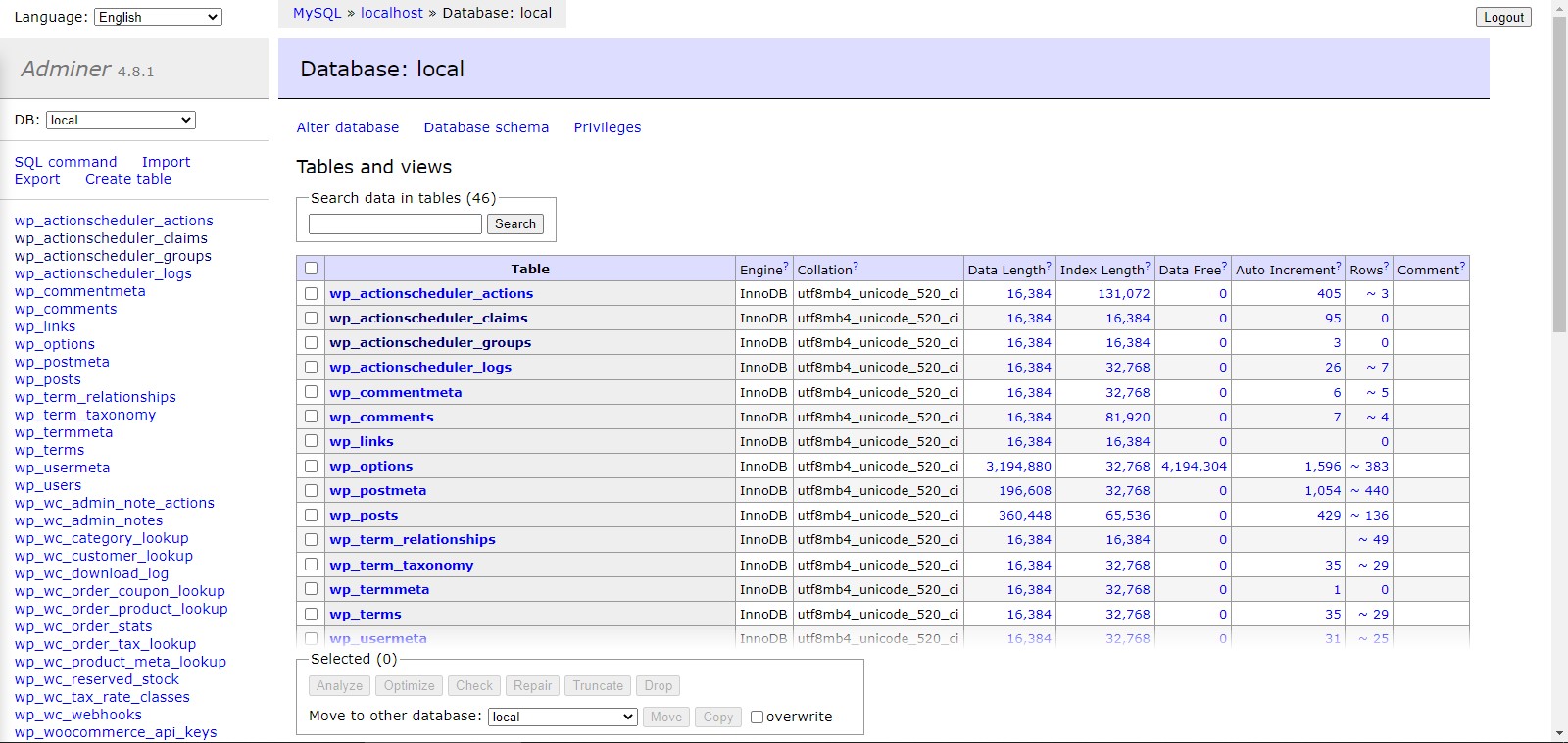
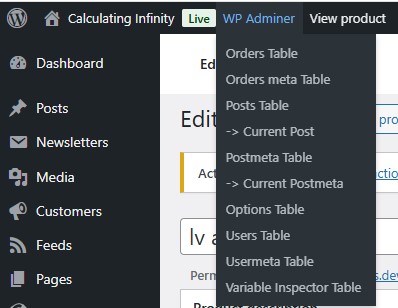
WP Adminer is a plugin that allows administrators to access the database directly from the WordPress Dashboard using the Adminer 4.8.1 tool. It is compatible with WordPress Multisite installations and can be accessed through the WP Adminer URL in the Admin Bar or the WP Adminer Tools Page in the Dashboard. Additionally, the developer offers other plugins such as Library Viewer and Gift Wrapping for WooCommerce.Screenshots
Frequently asked questions
What is this plugin?
This plugin is a database management tool for WordPress. It allows administrators to manage the database directly from the WordPress Dashboard.
What tool does this plugin use?
This plugin uses AdminerEVO 4.8.4, which is a fork of Adminer 4.8.1.
Is this plugin compatible with WordPress Multisite?
Yes, this plugin is compatible with WordPress Multisite installations.
How can I access WP Adminer?
You can access WP Adminer from the WP Adminer URL in the Admin Bar or from the WP Adminer Tools Page (Dashboard > Tools > WP Adminer).
Who created AdminerEVO?
AdminerEVO was created by an individual who took over the project after the original Adminer was not maintained for over two years.
Changelog
3.1.1
- Bug Fix: Resolved an issue where the feature for passing the WordPress user’s language setting (locale) to WP Adminer was not working correctly.
3.1.0
- Enhancement: The plugin now sends the WordPress user’s language setting (locale) to WP Adminer, but only if Adminer supports that language. Hook introduced:
pexlechris_adminer_locale
3.0.3.1
- New plugin name: Database Manager – WP Adminer
3.0.3
- Fix bug that produced when the plugin has been deactivated but the relevant MU plugin has not been deleted. Thanks peopleinside for reporting
3.0.2
- Change name from
Database Management tool - AdminertoAdminer for WP - The Database Management tool - Add an
Open WP Adminerlink in plugin’s action links - Improved Deactivation Behavior: Deactivating the plugin now removes the
pexlechris_adminer_mu_plugin_version option, ensuring the MU plugin is reinstalled upon reactivation.
3.0.1
- Fixes the bug introduced in version 3.0.0, where a disabled plugin named pexlechris_adminer_avoid_conflicts_with_other_plugins.php was displayed in the list of plugins.
3.0.0
- New Adminer Version Included: Updated to 4.8.4, forked from the original Adminer 4.8.1 due to lack of maintenance for over two years.
Learn more about the fork and updates at AdminerEVO Website. - Tested up to PHP: 8.2
- Tested up to WP: 6.7.1
- From version 2.2.0 there is a must-use plugin, that disables on the fly all other plugins to avoid conflicts.
From now and then the version and the mu plugins updates is controlled by option pexlechris_adminer_mu_plugin_version.
You can delete the option to reinstall it, or set option to 0 to ignore version updates forever - Fix load_plugin_textdomain file path and current language
- Fix Notice “Function _load_textdomain_just_in_time was called incorrectly” in WP 6.7.0 and above
- Filter pexlechris_adminer_access_capabilities can be used only in a must-use plugin!
- Fixed deprecated notices in non-standard environments or command-line scripts for server variables when using PHP 8.2.
- Fix errors that occur in some cases, when a user tries to load Adminer without being logged in.
2.2.2
- Before version 2.2, if PEXLECHRIS_ADMINER_SLUG ends with a slash, WP Adminer was not working.
2.2.1
- From now on, this plugin requires WordPress version at least 4.7.0 or later. According to Wordfence, versions below 4.7.0 have a vulnerability that can allow site takeover.
2.2.0
- Tested up to 6.4.2
- SOS: From now when WP Adminer runs, only WP Adminer plugin is running (a must-use plugin is automatically installed and is being deleted on plugin deactivation).
So the only way to extend WP Adminer plugin’s functionalities using wp hooks is using a must-use plugin.
Helpful Guide: How to add PHP Hooks in your WordPress Site using a must-use plugin - Hide php errors even if WP_DEBUG_DISPLAY is enabled, in action pexlechris_adminer_before_adminer_loads with priority 100
2.1.1
- Tested up to 6.3.2
- From now on, the PEXLECHRIS_ADMINER_SLUG can contain slashes. For example, you can use as below
define( ‘PEXLECHRIS_ADMINER_SLUG’, ‘wp-admin/wp-adminer’); - Load textdomain before WP Adminer loads
- Hide php errors even if WP_DEBUG_DISPLAY is enabled, AFTER action pexlechris_adminer_before_adminer_loads
- FAQ on how to fix WP Adminer endless loop has been added.
2.1.0
- Tested up to 6.1
- Code Refactoring
- Hide php errors even if WP_DEBUG_DISPLAY is enabled
- Fix Adminer warning
Undefined variable $Ah - FAQ on how to add your CSS & JS code in adminer interface has been added.
- FAQ on how to customize adminer has been added.
- FAQ on how to limit access to some table/DB has been added.
2.0.1
- Adminer is an admin tool, so now is considered as admin interface. is_admin() function now return true, when Adminer is viewed
2.0.0
- Tested up to 6.0.1
- PLEASE UPDATE NOW! Vulnerability issue with password as plain text fixed.
- SOS! All functions and actions have been renamed. Please have a look in the code to find the new names, if you have written your own customization code before
- Logout button have been hidden.
- Adminer has been removed from Tools Page because iframes are not allowed in admin pages
- print_css_inside_wp_adminer_tools_page action has been removed
- print_js_inside_wp_adminer_tools_page action has been removed
- print_js_inside_wp_adminer action has been removed
- print_css_inside_wp_adminer action has been removed
- From this version and then, developers can make their Adminer’ customizations using the function adminer_object
in the NEW pexlechris_adminer_before_adminer_loads action
and to print code in head, developers can use the NEW action pexlechris_adminer_head - From this version and then, this plugin is also compatible with WordPress Multisite installations
- From this version and then, you can change the slug of adminer using the constant PEXLECHRIS_ADMINER_SLUG (By default, adminer loads from www.site.com/wp-adminer )
- From this version and then, you can log in even if the password is empty string (For some local setups)
- From this version and then, by default you can only show wordpress database (to enable managing of other databases in same server see FAQ)
1.0.0
- Initial Release.

