

Site Kit is a one-stop solution for WordPress users to use everything Google has to offer to make…
About Images to WebP
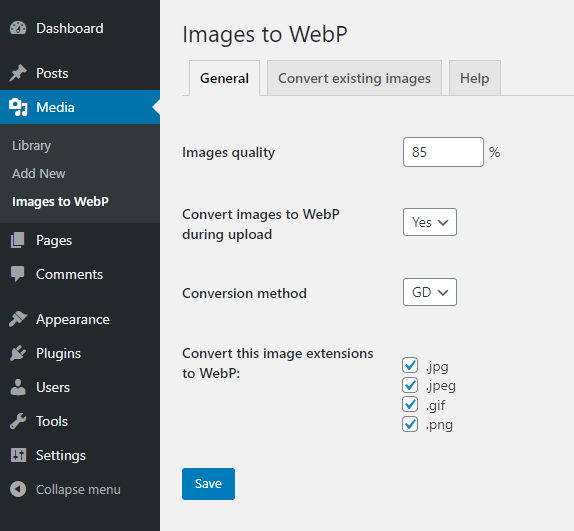
The WebP Express plugin converts PNG, JPG, and GIF images to the WebP format, which can save over half of the page weight without losing image quality. This can help speed up your website, save visitors' download data, and improve your Google ranking. The plugin offers automated testing to ensure compatibility with your server, works with all types of WordPress installations, and does not change the image URL or original files. Developers can also use hooks to customize the plugin's functionality.Screenshots


Frequently asked questions
What does this plugin do?
This plugin converts PNG, JPG, and GIF images to WebP format. This can speed up your website and save visitors' download data.
Does it work with all WordPress installations?
Yes, it works with all types of WordPress installations, including domain, subdomain, subdirectory, and multisite/network setups. It also works on both Apache and NGiNX servers.
Will my image URLs change?
No, your image URLs will not be changed. This ensures compatibility everywhere, including in <img> src, srcset, <picture>, and CSS backgrounds, without issues with caching.
Can I convert existing images?
Yes, you can bulk convert existing images to WebP, and you have the option to choose specific folders. You can also bulk convert only missing images.
Does it support developer hooks?
Yes, the plugin provides hooks for developers, including 'itw_extensions', 'itw_sizes', 'itw_htaccess', and 'itw_abspath' for customization.
Changelog
4.7
- Tested on WP 6.5
4.6
- Fix for “Find and convert MISSING images” button
4.5
- Tested on WP 6.4
- added FAQ section “Delete all generated WebP images”
4.4
- Tested on WP 6.3
- added FAQ section “NGiNX and Apache together”
- make configs error messages more descriptive
4.3
- Tested on WP 6.2
- new filter itw_abspath for WP installations with customized folder structure like Bedrock
4.2
- make convert old works also for local installations
4.1
- fix – convert also all subdirectories
4.0
- lazy load folders in convert tab
- make it works for local installations like XAMPP or Flywheel Local
- try-catch conversion errors
- updated jstree library
3.1
- add ?no_webp=1 to URL to receive original image content from Nginx server
3.0
- Tested on WP 6.1
- added support for Better image sizes plugin
- add ?no_webp=1 to URL to receive original image content – works only on Apache and only with direct image URL
2.0
- Tested on WP 6.0
- convert and serve WebP images anywhere – not only in wp-content folder
- option to delete original images after conversion
1.9.1
- Tested on WP 5.9
1.9
- Tested on WP 5.8
- added some nonce checks and more security validations
- better nginx instructions
1.8
- Tested on WP 5.7
- add more CURL options
- fix backslashes for localhosts
1.7
- Tested on WP 5.6
- fixed problem on some multisites
1.6
- Tested on WP 5.4
- added support for Fly Dynamic Image Resizer plugin
1.5
- notice when test image is not accessible
1.4
- new test method
1.3
- fixed text domain for translations
1.2
- added instructions for NGiNX
1.1
- make it works in multisite and subdirectory installs
1.0
- First version

