v3.30.0 is a release about the parts of a site you usually cannot reach from a dashboard. The headline is a new PHP Directives card in Tools, which lets you load a firewall such as Wordfence before WordPress starts, with a one-click setup for Wordfence’s Extended Protection.
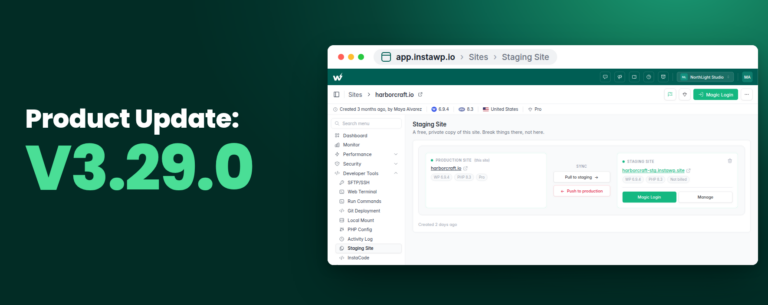
Around it sit a commission and payout history for affiliates, a way to unlink a staging site from its parent, a Live Imports tab so you can get back to an import you closed, and a bulk delete that tells you which sites you are not allowed to delete. It follows v3.29.0, which brought free staging environments to hosted sites.
Here is everything in this release, in order of impact.
Key Takeaways
v3.30 gives you control over how PHP starts on your site, and makes several everyday jobs easier to finish or undo.
PHP Directives: Set a site’s auto_prepend_file from Tools, and turn on Wordfence Extended Protection in one click.
Affiliate earnings history: Due, Pending and Paid commissions and a new Payouts list on your Affiliate page.
Unlink a staging site: Turn a connected staging site into an independent site without deleting it.
Live Imports tab: Every import from a live site, with a link back to its progress page.
Clearer bulk delete: The dashboard names the sites you cannot delete instead of silently skipping them.
Fewer billing and domain surprises: A new primary card now moves your subscriptions too, and abandoned domain purchases no longer leave invoices behind.
What’s New
#1: PHP Directives, With One-Click Wordfence Extended Protection
The Tools page of every paid site has a new PHP Directives card. It manages PHP’s auto_prepend_file setting: a PHP file that runs before every request to your site, ahead of WordPress. Security plugins use it to block an attack before WordPress has even loaded.
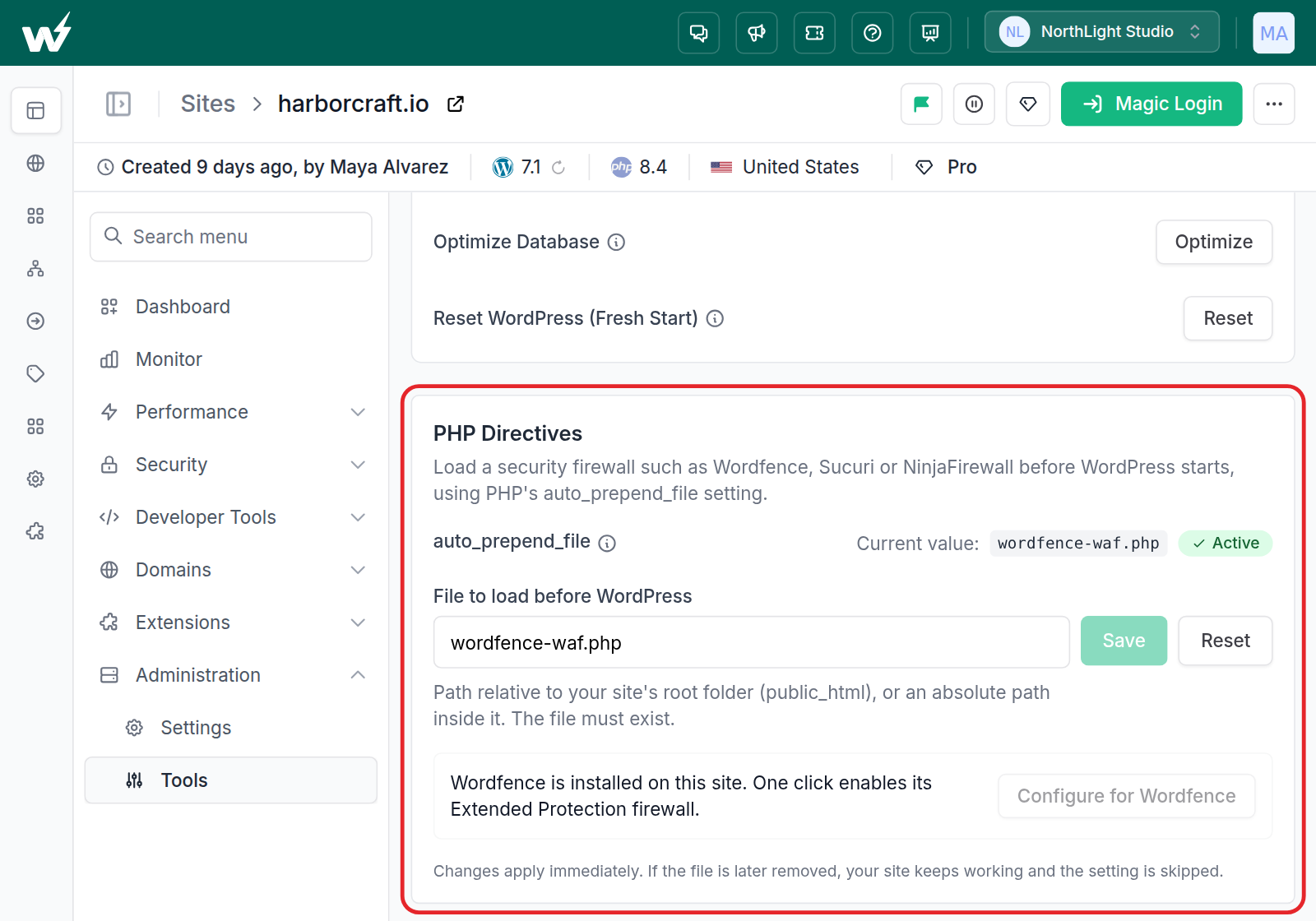
Until now, firewalls such as Wordfence Extended Protection, Sucuri and NinjaFirewall could not switch this on by themselves on an InstaWP site. They try to write the setting to a .user.ini file, which InstaWP’s servers do not read, and the attempt failed without telling you. The card sets it at the server level instead.
The card shows the current value. In File to load before WordPress, you enter a path relative to the site’s root folder (public_html), and the file must already exist. Changes apply immediately. Before saving, InstaWP checks that the file loads cleanly on your site, and a file that would break the site is refused with the error it reported, so nothing on your site changes. If the file is removed later, the site keeps working and the setting is skipped.
When Wordfence is installed, the card offers Configure for Wordfence. One click turns on its Extended Protection firewall, and the card shows an Active badge only once the server confirms that Wordfence’s loader really is loading.
That check matters most after a migration. Extended Protection is a server setting, so it does not come across when you move a site to InstaWP, and the wordfence-waf.php file a migration brings along was written for the old server. The card now tells you when that is the case, and Configure for Wordfence replaces the file and keeps the original as a backup. When a site that ran Wordfence finishes migrating, the migration page now shows a notice with a link to Tools. InstaWP never changes the setting for you.
#2: Commission and Payout History for Affiliates
On the Affiliate page in My Account, the Due Commissions, Pending Commissions and Paid Commissions tabs now list your actual commissions, one row per commission, and a new Payouts tab lists every payout you have received. The Unpaid and Paid Commission totals at the top are now worked out from the same list, so the numbers on the cards match the rows underneath. The docs explain how commission and payouts work.
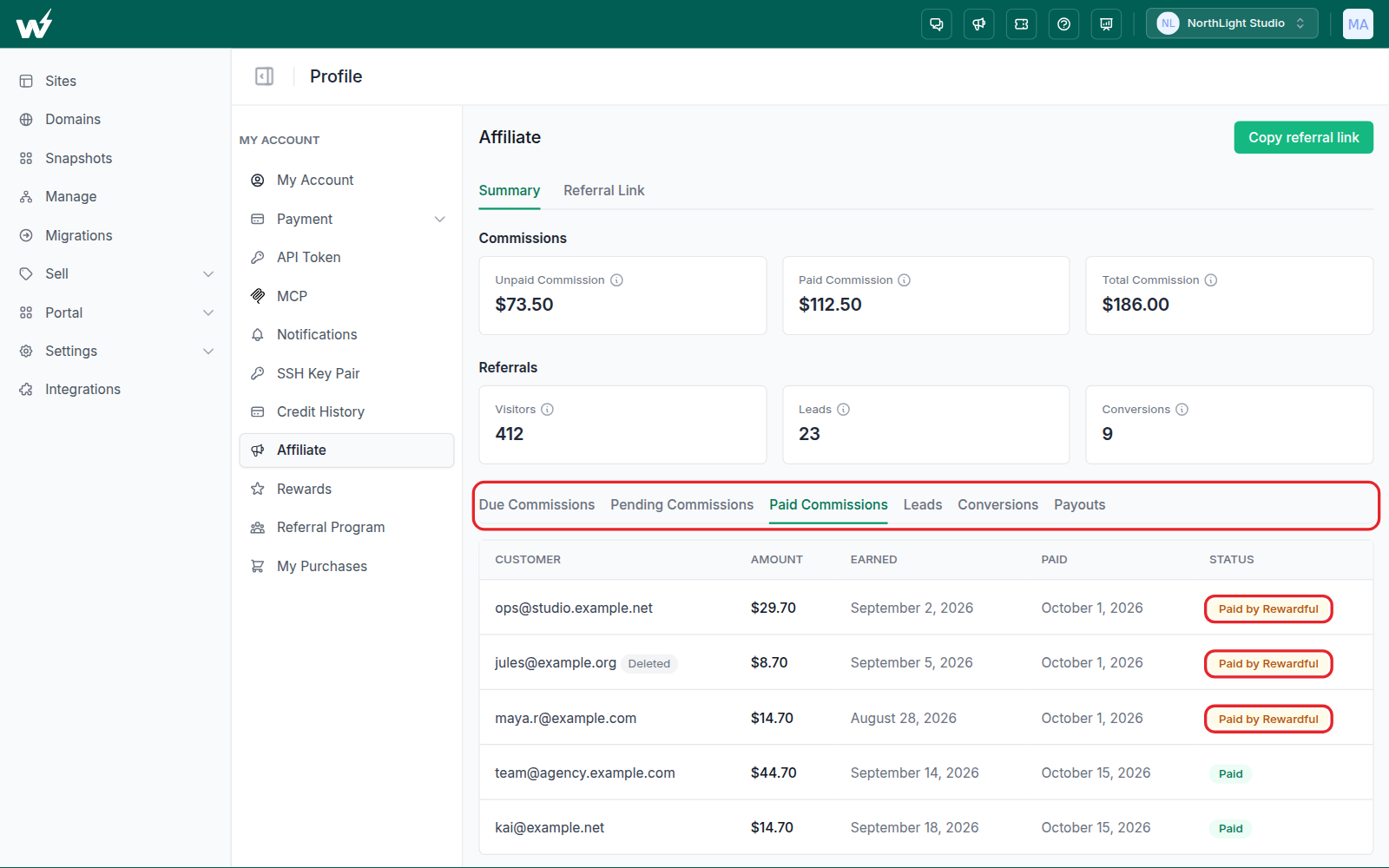
Commissions earned while the program ran on Rewardful, the platform InstaWP used before, appear in the same lists. Rewardful still pays those, so their rows carry a Paid by Rewardful or Settled by Rewardful badge. Nothing is paid twice.
A customer you referred who later closed their InstaWP account still counts as your lead and your commission. Their email stays visible on the Leads and commission tabs, marked with a Deleted badge.
#3: Unlink a Staging Site From Its Parent
Staging sites created through the InstaWP Connect plugin can now be detached from the site they were made from. Open Manage, open the Staging Sites list for a connected site, and choose Unlink from parent on the staging row.
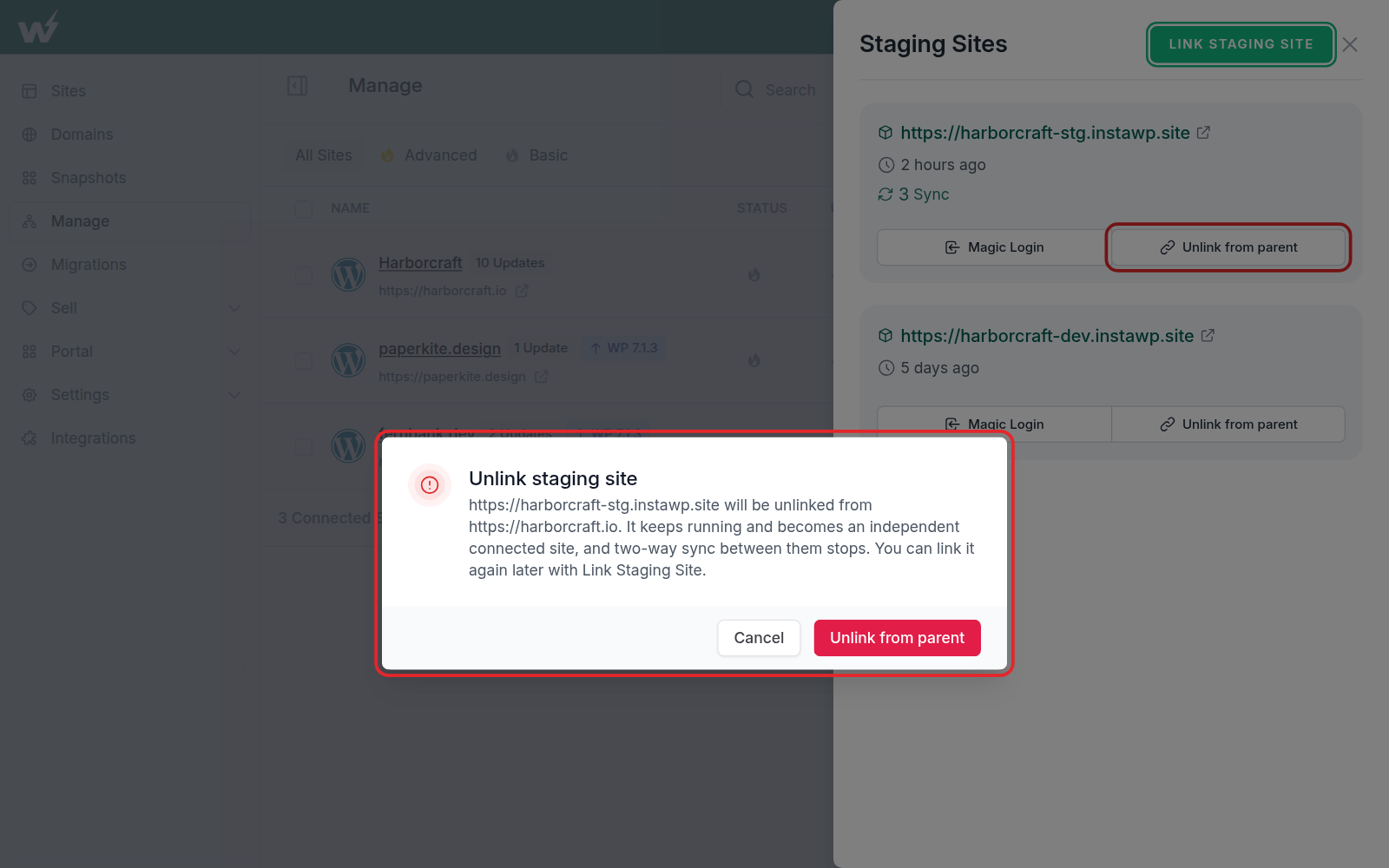
The confirmation names both sites. The staging site keeps running and becomes an independent connected site, and two-way sync between the two stops. You can link it again later with Link Staging Site. This is useful when a staging copy has turned into a project of its own, such as a new version of the site that will launch on a different domain.
Before this release, there was no way to do this: disconnecting and reconnecting the site brought the staging link straight back. Unlinking is refused while a sync between the two is still running, and if the staging site cannot be reached, the dashboard now says so instead of showing a generic error. Free staging environments from the site’s own Staging page are managed there and are not affected. The docs cover how to link and unlink a staging site.
One related fix: deactivating InstaWP Connect on a staging site used to drop its link to the parent, so it came back unlinked when you reactivated the plugin. The link now survives that.
#4: A Live Imports Tab on the Migrations Dashboard
If you closed the Import from Live Site window while an import was running, there was no obvious way back to it. The Migrations dashboard now has a Live Imports tab, after Failed, with a badge that counts the imports still in progress.
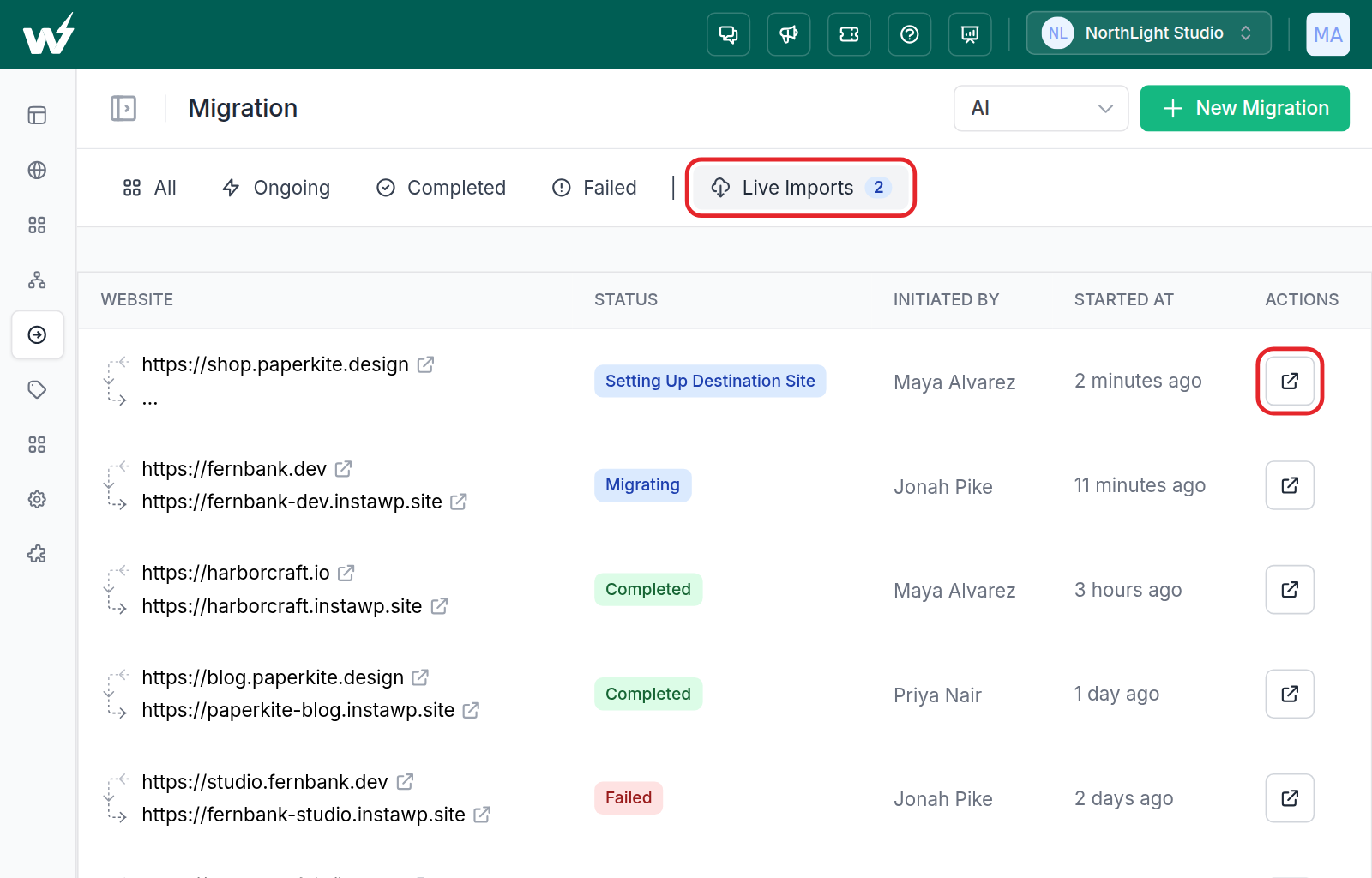
The tab lists your 20 most recent imports, newest first, with the source and destination site, status, who started it and when. The Open live import button in the Actions column takes you to that import’s progress page inside the dashboard. The Track migration button on the matching migration row now opens the same page. If you closed it before the new site was created, opening the import from this tab picks it up again. For the full walkthrough, see how to import a site from a live website.
#5: Bulk Delete Tells You Which Sites You Cannot Delete
A team Manager can delete only the sites they created. Before this release, a Manager who selected other members’ sites and ran a bulk delete was told “Site deletion is in progress”, and then nothing happened to those sites.
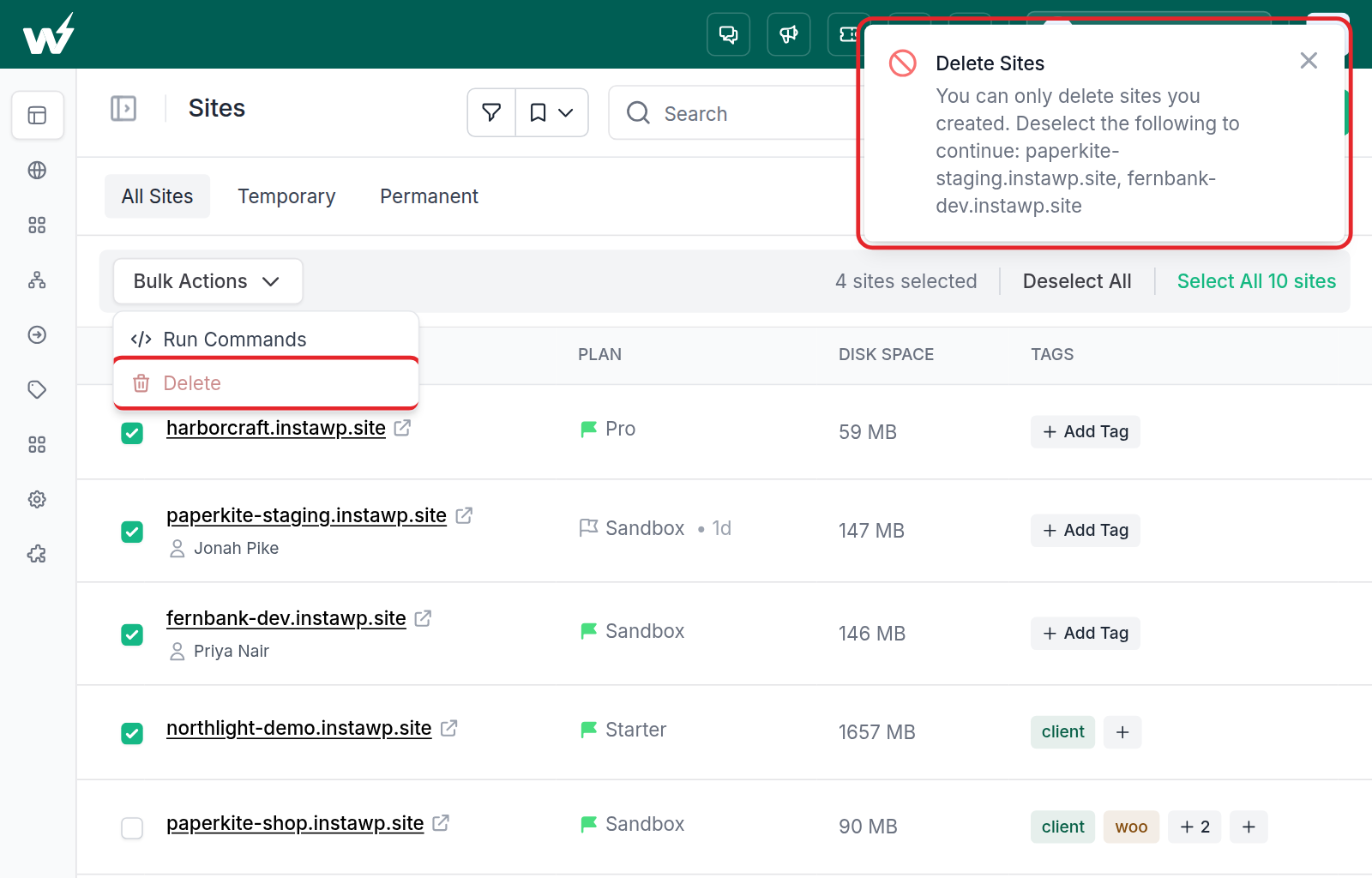
Now Delete in the Bulk Actions menu is greyed out when your selection includes sites you are not allowed to delete. Clicking it names them (“You can only delete sites you created. Deselect the following to continue”), so you can deselect them and carry on. Select all also picks the right rows when a filter is applied, which it did not always do before. See team member roles for what each role can do.
If you use the API, the bulk delete endpoint (POST /api/v1/sites/delete) changed in the same way. It now refuses the whole request when any site in it cannot be deleted by your token, and names those sites, instead of answering success and skipping them.
Improved
Billing and Payments
Setting a new card as your primary payment method now moves the subscriptions that were charging your old primary card onto the new one. Before, a subscription that had its own card attached kept trying the old card after you changed your primary, and could fall behind on payment even though you had added a working card. Subscriptions attached to a different card on purpose, such as a WaaS client’s own card, are left alone.
If an account is blocked for an unpaid balance, the block now stays until nothing is owed, rather than lifting as soon as any single invoice is paid. It also applies to API tokens, which get a payment-required response. The billing and pending-invoice pages stay open so you can settle up, and paying the last open invoice lifts the block automatically shortly afterwards.
Smoother Live Imports
- Host-tied plugins are switched off after import: a plugin that only works on the host it came from no longer comes across active. The first one on the list is SiteGround Optimizer, which broke Magic Login on sites imported from SiteGround.
- Slow hosts no longer block the import: InstaWP now waits up to two minutes for your old host to report the site’s size. If the size still cannot be measured but the site is reachable, the import goes ahead on the plan you chose.
- Plan sizes on the plan step: each plan now shows its disk size, with a hint to choose one with more disk space than your site uses.
- Plain error messages: when your site cannot be reached during analysis, you see a short explanation and the HTTP status, for example “We couldn’t reach your site (HTTP 503)”, instead of a raw connection error.
Clearer Site Creation Errors
When a site cannot be created for a reason that will not go away on a retry, such as a PHP version that the chosen WordPress version does not support, the dashboard now tells you the reason. It used to say “please retry after some time”, which sent people into retries that could never succeed.
More Improvements
- Connected sites stay fresh: opening a connected site under Manage now pulls up-to-date plugin, theme and version data, at most once an hour per site, and Scan for updates refreshes every tab without a page reload.
- Template demo emails: on a template’s Email Collection tab, Set Magic Login User Email now defaults to Demo Site Email for new templates and snapshots. If no visitor email was collected, the demo site keeps the parent site’s admin email.
- Push to production: the confirmation is now shorter and plainer: staging overwrites all production files and data, domain, SSL and plan stay unchanged, and there is no automatic backup or undo.
- Site transfers: the limit of 5 transfer requests an hour is gone, so you can move many sites or snapshots between your own teams in one sitting.
- WaaS receipts: the payment method box on a WaaS purchase receipt no longer shows “Something went wrong”, and adding a card there no longer moves your other subscriptions onto it.
- Translations: fixes across the Spanish and French dashboards.
Fixed
Domains and DNS
- Abandoned domain purchases: if your card was declined and you tried again, every attempt left a payable invoice behind, so one domain could be charged several times later. A retry now closes the earlier attempt’s billing, and abandoned attempts are closed automatically.
- Declined cards on promotional pricing: when a domain’s first-year price differs from its renewal price, a declined card now leaves the purchase pending so you can retry, instead of marking it failed.
- DNS record deletes: deleting a record could show “DNS record deleted” while the record came back on reload. The delete now really happens, or you see an error.
- White-label and connected domains: the same name, or a name and its parent domain, can no longer be both a white-label domain and a domain under Domains. Having both could take the white-label sites offline when one of them was removed.
- White-label domain removal: a white-label domain can no longer be removed while live sites still use it. The dashboard names those sites so you can move or delete them first.
Sites, Tools and WaaS
- Search Engine Visibility and Maintenance Mode: the Tools page now reads both from the live site, so a site that is indexable no longer shows as hidden from search engines.
- Protect Site: a password-protection change is saved only once the server confirms it, and a username the server cannot store is refused when you type it, instead of breaking the site.
- Template download email: five merge tags, including
{{site_url}}and{{magic_login_link}}, could reach your customers as literal text. They are now filled in. - WaaS user role: sites claimed instantly from a WaaS template pool now get the WP User Role set on the plan, as other WaaS sites already did.
- WaaS plan save: saving a new WaaS plan without touching the pre-selected suffix domain no longer fails with “The suffix domain field is required.”
- Legacy disk limits: on legacy plans, the nightly disk check now suspends only sites that count towards your measured usage, so an account over its allowance no longer gets the same warning night after night.
Security
A security review of the site, InstaWP Connect, template-launch and checkout code closed a set of permission gaps. Actions on connected sites, the site error and access logs, the code editor and domain settings now always check that you are allowed to edit that site. Template and WaaS plan prices always come from the stored product, never from the request, and the site icon in Connect reports is only fetched from public addresses.
Final Thoughts
The main change in v3.30 is that a server-level PHP setting is now a dashboard setting. If you run Wordfence, open Tools on each paid site, and above all on any site you migrated in, and check that Extended Protection shows as Active.
The rest of the release makes jobs easier to finish or reverse: unlinking a staging copy, getting back to a live import, seeing why a delete or a site creation was refused, and paying with the card you actually chose.
👉 Try the latest InstaWP updates now and build, host, manage and sell WordPress sites with less friction.