

Improve your WordPress SEO: Write better content and have a fully optimized WordPress site using the Yoast SEO…
About Media Library Organizer
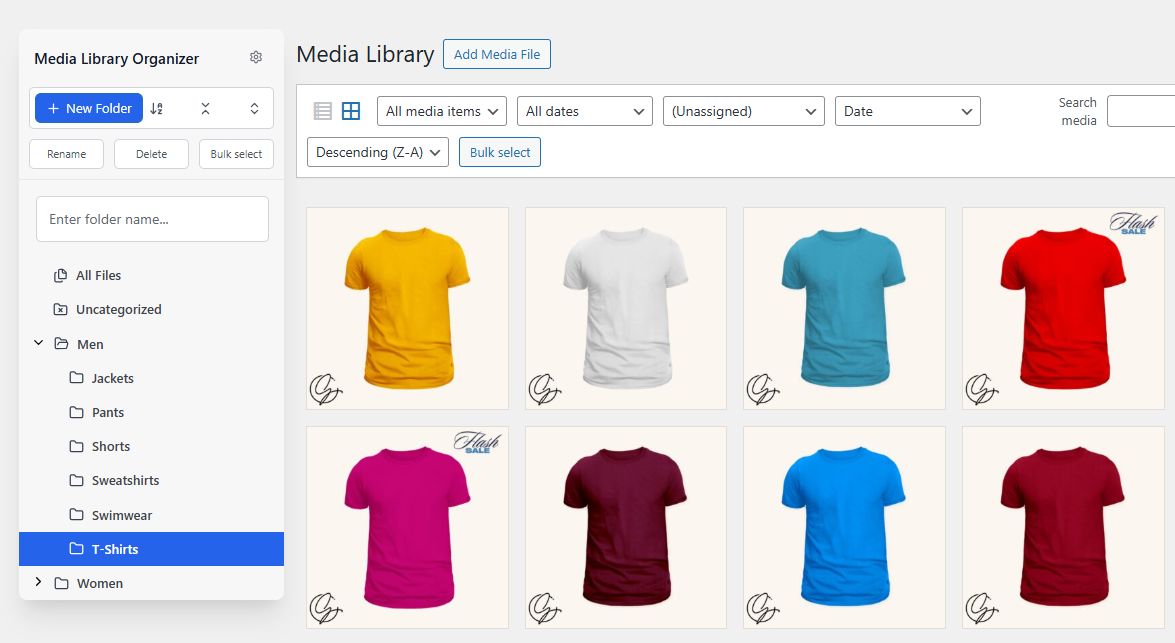
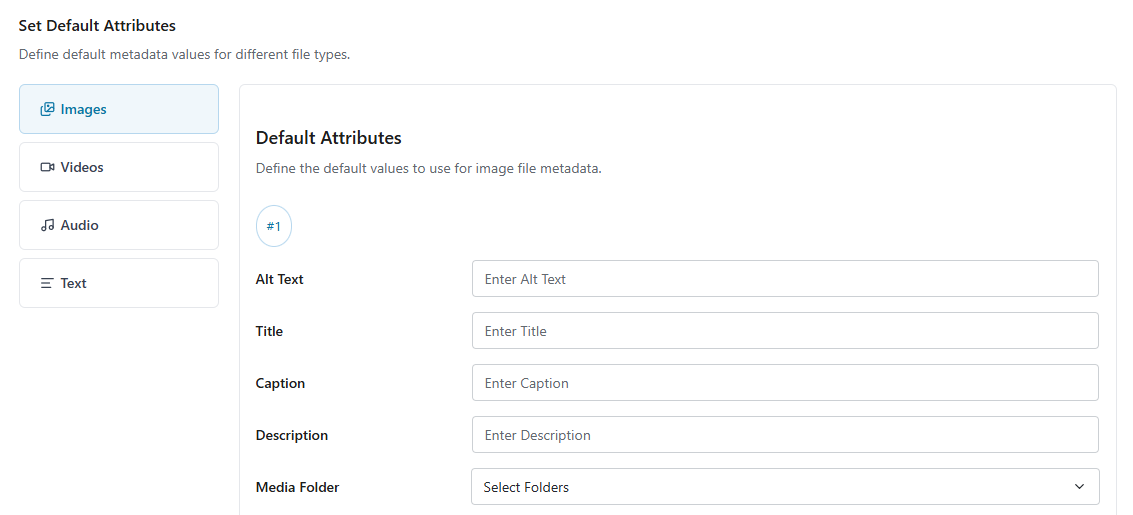
Media Library Organizer is a WordPress plugin that allows you to categorize and organize your media library. It adds functionality to add media categories, search and filter attachments by category, and bulk categorize multiple attachments. The Pro version offers additional features such as auto categorization, bulk and quick edit options, default attributes, duplicate attachments, dynamic galleries, EXIF and IPTC support, and more.Screenshots
Frequently asked questions
What is Media Library Organizer?
Media Library Organizer is a WordPress plugin that adds functionality to categorize images, videos, and other media in your Media Library. It enhances the native WordPress user interface for media organization.
What are the key features of Media Library Organizer?
Key features include categorizing media with unlimited categories and subcategories, searching and filtering attachments by category in various Media Library views, and bulk categorization using the Tree View. It also works with most Page Builders.
Does Media Library Organizer replace the existing Media Library interface?
No, Media Library Organizer does not replace the Media Library views you are used to. Instead, it enhances WordPress' native user interface by adding key organization, searching, and filtering features.
How does the Tree View work?
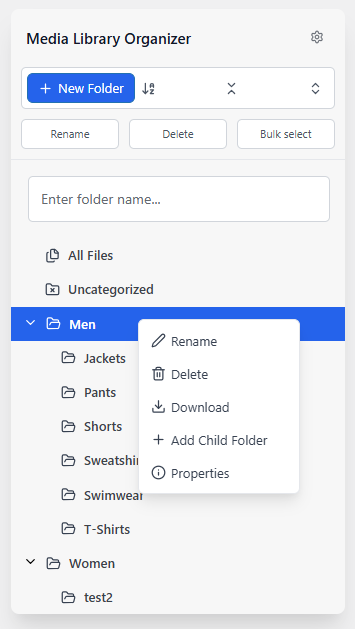
The Tree View adds a sidebar to your WordPress Media Library, allowing you to quickly add, edit, and delete Media Categories. You can also drag and drop individual or multiple attachments to a category.
Changelog
Version 1.6.5 (2024-08-03)
- Fixed the issue that was not allowing to active license key for the PRO plugin
Version 1.6.4 (2024-07-01)
- Improve translation compatibility
Version 1.6.3 (2024-06-29)
- Fix broken version tag
1.6.2 (2023-06-28)
- Harden security
- Improve translation compatibility
1.6.1 (2023-06-26)
- Fix the uninstall bug happening on certain environments.
1.6.0 (2023-03-08)
- Updated: Change plugin ownership to Optimole
1.5.1 (2022-12-08)
- Fix: Removed duplicate
show_uiparameter when registering Categories - Fix: Settings: Removed unused functions
1.5.0 (2022-11-15)
- Added: Grid View: Modal:
mlo:grid:edit-attachment:editevent when the Attachment details modal is opened
1.4.9 (2022-11-10)
- Fix: Remove unnecessary console.log entries
1.4.8 (2022-11-03)
- Fix: Upload actions loaded globally to support WordPress REST API
1.4.7 (2022-09-29)
- Fix: Category Dropdown Filter: Display Attachment counts for Administrators when PublishPress Permissions Pro active
1.4.6 (2022-07-18)
- Added: Grid View: Modal: Better method for defining toolbar height and attachments grid
- Updated: French translations
- Fix: Grid View: Modal: Edit Gallery: Don’t display Dropdown Filters, as they have no effect on the selected images
- Fix: Code improvements for WordPress Coding Standards
1.4.5 (2022-06-23)
- Added: French translations
- Fix: Grid View: Category Dropdown Filter: Order child terms by name, not ID
- Fix: User Options: Fallback to order by default when User Options > Sort Order is enabled and either the user has no sort order preference defined, or a non-valid sort order was specified
1.4.4 (2022-06-09)
- Added: Support for WordPress 6.0
1.4.3 (2022-05-12)
- Fix: Grid View: Edit Attachment: Corrected sanitization on inputs which would prevent Pro version EXIF/IPTC data from saving
- Fix: Multisite: Activation: Conditionally load required hook depending on WordPress version
1.4.2 (2022-03-16)
- Fix: Category Dropdown Filter: Attachment Count: Improved checks to determine current screen and whether to show counts
1.4.1 (2022-03-10)
- Fix: Category Dropdown Filter: Don’t show Attachment count for Terms when selecting media/files on Pages/Posts, as counts include all file types
1.4.0 (2022-02-25)
- Added: Tree View: Dragging and dropping Attachment(s) on to (Unassigned) will remove all Categories from Attachment(s)
- Fix: Tree View: Grid View: Refresh Attachments after drag and drop categorization to reflect changes
- Fix: Tree View: Grid View: Cancel Bulk Select after multiple Attachments dragged and dropped for categorization
- Fix: Tree View: Localize ‘Categorize items’ labels
- Fix: Tree View: Remove unused version number
- Fix: Grid and List View: Category Dropdown Filter: Localized ‘Unassigned’ label
- Fix: Grid View: Refresh Grid View when an Attachment’s Categories are changed, to reflect changes made
- Fix: Multisite: Ensure installation and uninstallation routines run if a new site is created outside of WordPress Administration
- Fix: Multisite: Activation: Use wp_insert_site hook when available in WordPress 5.1 and higher
- Fix: Settings: Documentation Tab’s Link was incorrect
- Fix: Ensure code meets WordPress Coding Standards
1.3.9 (2021-09-20)
- Fix: Retain image selection when uploading new images via e.g. Featured Image
- Fix: Import & Export: Correctly escape search and form action
1.3.8 (2021-07-22)
- Fix: Don’t minify Plugin Javascript if a third party minification Plugin is active, which would prevent some functionality from working
1.3.7 (2021-04-29)
- Fix: Improved autocompleters with better search and UI
1.3.6 (2021-03-25)
- Fix: Tree View: Remove pagination parameter from URL, so clicking a different Category will always load the first page of results
1.3.5 (2021-03-16)
- Fix: Enable Media Categories Dropdown Filter by default on new installations
1.3.4 (2021-03-11)
- Added: Grid and List Views: Improved filter and search field layout in toolbar on smaller screens
1.3.3 (2021-02-10)
- Added: Grid View: Edit / Select Attachment: Option to add new Media Categories. See Docs: https://wpmedialibrary.com/documentation/media-library-organizer/assigning-media-categories-to-media/
- Added: Grid View: Update Dropdown Category Filter when a Category is added, edited or deleted in the Tree View or when editing an Attachment
- Fix: Grid View: Update Category Dropdown Filter’s Category Counts when Attachment(s) edited and deleted
- Fix: Tree View: Grid View: Update Tree View Category Counts when Attachment(s) edited and deleted
- Fix: Tree View: List View: Category Dropdown Filter’s “All Media Categories” option would wrongly change to “All mlo-category” when a Category was added, edited or deleted in Tree View
- Fix: Tree View: Retain Attachment’s existing Categories when dragging and dropping an Attachment to a new Category
1.3.2 (2021-02-01)
- Fix: Settings: Filters: Always correctly show if Media Categories filter is enabled or disabled
- Fix: PHP Error: Trying to get property id of non-object
- Fix: PHP Error: Required parameter $mode follows optional parameter $screens
- Fix: Translations: Some strings used the incorrect textdomain
1.3.1 (2021-01-21)
- Fix: List View: Update Attachment counts in Categories dropdown filter counts when categorizing Attachments via drag and drop
- Fix: Grid View: Update Attachment counts in Tree View Categories when uploading Attachments to a Category
- Fix: Tree View: Reload Library if viewing a Category which is then deleted, so the deleted Category is no longer being viewed
- Fix: Tree View: When editing a Category, ensure the prompt contains the correct Category Name
1.3.0 (2021-01-14)
- Fix: Tree View: Grid View: Ensure drag and drop categorization always initializes and reinitializes
1.2.9 (2021-01-07)
- Fix: Galleries: Don’t change the sort order of Galleries
1.2.8 (2020-12-17)
- Added: Tree View: Display Attachment Count for each Category when Expand/Collapse is enabled
- Fix: Edit Post/Page: Attachments Modal: Set and honor Order and Order By options when User Sorting / Sort Order = Remember
- Fix: Grid View: Set and honor Order and Order By options when User Sorting / Sort Order = Remember
- Fix: ACF: Image/Attachment Field: Set Order and Order By options in a way that doesn’t conflict with ACF validation rules
1.2.7 (2020-11-26)
- Added: Tree View: Option to expand/collapse Categories. See Docs: https://wpmedialibrary.com/documentation/tree-view/setup/
- Fix: Tree View: Preserve selected category when adding/editing/deleting Categories and child Categories
1.2.6 (2020-11-19)
- Added: Localization support, with .pot file, translators comments and load_plugin_textdomain()
- Fix: Tree View: List View: Update category dropdown filter to reflect changes made when categories are added, edited and deleted through Tree View
- Fix: Grid View: Categorization would fail with “Uncaught TypeError: Cannot read property ‘uploader’ of undefined” JS error when editing an Attachment and then uploading a new Attachment
1.2.5 (2020-11-05)
- Fix: Import & Export: Tabs would not work when using Pro Plugin
- Fix: Import: Don’t attempt to import Terms that have no name
- Fix: Import: Continue importing Terms and assigning Terms to Attachments if a single Term import fails, instead of stopping
1.2.4 (2020-10-29)
- Added: Import & Export: Import from JoomUnited WP Media Folder. See Docs: https://wpmedialibrary.com/documentation/import-export/import-from-wp-media-folder/
- Added: Menus and Submenus: Filter to define minimum required capability for accessing Media Library Organizer Menu and Submenus. See Docs: https://wpmedialibrary.com/documentation/media-library-organizer/actions-and-filters/#media_library_organizer_admin_admin_menu_minimum_capability
- Fix: JS: Pass Plugin version number to all enqueued scripts to avoid aggressive caching
- Fix: List View: Default Custom Column output to blank string instead of Attachment ID
- Fix: Tree View: List categories below Categories title when Add/Edit/Delete Category options aren’t displayed due to e.g. User Role
1.2.3 (2020-10-22)
- Added: Grid View: Assign uploads to Category if filtering by Category
- Added: Grid View: Edit Attachment: Display Categories in hierarchy
- Fix: Grid View: Show uploads when added to Category
- Fix: Grid View: Allow Categorization drag and drop when more than 80 Attachments are loaded asynchronously by WordPress
- Fix: Grid View: Tree View: Update category counts after Attachment(s) are deleted
1.2.2 (2020-10-15)
- Added: Themify: Category Filter and Order / Order By options in Insert Media Modal when editing a Page with Themify
- Added: Pro Theme: Category Filter and Order / Order By options in Insert Media Modal when editing a Page with Pro / Cornerstone Builder
- Added: X Theme: Category Filter and Order / Order By options in Insert Media Modal when editing a Page with X / Cornerstone Builder
- Fix: List View: Load required libraries
- Fix: List View: Autocomplete Dropdowns: Improved performance
- Fix: Grid View: Update selected Category in Tree View when Category changed in filter dropdown
- Fix: Grid View: Allow Categorization drag and drop after uploading file
1.2.1 (2020-10-09)
- Fix: Grid View: Drag and drop categorization into Tree View
1.2.0 (2020-10-08)
- Fix: List View: Ensure Quick Actions column isn’t too narrow on smaller screen resolutions and/or when Tree View is enabled
1.1.9 (2020-09-24)
- Added: Filters for modifying Attachment data when a file is uploaded or modified
1.1.8 (2020-09-17)
- Fix: Grid View: Edit Attachment: Improved CSS layout for Media Categories and Fields
1.1.7 (2020-09-07)
- Fix: Tree View: Enabled by default on Plugin Activation, but wouldn’t display until settings were saved
1.1.6 (2020-07-30)
- Added: Attachment: Get/set filename
- Fix: Settings: Use AJAX to save statuses to avoid settings not saving or changing when PHP’s max_input_vars is exceeded
1.1.5 (2020-07-17)
- Added: Tree View: Enable by default on new installations
- Added: Tree View: Inline notification displayed when Attachments are categorized successfully
- Fix: Tree View: Drag and drop would fail after the first categorization
- Fix: Tree View: Position “Categorize X Items” relative to cursor when dragging Attachments
1.1.4 (2020-07-16)
- Added: Elementor: Category Filter and Order / Order By options in Insert Media Modal when editing a Page with Elementor
- Added: Thrive Architect: Category Filter and Order / Order By options in Insert Media Modal when editing a Page with Thrive Architect
- Added: Tree View, including Bulk Adding Media to Categories. See Docs: https://wpmedialibrary.com/documentation/tree-view
- Fix: List View: Display Selected Category in Media Categories Dropdown when a Category was clicked on in the table’s Media Categories column
- Fix: Grid View: Display Selected Category in Media Categories Dropdown when a Category was clicked on in the Tree View
- Fix: Tree View: List View: Update Attachment Media Categories Name and Link when a Category is edited in the Tree View
- Fix: Tree View: List View: Remove Attachment Media Categories Name and Link when a Category is deleted in the Tree View
- Fix: Tree View: Grid View: Set selected state of a Category in the sidebar
- Fix: Tree View: Grid View: Update Attachment Media Categories Name and Link when a Category is edited in the Tree View
- Fix: Tree View: Grid View: Remove Attachment Media Categories Name and Link when a Category is deleted in the Tree View
- Fix: Frontend Page Builders: Prevent Theme styles from overriding Attachment Modal
1.1.3 (2020-07-09)
- Added: Import & Export: Import from HappyFiles. See Docs: https://wpmedialibrary.com/documentation/import-export/import-from-happyfiles/
- Fix: Grid View / Modal: Edit Attachment: Don’t display Media Categories if the User’s Role doesn’t permit editing Attachments
1.1.2 (2020-07-02)
- Added: Import & Export: Import from FileBird. See Docs: https://wpmedialibrary.com/documentation/import-export/import-from-filebird/
- Added: Import & Export: Import from Wicked Folders. See Docs: https://wpmedialibrary.com/documentation/import-export/import-from-wicked-folders/
- Added: Import & Export: Import from Folders (Premio). See Docs: https://wpmedialibrary.com/documentation/import-export/import-from-folders-premio/
1.1.1 (2020-06-25)
- Added: Filters: Option to enable or disable File Types filter
- Added: Filters: File Type: Documents, Spreadsheets, Presentations and Text File Types
- Fix: JS and CSS: Differentiate between Upload/Media and Edit Attachment screens for performance
- Fix: Minified Javascript and CSS for performance
1.1.0 (2020-06-04)
- Fix: Settings: General: Autocomplete Search option wouldn’t always display for Media Categories Dropdown when enabled
1.0.9
- Added: Settings: General: Autocomplete Search option for Media Categories Dropdown
- Fix: Settings: Change General tab CSS class to avoid conflict with WordPress 5.3.2
- Fix: Settings: Accessibility: Replaced Titles with elements that focus the given input element on click
1.0.8
- Added: Integration with Divi Frontend Builder
1.0.7
- Added: Integration with Beaver Builder
- Added: Integration with Kallyas Theme’s Zion Builder
1.0.6
- Fix: PHP error: Trying to get property term_id of non-object
1.0.5
- Added: Settings: Notices can be dismissed / closed
- Fix: Code changes to improve performance
- Fix: CSS / JS: Enqueue on all screens in the Media section of the WordPress Admin UI
1.0.4
- Fix: Multisite: Network Activation: Ensure installation routines are automatically run on all existing sites
- Fix: Multisite: Network Activation: Ensure installation routines are automatically run on new sites created after Network Activation of Plugin
- Fix: Multisite: Site Activation: Ensure installation routines are automatically run
- Fix: Multisite: Network Deactivation: Ensure uninstallation routines are automatically run on all existing sites
- Fix: Deactivation: PHP warnings
- Fix: Changing a media item’s Categories in Grid View would result in console errors and not saving changes
1.0.3
- Added: Settings: UI Enhancements to allow for a larger number of setting tabs
- Added: Import & Export: UI Enhancements to allow for a larger number of setting tabs
- Fix: Gutenberg: Select or Upload Media: Sparodic issue where cached media queries would produce no results
1.0.2
- Fix: PHP Warning: call_user_func_array() expects parameter 1 to be a valid callback, class ‘Media_Library_Organizer_Install’ does not have a method ‘install_shutdown’
- Fix: PHP Notice: Undefined index: post_type in /wp-content/plugins/media-library-organizer/includes/admin/media.php on line 313
- Fix: PHP Notice: Trying to get property of non-object in /wp-content/plugins/media-library-organizer/includes/admin/media.php on line 414
1.0.1
- Added: Review Helper
- Added: Media View Mode (list or grid) is included in Admin Screen calls for Addons
- Fix: Removed unused upgrade() call
- Fix: Corrected Author information
- Fix: Settings > User Options were not always honored
- Fix: Settings > User Options > Sort Order description
- Fix: Media Library > Grid View > Order By value set to descending by default
1.0.0
- First release.

