
Site Kit is a one-stop solution for WordPress users to use everything Google has to offer to make…
About Social comments by WpDevArt
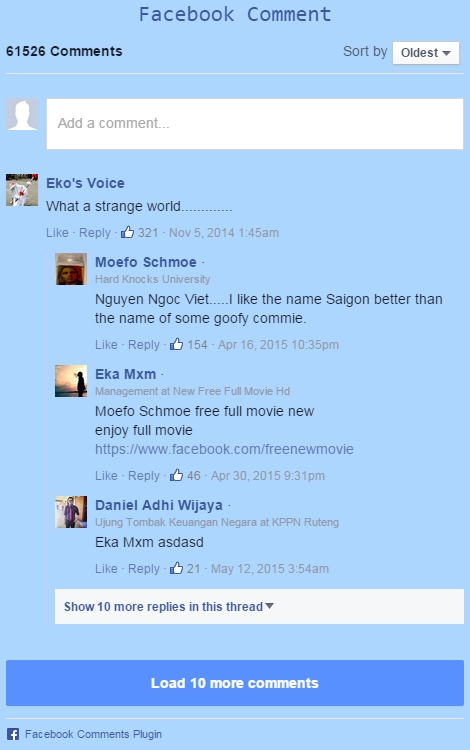
The Social (Facebook) comments plugin allows you to display Facebook comments on your website, improving your website traffic from Facebook. It is easy to use and can be disabled on any page/post. The free version has features such as customizing the box title, setting the width, and selecting the language, while the Pro version includes additional features such as color schemes, animation effects, and premium support.Screenshots


Frequently asked questions
What is the Social (Facebook) comments plugin?
The Social (Facebook) comments plugin is a tool that allows you to show Facebook comments on your website and improve website traffic from Facebook.
How do I use the plugin?
To use the plugin, you need to create a Facebook App ID and use it on your website. It is easy to use and can be disabled on any page/post if needed.
What are the features of the free version?
The features of the free version include being user-friendly and easy to use, compatibility with other popular plugins, ability to set the box title, customize the title text color, font size, font family, position, select where to display it, set the width, ordering and number of comments to display, and set the language.
What are the features of the Pro version?
The Pro version includes additional features such as the ability to set the color scheme, background color, position, 39 animation effects, and premium support.
How do I add the plugin shortcode?
To add the plugin shortcode, you can use the example provided in the HTML or PHP code. The shortcode attributes include the Facebook App ID, current URL, title text, title text color, font size, font family, position, width, number of comments, background color, and animation effect.
Changelog
2.6.5
=
- code improved.
2.6.4
=
- bug fixed.
2.6.3
=
- code improved.
2.6.2
=
- bug fixed.
2.6.1
=
- facebook sdk version changed.
2.6.0
=
- Fixed a mistake.
2.5.7
=
- Changed stable tag.
2.5.6
=
- Featured plugin removed.
2.5.5
=
- Added a description text for the language.
2.5.4
=
- Changed some default parameters.
2.5.3
=
- Security bug fixed.
2.5.2
=
- Security bug fixed.
2.5.1
=
- Bug fixed – Security Notice.
2.5.0
=
- Bug fixed.
2.4.9
=
- Changed a default option.
2.4.8
=
- Changed the user manual text.
2.4.7
=
- Changed some texts.
2.4.6
=
- Changed some texts of the user manual section.
2.4.5
=
- Made some changes in the admin panel of the plugin.
2.4.4
=
- The text of the changelog was reversed.
2.4.3
=
- Corrected some texts for the options.
2.4.2
=
- Corrected some admin texts.
2.4.1
=
- Corrected the admin menu options descriptions.
2.4.0
=
- Corrected some mistakes.
2.3.9
=
- Added descriptions for functions.
2.3.8
=
- Changed a default parameter.
2.3.7
=
- Fixed some text mistakes in the admin panel.
2.3.6
=
- Changed some options description texts.
2.3.5
=
- Corrected the positions of explanation of comments box shortcode attributes.
2.3.4
=
- Changed the Disable comment section text.
2.3.3
=
- Changed the admin page style.
2.3.2
=
- Made some admin-side changes.
2.3.1
=
- Changed a featured plugin icon design.
2.3.0
=
- Edited the Hire an Expert page structure.
2.2.9
=
- Corrected spelling mistakes on the featured plugins page.
2.2.8
=
- Changed the style of the admin menu page.
2.2.7
=
- Changed a featured plugin icon.
2.2.6
=
- Added new admin-side image.
2.2.5
=
- Changed the library parameters.
2.2.4
=
- Corrected some typos errors.
2.2.3
=
- Changed some default parameters values.
2.2.2
=
- Made some corrections in the admin side.
2.2.1
=
- Corrected mistake – support button text.
2.2.0
=
- Changed the admin menu icon.
2.1.9
=
- Fixed issued with admin page styles.
2.1.8
=
- Changed the Hire an Expert page design.
2.1.7
=
- Changed featured plugins icons.
2.1.6
=
- Changed the plugin admin page user manual text.
2.1.5
=
- Added new featured plugin – Duplicate page.
2.1.4
=
- Bug fixed – Mobile devices.
2.1.3
=
- Added a tutorial link to the admin menu page.
2.1.2
=
- Added new featured plugin – vertical menu.
2.1.1
=
- New featured plugin added.
2.1.0
=
- Added an SDK option.
2.0.9
=
- Updated SDK version.
2.0.8
=
- Fixed a URL mistake.
2.0.7
=
- Fixed spelling mistakes.
2.0.6
=
- Added icons for featured plugins.
2.0.5
=
- Change/remove icons.
2.0.4
=
- Added a service page in the admin panel.
2.0.3
=
- Edit comments default count.
2.0.2
=
- Added function description.
2.0.1
=
- Changed default comments count.
2.0.0
=
- Removed option from settings.
1.9.9
=
- Added support URL.
1.9.8
=
- Changed some default options.
1.9.7
=
- Added featured plugin.
1.9.6
=
- Change some default options.
1.9.5
=
- Edited the plugin admin.
1.9.4
=
- Changed featured plugin info.
1.9.3
=
- Edit plugin title.
1.9.2
=
- Changed some default parameters.
1.9.1
=
- Edit standard parameters.
1.7.8
=
- Edited and added descriptions for developers.
1.7.0
=
- Updated notices for developers.
1.6.9
=
- Added new featured plugin in admin panel.
1.6.8
=
- Edited notices in code.
1.6.7
=
- Edited install database file.
1.6.6
=
- Changed some descriptions in code.
1.6.5
=
- Edited some important notices in code.
1.6.4
=
- Edited descriptions in code.
1.6.3
=
- Add some information for plugin functions.
1.6.2
=
- Updated admin panel texts.
1.6.1
=
- Added function descriptions.
1.6.0
=
- Updated admin panel texts.
1.5.9
=
- Changed default parameters.
1.5.8
=
- Edited and added descriptions for developers.
1.5.7
=
- Edited notices in code.
1.5.6
=
- Changed default values.
1.5.5
=
- Edit notices code.
1.5.4
=
- Edit admin options descriptions.
1.5.3
=
- Edit user manual description in admin menu.
1.5.2
=
- Edit notices code.
1.5.1
=
- Edit featured plugins list.
1.5.0
=
- Edit admin option texts.
1.4.9
=
- Edit some options names.
1.4.8
=
- Edit admin option.
1.4.7
=
- Added new url for pro version.
1.4.6
- Edited admin menu options.
1.4.5
- Edit notices in code.
1.4.4
- Changed some install database options.
1.4.3
- Edited user manual text in admin panel.
1.4.2
- Edited admin menu options.
1.4.1
- Fixed issues.
1.4.0
- Added notices.
1.3.9
- Corrected mistakes.
1.3.8
- Edit some text in admin menu.
1.3.7
- Edit some descriptions.
1.3.6
- Edit some options.
1.3.5
- Added notices.
1.3.4
- Fixed some mistakes.
1.3.3
- Added notices.
1.3.2
- Edit some options.
1.3.1
- Edit some texts in admin menu.
1.3.0
- Edit some texts.
1.2.9
- Edit some options.
1.2.8
- Edit featured plugins list.
1.2.7
- Corrected mistakes.
1.2.6
- Edit list of featured plugins.
1.2.5
- Edit featured plugins list.
1.2.4
- Edit some options.
1.2.3
- Edit featured plugins list.
1.2.2
- Added notices.
1.2.1
- Added notices for developers.
1.2.0
- Edit admin options.
1.1.9
- Edit some options.
1.1.8
- Fixed mistakes.
1.1.7
- Edit some notices in code.
1.1.6
- Edit some options.
1.1.5
- Edit admin options.
1.1.4
- Edit some notices in code.
1.1.3
- Fixed notices.
1.1.2
- Added notices in code.
1.1.1
- Bug fixed.
1.1.0
- Change some notices for developers.
1.0.9
- Fixed issues.
1.0.8
- New featured plugin added.
1.0.7
- Added new plugin.
1.0.6
- Fixed issues.
1.0.5
- Fixed some mistakes.
1.0.4
- Fixed notices.
1.0.3
- Fixed issues.
1.0.2
- Fixed some mistakes.
1.0.1
- Added featured plugin.
1.0.0
- Initial version.

