
Improve your WordPress SEO: Write better content and have a fully optimized WordPress site using the Yoast SEO…

About Product Variations Swatches for WooCommerce
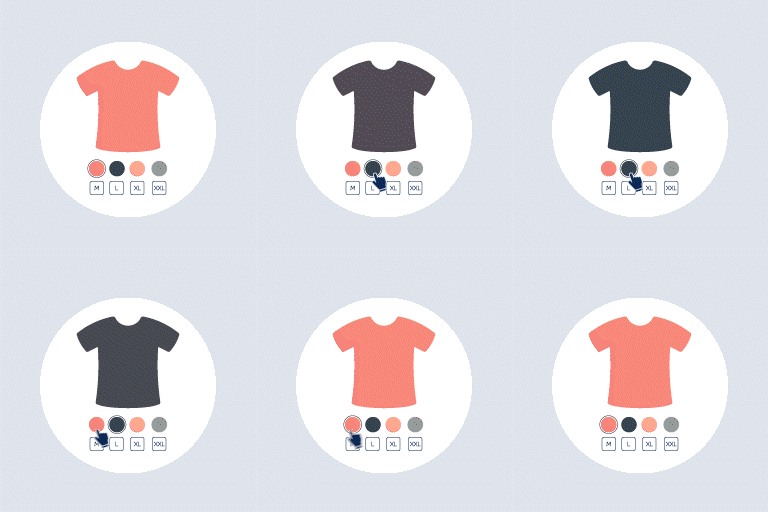
Product Variations Swatches for WooCommerce is a plugin that allows customers to visually select attributes for variation products. It converts the dropdown options into swatches, making it easier for customers to find and select the products they want. The plugin also offers customization options for attributes and swatch profiles.Screenshots


Frequently asked questions
What is Product Variations Swatches for WooCommerce?
Product Variations Swatches for WooCommerce is a professional plugin that allows you to show and select attributes for variation products. The plugin displays variation select options of the products under colors, buttons, images, variation images, radio so it helps the customers observe the products they need more visually, save time to find the wanted products than dropdown type for variations of a variable product.
What are the features of Product Variations Swatches for WooCommerce?
Some of the features of Product Variations Swatches for WooCommerce include:n- Converting any variations dropdown type into swatches with a couple of clicksn- Customizing the global attributes and custom attributes in the plugin settingn- Swatches profilesn- Works on mobilen- Easy to use
What is included in the Pro version of Product Variations Swatches for WooCommerce?
The Pro version of Product Variations Swatches for WooCommerce includes all the features from the free version, as well as additional features such as unlimited swatches profiles, showing particular attributes on the product list, changing product image based on attribute selection, disabling out-of-stock variation items, and customizing tooltip content.
Is there documentation available for Product Variations Swatches for WooCommerce?
Yes, there is documentation available for Product Variations Swatches for WooCommerce. You can find it at the following link: [Documentation](http://docs.villatheme.com/?item=woo-product-variations-swatches)
Where can I find more information about the plugin and get support?
You can find more information about the plugin and get support at the following links:n- [Project Page](https://villatheme.com)n- [Documentation](http://docs.villatheme.com/?item=woo-product-variations-swatches)n- [Report Bugs/Issues](https://villatheme.com/supports)
Changelog
/** 1.1.10 – 2025.02.28**/
– Fixed: Can not show the variation image on swatches
– Updated: Option to use variation swatch images as default display for products with multiple attributes.
/** 1.1.9.5 – 2025.02.25**/
– Fixed: Can not click the ‘Save attributes’ button
/** 1.1.9 – 2025.02.14**/
– Fixed: Error reported by customer
/** 1.1.8 – 2025.02.13**/
– Updated: Option to use variation swatch images as the default display type
– Updated: setting swatches on the product edit page
/** 1.1.7 – 2024.12.28**/
– Updated: Compatible with WC 9.5
/** 1.1.6 – 2024.11.23**/
– Updated: Compatible with WC 9.4 and WP 6.7
/1.1.5 – 2024.10.11/
– Updated: Compatible with WC 9.3 and WP 6.6
– Updated: Class VillaTheme_Support
/1.1.4 – 2024.04.13/
– Updated: Compatible with WC 8.7 and WP 6.5
– Updated: Update support file
/1.1.3 – 2024.02.05/
– Updated: Compatible with WC 8.5
– Fixed: Can not save/add product attributes
/1.1.2 – 2023.11.30/
– Updated: Compatible with WC 8.3 and WP 6.4
– Fixed: Can not save/add product attributes
/1.1.1 – 2023.07.24/
– Fixed: Can not save/add product attributes with WC 7.9
/1.1.0 – 2023.07.15/
– Updated: Compatibility with WooCommerce Extended Coupon Features PRO by Soft79
– Updated: Compatible with HPOS – WC 7.8.0 and WP 6.2.2
– Updated: Update support file
/1.0.10 – 2023.02.23/
– Updated: Compatible with WC 7.4.0
/1.0.9 – 2022.12.22/
– Updated: Compatible with WC 7.2.0 and WP 6.1.1
– Updated: Language file
– Updated: Update support file
/1.0.8 – 2022.07.15/
– Updated: Dismiss notice at admin bar
/1.0.7 – 2022.06.21/
– Fixed: Initialize swatches after a request to admin-ajax.php but not an ajax request
/1.0.6 – 2022.06.20/
– Fixed: Custom attributes not saving correctly if name contains quote sign
– Fixed: Error on settings page in some cases
– Fixed: “Change the size of attribute items” not applied to Select type
– Updated: Class VillaTheme_Support
– Updated: Compatibility check with WP6.0
– Improved: Values of Global attributes are paginated
– Improved: Remove empty css
– Added: Preview of attribute image and color on Global attributes page
/1.0.5 – 2022.04.20/
– Updated: Class VillaTheme_Support
/1.0.4 – 2022.03.29/
– Updated: Class VillaTheme_Support
/1.0.3 – 2022.03.21/
– Updated: Class VillaTheme_Support
/1.0.2 – 2022.01.11/
– Fixed: Swatches not working with Woodmart theme’s quickview
– Fixed: Some fields of global attributes(Edit screen) are duplicated when WPML is active
– Updated: VillaTheme_Support
– Updated: Make “Out of stock” design(Swatches profile) apply no matter “Disable ‘out of stock’ variation items” option is on or off
/1.0.1.16 – 2021.08.05/
– Fixed: Product not adding to cart correctly when using “Theme default” swatches type
/1.0.1.15 – 2021.08.03/
– Added: Unlock the Disable ‘out of stock’ variation items option
/1.0.1.14 – 2021.07.31/
– Fixed: “Out of stock” style not applying
– Updated: Compatibility with WP5.8 and WC5.5
– Updated: Class VillaTheme_Support
/1.0.1.13 – 2021.06.08/
– Fixed: “Out of stock” check only runs after selecting an attribute
/1.0.1.12 – 2021.06.05/
– Fixed: Custom attributes not saving correctly if attribute name contains special characters
– Updated: Product edit page: button “Add new” -> “Add”, add button “Add new” like WooCommerce which is to create a new term for global attributes
/1.0.1.11 – 2021.03.01/
– Added: Reset settings general
– Fixed: Attribute image not saving
/1.0.1.10 – 2021.02.20/
– Fixed: Tooltip position
/1.0.1.9 – 2020.12.15/
– Fixed: Edit attribute on product editor page
/1.0.1.8 – 2020.12.12/
– Fixed: save attribute on product editor page
– Updated: Compatibility with WP 5.6
– Updated: Delete image for attribute item
– Added: Enable/disable attribute title on single
– Added: Show selected attribute item on single
– Added: Import/ export settings general
/1.0.1.7 – 2020.08.22/
– Fixed: Swatches select revert to attribute slug after add to cart
/1.0.1.6 – 2020.08.12/
– Updated: Compatibility with WP5.5 and WC4.3
/1.0.1.5 – 2020.06.29/
– Added: Add ajax variation threshold
– Added: Add default Swatches profile
– Added: Select multi value for global in the product edit page
/1.0.1.3 – 2020.05.09/
– Fixed: Display color type and image type for custom attribute
/1.0.1.2 – 2020.04.23/
– Update: support class
/1.0.1.1 – 2020.04.22/
– Fixed: Style ‘Out of stock’ swatches
– Updated: Update readme
/**1.0.1 – 2020.04.11/
– Fixed: Horizontal style

