
Site Kit is a one-stop solution for WordPress users to use everything Google has to offer to make…
About Hide Admin Menu
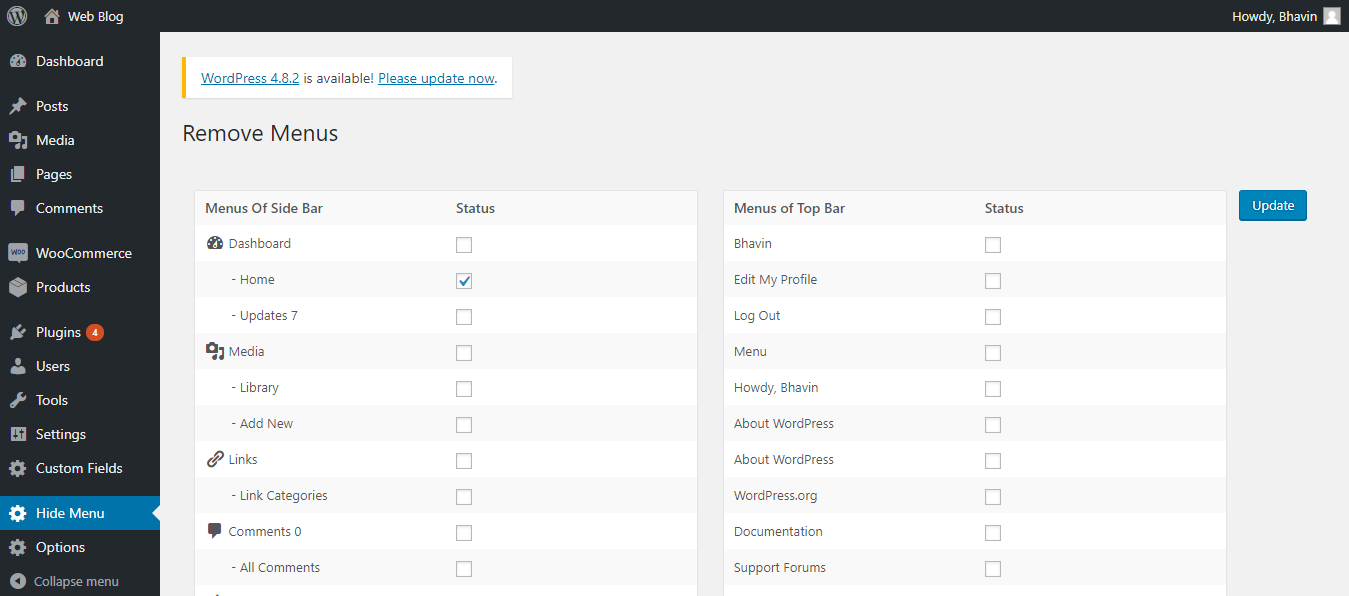
This plugin allows you to easily hide and show the admin menu in the side and top bars. You can hide specific menus by checking a checkbox and submitting the form. You can also hide menus based on the role of the user.Screenshots
Frequently asked questions
What does the Hide Admin Menu plugin do?
This plugin allows you to hide and show admin menu items from both the sidebar and top bars within WordPress.
How do I hide admin menus using this plugin?
You can hide admin menus by checking the checkbox next to the desired menu item in the plugin's form and then submitting the form.
Can I hide menus based on user roles?
Yes, the administrator can hide menus according to the role of users.
Changelog
- Solved some warnings and notices at the time of the save process at version WordPress 4.8.
- Solved 2 character error issue at the time of activation of the plugin and remove deprecate function on version 1.0.4
- Tested with WordPress 5.4.1
- Solved the error shown in the site health tools.
- Solved the issue of the session related to version 1.0.7. So please update the version of 1.0.8 which is the latest one.
- Removed the use of the $_SESSION of PHP and used the wp_session in version 1.0.9 to solve the session-related warning in the website.
- In version 1.1.0, solved the issue of not hiding the customized menu. Also removed unnecessary CSS for one class from the CSS file which conflicts with other CSS.
- In version 1.1.1, Tested with WordPress 6.2 and solved the warning related to the already sent content during the updating of the form.
- Version 1.1.2 is tested with WordPress 6.5.4.

