

Improve your WordPress SEO: Write better content and have a fully optimized WordPress site using the Yoast SEO…
About Import Products from any XML or CSV to WooCommerce
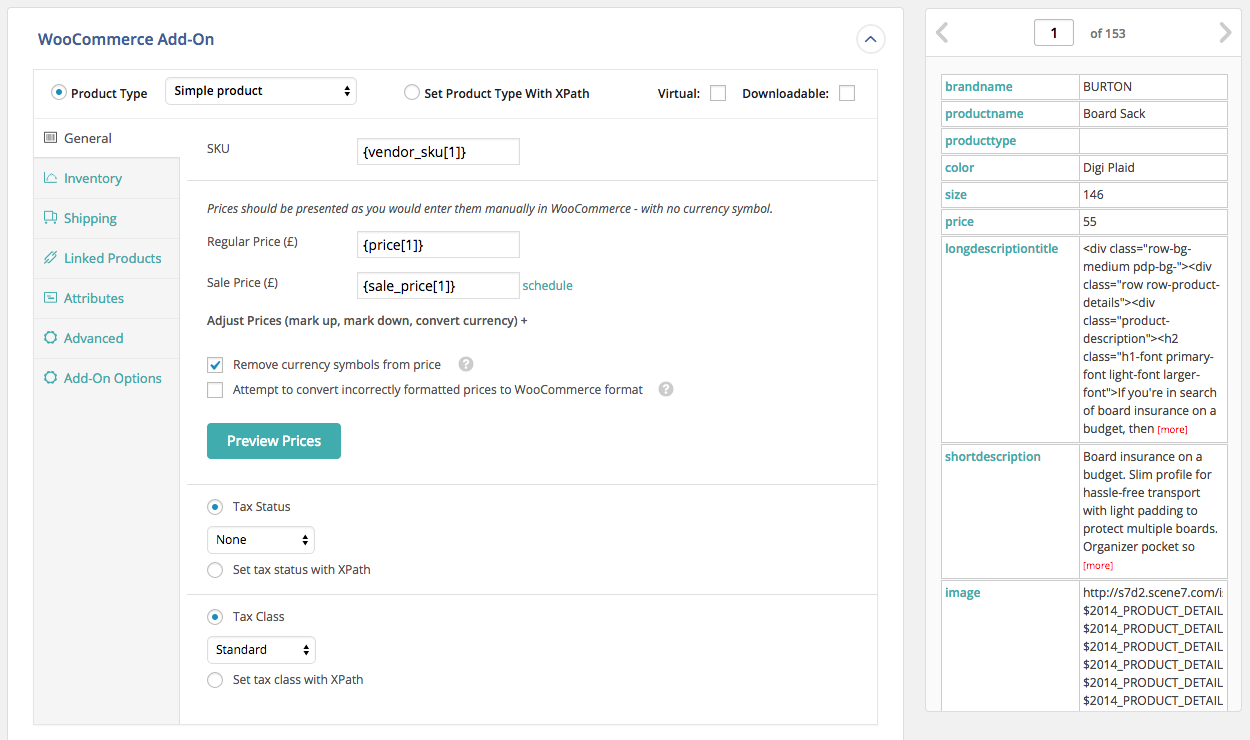
The WooCommerce add-on for WP All Import allows you to easily import products to your WooCommerce store from XML, CSV, Google Sheets, or Excel files. It supports files of any format and size, and has a user-friendly interface that makes importing products quick and easy. The Pro edition of WP All Import + the WooCommerce add-on includes additional features such as support for variable products, importing external/affiliate products, and recurring imports.Screenshots
Frequently asked questions
What is WP All Import?
WP All Import is a plugin that allows you to easily import XML or CSV files to your WordPress site.
How does the WooCommerce add-on for WP All Import work?
The WooCommerce add-on for WP All Import allows you to bulk import your products to WooCommerce in less than 10 minutes. It provides an intuitive interface that allows you to drag and drop data from your XML or CSV file into the WooCommerce fields to import it.
What are the benefits of using the WooCommerce add-on for WP All Import?
The WooCommerce add-on for WP All Import supports files in any format and structure, making it easy to import CSV or XML files to WooCommerce. It also supports files of unlimited size by automatically splitting them into chunks, allowing you to import large product catalogs with ease.
What features are included in the Pro edition of WP All Import + the WooCommerce add-on?
The Pro edition of WP All Import + the WooCommerce add-on includes in-depth support for variable products, the ability to import external/affiliate products and grouped products, the ability to import files from a URL, cron job/recurring imports functionality, execution of custom PHP functions on data, and access to the customer portal with documentation and tutorials, as well as email technical support.
What are the requirements for importing CSV files to WooCommerce using WP All Import?
When importing CSV files, it is recommended to use UTF-8 encoding. Other than that, there are no special requirements. WP All Import can import any CSV file to WooCommerce, regardless of its structure or column names.
Changelog
1.5.4
- improvement: add ‘GTIN, UPC, EAN or ISBN’ field
1.5.3
- bug fix: don’t block use of HPOS
1.5.2
- improvement: update upgrade links
1.5.1
- bugfix: some output not properly sanitized
- bugfix: update only these attributes option doesn’t work in some cases
- bugfix: import attributes with < and > characters doesn’t work properly
- bugfix: not possible to import “0” as an attribute value
1.5.0
- bug fix: attributes with < and > characters weren’t imported correctly
1.4.9
- bug fix: product_shipping_class taxonomy not updated
1.4.8
- bug fix: downloadable permissions wan not imported correctly
1.4.7
- bug fix: matching linked products didn’t work properly, this functionality moved to the end of import process
- bug fix: import download limit and download expiry are set to 1, instead of being provided empty values
- bug fix: featured image not updated when only “Images” is set to be updated in “Choose which data to update”
1.4.6
- improvement: compatibility with WordPress 5.5
1.4.5
- improvement: updated tested up to version
1.4.4
- API: add wp_all_import_regenerate_lookup_tables filter to control lookup tables generation
1.4.3
- bug fix: lookup table not updating after import
- bug fix: attributes not re-counting after import
1.4.2
- bug fix: grant incorrect downloadable product permissions
- bug fix: update attributes with non utf-8 characters
1.4.1
- bug fix: re-import options not rendering correctly
1.4.0
- improvement: notice on plugin activation when WooCommerce Add-On Pro installed
- improvement: match cross-sell products by title
- bug fix: shipping class not imported properly in some cases
1.3.9
- bug fix: do not execute product import code when importing other post types
1.3.8
- bug fix: stock status not importing properly when _backorders custom field is not set
- bug fix: product dimensions won’t import if ‘Virtual’ field is not set
- bug fix: compatibility fix WooCommerce 2.6.x
- bug fix: remove deprecated function calls for PHP 7.2 compatibility
- bug fix: unable to import 0 as a value for attributes
- bug fix: mirror new WooCommerce core behavior that forces all uncategorized products to be assigned to the Uncategorized category
- bug fix: import attributes with special characters
- bug fix: recount product terms when updating post status
1.3.7
- improvement: added new filter wp_all_import_recount_terms_after_import
- bug fix: compatibility with woo commerce 2.6
- bug fix: do not update stock_status if _stock is not set to update
1.3.6
- improvement: added ‘WooCommerce Advanced Options’ to re-import section
- bug fix: variations title
- bug fix: import first variation image
- bug fix: updating featured product status
- bug fix: WPML & link all variations option conflict
- bug fix: add _price field for each variation
- bug fix: terms re-count
1.3.5
- bug fix: import product attributes
1.3.4
- bug fix: import product visibility WC 3.0
- bug fix: stock threshold
1.3.3
- improvement: compatibility with WC 3.x
1.3.2
- bug fix: updating product gallery
- bug fix: import shipping class
1.3.1
- improvement: compatibility with PHP 7.x
1.3.0
- improvement: updated post types dropdown
1.2.9
- fixed ucwords attributes names
- fixed tooltips & css for woo 2.6 compatibility
1.2.8
- fixed updating stock qty with disabled manage_stock import
1.2.7
- fixed compatibility with WPML ( import multilingual attributes )
- added possibility to import up & cross sells by product SKU, ID, Title
1.2.6
- fixed setting up shipping class to -1 when «No shipping class» option chosen
1.2.5
- fixed conflict between options [update only these custom fields & update only these attributes]
- added feature to dynamically set attribute options
- added new option “Convert decimal separator to a period”
1.2.4
- added Variation Description field
- added auto create shipping classes
- removed ‘Virtual’ and ‘Downloadable’ checkboxes
- hide ‘Downloadable’ settings if product not downloadable
1.2.3
- fixed import total_sales
1.2.2
- fixed import stock status for negative qty
- fixed import shipping class when their slugs presented as numeric values
1.2.1
- fixed css styles
- added compatibility with woocommerce 2.3
1.2.0
- IMPORTANT: WP All Import v4 (3.2.0) is a MAJOR update. Read this post before upgrading: (http://www.wpallimport.com/2014/11/free-version-wordpress-org-update-information)
- speed up the import of taxonomies/categories
- updated design
- new option – adjust prices (mark up, mark down, convert currency)
- added preview prices feature
- fixed importing of menu order
1.1.6
- fixed saving shipping class option
- fixed import product attributes
1.1.5
- fixed updating shipping class
- fixed updating tax class
1.1.4
- fixed automatic fixing of improperly formatted prices
- fixed php notices
- updated css for compatibility with wocommerce 2.1
- added download type option
- added file names option
1.1.3
- Fixed price conversation
1.1.2
- Compatibility with WooCommerce 2.1
- updated price filter
1.1.1
- Compatibility with WooCommerce 2.1
- CSS fixes
1.1.0
- Compatibility with WP 3.8
1.0.1
- Fixed import product shipping class
- Fixed import attributes;
- Added SKU auto generation options;
- Updated parsing price, now plugin will delect price correctly even it present with currency symbol, like $100.20
1.0
- Official release on WP.org. Enhanced session handling.
0.9
- Initial release on WP.org.

