

Improve your WordPress SEO: Write better content and have a fully optimized WordPress site using the Yoast SEO…
About Sequential Order Number for WooCommerce
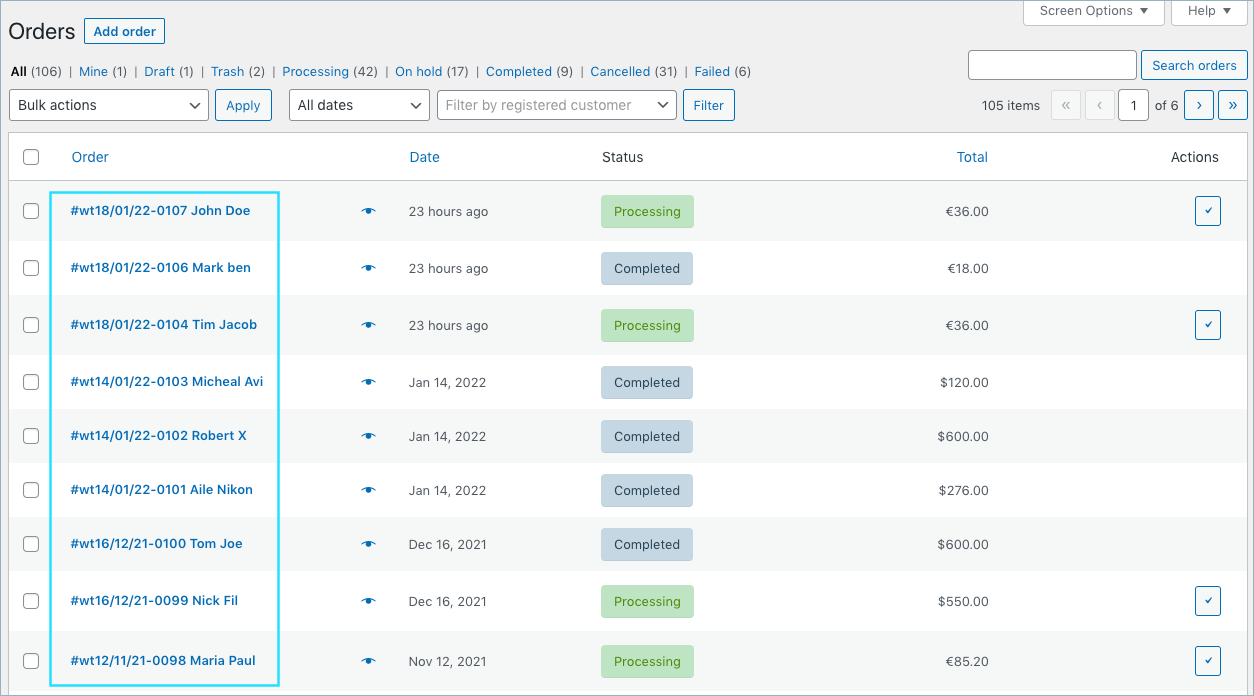
The Sequential Order Number plugin for WooCommerce allows you to arrange and format your order numbers in a consecutive or linear format. This makes it easier to manage and track your orders. The plugin also offers additional features in the premium version, such as adding custom suffixes and auto-resetting order numbers.Screenshots
Frequently asked questions
What does the Sequential Order Number for WooCommerce plugin do?
The Sequential Order Number for WooCommerce plugin enables you to re-arrange or format your existing and new WooCommerce order numbers into a consecutive or linear format.
How does the plugin assign order numbers?
WordPress uses an ID system for posts, pages, and media files. WooCommerce uses the same ID for order numbers too. When a new WooCommerce order is created it may not always get the next order in sequence as the ID may have already been used up by another post or page. Using this custom order number plugin, you will always get sequential numbers for your WooCommerce orders.
What happens when the plugin is activated?
When you activate the sequential order number plugin, if you have no orders in your store, your orders will start counting from order number 1 or the custom starting number specified. If you have existing orders, the order number will pick up from your highest order number.
What are the features of the free version of the plugin?
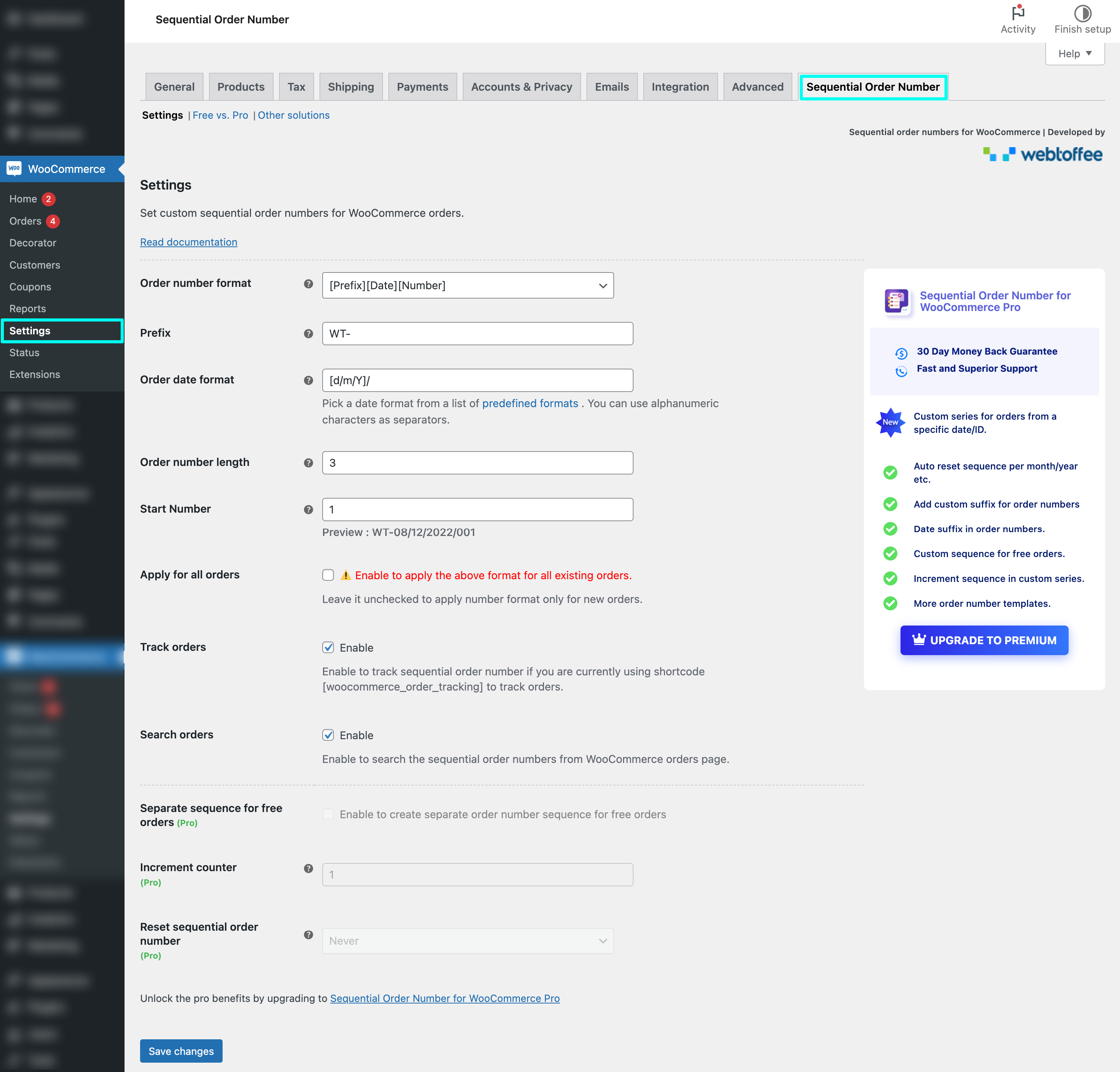
The free version of the Sequential Order Number for WooCommerce plugin supports sequential order numbers, custom starting number for orders, custom prefix to order numbers, order date prefix, option to choose order template, custom order number length, option to keep existing order numbers, order number preview available, enable admin order search for custom order numbers, supports subscription orders, enables order tracking, supports WooCommerce custom order numbers, compatible with HPOS, tested OK with PHP 8, and tested OK with WooCommerce 8.2.1.
Where can I find the installation and setup instructions for the plugin?
To learn about the installation and setup of this free sequential order plugin, visit the WooCommerce sequential order number plugin documentation.
Changelog
1.6.8 2024-01-06
- [Compatibility] – WooCommerce 9.5.1
- [Compatibility] – WordPress 6.7.1
- [Fix] – Issue with loading textdomain.
1.6.7 21-11-2024
- [Compatibility] – Tested OK with WordPress 6.7
- [Compatibility] – Tested OK with WooCommerce 9.4.2
1.6.6 15-10-2024
- [Compatibility] – Tested OK with WooCommerce 9.3.3.
- [Fix] – Fixed issue where order number was generated on all status changes.
- [Fix] – Update the deprecated subscription hook ‘wcs_subscription_meta_query’.
- [Fix] – Order without order created date will return null on $order->get_date_created();
1.6.5 15-07-2024
- [Compatibility] – Tested OK with WooCommerce 9.1.2.
- [Compatibility] – Tested OK with WordPress 6.6.
- [Fix] – Improved order search using order number on WooCommerce orders listing page.
1.6.4 10-07-2024
- [Compatibility] – Tested OK with WooCommerce 9.0.2.
- [Compatibility] – Tested OK with WordPress 6.5.5.
- [Enhancement] – Improved order search using order number on WooCommerce orders listing page.
1.6.3 11-06-2024
- [Add] – A new search filter option based on order numbers has been added to the WooCommerce orders page.
- [Compatibility] – Tested OK with WooCommerce 8.9.3.
- [Compatibility] – Tested OK with WordPress 6.5.4.
1.6.2 13-05-2024
- [Fix] – Emails sent for orders created manually through the WooCommerce admin panel use the order ID instead of the assigned sequential order number.
- [Compatibility] – Tested OK with WooCommerce 8.8.3.
- [Compatibility] – Tested OK with WordPress 6.5.3.
1.6.1 01-04-2024
- [Fix] – Skip sequential order number generation for draft orders.
- [Compatibility] – Add support for the HPOS feature.
- [Compatibility] – Tested OK with WooCommerce 8.7.0.
1.6.0
- [Fix] – Error encountered when start number field is empty.
- [Compatibility] – Subscriptions for WooCommerce by WebToffee.
- [Compatibility] – Tested OK with WooCommerce 8.6.1.
- [Compatibility] – Tested OK with WordPress 6.4.3.
1.5.9
- [Fix] – Error encountered when failed to declare a variable in PHP version 8.2.
- [Enhancement] – Disabled scrolling for the Start Number field on the settings page.
- [Compatibility] – Tested OK with WooCommerce 8.5.1.
1.5.8
- [Fix] – Improved the file create and lock methods to avoid the duplication of sequential order numbers.
- [Fix] – Issue with the sequential order number when the plugin is installed on a newly created site.
- [Compatibility] – Tested OK with WooCommerce 8.4.0
- [Compatibility] – Tested OK with WordPress 6.4.2
1.5.7
- [Fix] – Duplicate sequential order numbers.
- [Compatibility] – Tested OK with WooCommerce 8.2.2
- [Compatibility] – Tested OK with WordPress 6.4.1
1.5.6
- [Compatibility] – Tested OK with WooCommerce 8.2.1
- [Compatibility] – Tested OK with WordPress 6.3.2
1.5.5
- [Compatibility] – RMA Return Refund & Exchange For WooCommerce Pro By WP Swings.
- [Compatibility] – Tested OK with WooCommerce 8.1.1
- [Compatibility] – Tested OK with WordPress 6.3.1
1.5.4
- [Fix] – Issue in searching order number when HPOS orders table is enabled.
- [Compatibility] – Tested OK with WooCommerce 8.0.1
- [Compatibility] – Tested OK with WordPress 6.3
1.5.3
- [Fix] – Duplicate sequential order numbers.
- [Compatibility] – Tested OK with WooCommerce 7.8.2
1.5.2
- [Add] – HPOS Compatibility.
- [Enhancement] – Add 3 new filters ‘wt_alter_get_settings_pages_priority’,’wt_sequential_alter_shop_order_meta_priority’ and ‘wt_sequential_alter_order_number’.
- [Compatibility] – Tested OK with WooCommerce 7.8.0
- [Compatibility] – Tested OK with WordPress 6.2.2
1.5.1
- [Compatibility] – WooCommerce 7.6.0
1.5.0
- [Fix] – Duplicate order numbers issue when orders placed simultaneously in heavy traffic site.
- [Compatibility] – WooCommerce Subscriptions 4.7
- [Compatibility] – WooCommerce 7.3
- [Compatibility] – WordPress 6.2
1.4.9
- [Fix] – Issue of generating duplicate order number for simultaneously placed orders is fixed.
- [Enhancement] – New side banner.
- [Enhancement] – Custom page for displaying other WebToffee plugins.
- [Compatibility] – WooCommerce 7.1.1
1.4.8
- [Fix] – Issue of returning post_id instead of WooCommerce sequential order numbers in some sites due to timezone conflicts is fixed.
1.4.7
- [Fix] – Issue of generating order number for old orders while making updates in the order.
- [Fix] – “Trying to get property ‘post_type’ of non-object” notice while using ‘woocommerce_before_resend_order_emails’ hook is fixed.
- [Compatibility] – WooCommerce Amazon Pay By WooCommerce.
- [Compatibility] – WooCommerce 6.7
- [Compatibility] – WordPress 6.1
1.4.6
- [Fix] – PHP warning – Undefined variable $increment_counter.
- [Fix] – PHP warning – Call to an undefined method ‘ wt_quickpay_order_number_for_api ‘.
- [Compatibility] – WooCommerce 6.5.1
- [Compatibility] – WordPress 6.0
1.4.5
- [Fix] – Start number not resetting when settings saved.
- [Fix] – Duplicated sequential order numbers.
- [Compatibility] – WooCommerce QuickPay By Perfect Solution.
- [Compatibility] – WooCommerce 6.4.1
- [Compatibility] – WordPress 5.9.3
1.4.4
- [Enhancement] – Settings page UI.
- [Enhancement] – Add 2 new filters ‘wt_sequential_change_last_order_number’,’wt_sequential_reset_start_number’.
- [Enhancement] – Replaced ‘wcs_subscription_meta’ filter by ‘wcs_subscription_meta_query’.
- [Compatibility] – WooCommerce 6.2.1
- [Compatibility] – WordPress 5.9.1
1.4.3
- [Enhancement] – Free to Pro section.
- [Compatibility] – Activity Log by Activity Log Team.
- [Compatibility] – WooCommerce 6.1
- [Compatibility] – WordPress 5.8.3
1.4.2
- [Add] – Free vs Pro section.
- [Fix] – Sequential order number not saved to database while creating an order issue is fixed.
- [Fix] – Returning post_id in order mails issue is fixed.
- [Compatibility] – Stripe Payment Gateway Plugin for WooCommerce by WebToffee.
- [Compatibility] – Mollie Payments for WooCommerce By Mollie
1.4.1
- [Enhancement] – Pro version banner.
- [Enhancement] – Minor code refactoring.
- [Compatibility] – WooCommerce 5.9
1.4.0
- [Enhancement] – Minor code refactoring.
- [Compatibility] – WordPress 5.8.1
- [Compatibility] – WooCommerce 5.8
1.3.9
- [Add] – Pro version coming soon banner.
- [Compatibility] – PayPal for WooCommerce By AngellEye.
- [Compatibility] – WordPress 5.8.1
- [Compatibility] – WooCommerce 5.6
1.3.8
- [Add] – Sample sequential order number preview.
- [Fix] – Issue of returning post_id instead of WooCommerce sequential order numbers when order placed through POS plugins is fixed.
- [Fix] – Returning post_id in order confirmation mail is fixed now.
- [Compatibility] – Orders created via Woocommerce rest api.
- [Compatibility] – Point of Sale (POS) for Woocommerce by BizSwoop.
- [Compatibility] – WooCommerce POS by kilbot.
- [Compatibility] – WordPress 5.8
- [Compatibility] – WooCommerce 5.5.2
1.3.7
- Fix – Issue of returning post_id instead of WooCommerce sequential order numbers in some sites is fixed.
1.3.6
- Feature – Order template selection for sequential order numbers.
- Feature – Order date prefix for sequential order numbers.
- Bug Fix – Sequential order number skipping.
- Enhancement – Help text and tool tips.
- Enhancement – UI Improvement
- Enhancement – Uninstall feedback Improvement
- WooCommerce 5.4.1 Tested OK
1.3.5
- Bug Fix- Activation issue in multisite
1.3.4
- WordPress 5.7.2 Tested OK
- WooCommerce 5.3 Tested OK
- Readme Update
1.3.3
- Added option to set WooCommerce order numbers’ width.
- WooCommerce 5.2.2 Tested OK
- Bug fix – Sequential order number skipping.
- Uninstall feedback improvement
1.3.2
- WooCommerce 5.2.1 Tested OK
- WordPress 5.7.1 Tested OK
- Bug fix – Plugin version number missing in uninstall feedback.
1.3.1
- WooCommerce 5.1 Tested OK
- WordPress 5.7 Tested OK
- FAQ Update.
- PO File Update.
- WPML Compatibility
1.3.0
- WooCommerce 5.0 Tested OK
- WordPress 5.6.2 Tested OK
- Moved plugin settings page to WooCommerce settings page.
- Added Option to Keep Existing Order Numbers.
- Added Option to Enable/Disable order tracking using [woocommerce_order_tracking] shortcode.
- Added Option to Enable/Disable admin order search by woocommerce custom order numbers.
- Settings Page Style Update.
- Help text Improvement
- Screenshot Update.
1.2.7
- WooCommerce 4.9.2 Tested OK
- WordPress 5.6.1 Tested OK
- Review request banner.
- Settings Page Style Update.
- Screenshot Update.
1.2.6
- WooCommerce 4.9.1 Tested OK
- Added support for [woocommerce_order_tracking] shortcode.
- Readme Update.
- Screenshot Update.
- PHP8 Compatibility Updates.
1.2.5
- Added compatibility with Woocommerce Subscription
- Added compatibility with Webtoffee Subscription
- Bug fix – Duplicating order numbers.
1.2.4
- WooCommerce 4.8.0 Tested OK
- WordPress 5.6 Tested OK
1.2.3
- WooCommerce 4.3.3 Tested OK
1.2.2
- WooCommerce 4.3.1 Tested OK
1.2.1
- WooCommerce 4.0.1 Tested OK
- WordPress 5.4 Tested OK
1.2.0
- WooCommerce 4.0.0 Tested OK
1.1.9
- Feedback Capture Improvement.
1.1.8
- Security update.
1.1.7
- Tested OK with WP 5.4 Beta and WooCommerce 3.9.1
1.1.6
- Tested OK with WP 5.3 and WooCommerce 3.8.1
1.1.5
- WC tested OK with 3.7.1.
1.1.4
- WC tested OK with 3.7.0.
1.1.3
- Bug fix with last update.
1.1.2
- Introduced Settings
- Custom Start Number
- Custom Prefix
1.1.1
- Tested OK with WP 5.2 and WooCommerce 3.6.5
1.1.0
- Tested OK with WP 5.1.1 and WooCommerce 3.5.7
1.0.9
- Tested OK with WP 5.0.3 and WooCommerce 3.5.3
1.0.8
- Content updates.
1.0.7
- Content updates.
1.0.6
- Tested OK with WooCommerce 3.5.1
1.0.5
- WC Tested OK with 3.4.5.
1.0.4
- Optimization.
1.0.3
- Minor content changes.
1.0.2
- Readme content updates.
1.0.1
- Fixed issue with dashboard order search functionality.
1.0.0
- Initial commit.

