

Site Kit is a one-stop solution for WordPress users to use everything Google has to offer to make…
About Say what?
Say What is an easy-to-use plugin that allows you to change translatable strings on your WordPress site without editing code. It offers features like string discovery, wildcard string replacements, multi-lingual support, and import/export features. It's available for free, but you can support the plugin by buying trees to help with climate change projects.Screenshots

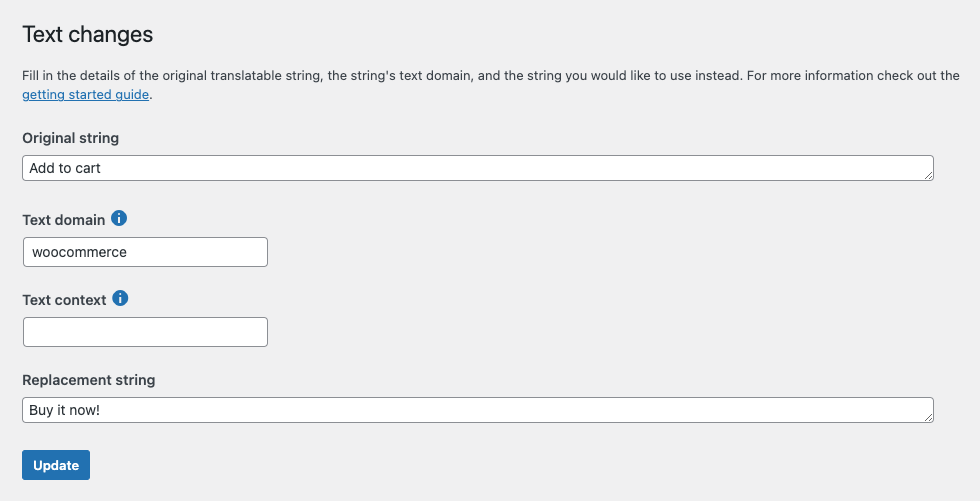
Frequently asked questions
What is Say What plugin?
Say What is an easy-to-use plugin that allows you to change translatable strings from plugins / themes and WordPress core without editing code.
Where can I find the Say What plugin?
The plugin is available for forking and contribution on GitHub at https://github.com/leewillis77/say-what.
What are the features of Say What Pro?
Say What Pro offers String Discovery and autocomplete, improved performance using text-domain-specific filters, wildcard string replacements, multi-lingual support, and import/export features.
How can I support the free plugin?
As a business, we donate a percentage of our profits from premium plugins to global climate change projects. You can support us by buying the world some trees at https://ecologi.com/ademtisoftware?gift-trees&r=ademtisoftware.
Changelog
2.2.5
- General tidy-ups and maintenance
2.2.4
- Fix: Do not generate warning on initial install
2.2.3
- Change: Internal package updates
- Change: Compatibility with WordPress 6.6
2.2.2
- Fix: Resolve issue where replacements weren’t made if an external object cache was in use.
2.2.1
- Change: Internal refactor of classes
2.1.9
- Change: Minor admin UI changes
2.1.8
- Fix: Include missing image
2.1.7
- Change: Admin UI updates
2.1.6
- Change: Styling & documentation updates.
2.1.5
- Fix: Avoid warning when sorting list table.
2.1.4
- Change: Localisation improvements
2.1.3
- Change: Updates to Javascript dependencies.
2.1.2
- Change: Updates to Javascript dependencies, smaller JS footprint.
2.1.1
- Fix: Resolve issue where console errors could be thrown if no replacements configured.
2.1.0
- New: Optimise performance when an external object cache is available
- Fix: Imports via WP-CLI could fail if the pro extension had previously been active
2.0.2
- Reduce size of bundled images
- Update dev build scripts
2.0.1
- Improve Javascript performance, and remove lodash dependency (resolves some plugin conflicts)
2.0.0
- Support for translatable strings rendered through WordPress Javascript framework
- Supports replacing text in Gutenberg / WooCommerce admin / WooCommerce blocks
- Update details of Say What? Pro vs free plugin
1.9.7
- Fix issue where replacement table disappeared at small screen widths
- Update WordPress compatibility
- Changes to donation / upsell content
1.9.6
- Fix link in documentation
1.9.5
- WordPress 5.5 compatibility
- Changes to Treeware links
1.9.4
- Ensure help links open in new windows
1.9.3
- Fix link target in Treeware content
1.9.2
- Suggest Treeware donations
1.9.1
- Update information about Pro features
1.9.0
- Fix issue adding more strings after downgrade from Pro
- Update text domain of plugin to match wordpress.org guidelines to aid translations
1.8.2
- Documentation updates only
1.8.1
- Update plugin links, include settings and upgrade link
- Update documentation about pro features
- Admin styling fixes
1.8.0
- Fix issues where entities could be double encoded on admin screens.
1.7.1
- Update to admin marketing message. No functional changes.
1.7
- Support for _n() and _nx()
- Support for multi-line strings
1.6
Introduce filters that allows back compatibility for plugins that change their text-domain. Props Pippin Williamson
1.5
Avoid warnings on initial activation.
Avoid issues where strings contain HTML / entities
1.4
Add info box about Pro version
1.3
Support for WP-CLI import and export.
1.2
Swap database to UTF-8 to fix problems entering non-ASCII strings.
1.1
Fix incorrect escaping on the admin screens.
1.0.1
Fix initial DB table creation
Fix translations for strings with no domain
1.0
Allow strings with context to be replaced
0.9.3
Documentation improvements
0.9.2
Avoid wpdb->prepare warning
Minor admin fixes, don’t double translate strings
0.9.1
Fix issue with fields being swapped when first entered
0.9
Beta ready for testing and feedback

