

Improve your WordPress SEO: Write better content and have a fully optimized WordPress site using the Yoast SEO…

About Search & Filter
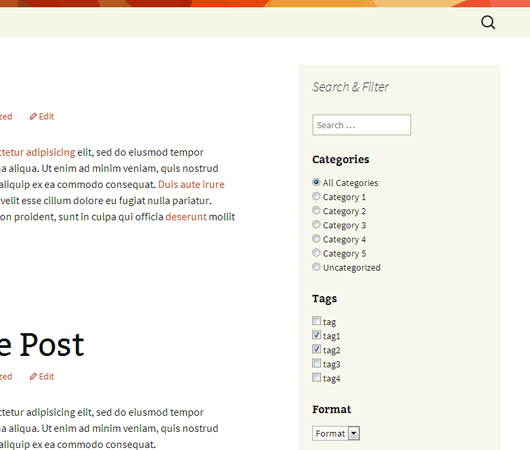
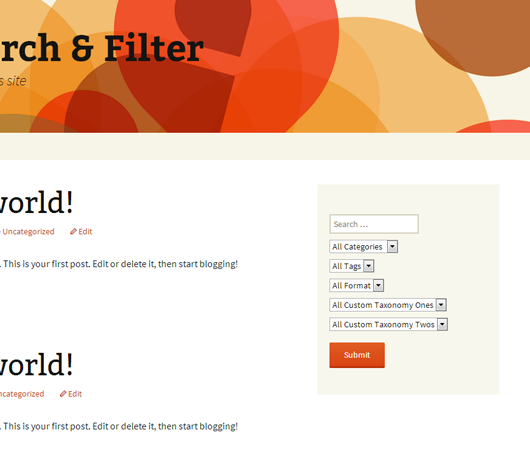
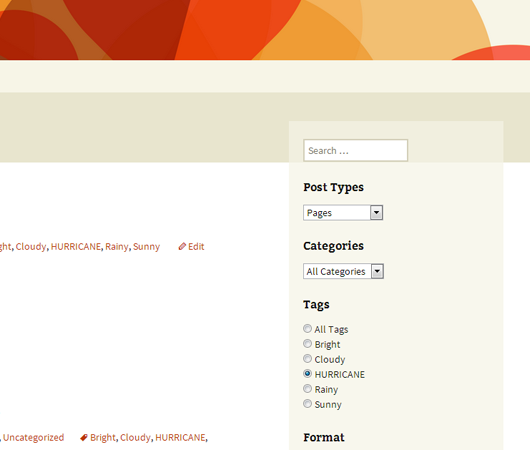
Search & Filter is a WordPress plugin that enhances the search functionality on your website. It allows you to search by category, tag, custom taxonomy, post type, and post date. You can also customize the search fields to be displayed as dropdowns, checkboxes, radio buttons, or multi selects. For more advanced features, you can upgrade to the Pro version, which includes options like searching custom fields, using AJAX to display results, and creating custom templates.Screenshots

Frequently asked questions
What is Search & Filter?
Search & Filter is a WordPress plugin that enhances the standard WordPress search box. It allows for advanced searching and filtering of content.
What types of content can be searched and filtered?
Users can search and filter by Category, Tag, Custom Taxonomy, Post Type, Post Date, and combinations of these. With Search & Filter Pro, you can also search Custom Fields, Post Meta, and Authors.
What display options are available for search fields?
Fields can be displayed as dropdowns, checkboxes, radio buttons, or multi-selects. The Pro version adds jQuery range sliders, date pickers, and auto-complete comboboxes.
Does Search & Filter support e-commerce platforms?
Yes, Search & Filter Pro is tested and compatible with WooCommerce, WP eCommerce, and Easy Digital Downloads.
How can Search & Filter be integrated into a WordPress site?
The plugin can be placed anywhere in themes and posts using shortcodes and widgets. It also features a drag & drop editor and an easy-to-use admin UI.
Changelog
1.2.17
- Fixed – PHP notice about frmqreserved not being initialised.
- Bump – version number + tested upto.
1.2.16
- Fixed – a potential security issue with escaping
- Fixed – add support for block editor themes which don’t use
get_header() - Fixed – prefixed classes to avoid conflicts with other plugins + themes
1.2.15
- Fixed – a PHP 8 warning when using the taxonomy walker class – thanks @jules-colle + @superthin
1.2.14
- Admin notice added – Version 3 is coming soon – beta testers wanted + tons of improvements and changes coming – make sure you know what’s in store.
- Update docs URLs
- Fix – an issue with an
<option>element self closing in the multiselect field (thanks @matzeatweb)
1.2.13
- Fix – a PHP warning when using Beaver Builder
1.2.12
- Fixed – some PHP warnings when using radio, checkbox and multiselects
- Fixed – a typo (thanks sunjunkie)
- Tested with WP 5.3
1.2.11
- Fixed – a few typos in the admin screen
- Tested with WP 5.0 RC2
1.2.10
- Fixed – an issue with our syntax highlighting script modifying our shortcodes
1.2.9
- Fixed – bugs with WP 4.4 compatibility
- Fixed – an issue with operators being case sensitive – they are no longer case sensitive
1.2.8
- Fixed – an issue with rewrites – thanks @iohannis
1.2.7
- Fixed – fix for new taxonomy rewrites and problems with multiple selection when using checkboxes
- Fixed – added previously hidden
multiselectfield type
1.2.6
- Fixed – compatibility issues with WP 4.2.x
1.2.5
- Fixed a PHP error when setting defaults for taxonomies – many users did not see this but resulted in unexpected behaviour
- Fixed an error with post date sometimes being undefined for blank searches
- Added argument
empty_search_url– when a users submits the search form without any search preferences selected they will be redirected to this URL - Updated argument
add_search_param– setting to1will force add a “?s=” to all urls generate by the plugin – this may help with the loading of search templates in some themes
1.2.4
- Fixed a bug created in 1.2.3 when doing an empty search
1.2.3
- Added arguement
all_items_labelswhich allows for support for customall_itemslabels in taxonomies, categories, post tags and post types when usingselectandradiotypes – the default text displaying “All Categories” for example can now be defined usingall_items_labels - Added
show_countto arguments – this shows how many posts are in a particular term, in brackets after the term name – works only for categories, tags and taxonomies - Fixed a bug when using when using “all post types” and it displaying no results
- Reverted behaviour from 1.2.2 – no longer force load search template when search is blank – let WP handle it again
- Added argument
add_search_param– setting it to1will force a “?s=” or “&s=” to be added to the url even when the search is blank – in some circumstances this will force load the search template, instead of other WP templates, such as taxonomy or category templates
1.2.2
- Added support for multi selects – use
multiselectas the type for your field - Added support for AND & OR operators when using checkboxes or multiselects – use the
operatorsargument with allowed values ofand&or - Force load search template when search is blank, don’t include when search field is not included in shortcode
- Fixed an issue with navigation disappearing when using post_types
1.2.1
- Version Bump – bad commit
1.2.0
- WARNING – this update includes some major changes to shortcode construction, do not upgrade until you have read how this will affect your setup – updating should be easy.
- Renamed the
taxonomiesargument tofields–taxonomiesis now no longer appropriate as this list contains field types other than taxonomies – this list now contains taxonomies,post_type,post_dateandsearch–taxonomiesas an argument is still supported however will be deprecated - Search box can now be positioned anywhere, simply include
searchin the fields list in the position desired. Upgrading from previous versions will cause you to lose your search box, simply includesearchin the fields list to show it again - Drop support for
searchargument as no longer relevant – control display of search input by adding it to thefieldslist - Labels have been completely rewritten –
labelhas been renamed toheadingsto avoid confusion with internal taxonomy labels – theheadingsargument now allows for any text to be added and displayed as a heading for each field – this allows for much more flexibility and no longer uses internal taxonomy labels – to hide a label simply leave blank - Added support for hierarchical taxonomies for all input types – checkbox, radio & select
- Added support for ordering of taxonomies – use
order_byargument – allowed values areid,name,slug,count,term_group - Added support for ordering direction of taxonomies – use
order_dirargument – allowed values are ‘asc’ or ‘desc’ - Added support to show or hide empty taxonomies – use
hide_emptyargument - Added support for
search_placeholder - Updated
post_datefunctionality to work with older versions of WP – can be displayed either asdateordaterange– thepost_datefield uses the HTML 5 input type ofdate– browsers that do not support it will simply show a text box – a tutorial of integrating jquery for graceful degredation is in the works - Renamed
submitlabeltosubmit_label–submitlabelstill works for now. - Renamed
typetotypes–typestill works for now. - Updated display of checkboxes and radio buttons, inputs are now wrapped in an unordered list which may affect your styling
- Various bug fixes
- Thanks to
bradaricfor help with hierarchical dropdown lists and date input types – https://github.com/bradaric
1.1.3
- Added support for post_date to be displayed either as
dateordaterange(WP 3.7+) type
1.1.2
- Added support for all public and custom post types (the
attachmentpost type is excluded) – all post types can be user searchable or predfined and hidden from the user. This allows for users to add multiple search widgets to their site which work on specific post types independantly from eachother. - Added offical updated documentation, created and moved to Search & Filter Docs
1.1.1
- Fixed: when submitting an empty search/filter, “?s=” now gets appended to the url (an empty search) to force load a results page, previously this was redirecting to the homepage which does not work for many use cases
1.1.0
- Added support for checkboxes and radio buttons, with the option to control this for each individual taxonomy.
- Added support to show or hide headings for each individual taxonomy.
- Added support to pass a class name through to Search & Filter widgets, this allows styling of different instances of Search & Filter
- Fixed problems with escaping output in search box
- Notice: This update will automatically add headings to taxonomy dropdowns, refer to usage and examples on how to disable them.
1.0.3
- Added some documention & screenshots to plugin page
1.0.2
- Version bump for WordPress plugins site
1.0.1
- Updated to use
label->all_itemsin taxonomy object for dropdowns before usinglabel->name - Notice: This update may cause some labels to break, ensure you have set up your taxonomy properly including setting
label->all_items
1.0.0
- Initial Release

