

Improve your WordPress SEO: Write better content and have a fully optimized WordPress site using the Yoast SEO…
About Quick Featured Images
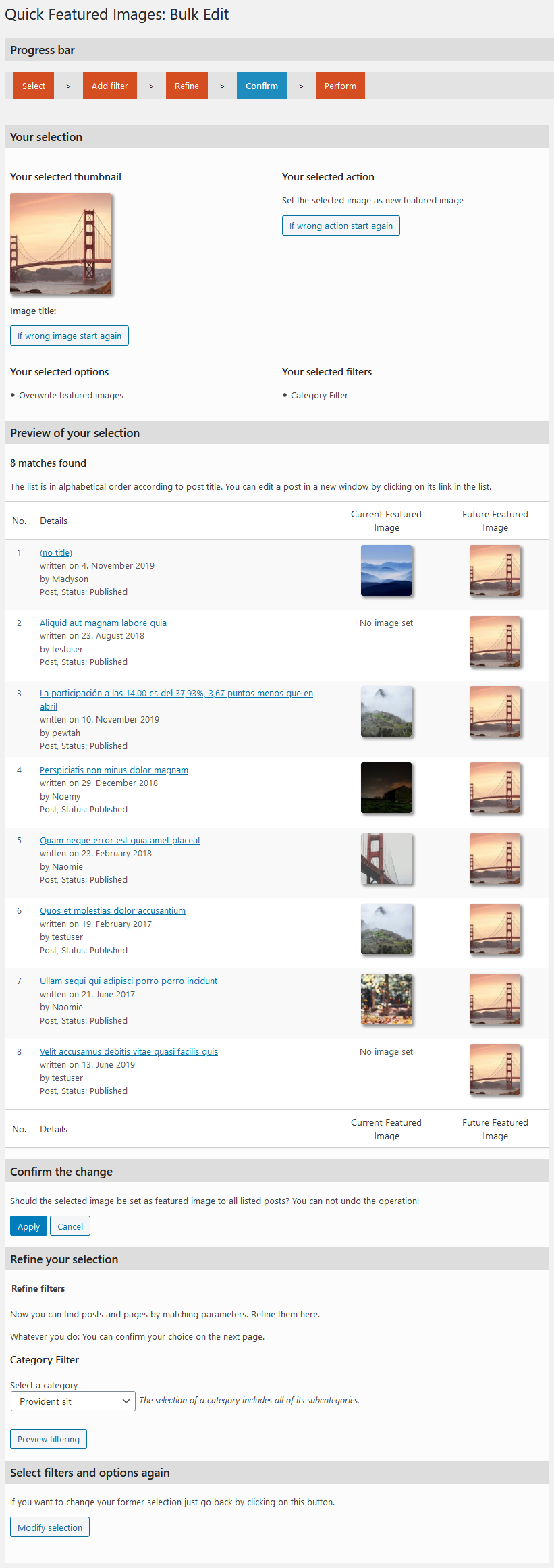
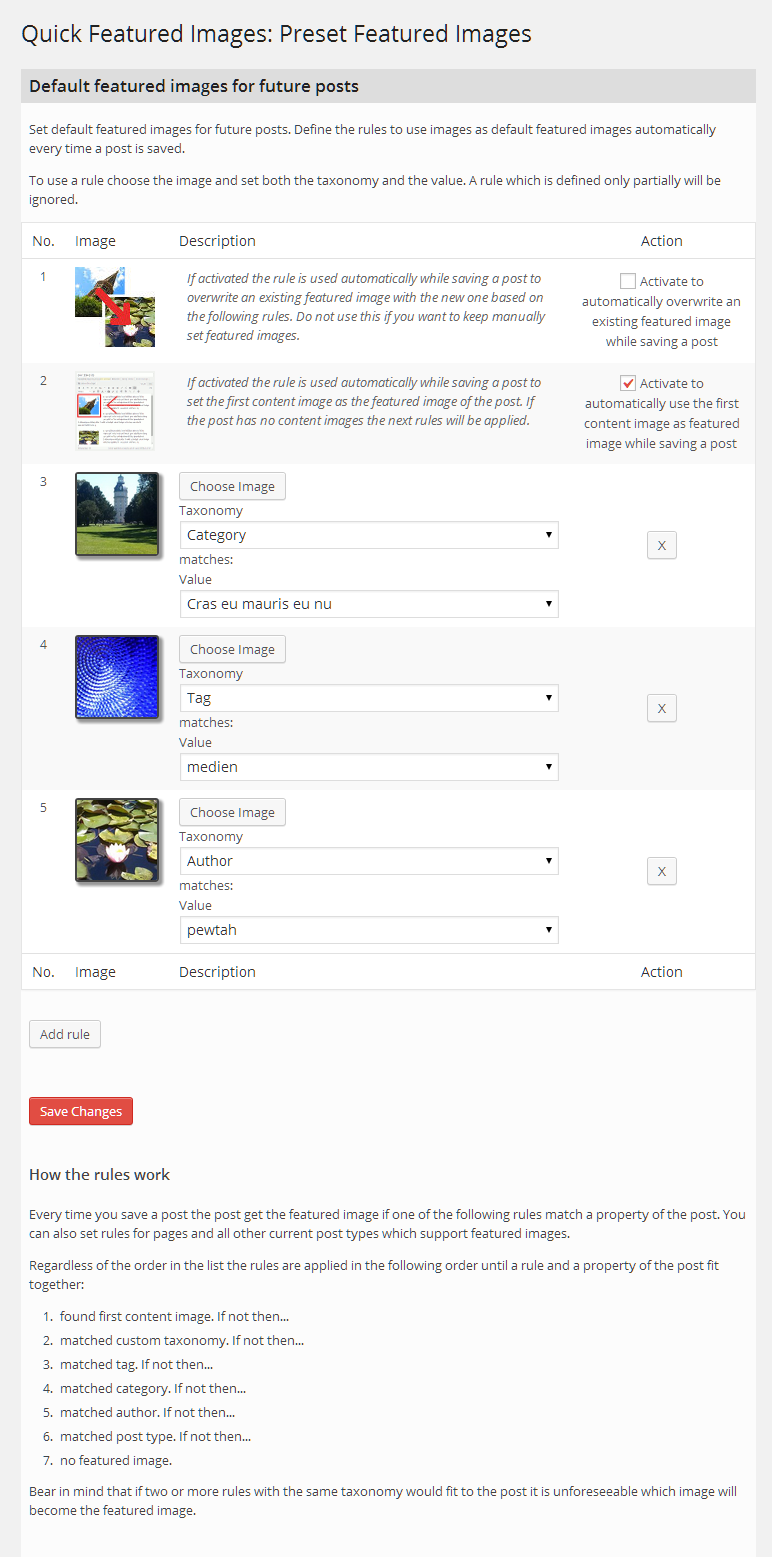
Quick Featured Images is a plugin that allows you to easily manage and bulk edit featured images on your WordPress site. You can set, replace, and delete featured images for multiple posts at once, and even set default featured images for future posts. The plugin is GDPR compliant and does not collect any personal data.Screenshots

Frequently asked questions
What does the plugin 'Quick Featured Images' do?
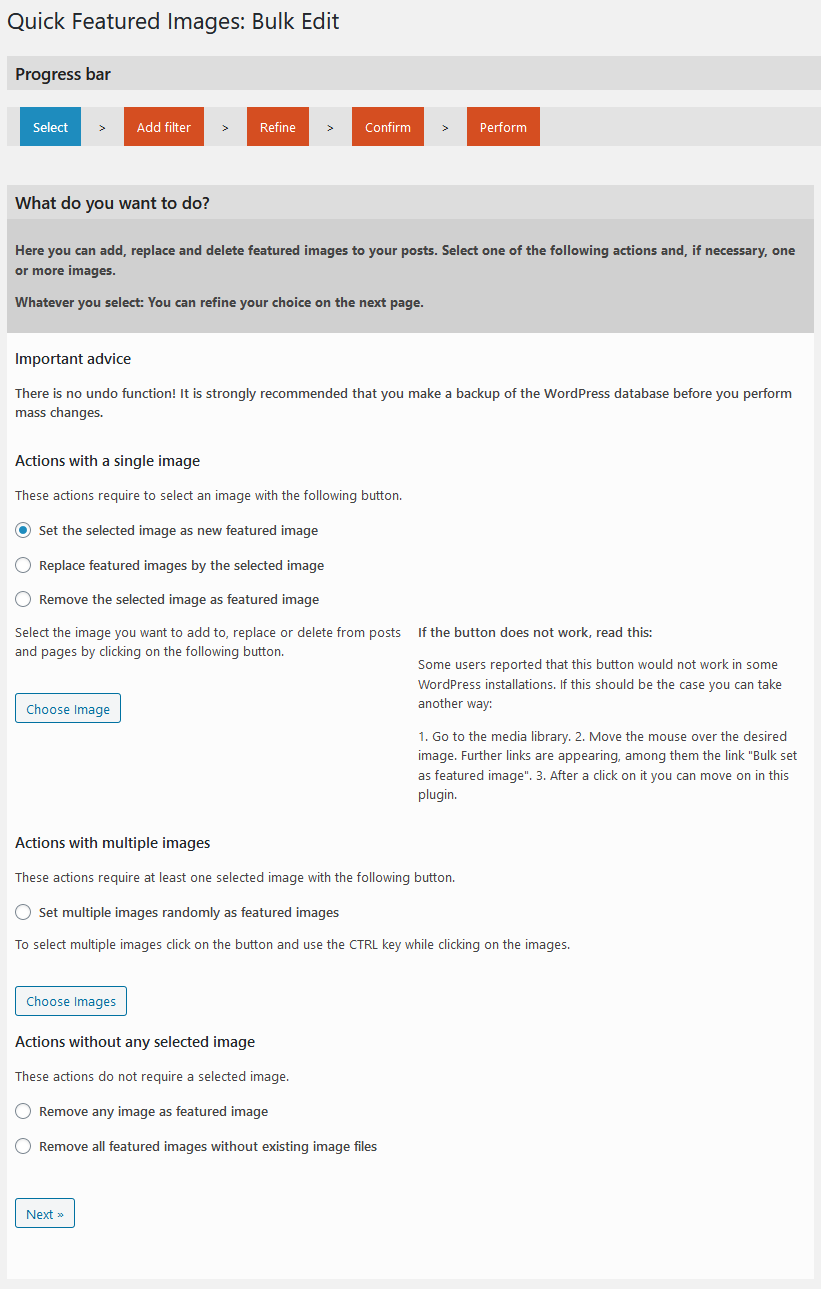
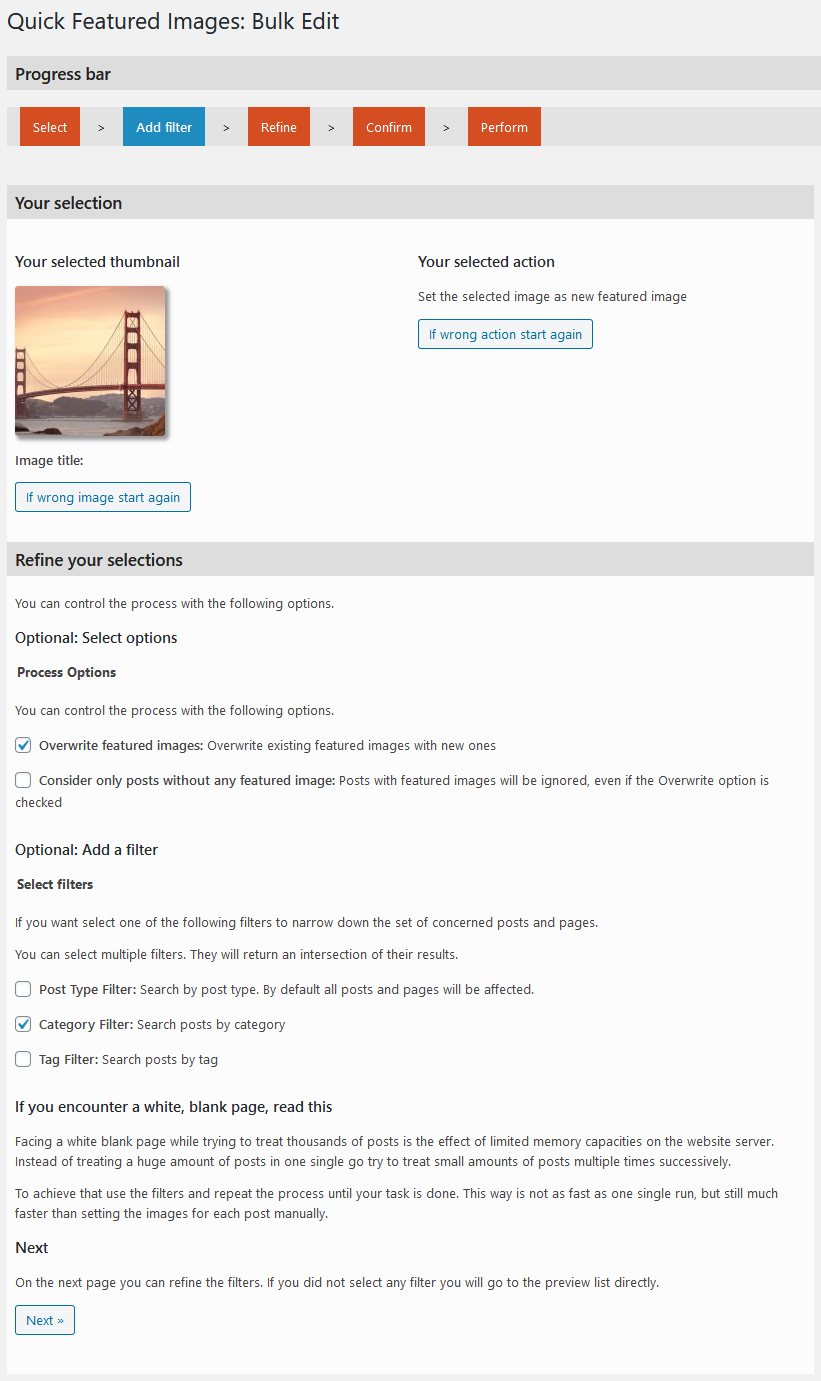
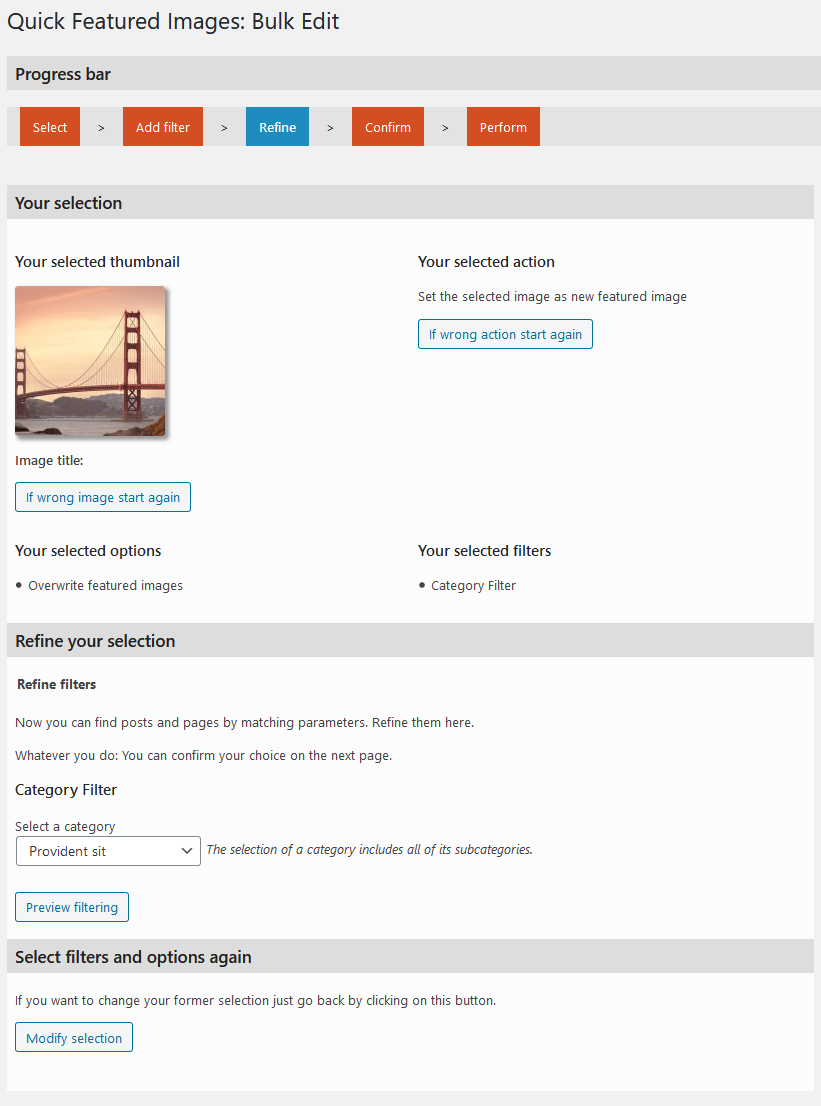
The plugin helps you bulk manage featured images, set automatic default featured images, and perform actions such as setting, replacing, and removing featured images for multiple posts and pages.
What languages is the plugin available in?
The plugin is available in English, German, Catalan, Spanish, Brazilian Portuguese, French, Arabic, Japanese, and Greek.
Is the plugin compliant with GDPR?
Yes, the plugin does not collect any personal data and is ready for GDPR compliance.
Is there a Pro version of the plugin?
Yes, there is a Pro version which offers additional features and options such as support for audios, videos, and custom post types.
Where can I find support for the plugin?
Support for the plugin is provided in the form of Product Support. Pro users get premium support, while free support is offered in the WordPress forums.
Changelog
13.7.2
- improved class autoloader to prevent issues with a Transliteration Plugin
- improved code
- fixed deprecated notices
13.7.1
- fixed vulnerability to unauthorized modification of data (reported by Wordfence)
13.7.0
- Improved performance when displaying post-thumbnails (thanks to @odoremieux)
13.6.0
- improved styles and starting using minifying
- added free vs. pro-section
13.5.7
- improved and added text and help
13.5.6
- added autoload class
- small improvements and fixes
- moved language files to GlotPress. So, please contribute as a translator to make Quick Featured Images available in more and more languages.
- added information about the Pro version
13.5.5
- new branding
13.5.4
- Fixed assignments errors in the image column on the post overview page
13.5.3
- Corrected some texts
13.5.2
- Fixed text domain name in the footer section
- Updated screenshots for the plugin page
13.5.1
- Added catalan translation, thanks to Ibidem Group
- Changed order of action links
13.5.0
- Fixed missed binding to dynamically created selection options in ‘Default Images’
- Fixed missed higher upgrade of the version number
13.4.2
- Revised an error message in ‘Bulk Edit’
- Fixed deprecated jQuery function live() in ‘Default Images’
13.4.1
- Fixed error in image columns on post overview pages
13.4.0
- Added new column in the media library to list at each image for which posts it is set as featured image
- Refactored user query for ‘Default Images’
13.3.6
- Tested successfully with WordPress 5.3
13.3.5
- Improved performance for the image column on post overview pages
- Updated translations
- Pro: Added support of plugin ‘Featured Image From URL’ in ‘Bulk Edit’, ‘Default Images’ and image column
- Pro: Added support of plugin ‘Featured Image By URL’ in ‘Bulk Edit’, ‘Default Images’ and image column
13.3.4
- Tested successfully with WordPress 5.2.1
13.3.3
- Added checkered background for transparent thumbnails
13.3.2
- Refactored ‘Default Images’ for more robustness
- Updated translations
- Pro: Added support of Facebook images, added Export/Import of rules on page ‘Default Images’
13.3.1
- Added greek translation. Thank you, Kostas Arvanitidis!
- Changed label ‘Set, replace, remove’ to WP string ‘Bulk Edit’ to be translated in much more languages
- Changed label ‘Preset Featured Images’ to WP string ‘Default Images’ to be translated in much more languages
- Changed previous mentioned labels in readme file
- Updated translations due to WordPress 4.9
- Pro: Added in ‘Set, replace, remove’: Presets for recurring tasks managing featured images
13.3
- Added japanese translation. Thank you, Kazuyuki Kumai!
- Added ‘Requires PHP’ info in readme.txt
- Fixed in ‘Set, replace, remove’: locale name as variable in error message section
- Fixed in ‘Set, replace, remove’: typo in page description
- Removed redudand explanations
13.2.2
- Fixed incorrect detection of post type name for the result list
13.2.1
- Improved in ‘Default Images”: Image paths starting with ‘/’ will be considered
13.2
- Added in ‘Default Images”: Post type filters for first image option
- Revised translations
13.1
- Added french translation. Thank you, Ivan M. Frakov!
- Revised sanitations for texts and URLs on the pages
- Revised translations
- Set activation message as dismissible
13.0.1
Fixed in ‘Set, replace, remove’: unnecessary HTML escaping
13.0
- Added in ‘Set, replace, remove’: action for removing database entries of featured images without existing image files
- Added in image column: check for existence of image file and, if not available, Delete link
- Revised: added sanitations to (nearly) all displayed texts
- Updated translations
12.3.7
- Added background color for transparent thumbnails or vector graphics on admin pages
- Changed in ‘Set, replace, remove’: Tiny rearrangement of explanations
- in Pro version: Added options for thumbnails of external services embedded with an URL
12.3.6
- Fixed missing sanitations of ID in “Columns” class to close possible cross-site-scripting security hole
12.3.5
- Fixed outdated (pre WP 4.8) texts for WP 4.8
12.3.4
- Fixed minor errors for SVG support
12.3.3
- Revised translations
12.3.2
- Fixed missing loading of Javascript media API on Default Images page
12.3.1
- Fixed missing loading of Javascript media API on post edit pages
- Fixed a typo, revised translations
12.3
- Changed in part “Replace” of section ‘Set, replace, remove’: Media library dialog box instead of image list to select the replacement images
- Improved: Faster check for found attachment against being an image
- Updated translations
12.2
- Added in ‘Set, replace, remove’: server configuration to avoid PHP timeout and memory limitation in most cases
- Fixed deprecated jquery live()
- Adjusted texts for WP 4.7
12.1.1
- Fixed warning about undefined variable in ‘Default Images”
- Revised german translation
12.1
- Fixed fatal error at plugin activation
- Fixed missing default settings
12.0
- In Pro version: Added in ‘Default Images”: option for displaying random featured images at each page load
- Changed menu item name ‘Image Columns’ to ‘Settings’
- Added in Settings: option to set a minimum user role to be allowed to see the plugin
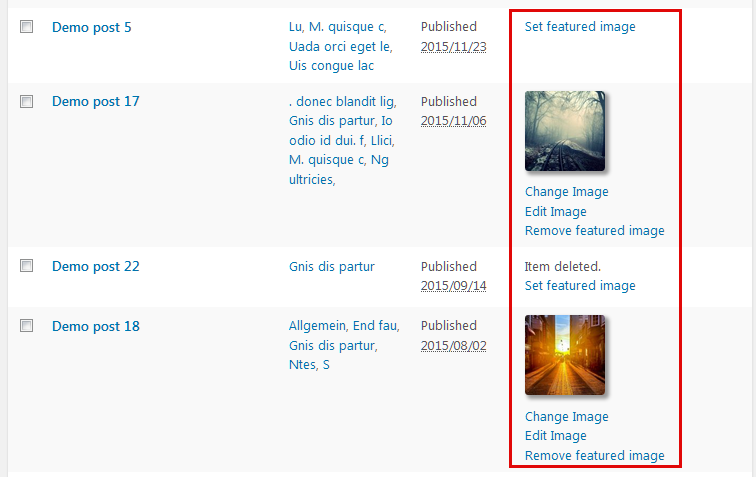
- Added in image column: action links to add, change and remove featured images at each post
- Revised uninstall function for WordPress 4.6 due to the introduction of WP_Site_Query class
- Revised style of thumbnails in image column, ‘Default Images” and bulk edit pages
- Updated *.pot file and german translation
11.8.1
- Improved: media dialogs show only images instead of all files
- Improved in ‘Default Images”: only authors instead of all users are listed
- Fixed in ‘Default Images”: empty user data
11.8
- Added brazilian portuguese translation
11.7.3
- Fixed: outdated translations for post statusses
11.7.2
- Fixed: broken recognition of first post image works in multilines
11.7.1
- Revised plugin activation message function
11.7
- Improved: ‘Default Images” are working in the frontend, too, e.g. at creating a post with Gravity Forms
- Improved: Headline structure since WP 4.4 for better accessibility
- Refactored: Page ‘Preset Images’
- Updated *.pot file and translations
11.6.1
- Pro version: Added in ‘Preset Images’: Selection of multiple images to set one of them randomly as default featured image
- Improved usability: Advice for selection of multiple images in the media dialog box
- Improved usability in ‘Set, replace, remove’: On the start page show selected images after closing the media dialog box
- Updated *.pot file and translations
11.6
- Added in ‘Preset Images’: After an image is removed from the library all preset rules assigned with that image will be removed automatically
- Pro Version: Added in ‘Preset Images’: User defined order of applying the types of rules
- Pro Version: Added in ‘Preset Images’: Option ‘First content image’ also takes image of an external server
- Fixed in ‘Preset Images’: Wrong background color for third table row
- Fixed in ‘Preset Images’: Missing translations for changed texts
- Refactoring in ‘Preset Images’
- Updated *.pot file and translations
11.5
- Added arabic translation. Thank you, Shadi AlZard!
- Added in ‘Set, replace, remove’: Back button on result page. So you can start a further run faster
- Pro version; Added in ‘Preset Featured Images’: post format as taxonomy
- Fixed table row colors due to changes in WP 4.3
- Redesigned in ‘Preset Images’: Moved checkboxes to middle column
- Revised styles for page descriptions
- Changed text domain for translate.wordpress.org
- Updated *.pot file and translations
11.4.1
- Revised styles for image column in small displays, since WP 4.3
- Pro version: Added search in post title in ‘Default Images”: set default featured image for posts with a specific search string in the title
11.4
Added spanish translation for the main texts of the plugin
11.3
- Added in image column: Link to the edit page of the displayed image
- Updated screenshot
11.2
- Fixed in ‘Set, replace, remove’: invalid thumbnail IDs will be ignored
- Fixed in ‘Set, replace, remove’: Added missing ‘break’ in switch()
- Fixed in ‘Set, replace, remove’: Post Type Filter founded always posts and pages
- Fixed broken bulk assign link at each image in the media library
- Pro version: Added option in ‘Set, replace, remove’: Take the first post image from current site domain
- Updated *.pot file and german translation
11.1
- Fixed bug which yielded the error message “No matches found” at the Confirmation step
- Fixed wrong links in the Confirmation list if cache was used
11.0
- Improved performance of confirmation step by using cached results of preview step
- Improved security by changing $_REQUEST to $_POST and $_GET
- Pro version: Added option in ‘Set, replace, remove’ for selection of multiple images: Use each selected only once
- Pro version: Added option in ‘Set, replace, remove’ for selection of multiple images: Remove excess featured images after all selected images are used
- Pro version: Added option in ‘Set, replace, remove’: Remove first image in content
- Pro version: Added option in ‘Set, replace, remove’: Take first image of NextGen galleries
- Pro version: Added option in ‘Set, replace, remove’: Take first external image
- Pro version: Added option in ‘Set, replace, remove’: Take first attached image
- Updated *.pot file and german translation
10.0
- Introducing Pro version Quick Featured Images Pro
- Deleted in ‘Set, replace, remove’: some filters and options in favor of the Pro version
- Corrected CSS height for images in image column to keep the aspect ratio
- Updated *.pot file and german translation

