

Import your demo content, widgets and theme settings with one click. Theme authors! Enable simple theme demo import…
About Forget About Shortcode Buttons
Forget About Shortcode (FASC) Buttons is a plugin that allows you to easily add CSS buttons to your WordPress posts and pages. You can customize the buttons by double-clicking on them and using the options panel, and the plugin also includes icons from Dashicons and Font Awesome. It is compatible with WordPress 4.2 and above.Screenshots
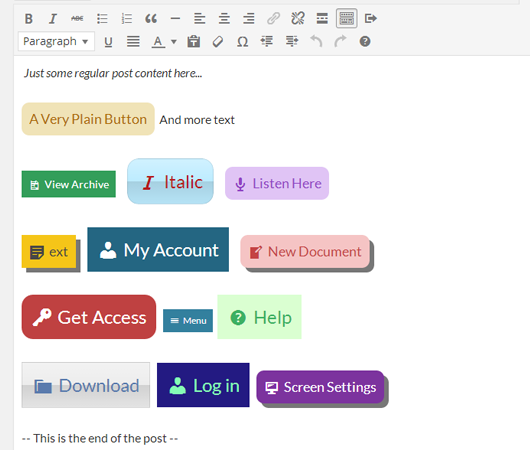


Frequently asked questions
What is Forget About Shortcode Buttons?
Forget About Shortcode Buttons (FASC) is a WordPress plugin that allows users to add CSS buttons visually in the rich text editor and to their themes. It aims to make the process of adding buttons more natural and improves the appearance and usability of the post editor.
How does FASC Buttons handle styling?
FASC Buttons uses clean HTML, only employing data attributes for essential features. The buttons in the post editor use the same classes as on the front end of your site, without extra or hidden markup.
Can I edit buttons easily with this plugin?
Yes, editing a button is simple; you can double-click a button to bring up an options panel to reconfigure it. This eliminates the need for tedious shortcodes and precise syntax.
What icon sets are included?
The plugin includes Dashicons and Font Awesome Icons, which can be added to your buttons and used in your themes.
What WordPress versions are compatible with FASC Buttons?
This plugin is compatible with WordPress 4.2 and upwards. For compatibility with WordPress 3.9 – 4.1, users should download version 1.x.
Changelog
2.1.3
- Fix – a potential security issue with nonce validation for authenticated users
2.1.2
- Fix – JS issues when no TinyMCE instance is loaded on the page
- Fix – better conditional loading of CSS and JS
2.1.1
- Fix – various issues with loading & the TinyMCE Editor
2.1.0
- New – added support for FASC buttons in WP 4.8 widget areas ?
- Fix – an issue with button styles in the admin area, only when they were selected (this is due to some new CSS classes being added in WP 4.8)
- Fix – some copy / paste issues and buttons losing their styles (WP 4.8 bug)
- Fix – a compatibility with other TinyMCE related plugins – FASC was extending the view object incorrectly
- Fix – some issues on the
PostProcessTinyMCE event, made sure FASC only handles this when there are FASC buttons to be handled
2.0.1
- Fix – an issue with the border effect on glossy buttons
- Fix – remove
box-shadowproperties from FASC buttons by default, some themes such as twentyseventeen add this to all anchor tags - Fix – remove button rollover/hover effects from TinyMCE editor
- Fix – some issues when using multiple buttons in a post, and their setting not being saved/retrieved correctly
2.0.0
- Rewritten the core to use WP standards – no more iframes – much quicker to load
- New – integrated with WP Views – inline toolbars for editing and deleting – more options to come
- New – UI refresh – should make it easier to edit buttons as you are going through button options – the new UI also paves the way for some upcoming new features ?
- New – Added bold, italic & strikethrough options from within the button editor – these are also saved to your templates
- New – nofollow option
- New – Add icons after buttons
- Fix – a bug where the popup wasn’t loading / showing forbidden
- Fully backwards compatible with buttons created in 1.x
1.1.2
- Security Update – XSS patch
1.1.1
- Fix – “Insert button” icon added for custom post types
- Tested up to WP 4.4
1.1.0
- Save buttons!
- Prevent directory listing of folders by adding blank index.php files to all folders – silence is golden!
1.0.4
- Bug fix – properly use WP versioning and cache busting methods – upgrading to 1.0.3 caused some layout errors for some users as assets were being loaded from the cache – should be no more problems regarding caching and updating the plugin now
1.0.3
- Added Font Awesome Icons ?
- Updated Icon Selector UI – no scrolling to find the icon you just used! ?
1.0.2
- Added subtle rollovers to buttons
- Improved HTML output – removed nearly all cases of using the
data-attributes on buttons – much cleaner code - Optimized JS functions for performance
1.0.1
- JS error Fix for IE9
- prefixed the .rounded css classes
1.0.0
- Initial Release

