- What happened: PHP announced a security release for 21 October 2026, 14:00 UTC, fixing two critical vulnerabilities (CVE-2026-109618 and CVE-2026-109619, informally “php2shell”), both rated CVSS v4.0 9.2.
- Are you affected: the vulnerabilities are reported to affect every PHP version in use. InstaWP has already applied the recommended interim mitigation on all InstaWP-managed servers and will install the patched PHP versions as soon as they are released.
- What to do: if your site runs PHP 8.2 or newer, nothing. If it runs PHP 8.1 or older, move it to PHP 8.3 or newer, testing on a staging copy first.
What is php2shell?
php2shell is the informal name for two critical PHP vulnerabilities, CVE-2026-109618 and CVE-2026-109619. The CVE identifiers are reserved and will be published in full with PHP’s release. On 20 October 2026 the PHP security team gave advance notice of a security release scheduled for Wednesday 21 October 2026 at 14:00 UTC, fixing two vulnerabilities that are both rated CVSS v4.0 9.2 (critical).
The vulnerabilities are reported to allow remote code execution without a login, through the way PHP handles file uploads (specifically, the session upload-progress feature). In plain terms: an attacker who can reach a vulnerable site may be able to run their own code on the server. PHP will publish the full technical details, affected versions and fixed versions with the 14:00 UTC release, so until then this page describes the issue as reported, not confirmed. PHP says it may publish the release earlier than 14:00 UTC if details of either vulnerability become public or evidence of active exploitation appears, and it encourages all PHP users to prepare now so they can upgrade as soon as the release is available.
Security researchers report that every PHP version in use is affected, including the latest releases of PHP 8.2, 8.3, 8.4 and 8.5. PHP will confirm the affected and fixed versions with the release. PHP 8.1 and older are past end of life and will not receive an official fix. Security vendors report early exploitation attempts.
What has InstaWP done?
On the morning of 21 October 2026, InstaWP applied the recommended interim mitigation (disabling PHP’s session upload-progress feature) across all InstaWP-managed servers ahead of the release. We tested it on staging first and confirmed it caused no disruption to uploads or sites.
We are installing the patched PHP versions on all InstaWP-managed servers as soon as they are available, including if PHP publishes the release ahead of its 14:00 UTC schedule. This page will be updated as that happens.
What do InstaWP customers need to do?
What you need to do depends only on the PHP version your site runs.
| Your site runs | What you need to do | Why |
|---|---|---|
| PHP 8.2, 8.3, 8.4 or 8.5 | Nothing. | InstaWP patches the servers. The interim mitigation is already in place. |
| PHP 8.1 or older | Move the site to PHP 8.3 or newer, testing on a staging copy first. | PHP 8.1 and older are past end of life and will not get an official fix. |
To see which PHP version a site runs, open the Sites page in your InstaWP dashboard and click the site’s name. The version is shown in the bar under the site name and on the PHP Version card.

Sites on PHP 8.2 or newer
You do not need to do anything. InstaWP has applied the interim mitigation on all InstaWP-managed servers and is installing the patched PHP versions as soon as PHP releases them.
Sites on PHP 8.1 or older
Move the site to PHP 8.3 or newer. PHP 8.1 and older will not receive a fix for these vulnerabilities, so upgrading is the only lasting solution. Test the change on a WordPress staging copy first, then make the same change on the live site:
- Go to the Sites page in your InstaWP dashboard.
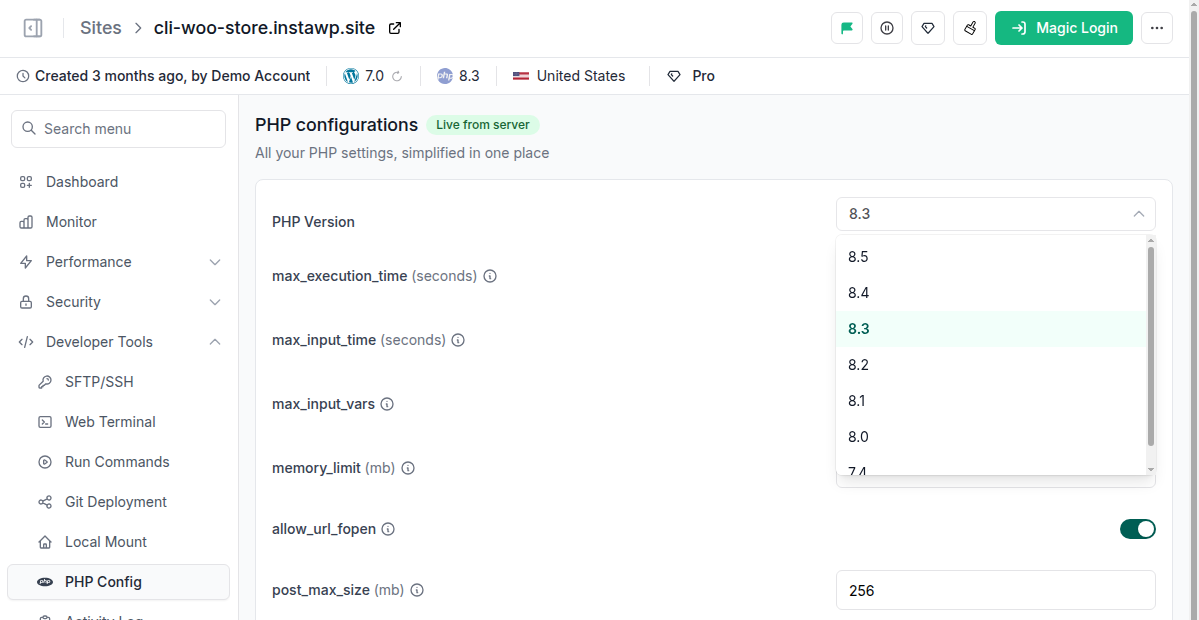
- Click the site’s name to open it, then in the site menu on the left expand Developer Tools and select PHP Config.
- Change the PHP Version to 8.3 or newer and click Save.
- Check the site’s key pages, forms and admin area before you repeat the change on production.
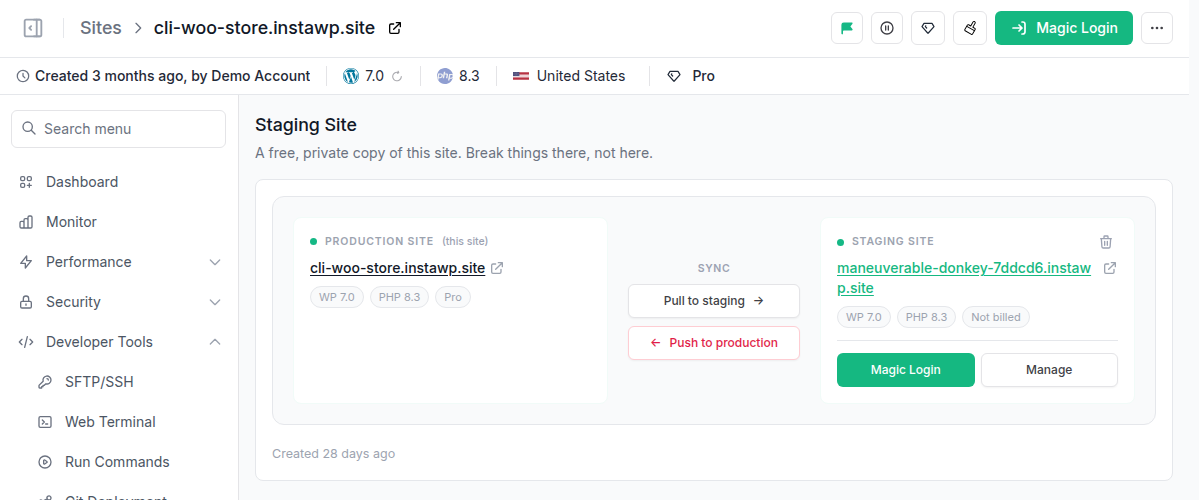
If the site has a staging copy, its Staging Site page (also under Developer Tools) shows the production site and the staging copy side by side, each with its PHP version. Open the staging copy, change its PHP version first, and check it before you change production.
The full walkthrough is in the InstaWP guide to configuring PHP.
InstaWP is emailing the owners of affected sites directly.
Timeline (UTC)
Newest first. New entries are added here as the situation develops.
Frequently asked questions
Do I need to do anything?
Only if your site runs PHP 8.1 or older. In that case, move it to PHP 8.3 or newer, testing on a staging copy first. Sites on PHP 8.2 or newer need no action: InstaWP has applied the interim mitigation on all InstaWP-managed servers and will install the patched PHP versions as soon as they are released.
My site is on WP Cloud (previously InstaWP Live). Does this apply to me?
Sites on WP Cloud (previously InstaWP Live) run on our hosting partner’s platform, which manages its own PHP updates. We’ll update this page once they confirm.
How do I check my PHP version?
In your InstaWP dashboard, go to the Sites page and click the site name. The PHP version is shown in the bar under the site name and on the PHP Version card. To change it, open Developer Tools in the site menu and select PHP Config.
Will switching PHP versions break my site?
It can, if an older or unmaintained plugin or theme does not support the newer PHP version. That is why you should make the change on a staging copy first and check your key pages, forms and admin area before changing the live site. If something breaks, update or replace the plugin that caused it rather than staying on PHP 8.1, which will not be fixed.
What about my staging sites?
Staging sites follow the same rule as any other site. If a staging site runs PHP 8.2 or newer, there is nothing to do. If it runs PHP 8.1 or older, change its PHP version on its own PHP Config page, under Developer Tools. You can open a staging site directly to reach its PHP settings.
Why do you recommend PHP 8.3 instead of 8.2?
PHP 8.2 will get this fix, but its security support ends on 31 December 2026. Moving to 8.3 or newer now means you will not need to upgrade again before the end of the year.
Did the interim mitigation affect file uploads on my site?
InstaWP tested the mitigation on staging before rolling it out and confirmed it caused no disruption to uploads or sites. It disables only the session upload-progress feature, not file uploads themselves.
Has the vulnerability been exploited?
Security vendors report early exploitation attempts. In its 20 October notice, PHP said it will publish the release earlier than scheduled if evidence of active exploitation appears in the wild. The full technical details will be published by the PHP security team with the release, scheduled for 21 October 2026 at 14:00 UTC.
References
- PHP.net: Upcoming Critical PHP Security Release (20 October 2026)
- PHP.net: Supported versions and end-of-life dates
- InstaWP docs: Configure PHP for your site
Questions about your site? Contact InstaWP support and we will help.