
If you have ever tried to migrate a site from a slow host, you already know the pain. Backups hang. Plugins timeout. The client wants it done yesterday.
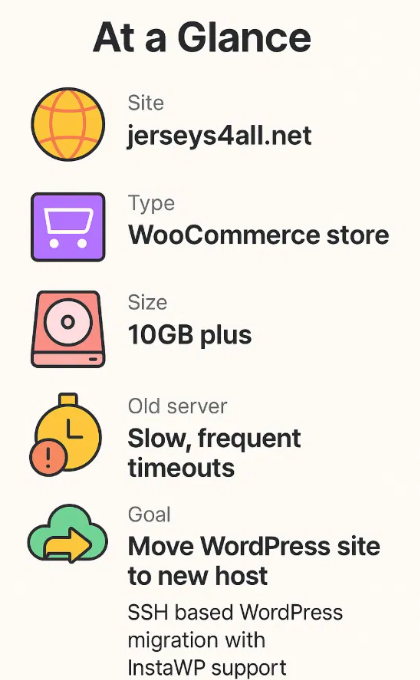
That is exactly where jerseys4all.net found themselves. Their WooCommerce store had grown into a heavy 10GB+ WordPress site sitting on an underpowered server. Every attempt to move the WordPress site to a new host kept running into performance issues.
They chose InstaWP as their new home, but more importantly, they leaned on our hands on WordPress migration service to actually get the job done.
This case study walks through what was going wrong on their old server and why this WordPress migration needed more than a one click plugin.
Meet Jerseys4All: A Store That Outgrew Its Hosting
Jerseys4All is an online store that lives and breathes sports. Think team jerseys, fan apparel, and a catalog that keeps growing every season.

Like many WooCommerce stores that actually sell, they did everything right from a business perspective:
- Added more products and variants
- Uploaded high quality jersey photos
- Collected customer and order data over time
Over time, all the good things that help a store grow also pushed the site to more than 10GB.
From a WordPress perspective, that is not unusual. For a weak, overloaded server, it is a problem waiting to happen. Day to day, the team started feeling the friction:
- Product edits took too long to save
- The WordPress dashboard felt heavy and unresponsive
- Any attempt to back up or clone the site stressed the server
They knew it was time to migrate the site to something faster and more reliable.
Where The WordPress Migration Started Hurting
On paper, the plan was simple. Install a WordPress migration plugin, export the site, import it on InstaWP, switch DNS. In reality, Jerseys4All hit the same wall many of your clients run into when you try to move a WordPress site to a new host that is already crawling.
1. A heavy site on an already stressed server
Because the server was already slow, any resource intensive task put it under pressure. Backup jobs, export processes, and plugin based migration attempts would often hang or time out.
For a store of this size, using a WordPress migration plugin was not enough.
2. 10GB plus of WordPress data to move
The combination of WooCommerce data, product images, theme and plugin files, and historical content pushed the site past the 10GB mark.
That is exactly the kind of scenario where a typical one click WordPress migration tool starts to struggle. The customer tried to migrate the site themselves and ran into:
- Incomplete archives
- Failed uploads
- Broken migration attempts that never finished
They knew they wanted to move the WordPress site to a new host. They also knew they no longer trusted plugin only methods to get them there.
This is the point where our team stepped in and treated it like what it was:
a serious WordPress migration that deserved a hands-on, SSH first approach.
How InstaWP Turned A Stuck Migration Into A Clean Move
Once Jerseys4All decided to move their WordPress site to our platform, we knew this could not be treated like a simple “install a plugin and hope” situation.
- A slow origin server.
- A 10GB plus WooCommerce site.
- Failed DIY attempts to migrate a site using standard tools.
This was a textbook case for a hands on WordPress migration service built around SSH.
Our teammates Ananta and Piyush took ownership of the process and handled the move step by step.
Step 1: Understanding what we were dealing with
Before running a single command, the team did what every good WordPress dev does first: look under the hood.
“The moment I saw the server response times and the 10GB footprint, I knew this wasn’t a ‘click and pray’ WordPress migration. It had to be SSH first”, says Ananta.
They:
- Checked how the current server was behaving under load
- Reviewed the folder structure for wp content, uploads, and plugins
- Identified anything that could slow down or break a WordPress migration in the middle
The goal was simple. Avoid surprises. For a store like Jerseys4All, you cannot afford to miss old uploads, customer data, or WooCommerce related tables.
By the time they were done with this first pass, Ananta and Piyush had a clear picture of:
- What needed to move
- What could be cleaned up later
- How to sequence the migration so the site stayed safe
Step 2: Preparing InstaWP as the new home
In parallel, we brought up the target environment on InstaWP. This is where the platform side makes life easier for everyone involved.
We:
- Provisioned a WordPress ready environment tuned for performance
- Ensured PHP, database, and file system were ready for a large import
- Set things up so the store could be tested safely before any DNS change
From an agency perspective, this is the phase where you stop worrying whether the new host can handle the site and start focusing on moving it correctly.
Instead of juggling separate tools for staging, hosting, and testing, the entire flow stayed inside InstaWP.
Step 3: Running an SSH first WordPress migration
With the plan ready and the new environment in place, it was time to actually move the WordPress site to the new host.
This is where a lot of plugin based migration attempts fail, especially for big installs running on a tired server. Our team used an SSH centric approach that is more reliable at scale.
Using SSH and tried and tested workflows, Ananta and Piyush:
- Copied the file system in chunks to avoid overloading the old server
- Created and moved a clean database export for all the critical tables
- Verified that wp config and URLs lined up correctly on the new side
Instead of fighting browser limits or upload timeouts, the migration ran closer to the metal. That is the advantage SSH gives you when you migrate a site that big.
Yes, it took a couple of hours. For a 10GB store on a slow host, that is actually a win. The important part is that the process stayed stable and transparent from start to finish.
Step 4: Fixing the small stuff before it becomes big
Every real world WordPress migration has some fine tuning baked in. After the main move, our team went through the details developers care about:
- Checking for missing media references
- Making sure permalinks and product URLs worked as expected
- Confirming login, cart, and checkout flows for WooCommerce
- Ensuring the admin area felt snappy on the new host
Any small issue that surfaced during this phase was handled before the site went live for customers. Jerseys4All did not have to chase loose ends. They just saw a faster site that worked.
Step 5: Keeping the customer in the loop
Technical work is only half of what makes a WordPress migration service feel trustworthy. The other half is communication.
“They’d already burned time trying to migrate the site themselves, so my priority was to keep every step transparent: what we were doing, why we were doing it, and when it would be safe to switch over”, says Piyush.
Throughout the process, Ananta and Piyush:
- Explained what was happening in simple terms
- Set expectations around the time window
- Confirmed each milestone, from file copy to final checks
For Jerseys4All, this turned a stressful “will the site move or break” situation into a guided transition.
They did not have to watch logs or guess what was going on behind the scenes. They could see the migration progressing and then log into a working store on InstaWP at the end of it.
What Changed After The Move And What You Can Learn From It
Once the migration was complete, Jerseys4All could finally see the difference between "hosting a WordPress site" and having a platform plus a team that treats performance and WordPress migration seriously.
- They did not change their business model.
- They did not rebuild the store from scratch.
- They only moved the existing WordPress site to a new host that was built to handle it.
The impact was very real.
A heavy WooCommerce site that actually feels usable
The most obvious shift came from performance. After Ananta and Piyush finished the SSH based WordPress migration and the store was live on InstaWP, Jerseys4All could:
- Log into wp admin without feeling like every click was a chore
- Work with products, images, and orders more smoothly
- Rely on the site to respond instead of worrying about timeouts
Nothing magical. Just what you expect when you move a WordPress site to a new host that is tuned for WordPress and not fighting the workload.
For a store owner, that feels like a weight lifted. For an agency or developer, that means fewer tickets that start with "the site is so slow".
Support that acts like part of your tech team
The other big win was how the migration was handled from a human side.
Jerseys4All had already tried to migrate a site on their own. Every failed attempt was draining confidence. When our team stepped in, the experience shifted from guesswork to guided action.
With a proper WordPress migration service:
- They did not have to keep switching plugins to see which one might work
- They did not have to babysit long running processes on a weak server
- They knew someone capable was watching the details and owning the outcome
That blend of technical depth plus communication is what makes a big migration feel safe, especially when you are moving a live WooCommerce store that pays the bills.
What Agencies and Developers Can Take From Jerseys4All’ Migration Saga
If you work with multiple WordPress client sites, you have probably seen a version of this same problem already. A big install on bad hosting. Multiple failed plugin attempts. A client who is now scared to touch anything.
Here are a few practical takeaways you can reuse.
1. Treat large sites as migration projects, not quick tasks
Once a WordPress install hits several gigabytes, especially with WooCommerce, it deserves a proper plan. That often means:
- SSH first thinking instead of plugin only thinking
- Clear sequencing of files, database, and DNS
- A restore path if something needs to be rolled back
You will save hours by treating it as a real WordPress migration from the start.
2. Use the right platform as your landing zone
You can be the best developer in the world. If the target host cannot cope, every effort to move a WordPress site to a new host will feel harder than it needs to be.
With InstaWP, you get:
- Environments that are already optimized for WordPress
- Tooling that plays nicely with advanced workflows like SSH
- A place where big stores like Jerseys4All can live comfortably after the move
That reduces the number of unknowns and lets you focus on doing the migration cleanly.
3. Let support handle the heavy lifting when it makes sense
Sometimes the smartest move is to let a WordPress migration service handle the core steps while you focus on your client, upsells, and post launch improvements.
In the Jerseys4All story, our team:
- Took ownership of the migration itself
- Kept the customer informed in simple language
- Delivered a ready to use site instead of a half finished copy
You can plug that same approach into your own service offering. You look like the hero who "knows the right people" while we do the heavy, technical work in the background.
Turning This Into Your Repeatable Playbook
The jerseys4all.net journey is not a one off edge case. It is exactly what happens when a successful store outgrows weak hosting and DIY tools.
If you are managing big WooCommerce stores, handling multiple legacy sites stuck on slow shared servers, or tired of failed attempts to migrate a site with generic plugins, you can use this same pattern:
- Decide that the old host is not worth fighting any more.
- Set up InstaWP as the new home for the site.
- Let our team help with an SSH based WordPress migration when the project is large or fragile.
- Give your client a faster store and a calmer backend experience.
That is what Jerseys4All did.They went from being stuck in WordPress migration limbo to running a heavy WooCommerce site on a platform that can keep up.
You can do the same for your next big client move. Connect with our WordPress Migration experts.