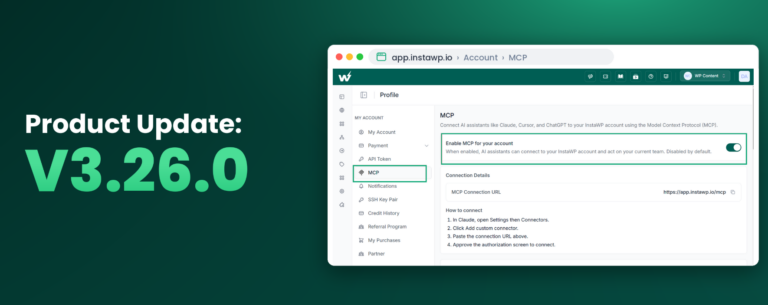
v3.24.0 introduces InstaMCP 1.1, a major release that lets InstaWP sites talk with 13 site tools for faster site management and automation.
This release also gives users more control over migrations with destination server selection, improves URL-change handling, introduces stuck PHP-FPM recovery, hardens Apache worker tuning, and applies safer defaults for SSH/SFTP access on newly provisioned users.
Here is what you’ll find with this release.
Key Takeaways
v3.24.0 leads with InstaMCP 1.1, bringing 13 site tools to InstaWP sites, along with migration control, stronger server recovery, safer access defaults, and more secure migration handling.
What’s New
#1: InstaMCP 1.1 with 13 Site Tools
InstaMCP 1.1 is the headline update in v3.24.0. InstaWP sites can now talk with 13 site tools, giving teams a more connected way to manage, inspect, and operate WordPress sites.
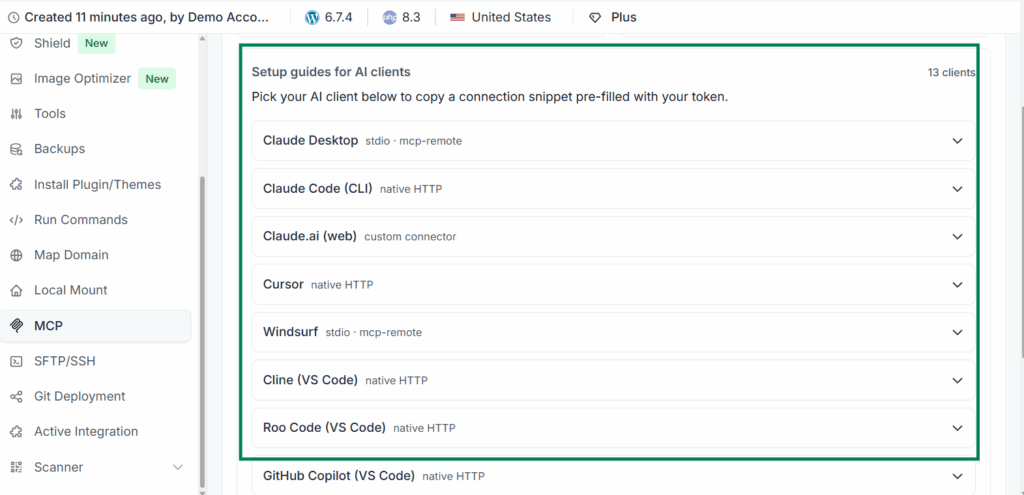
This is especially useful for developers and agencies that want faster site operations without jumping between disconnected screens. With more site tools available through InstaMCP, routine actions and site-level workflows become easier to run from one place.
For teams managing many WordPress sites, this is the most important update in the release because it expands what InstaWP sites can do through connected tooling and automation.
#2: Destination Server Selection for Site Migration
The Migrate Site workflow now lets users choose a specific destination server from a dropdown instead of relying only on automatic assignment.
This gives agencies and developers more control over where a site lands during migration. If you manage infrastructure by region, capacity, customer type, or server role, this change makes migration planning more deliberate and predictable.
The destination server dropdown displays servers in an ID - IP Address format, making it easier to identify the correct target server before starting a migration.
#3: Destination Server API Endpoint
A new API endpoint has been added to fetch eligible destination servers for migration.
This supports the new server selection workflow and gives the migration UI a clear source for available target servers. It also helps keep migration behavior more consistent across the dashboard and backend workflows.
#4: Stuck PHP-FPM Worker Detection
A new scheduled script now detects and kills stuck PHP-FPM worker processes scoped to tenant pools.
Stuck PHP-FPM workers can lead to unexplained slowdowns or intermittent 502/504 errors. This update adds automatic recovery for those cases while excluding the system www pool to avoid unintended process kills.
For site owners, the outcome is simple: fewer unresolved performance drops caused by stuck backend workers.
#5: Fail2ban Orphan Cleanup
v3.24.0 adds cleanup for stale IP entries in HestiaCP banlist.conf that are no longer managed by fail2ban.
This keeps banlist data cleaner and reduces the chance of stale entries lingering after fail2ban has already moved on.
#6: Admin-AJAX Flood Detection
Admin-AJAX flood detection has been added for runaway plugin loops, including cases such as WP File Manager elFinder loops.
When a plugin starts generating excessive admin-ajax activity, it can slow down a site quickly. This update improves visibility into those patterns so support teams can identify sudden slowdowns more effectively.
#7: Apache MPM Drift Detection and Auto-Tuning
The health-check system can now detect Apache MPM configuration drift and apply RAM-aware auto-tuning.
This helps keep worker pool settings aligned with available server resources. When configuration drift is detected during a fix run, Apache can be corrected and reloaded to prevent performance degradation over time.
Improved
Migration Pulls Store Database Dumps More Securely
Pull-migration database dumps are now stored outside public_html with hashed filenames.
This reduces the risk of accidental exposure during migration. The flow also includes cleanup safeguards so temporary database dump files do not linger unnecessarily after the migration process exits.
Health Check Received a Major Refactor
The InstaWP health-check script received a major refactor and optimization pass.
The updated structure improves coverage, reliability, and long-term maintainability for server diagnostics and automated correction workflows.
Apache MPM Tuning Is More Robust
Apache MPM tuning is now more tightly controlled with gated triggers, aligned RAM tiers, and capped backup counts.
This reduces the risk of unnecessary changes while still allowing misconfigured worker pool settings to be corrected when needed.
Safer Service Reload Handling
The safe_reload flow now strips the .service suffix before matching service names.
This fixes silent no-op behavior on some reload paths, making service reloads more dependable when server configuration changes are applied.
Fail2ban CIDR Validation Is Stricter
CIDRs are now validated upfront with a grep prefilter in the fail2ban integration.
This improves input handling and reduces noisy or invalid fail2ban operations.
Fixed
skip_search_replace Now Works Correctly During URL Changes
The skip_search_replace flag is now correctly forwarded through the WordPress URL change flow.
This prevents unintended search-replace operations when a URL change should update domain records without rewriting content in the database.
SFTP Chroot Ownership Restored After SSH/SFTP Toggle
A chained SSH/SFTP chroot ownership regression has been fixed.
This resolves cases where SFTP access could break after toggling SSH/SFTP. Customers who previously hit this issue may need to toggle SSH/SFTP once to apply the corrected behavior.
MCP Token Re-Enable Fix
MCP tokens are now synced correctly into the user_tokens table when MCP is re-enabled.
This fixes cases where MCP tokens became invalid after the MCP plugin was disabled and then enabled again.
Stuck PHP-FPM Recovery Is Properly Scoped
Stuck PHP-FPM recovery now targets tenant pools only and excludes the system www pool.
This keeps automatic recovery focused on affected tenant workloads while preventing unintended kills of system-level PHP-FPM processes.
SSH/SFTP Disabled by Default for New Users
New users created through the provisioning flow no longer have SSH/SFTP enabled by default.
Existing users are not affected. For newly provisioned users, access can still be enabled explicitly when needed, but the default posture is now more restrictive.
Security
This release includes two important security-focused changes.
- SSH/SFTP access is disabled by default for new users, reducing the attack surface on newly provisioned accounts.
- Pull-migration database dumps are stored outside the web root with hashed filenames to reduce accidental exposure risk.
Both changes are designed to keep secure defaults in place while preserving flexibility for teams that need explicit access or controlled migration flows.
Final Thoughts
v3.24.0 improves connected site management, migration control, and infrastructure resilience. InstaMCP 1.1 gives InstaWP sites access to 13 site tools, migration users get a clearer choice of destination server, and the infrastructure layer gains stronger recovery, tuning, cleanup, and security defaults.
For developers and agencies, that means fewer surprises during migrations, fewer hidden server-side reliability issues, and safer defaults for newly provisioned environments.
? Try the latest InstaWP updates now and migrate, manage, and operate WordPress sites with more control and stronger infrastructure reliability.