Ever wonder what propelled Love Beauty, a top beauty brand, to achieve 2,027 conversions from 33,656 views—a stellar 6% conversion rate? The secret? A scroll-triggered popup offering a 20% discount on first purchases.
Sure, it might sound like a classic marketing tactic, but it’s actually a powerful strategy- using WordPress popups- that savvy brands use to transform browsers into buyers!
With popups in WordPress, businesses can tap into the perfect touchpoint at just the right moment, transforming their site into a sales powerhouse!
They hold the power to skyrocket email engagement by 74.27%, boost newsletter sign-ups by 30%, and convert 7% of would-be abandoners into loyal subscribers.
Wondering what WordPress popups are and how to use them? Don’t worry! We’ve got all the tricks up our sleeves to get you started.
Table of Contents
What are Popups?
At their core, popups are the different types of interactive elements. They typically appear as a new window or overlay of the existing content and can be triggered by various actions like scrolling to a specific section, a new user visiting a page, or a buyer abandoning a cart.
Let’s explain WordPress popups through your shopping journey on Amazon. A big part of this e-commerce giant’s success lies in the clever use of popups in WordPress.
Suppose you’re browning Amazon for the perfect Christmas gift for your family. Just as you’re about to checkout, you’re offered a 10% discount or a gift card on your first purchase through a small window popup.
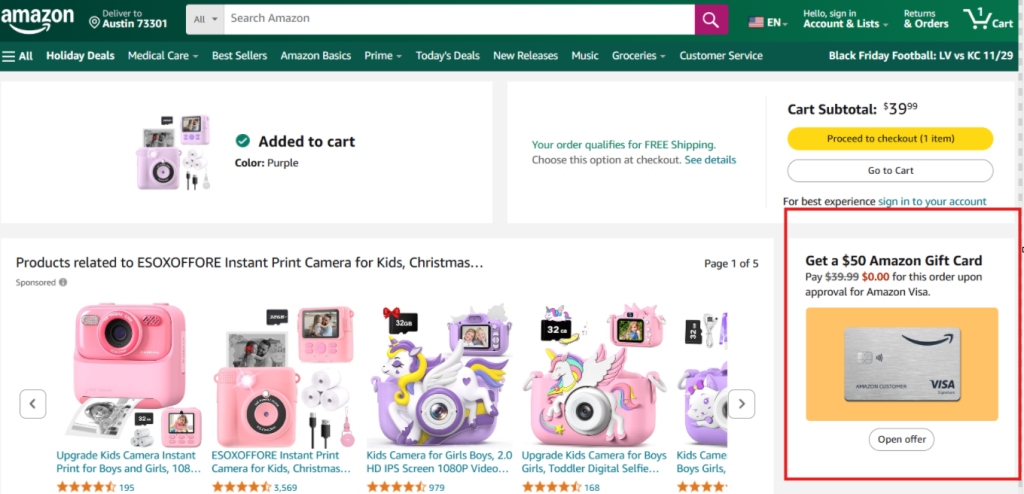
If you dare to leave the site with items still waiting in your cart, Amazon swoops in with a reminder, showcasing those abandoned items.
All these are the WordPress popups of different kinds that Amazon uses to:
- Fine-tune the shopping experience of the buyers
- Keeping users informed
- Engage buyers while boosting their conversions
It’s all about making a buyer/user journey seamless while multiplying revenue.
Not just Amazon, but virtually every website harnesses the power of popups to elevate functionality and supercharge user engagement.
Types of Popups in WordPress
Popups in WordPress are highly diverse and come in various forms to suit different marketing and engagement goals.
| Type | Exit Intent | Scroll-Triggered | Timed | Click to Open | Modal |
| Meaning | Appears when a user is about to leave a site | Appears when a user has scrolled up to a specific section of a site page. | Appears when a specific period has elapsed | Appear when a user clicks on a specific element | Overlay the entire page, requiring users to close them before continuing |
| Purpose | NYP Bar and Grill implemented a simple pop-up offering a discount for first-time visitors triggered by a button click. | To promote related content/product/discount | To display a welcome message or a limited-time offer | To provide more information about a product/service/offer | To display important details or to collect user data |
| Triggered By | Offers additional discounts or displays relevant content | User action (scrolling) | Time | User Interaction | User Interaction |
| Common Use Cases | Offers discounts or exclusive deals | User behavior, such as the cursor near the exit or mouse movement | Welcome messages, surveys, and limited-time deals. | More Information, Free Downloads | Important messages, surveys |
| Example | Coursera uses an exit-intent message at the bottom of the page to learn who visitors have heard about the platform | InstaWP is offering 50% Off for 6 Months through a scroll-triggered popup | InstaWP hosting is offering up to $500 in Hosting credits through a timed popup | NYP Bar and Grill implemented a simple popup offering a discount for first-time visitors triggered by a button click. | InstaWP hosting is offering up to $500 in Hosting credits through a timed pop-up |
How Popups Can Boost Revenue, Conversion, and Engagement for Different Businesses
If used wisely, popups in WordPress can become a game-changer for businesses- making stripes with everything.
Revenue Boost
WordPress popups can increase user interaction by up to 50% and drive revenue by 25% for e-commerce sites.
Take Lamale, for example, this brand saw online sales jump by 23.5% with a well-timed exit-intent popup, showcasing the revenue potential of popups in action.
Must Read: 8 Best Exit-Intent Popup Plugins for WordPress to Maximize Conversions
Higher Conversion Rates
Popups capture visitor attention at just the right moment, turning passersby into active participants. By segmenting audiences and delivering personalized messages, WordPress popups can significantly increase conversion rates by aligning content with user interests.
Increased Engagement
Popups fuel engagement by:
- Capturing email addresses to grow your lead list.
- Offering discounts to incentivize immediate purchases.
- Promoting new products to build awareness.
HelloFresh, a German meal-kit company, used popups. The result? Sign-ups increased by 20% in just one month.
How to Use WordPress Pop-up Plugin on Your WordPress Site?
If boosting your website’s conversions and engagement is your goal, WordPress popups are the go-to solutions.
The million-dollar question here is:
How to use WordPress pop-up plugins?
Here is the crisp guide that will help you figure this out.
Setting Up Your WordPress Popup Plugin
Setting up popups in WordPress is child’s play. Just dive into the WordPress plugin repository, choose the best WordPress popup plugin that fits your needs, and install it. Your website will be armed with the dynamic power of popups in WordPress in no time.
You thought the same, right?
Well, this approach is a gamble that can throw your live site into chaos, with unimaginable plugin/theme incompatibility issues that can leave you pulling an all-nighter.
InstaWP is a smart solution for installing WordPress popup plugins without making things go south. With InstaWP, you’re not simply creating popups in WordPress. You’re turning them into strategic touchpoints that boost revenue and increase user engagement.
Through this one tool, WordPress developers can:
- Safely test the WordPress popups in a staging environment to check compatibility with the WordPress core and other themes/plugins.
- Tweak the functions of the popups according to your needs.
- Experiment with popup display time, format, and other WordPress popup settings to ensure they’re hitting the mark and maximizing impact.
- Track the performance of WordPress popups in real-time and identify the underperforming areas.
Here’s how you can use InstaWP to get the most out of your popups in WordPress.
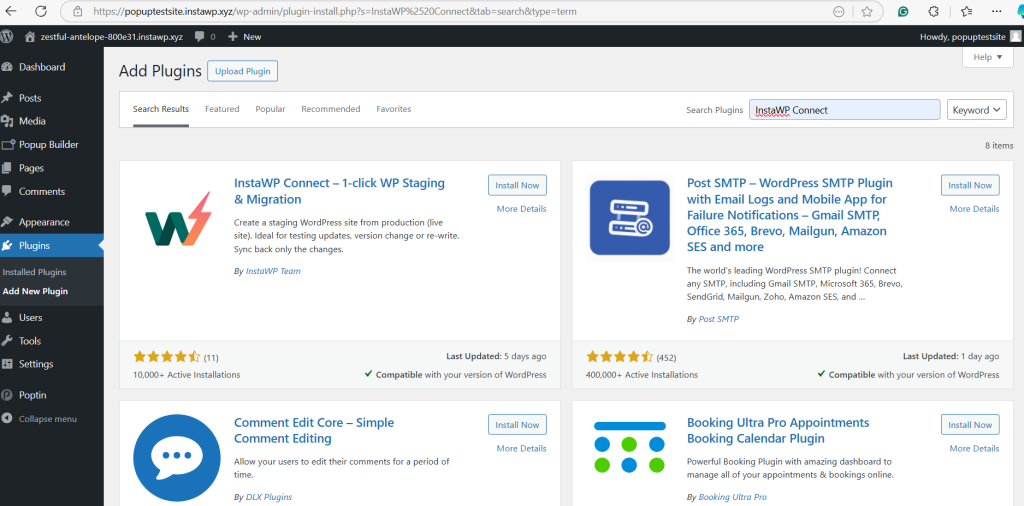
Step 1: Install InstaWP Connect on Your Live Site
- Go to the WordPress dashboard of your live site.
- Click on Plugin>Install Plugin>Add New Plugin.
- In the search section, type ‘InstaWP Connect’.
- Install and activate the InstaWP Connect plugin.
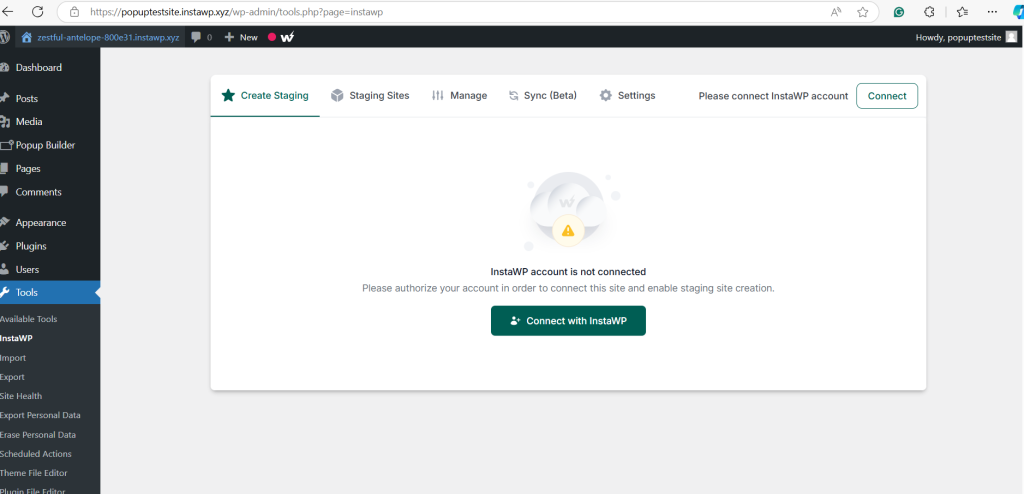
Step 2: Create Staging Site
- Click on Create Staging>Connect with InstaWP.
- Approve the request.
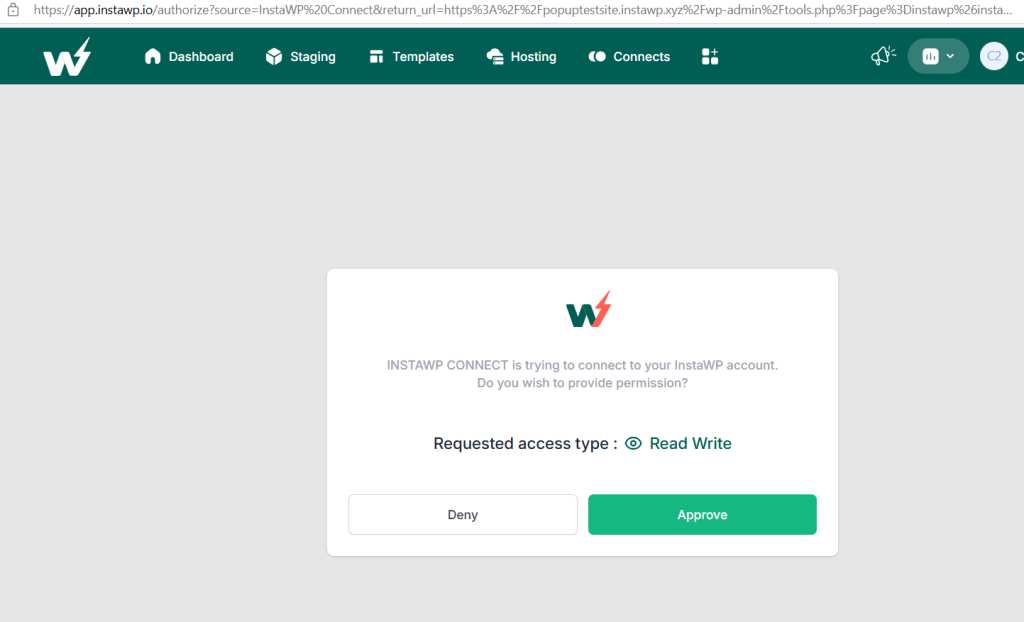
- The live site is now connected with the InstaWP account. Click on ‘Create Staging Site’ to make a copy of your site.
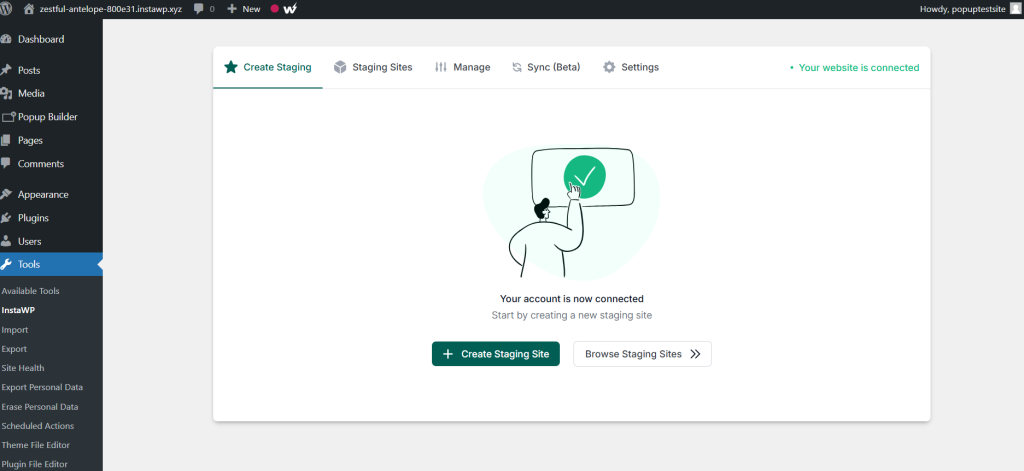
- Select the type of staging you need. For this demo, we’re selecting ‘Quick Staging’.
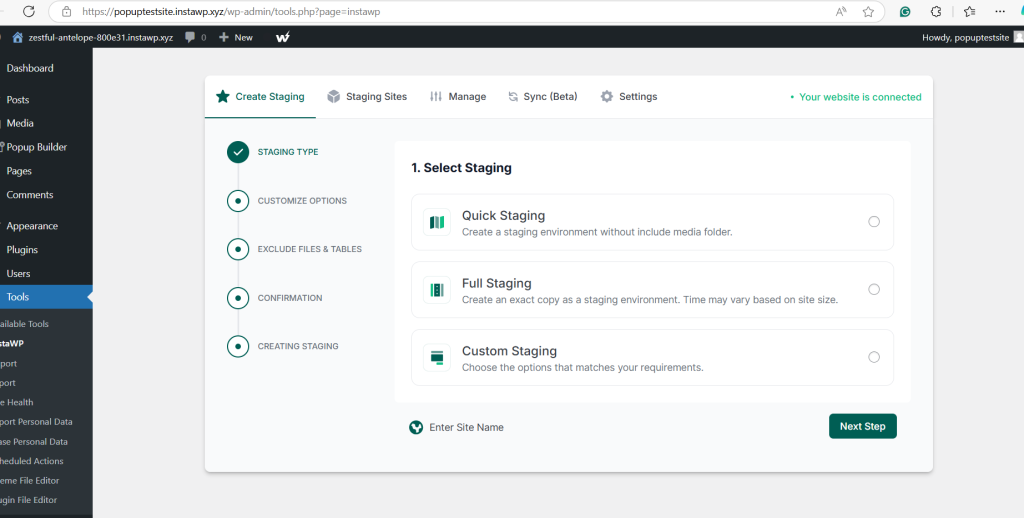
- Click on ‘Next Step’.
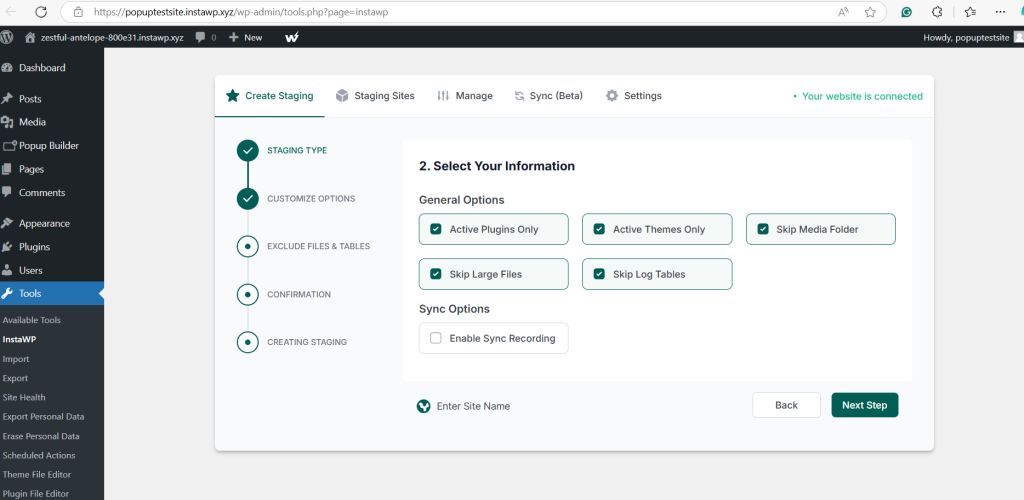
- Select the configuration you want to migrate. Wait for a while as staging is created.
Installing The Best WordPress Popup Plugin
- Once you’ve successfully created a WordPress staging site, use ‘Magic Login’ to have credential-free access to the WordPress dashboard of the staging site.

- In the search bar, type the name of the WordPress pop-up plugins you want to use and test.
Our recommendations here are:
- Depicter – A professional pop-up builder that lets you design high-converting pop-ups, slide-ins, and notification bars with advanced targeting, smart triggers, and a library of 700+ templates, combining powerful marketing features with polished, responsive design.
- Popup Maker by OptinMonster– Create customer popups in WordPress for email lists, coupons, product promotions, and many more goals.
- Poptin– Best marketing pop-up maker that businesses can use to create exit-intent, slider, and many other types of WordPress pop-ups.
- Popup Builder– An easy-to-use WordPress popup maker allowing businesses to create Mailchimp popups, Login popups, WooCommerce popups, and more.
Looking for more? Here is a blog that talks about 15 WordPress pop-up plugins in detail.
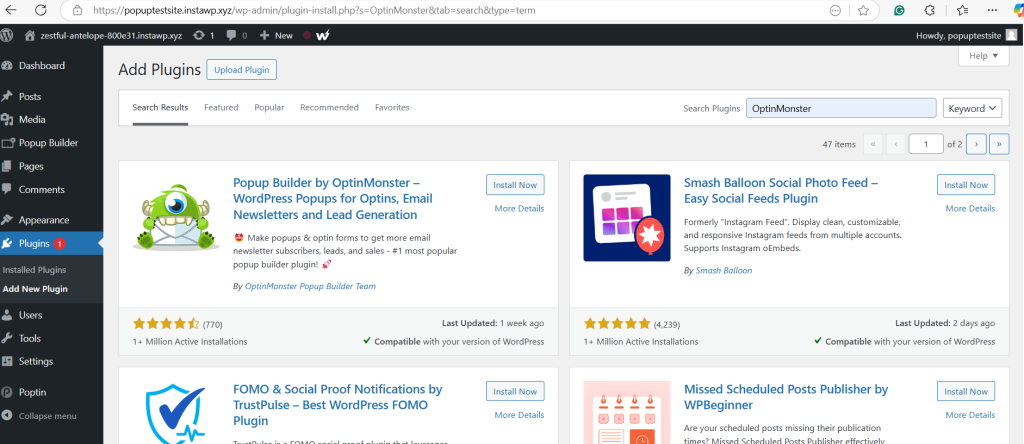
- Select the plugin and click on ‘Install>Activate.
- Configure the WordPress Popup plugin through the settings.
- Select popup triggers, customize designs, and set targeting rules.
Step 3: Test the WordPress Popup Plugin
In InstaWP staging, test various aspects of the selected WordPress popup plugin, such as:
- Preview of the plugin on different devices, such as mobile, desktop, and tablets
- Simulate different user behavior
- Test 3rd party integrations
- Any changes in the site’s functionality
How to Create High-Converting Popups?
While popups in WordPress hold immense power to boost everything from user engagement to conversion, doing them the right way is the real deal.
Here is what WordPress experts do to create high-converting pop-ups in WordPress.
Writing Headlines That Capture Attention
80% of the people read the headline only, and the rest 20% will read beyond, says Medium. So, if you want to have a popup that delivers, give it a compelling and catchy headline. This happens by:
- Adding numbers to the headline
- Using phrases like Act Now or Limited Time offers to create an urgency
- Clearly state the gains of the users
- Using power words such as Exclusive, Instant, or Free to incorporate strong emotions
- Tailoring headlines to specific audience strategies or behaviors
- Conducting A/B testing to determine which resonates best with your audience
Pro Tip– Optimize landing pages to double the impact of popups in WordPress.
Designing Popups for Mobile and Desktop Users
With over 58% of web traffic coming from mobile devices, WordPress developers must optimize WordPress for both mobile and desktop users.
Doing so is easy. Just make sure that :
- The popups in WordPress have sizes optimized for different screens.
- You’re using exit-intent technology to show popups in WordPress when users are about to leave the site and are triggered with different actions such as touch or mouse scrolling.
- The design is simple and uncluttered.
Popup Automation and Targeting
If used smartly, pop-ups in WordPress can automate lead generation and enable businesses to do very precise customer targeting.
Use Popups to Automate Lead Capture
Fed up with manual and tiring lead generation? Don’t worry! Grab the best WordPress popup plugin to automate lead capture as they:
- Let you set triggers, like scrolling or exit intent, to show the popup at just the right moment-resulting in higher customer engagement.
- Tweak the popup’s message based on the user behavior to boost the engagement rate.
- Set automated follow-up emails for those who sign up through the popup.
Segmenting Audiences for Personalized Popups
Businesses having a wider reach can use popups in WordPress to segment the audience based on demographics, behavior, and interests.
Some of the most popular WordPress popup builders offer in-build audience segmentation to make this task a cakewalk.
Wrapping Up
WordPress popups are the dark horses for businesses looking to boost user engagement, increase sign-ups, and drive revenue. However, ensuring that these popups in WordPress enhance the user experience -rather than disrupting it- is paramount.
That’s why testing and optimizing your popups before going live is the smart move.
InstaWP makes this easy. With its intuitive staging capabilities, InstaWP empowers WordPress developers to fine-tune popups and fully realize their potential.
So, stop struggling with sluggish engagement and start turning your store into a revenue-generation machine with the help of the best WordPress popups and InstaWP.
Here is a free sign-up opportunity for you.
FAQs
u003cstrongu003eWhat is a WordPress pop-up plugin?u003c/strongu003e
A WordPress pop-up plugin is a tool that users can use to create pop-up messages on the website. Through these popups in WordPress, businesses can capture leads, promote a specific discount/offer, provide exclusive content, and do a lot more. u003cbru003eu003cbru003eu003cstrongu003eHow can pop-ups in WordPress help increase sales?u003c/strongu003eu003cbru003eu003cbru003ePopups in WordPress can seize user attention at the right time and promote special offers, leading to higher conversion rates and increased sales.u003cbru003eu003cbru003eu003cstrongu003eWhat types of popups are effective for increasing sales?u003c/strongu003eu003cbru003eu003cbru003eThere are many types of popups in WordPres,s such as exit-intent popups, time-delayed popups, and scroll-triggered popups that businesses can use to promote specific discounts, exclusive content, or lead capture forms. All these actions help in boosting sales. u003cbru003eu003cbru003eu003cstrongu003eHow do I set up a WordPress popup plugin?u003c/strongu003eu003cbru003eu003cbru003eTo set up a WordPress popup plugin, install your chosen plugin from the WordPress repository, configure the settings to create your popup, and then specify when and where it should appear on your site.u003cbru003eu003cbru003eu003cstrongu003eHow do I measure the effectiveness of my popups?u003c/strongu003eu003cbru003eu003cbru003eYou can track the performance of your popups by monitoring metrics such as conversion rates, click-through rates, and the number of leads generated using your website analytics tools.u003cbru003eu003cbru003eu003cbru003eu003cstrongu003eWhat are common mistakes to avoid when using popups?u003c/strongu003eu003cbru003eu003cbru003eCommon mistakes include making popups too intrusive, failing to target the right audience, neglecting mobile optimization, and not testing popup performance. Experts recommend using staging sites for pre-launch testing.


