Are you seeking ways to enhance your customer support system through your WordPress site? This article will guide you on the path to excellent customer service by introducing the best WordPress Helpdesk plugins. These plugins are crucial tools that allow you to manage customer inquiries, respond efficiently, and ultimately, boost customer satisfaction.
In this comprehensive listicle, we will explore some of the top WordPress helpdesk plugins. Each plugin comes with its unique features and benefits that can be tailored to your business needs. By the end of the article, you will have a clear understanding of which helpdesk plugin is the perfect fit for your WordPress site.
Table of Contents
What are WordPress Helpdesk Plugins
WordPress Helpdesk Plugins are extensions or add-ons that integrate with WordPress websites to provide helpdesk or customer support functionalities. These plugins are designed to streamline and manage customer inquiries, support tickets, and communication between website owners and their users.
Here are some common uses and features of WordPress Helpdesk Plugins:
- Ticket Management: Helpdesk plugins allow you to create, organize, and manage support tickets efficiently. Users can submit their queries through forms on your website, and these queries are then converted into tickets that can be tracked and prioritized. For larger organizations considering help desk outsourcing, these plugins can seamlessly integrate with external support teams while maintaining quality control over ticket management
- Email Integration: Most helpdesk plugins integrate with email systems, allowing you to manage support tickets directly from your email inbox. You can reply to tickets, assign them to team members, and update ticket statuses, all without leaving your email interface.
- Knowledge Base: Many helpdesk plugins include a knowledge base feature where you can create and organize articles, FAQs, and tutorials to help users find answers to common questions on their own. This can reduce the number of support tickets and improve user satisfaction.
- Automation: Helpdesk plugins often include automation features such as auto-assigning tickets to specific agents or departments, sending automatic replies to users when a ticket is received, and setting up predefined responses for common inquiries.
- Customization: You can customize the look and feel of your helpdesk system to match your website’s branding. This includes customizing ticket submission forms, email templates, and the overall user interface.
- Reporting and Analytics: Helpdesk plugins provide reporting and analytics tools that allow you to track metrics such as ticket volume, response times, resolution rates, and customer satisfaction scores. These insights help you identify areas for improvement and measure the effectiveness of your support efforts.
- Integration with Other Tools: Many helpdesk plugins integrate with other tools and services such as CRM systems, live chat software, and project management tools, allowing you to streamline your support workflow and improve collaboration among your team members.
Overall, WordPress Helpdesk Plugins are valuable tools for businesses and organizations looking to provide efficient and effective customer support directly from their WordPress websites. They help streamline communication, improve response times, and enhance the overall user experience.
Best Free WordPress Helpdesk Plugins
Check out these free yet best WordPress helpdesk plugins that agencies can use to improve the functionality of their clients’ sites.
1. SupportCandy

SupportCandy is a comprehensive, feature-packed Helpdesk plugin that effortlessly integrates with your WordPress site. It transforms your site into a complete help desk and customer support ticket system, offering features at par with leading SaaS solutions like Zendesk, Help Scout, or Freshdesk.
As one of the oldest helpdesk plugins, it provides a simple, secure, and robust support ticketing system for optimal customer service.
Features and Benefits
- Unlimited Tickets: There is no limit to the number of tickets, making it ideal for businesses of all sizes.
- Unlimited Agents and Roles: You can have as many support agents as you need, each with specific roles and responsibilities.
- Advanced Filters and Search Functionality: Allows you to easily sort and find tickets based on custom criteria.
- Private Notes for Agents: Facilitates internal communication and collaboration among support agents.
- Agent Collision: Avoids confusion and repetitive responses by indicating when an agent is responding to a ticket.
- Email Notifications: Keeps you and your agents updated on ticket status via email.
- Premium Add-Ons: Enhance the plugin’s functionality with add-ons like Email Piping, WooCommerce Integration, Canned Reply, Assign Agent Rules, SLA, Satisfaction Survey, Automatic Close Tickets, Usergroup, Agentgroup, Schedule Tickets, Knowledgebase Integrations, and FAQ Integrations.
Pricing Structure
SupportCandy offers a free version with significant features to get you started. For more advanced features, they offer premium add-ons starting from $79 for one site.
2. Support Genix
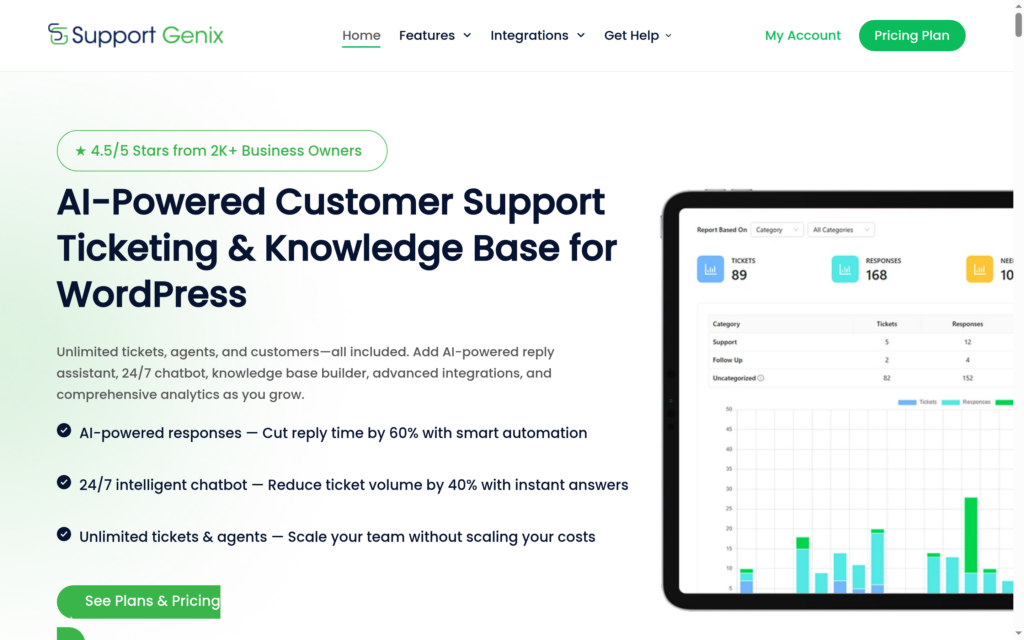
Support Genix is a versatile WordPress helpdesk plugin designed to simplify support operations. Businesses can efficiently handle unlimited tickets and manage multiple agents directly from their WordPress dashboard. The plugin streamlines support workflows by integrating various email addresses and enabling faster ticket responses.
From essential ticket management to advanced features, Support Genix delivers comprehensive helpdesk solutions for businesses to enhance customer service.
Features and Benefits
- Unlimited Ticket Management: Organize and manage unlimited tickets efficiently using a centralized dashboard.
- Multi-Email Integration: Connect multiple email addresses and inboxes for consolidated communication and faster ticket responses.
- Custom Fields Support: Gather specific customer information with custom ticket fields.
- Automated Ticket Assignment: Automatically distribute tickets to available agents based on workload and expertise.
- Advanced Reporting System: Analyze ticket performance and agent productivity with detailed reports.
- Email Notification System: Automated email alerts for ticket updates, ensuring timely communication between agents and customers.
Pricing Structure
Support Genix offers a free version with essential helpdesk features. The Pro version, priced at $59, includes advanced functionality.
3. Awesome Support

Awesome Support – WordPress HelpDesk & Support Plugin is an innovative and feature-packed solution that revolutionizes the way businesses manage their customer support. It is a versatile helpdesk and support ticketing plugin that stands on par with SAAS solutions such as Zendesk or Helpscout, offering a comprehensive set of tools to efficiently handle customer inquiries and issues.
Features and Benefits
- Ticketing: Customers can conveniently submit tickets from the front-end while agents can respond from the WordPress back-end, ensuring a seamless communication process.
- Import: This plugin allows the import of tickets from other platforms such as Zendesk, Helpscout, and Ticksy, facilitating a smooth transition to your new helpdesk.
- Email Notifications: Relevant parties receive email notifications regarding certain actions, with the option to customize these emails.
- Restricted Access: Correspondence is kept private between the client and the agents, maintaining confidentiality unless the public tickets premium add-on is activated.
- File Upload: You can control when files can be uploaded, the number of files, and their size, ensuring the security and efficiency of the process.
- Multiple Products and Departments: Provide support for multiple products and departments, catering to a diverse range of inquiries.
- Custom Fields: Set up additional custom fields on your ticket forms to gather more specific information from your customers.
- Terms & Conditions: Customers are required to agree to terms and conditions before opening a ticket, ensuring legal compliance.
- Old Tickets: Identify old tickets quickly with tags and limit your viewable ticket list to only show old tickets, enhancing organization and management.
Pricing Structure
For the most updated pricing details, please visit the official site of Awesome Support.
4. Fluent Support

Fluent Support is a top-tier WordPress helpdesk and customer support ticket plugin. Offering an impressive array of features, Fluent Support is designed to streamline customer service operations and improve response times.
It is an ideal choice for businesses seeking to centralize customer queries, manage support tickets effectively, and enhance overall client satisfaction. It is a perfect alternative to premium SaaS solutions like Zendesk, Helpscout, or FreshDesk.
Features and Benefits
- All-in-One Customer Support: Solution Fluent Support consolidates all customer queries, allowing businesses to efficiently respond and track them. It also lets you store additional customer data and track their overall stats.
- Customer Portal: Customers can open a ticket from your website or use your site’s contact form. They can also view all their tickets when they log into your site.
- Ticket Segmentation and Reporting: Fluent Support provides the capability to segment tickets by product. Detailed reports about support agents and customers are also available.
- Built-in Productivity Tools: The plugin offers tools that enhance productivity such as sending a response to multiple tickets at once and closing old tickets automatically.
- Seamless Integrations and Features (Pro): The Pro version of Fluent Support offers integrations with WooCommerce, EDD, and popular membership plugins.
Pricing Structure
The pro version of the plugin starts from $129 for a single site.
5. JS Help Desk

JS Help Desk is a comprehensive, easy-to-use WordPress helpdesk and support plugin. As a professional customer support tool, this plugin offers more features than most expensive alternatives on the market.
The best part – it’s completely free. JS Help Desk solves the need for an efficient and user-friendly support system for your website, allowing you to seamlessly manage customer inquiries and provide excellent customer service.
Features and Benefits
- Front-end Tickets: Users can create tickets from the front end, simplifying the ticket submission process.
- Visitor/Guest Tickets: This feature allows guests to open support tickets without creating an account, enhancing convenience for all users.
- Unlimited Tickets & Agents: JS Help Desk supports unlimited tickets and agents, making it scalable for businesses of all sizes.
- Support Icon: The plugin offers a support icon for the front end with various position options, enhancing the visibility and accessibility of customer support.
- Multiple Attachments: Users can upload multiple attachments in ticket creation and ticket replies, streamlining communication and problem-solving.
- Powerful Filters and Sorting: The plugin offers powerful filters for both users and admins to search tickets with sorting options, enhancing efficiency in ticket management.
- Email Notification: The system sends email notifications to users, agents, and admin in different actions like new ticket creation, reply, ticket closure, etc.
- Custom Fields: JS Help Desk offers 12+ custom fields (Text field, Dropdown, Checkbox, Radio button, Text area, Dependent fields, Admin only, Date, Email, Upload file, Multi-select, and T&C), providing flexibility in data collection.
Pricing Structure
JS Help Desk is completely free. However, it offers 35+ premium add-ons that enhance its functionality, starting from $69/ year.
6. Help Scout

Help Scout is a renowned WordPress Helpdesk Plugin that serves thousands of businesses across 140 countries. This plugin is designed to make customer support interactions more human and helpful. It addresses the need for a streamlined and effective communication channel between your business and your customers.
Features and Benefits
- Easy to Set Up: Help Scout is straightforward and takes only a few minutes to install and set up on your WordPress site. This allows you to save time and start enhancing your customer support immediately.
- Contact Form: The plugin enables you to add a contact form to your site, which submits inquiries directly to Help Scout. This feature ensures that all customer inquiries are received and addressed on time, improving customer satisfaction.
- Help Scout Beacon: By adding a Help Scout Beacon to your site, you can provide real-time chat support to your site visitors. This proactive support tool can significantly enhance user experience on your site.
- For businesses seeking more advanced features, Help Scout Desk is a premium plugin that adds a comprehensive customer portal to your WordPress site. With this, customers can submit inquiries, view their complete history, and more, providing an all-in-one customer support solution.
Pricing Structure
Help Scout offers different pricing plans to suit various business needs, with a single site priced at $49.99
7. Zendesk Support for WordPress

Zendesk Support for WordPress is a dynamic Helpdesk plugin that enables you to integrate your existing Zendesk helpdesk into your WordPress site or blog. This plugin is designed to offer an efficient platform for managing your customer support right from your website.
It is a problem-solving tool that ensures your users do not have to leave your website to submit tickets, track their progress, or participate in community forums.
Features and Benefits
- Single Sign-On with Zendesk’s Remote Authentication: This feature ensures that your users do not have to log in to Zendesk Support to submit tickets or participate in community forums. It checks the login status on your WordPress site and signs them directly into Zendesk. The benefit of this feature is the convenience it offers to your users, improving their experience and enhancing security.
- Conversion of Blog Comments into Zendesk Support Tickets: With this feature, you can convert any comment into a ticket directly from the comments administration screen. This is beneficial as it allows you to manage customer concerns efficiently and show your commitment to excellent customer service.
- The Zendesk Support Web Widget: This widget allows you to add a feature to any webpage where users can search your knowledge base, chat with an agent, or submit a ticket. The widget can be added to every page on your WordPress blog or specific pages using a template tag.
- The Zendesk Support Feedback Tab: Similar to the Web Widget, this tab can be added to any webpage, enabling users to search your knowledge base, chat with an agent, or submit a ticket. The look and feel can be customized according to your preference.
- Access Tickets from Your Dashboard: This feature allows you full access to your views, tickets, and comments from your dashboard, keeping you updated on your support requests at all times.
- A Simple Contact Form on the Dashboard: The plugin allows you to add a simple contact form on your dashboard, enabling visitors to quickly submit a question or issue.
Pricing Structure
Zendesk Support for WordPress plugin is available for use with an existing Zendesk account. If you do not have an account, you can sign up for a 30-day free trial without the need for a credit card.
The service package starts from $19/ month while the sales package starts from $55/ month.
Final Word
In conclusion, each of these WordPress Helpdesk Plugins – SupportCandy, Awesome Support, Fluent Support, JS Help Desk, Help Scout, and Zendesk Support for WordPress – provide unique features to enhance your customer support system.
They all offer comprehensive ticketing systems, customizable appearances, and GDPR compatibility. Some offer advanced features like agent collision, email piping, and WooCommerce integration.
Choosing the right plugin depends on your specific business needs and budget. You are encouraged to explore these plugins further and decide which one best fits your requirements. Remember, an efficient customer support system is key to customer satisfaction and overall business success.
FAQs
What are WordPress Helpdesk Plugins?
WordPress Helpdesk Plugins are extensions that integrate with WordPress websites to provide customer support functionalities, such as ticket management, email integration, and knowledge base creation.
How do WordPress Helpdesk Plugins benefit my website?
These plugins streamline customer inquiries, manage support tickets efficiently, and enhance communication between website owners and users, ultimately improving user satisfaction and reducing workload.
Are WordPress Helpdesk Plugins customizable?
Yes, most plugins offer customization options, allowing you to tailor the look and feel of your helpdesk system to match your website’s branding and customize ticket submission forms, email templates, and user interfaces.
Can I automate tasks with WordPress Helpdesk Plugins?
Yes, automation features are common in these plugins, including auto-assigning tickets, sending automatic replies, and setting up predefined responses for common inquiries, which helps save time and streamline support processes.
Do WordPress Helpdesk Plugins offer reporting and analytics?
Yes, most plugins provide reporting and analytics tools to track metrics like ticket volume, response times, resolution rates, and customer satisfaction scores, enabling you to measure the effectiveness of your support efforts and identify areas for improvement.
Do WordPress Helpdesk Plugins integrate with other tools?
Yes, many plugins integrate with CRM systems, live chat software, and project management tools, allowing you to streamline your support workflow, improve collaboration among team members, and enhance overall efficiency.
Are WordPress Helpdesk Plugins suitable for businesses of all sizes?
Yes, these plugins can be beneficial for businesses and organizations of all sizes, from small startups to large enterprises, by providing scalable support solutions that adapt to their needs and requirements.
How do I choose the right WordPress Helpdesk Plugin for my website?
Consider factors such as your specific support requirements, budget, scalability, ease of use, compatibility with your existing tools, and user reviews when selecting a plugin that best suits your needs.


