If you’ve worked with WooCommerce long enough, you’ve likely hit its limits. Perhaps a client requested a customized checkout flow. Or a pricing model that no plugin could handle. That’s where custom WooCommerce development comes in, and it’s one of the biggest opportunities for agencies in 2026.
Clients no longer want WooCommerce stores that look like everyone else’s. They want experiences tailored to their brand and customers. That means unique features, smarter workflows, and solutions that can’t be downloaded from the plugin directory.
In this guide, we’ll walk you through what WooCommerce customer development is and how your agency can offer it as a service.
Table of Contents
What Is WooCommerce Custom Development?
WooCommerce custom development involves creating features and workflows that extend beyond what plugins and themes can offer out of the box. It’s not just about tweaking colors or moving buttons. It’s about shaping a WooCommerce store to match a client’s exact business needs.
For example, a client might want:
- A one-page checkout with conditional fields
- A dynamic pricing system based on user roles or quantity
- A custom product builder that lets users design items live
- A vendor dashboard for multi-seller management
- Unique tax, shipping, or payment logic for specific regions
You can’t achieve these things by simply installing a few plugins. That’s where custom WooCommerce development services step in.
At the technical level, it involves working directly with WooCommerce’s codebase. This could include writing custom PHP functions, using WooCommerce hooks and filters, editing templates, building mini-plugins, or even integrating third-party APIs.
But from a client’s perspective, it’s about solving real business problems. They don’t care if it’s done through a hook or a function file. They care that their site works exactly the way they need it to.
As an agency, offering custom WooCommerce development allows you to create tailored eCommerce experiences that give your clients a competitive edge. And because every business is different, this kind of service often leads to deeper client relationships, long-term retainers, and more word-of-mouth referrals.
Why Agencies Should Offer Custom WooCommerce Development Services
Most clients who come to your agency don’t want a basic WooCommerce store. They want something that works for their business model, not against it. That’s exactly why custom WooCommerce development services are in high demand — and why they’re a smart offering for any agency working in eCommerce.
1. Clients Need Features Plugins Can’t Provide
Plugins are great for general needs, but real businesses often need something more specific. Think custom subscription rules, tiered pricing, or a booking system with unique availability logic. These aren’t things you can always solve with a plugin, and when you try, it often leads to bloated, slow, and unstable sites.
By offering custom WooCommerce development, your agency becomes the team that says “yes” when others say “we can’t do that.”
2. Higher Project Value and Profit Margins
Custom development commands higher pricing because it solves deeper problems. Instead of charging a few hundred dollars for setup, you can quote in the thousands for real, tailored functionality.
And because clients often need changes and improvements over time, it opens the door for monthly retainers and repeat work.
3. Better Client Retention
When you build something custom, your agency becomes more than a service provider; you become a partner. Clients stick around longer because you understand their systems, their goals, and their business logic. That kind of relationship is hard to replace.
4. A Competitive Edge in the Agency Space
Most agencies still rely on cookie-cutter templates and prebuilt solutions. By offering custom WooCommerce store development, you stand out from the crowd. You can confidently pitch to clients in complex industries like B2B, multi-vendor marketplaces, or hybrid service-product businesses, where competitors may hesitate.
5. Scalability Through Repeatable Custom Workflows
The best part? Once you’ve built a few custom features, you can start templatizing them for future use. You don’t need to reinvent the wheel every time.
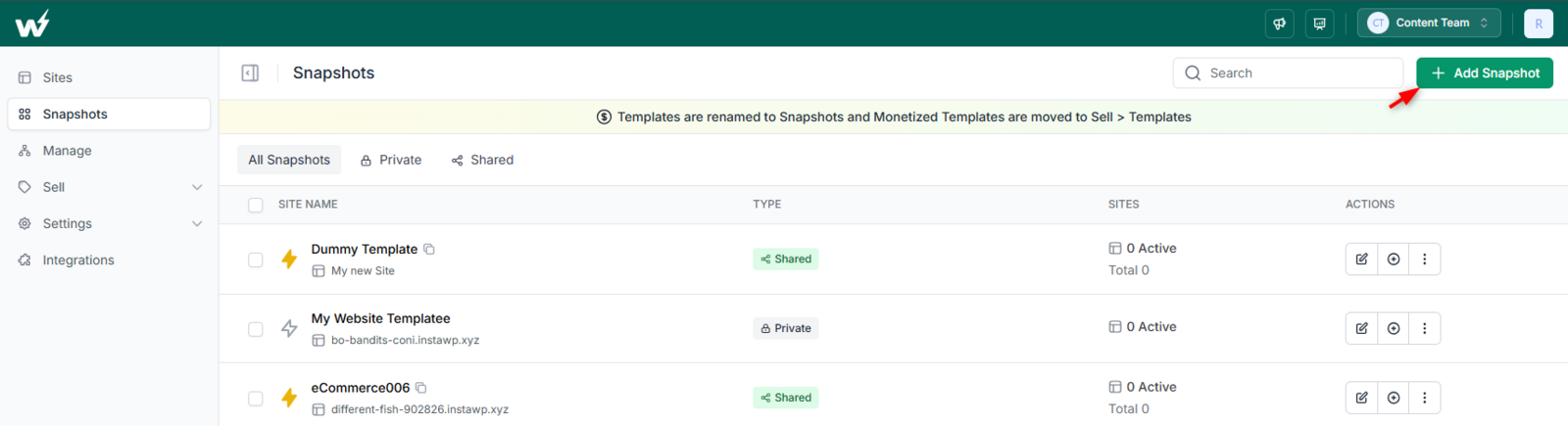
You can save those custom WooCommerce configurations as a Snapshot ( for internal use) or as Templates( for external use) in InstaWP and clone them instantly for new projects.
In short, custom WooCommerce development is not just a technical skill — it’s a business opportunity. It lets you charge more, deliver more value, and build stronger client relationships.
What Types of WooCommerce Custom Development Services Can Agencies Offer (And Charge For)?
If you’re thinking about offering WooCommerce custom development services, it helps to know what clients need and what they’re willing to pay for. Below are some of the most in-demand services agencies are offering today, with real use cases you can build around.
Custom Checkout Experiences
Example: A fashion brand wants a one-page checkout with size guides, conditional shipping options, and a live delivery ETA.
- What you build: a lightweight, branded checkout with logic that adapts based on cart content, user role, or location.
- Why it matters: checkout friction kills conversions. A custom flow directly increases sales.
Product Builders and Configurators
Example: A client sells customized furniture. Customers need to pick a size, material, color, and add engraving.
- What you build: an interactive product builder with live previews and dynamic pricing.
- Why it matters: Standard variable products can’t handle complex logic. A custom WooCommerce store development project like this becomes a major value-add.
Dynamic Pricing & Discount Logic
Example: A wholesaler offers bulk discounts and partner-specific pricing tiers.
- What you build: pricing rules based on quantity, user role, or cart value.
- Why it matters: most discount plugins are clunky or incompatible. You offer a clean, reliable solution.
Role-Based Access and B2B Portals
Example: A B2B company wants to show different products and prices based on who’s logged in.
- What you build: a gated storefront experience with restricted categories, login-only pricing, and role-specific dashboards.
- Why it matters: this is one of the top requests in custom WooCommerce development for agencies working in wholesale or distribution.
Custom Reports and Admin Dashboards
Example: A client needs monthly vendor sales reports and payout summaries emailed automatically.
- What you build: a backend dashboard that aggregates data and generates branded reports on schedule.
- Why it matters: saves time, builds trust, and becomes a recurring feature that keeps clients coming back.
API Integrations and Automations
Example: A client wants their orders synced with a shipping provider or CRM.
- What you build: custom API calls to push order data securely and automate status updates.
- Why it matters: These integrations reduce manual work and eliminate human error. They’re high-value and hard to outsource.
Offering these services positions your agency as a go-to team for custom WooCommerce development, not just for building stores, but for solving complex eCommerce problems. And when done right, these projects are not only profitable but also lead to long-term client relationships.
The Technical Stack You Need to Start Offering Custom WooCommerce Development Services
To offer reliable custom WooCommerce development services, your agency needs more than just coding skills. You need the right development environment, tools for collaboration, and a workflow that supports custom features without delays or chaos.
Core Skills to Have (or Hire For)
You don’t need a massive dev team, but you do need someone who’s confident with:
- PHP – Still the core language of WordPress and WooCommerce. Most custom logic is built here.
- JavaScript (basic to intermediate) – Needed for real-time interactions like product configurators and custom checkout elements.
- WooCommerce Hooks & Filters – These give you fine-grained control over how WooCommerce behaves.
- Template Overrides – Knowing when and how to override WooCommerce templates without breaking things is key.
- REST API & Webhooks – Especially useful when syncing orders or data with third-party systems.
Tools That Power a Real-World WooCommerce Workflow
Your agency’s workflow should focus on building faster, testing safely, and delivering with confidence. Here’s a modern toolset to make that happen:
InstaWP (Your Full Dev + Hosting Environment)
InstaWP is an all-in-one cloud development environment for WordPress and related functionalities. It lets you build, host, and manage WooCommerce sites from one place, including fully hosted, production-ready stores.
You can:
- Launch a new WooCommerce site in seconds
- Customize themes, plugins, and workflows directly in a live environment
- Manage backups, PHP settings, and site access without touching cPanel
- Use InstaWP Connect for 2-way sync with client sites
This makes it ideal for both development and delivery. You don’t need to move sites from staging to production. You’re already building on scalable and managed hosting.
What’s more interesting here is that InstaWP will streamline the entire process of custom WooCommerce development for agencies. Over time, you’ll find yourself repeating custom setups, a specific plugin combo, a pricing logic snippet, or a layout tweak.
With InstaWP, you can save that full setup as a reusable Template. That means you can:
- Launch a client-ready WooCommerce site with your custom stack already pre-installed
- Skip repetitive configuration
- Start every new project with confidence
This helps you scale your custom WooCommerce store development process and shorten delivery timelines.
Other than this, you require a few plugins like Advanced Custom Fields (ACF), Query Monitor + Debug Bar, or WPCode or Code Snippet. Platforms like Git + GitHub / GitLab, Postman / Insomnia, and Figma or Adobe XD (Optional) are also required to take care of other aspects of WooCommerce customer development.
With the right tools and environment, you’ll not only build better stores. You’ll do it faster, more reliably, and with fewer surprises for your team or your clients.
How to Get Started with Custom WooCommerce Development
If you’re running an agency and want to start offering custom WooCommerce development services, it’s not just about knowing the code; it’s about creating systems, services, and proof points that win clients and deliver value consistently.
Here are 10 proven steps to help your agency confidently enter and grow in this space:
1. Start with a Micro-Niche Offering
Instead of trying to offer “custom everything,” narrow down to one or two high-demand use cases like:
- Custom WooCommerce checkout optimization
- B2B WooCommerce setups
- Product configurators for made-to-order stores
This builds credibility and simplifies sales. Once you’re trusted in one area, you can upsell more services later.
2. Create a Live Demo You Can Show or Clone
Use InstaWP to build and host a demo WooCommerce site that shows off your custom work.
For example:
- A demo with a custom checkout + pricing logic
- A custom vendor dashboard with limited role access
Let prospects test it live, no screenshots, no slide decks.
? Pro tip: Save that site as a Snapshot inside InstaWP so you can clone it for new projects instantly.
3. Build Pre-Packaged Service Pages
Don’t list “WooCommerce development” as a generic service. Create landing pages like:
- “Custom WooCommerce Checkout Setup – from $999”
- “WooCommerce Role-Based Pricing for Wholesale Businesses”
- “Advanced WooCommerce Product Builder Solutions”
This makes your offer clear and productized, easier to sell, quote, and scale.
4. Position Yourself as a Problem-Solver, Not a Coder
Clients don’t search for “custom filters” or “template overrides.” They search for:
- “How to show different prices to logged-in users”
- “How to customize the checkout fields in WooCommerce”
- “WooCommerce only allows orders above $500.”
Create content, services, and pitch decks that speak their language, not yours.
5. Train Your Team on WooCommerce-Specific Hooks & Architecture
WooCommerce has its way of doing things. Get your dev team familiar with:
- WooCommerce actions and filters (woocommerce_before_checkout_form, etc.)
- How to safely override templates
- The structure of key files like class-wc-cart.php and class-wc-checkout.php
This is where real custom WooCommerce development work happens.
6. Build an Internal Component Library
Start saving reusable code snippets, plugin settings, and UI elements that can be used across projects. Examples:
- Custom mini-plugin for dynamic cart rules
- ACF layouts for product tabs
- Snippets for tax/shipping logic overrides
This makes future projects faster and more profitable. And, to make everything way too fast, InstaWP is the only resort. Agencies selling or planning to sell WooCommerce customer development services with InstaWP will have an edge over their competitors because they are not simply building. They are building 10x faster.
Instead of saving these components separately and copying them manually each time, you can build a full working setup in InstaWP and save it as a Snapshot, complete with your custom plugins, theme settings, and field configurations.
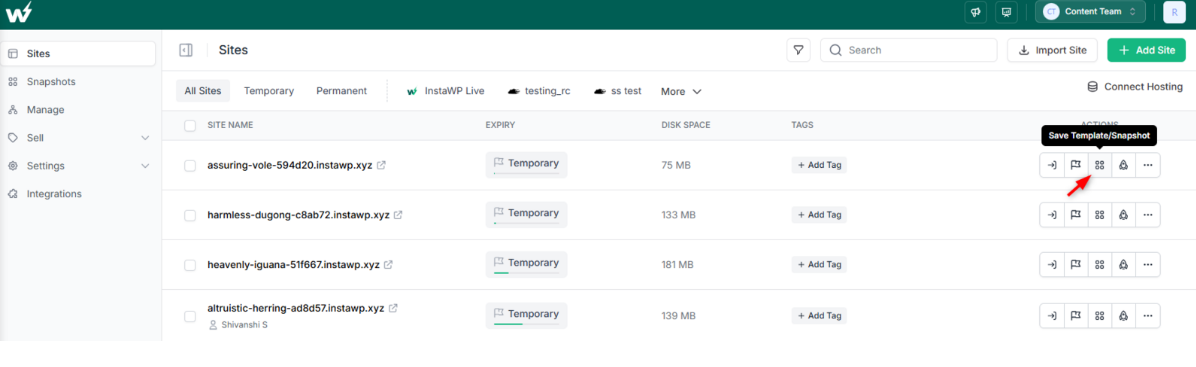
Then, when a new project comes in, just:
- Launch a new InstaWP site from your saved template
- Customize only what’s specific to that client
- Use InstaWP’s Site Tools like the Code Editor, WP Config Editor, and Plugin Manager to tweak or test features instantly
- Hand off or go live without migration, because the site is already fully hosted
7. Create Before-After Case Studies (Even if They’re Internal)
Use your InstaWP-hosted demos to show:
- A default WooCommerce checkout vs your custom version
- A stock pricing setup vs your tiered logic in action
Even mock examples work. These case studies build trust and shorten the sales cycle.
8. Leverage Your Existing Clients
Go back to current or past clients and suggest enhancements:
- “We can simplify your checkout and reduce drop-offs”
- “Let’s make your pricing smarter for repeat customers”
Offer a mini audit, then pitch a small custom project to get started.
9. Start Writing About What You’re Building
Write blogs or post on LinkedIn about:
- “How we built a role-based WooCommerce cart”
- “Our process for building custom product types”
- “Why this WooCommerce store doubled revenue after checkout changes”
This builds authority and gets inbound leads searching for custom WooCommerce development services.
How to Price WooCommerce Custom Development Services
When it comes to custom WooCommerce development services, pricing isn’t just about hours and effort. It’s about understanding the business value you’re delivering. A faster checkout or smarter pricing logic can directly impact a client’s revenue, so your pricing model should reflect that impact.
Here’s how to approach pricing in a way that’s profitable for your agency and clear for your clients.
1. Don’t Sell Code — Sell Solutions
Clients don’t care if a feature takes you 3 hours or 30. They care about what it does — reduces cart abandonment, speeds up admin workflows, or increases conversions.
Position your pricing around the problem you’re solving, not the technical details. For example:
- “Custom checkout optimization to reduce drop-offs”
- “Wholesale pricing system with role-based logic”
- “Custom product builder for made-to-order workflows”
This lets you command higher fees and avoids hourly pricing traps.
2. Use a Tiered Pricing Model
Offer your services in structured tiers to help clients choose based on value, not just cost.
Example:
| Tier | What’s Included | Starting Price |
| Starter | Basic field customization, minor checkout changes | $500–$1,000 |
| Pro | Custom checkout, pricing logic, and dashboard edits | $1,500–$3,000 |
| Advanced | API integrations, role-based storefronts, performance tuning | $3,500+ |
This makes quoting easier and sets expectations upfront.
3. Add Scope Buffers for Iteration
Custom WooCommerce development rarely goes exactly to plan. Clients change their minds, edge cases emerge, and logic evolves. Build in buffer time and pricing for:
- Revisions
- Testing across devices
- Compatibility with plugins or payment gateways
You can also offer priority support or “urgent turnaround” as a premium add-on.
4. Use InstaWP to Scope Faster and Test Deliverables
When scoping projects, use InstaWP to:
- Launch a site with WooCommerce pre-installed
- Build quick prototypes of the requested features
- Share a working preview before quoting or committing
Clients understand value faster when they can see it in action. This helps you justify pricing and close deals faster, especially for high-ticket work.
Later, you can use InstaWP’s versioning and site tagging to organize deliverables, track changes, and present staged work cleanly.
5. Offer Retainers for Long-Term Value
Most custom WooCommerce projects lead to ongoing needs: maintenance, optimization, or CRO. Offer retainers that include:
- Bug fixes or feature improvements
- Site speed monitoring
- WooCommerce updates and security patches
- Monthly performance reports
Once you’ve delivered real value, clients are more than happy to keep paying for peace of mind.
6. Be Transparent About What’s Custom and What’s Not
Always clarify:
- What is being custom-built vs configured with existing tools
- What’s scalable or reusable vs hard-coded
- What happens when WooCommerce or plugin updates roll out
This protects you from unrealistic expectations and keeps the relationship healthy.
Pricing custom WooCommerce development is part art, part strategy. Start with a simple structure, base it on client outcomes, and let your results speak for themselves.
Selling Custom WooCommerce Development to Clients
Selling custom WooCommerce development services isn’t just about listing technical capabilities. It’s about helping clients understand why tailored solutions deliver better results than off-the-shelf plugins or templates.
Here’s how your agency can close more deals by shifting the conversation from features to outcomes.
1. Lead with Business Problems, Not Code
Clients don’t come to you asking for add_filter() or custom post types. They come with business goals:
- “We’re losing sales at checkout”
- “Our team wastes hours managing orders manually”
- “Our store doesn’t support wholesale customers properly”
Start the conversation there. Show how custom WooCommerce development can solve those pain points directly — faster checkouts, smarter workflows, and user experiences designed around their goals.
2. Show Working Demos Instead of Slides
Don’t try to explain custom logic with diagrams. Instead, use InstaWP to spin up a live demo:
- A one-page checkout with custom fields
- A role-based storefront showing different pricing
- A product configurator with real-time price updates
Clients understand instantly when they can click through a live example. You reduce objections and position yourself as a doer, not just a talker.
3. Use Language Clients Actually Understand
Instead of saying:
“We’ll override checkout_form.php and inject ACF fields using WooCommerce filters.”
Say:
“We’ll simplify your checkout and let buyers choose delivery time slots, which reduces abandoned carts.”
Keep your proposals simple, results-focused, and jargon-free.
4. Productize Common Services with Fixed Outcomes
Make your offer easy to buy. Package your most in-demand services like:
- Custom Checkout Optimization — “Reduce drop-offs and improve mobile experience”
- Wholesale Store Setup — “Support bulk buyers with role-based pricing and gated content”
- Smart Shipping Logic — “Set rules based on location, weight, or user role”
Give each service a name, a benefit, and a starting price. This builds trust and makes your expertise tangible.
5. Share Case Studies — Even Small Ones
You don’t need a Fortune 500 client to build trust. A short story like this works wonders:
“We helped a home decor brand simplify their checkout. It used to be 5 steps — now it’s 2. They saw a 23% lift in conversions within 2 weeks.”
Attach screenshots, a Loom walkthrough, or a working demo on InstaWP. This makes the benefit real.
6. Handle the Common Objection: “Can’t We Just Use a Plugin?”
Yes, there’s probably a plugin for it — but plugins:
- Often conflicts with other tools
- Don’t match the exact workflow the client needs
- Can break or slow down the site during updates
Explain how custom WooCommerce development gives them full control, better performance, and features that grow with their businesses. It’s a long-term investment, not a quick patch.
7. Add a Clear CTA and Onboarding Plan
Once a client is ready, don’t leave them guessing.
Offer a simple onboarding process:
- Discovery call → goals + pain points
- Scope draft with examples and pricing
- InstaWP sandbox build → feedback round
- Go live or migrate to client domain
The smoother the path, the faster they say yes.
When you shift from selling “hours of work” to selling results backed by smart tools and demos, your close rate goes up — and so does the value of every project.
Next, let’s look at some of the common technical and business challenges agencies face when doing this work — and how to solve them smartly.
Common Challenges (And How to Solve Them)
Custom WooCommerce development opens doors to higher-value projects — but it also introduces a few challenges that agencies need to manage carefully. The good news? Most of these problems are easy to solve once you know what to expect and have the right systems in place.
Let’s look at the most common issues and how to handle them without losing time, trust, or profit.
Challenge 1: Plugin Conflicts and Breakages
The problem: Many clients already have a long list of plugins installed. When you add custom code, something unexpectedly breaks, especially on updates.
The fix:
- Always start WooCommerce development on a fresh environment using InstaWP.
- Use versioning and site tagging to track what changed and when.
- Isolate your custom features as standalone mini-plugins, rather than injecting code everywhere.
This gives you more control and reduces compatibility issues during updates.
Challenge 2: Scope Creep
The problem: The client starts with “just a small change,” but keeps adding new ideas mid-project.
The fix:
- Break the work into phases with clearly defined deliverables and review rounds.
- Use InstaWP to create visual checkpoints — “Here’s what’s done in Phase 1, let’s approve it before moving on.”
- Include a buffer in your quote for small revisions, and charge separately for feature changes.
Being transparent and visual keeps everyone aligned.
Challenge 3: Poor Testing Before Launch
The problem: A feature works on your machine, but not on the client’s store. Or even worse, it breaks the live checkout.
The fix:
- Test all custom WooCommerce development inside InstaWP first, where it mirrors a live environment (not just local).
- Use different device simulations and user roles to catch edge cases.
- For larger builds, spin up a staging copy of the client’s site using InstaWP Connect and test the changes there before pushing live.
A managed testing workflow builds trust and prevents fire drills.
Challenge 4: Slow Approvals and Feedback
The problem: You finish a feature, but the client takes forever to review, or doesn’t know how.
The fix:
- Use InstaWP’s Magic Login to send a 1-click, no-password link so clients can explore the custom feature directly.

- Include a checklist or short Loom video: “Here’s what to test, click here, submit there.”
This speeds up feedback loops and helps clients engage without technical roadblocks.
Challenge 5: Keeping Codebase Maintainable
The problem: Over time, your WooCommerce projects become a mess of snippets, overrides, and patch fixes.
The fix:
- Build mini-plugins for repeated logic (like pricing rules or role access).
- Use a shared Git repo and structured folders for all customizations.
- Maintain a documentation file per project, even a simple README inside InstaWP’s File Manager.
Clean code and clear structure save hours in future support or handovers.
Challenge 6: Client Expectations About “Custom”
The problem: Clients often think custom means unlimited, or expect you to fix issues with third-party tools they’ve added.
The fix:
- Set clear boundaries: what’s included, what’s not, and where plugin limitations begin.
- Offer a support retainer or care plan to address future changes professionally.
- Always frame “custom WooCommerce development” as targeted business solutions, not endless tinkering.
By planning for these challenges, your agency stays in control, and you can scale custom WooCommerce projects without burnout or backtracking.
The Opportunity in Custom WooCommerce Development Is Real
If you’re an agency working with eCommerce clients, offering custom WooCommerce development services is one of the most valuable moves you can make right now.
Clients are looking for solutions they can’t get from plugins — faster checkouts, smarter pricing, B2B functionality, better user experiences. And they’re willing to pay for it, as long as you can deliver clean, stable, and tailored outcomes.
If you’re serious about offering custom WooCommerce development services, the best time to start is now. Use InstaWP to set up your stack, build client-ready demos, and manage every custom project from idea to launch — faster and cleaner than ever before.
FAQs
u003cstrongu003e1. What is WooCommerce custom development?u003c/strongu003e
WooCommerce custom development refers to building features or workflows tailored to a specific business, beyond what plugins and default settings offer. This can include custom checkout pages, role-based pricing, API integrations, or entirely new product types.u003cbru003eu003cbru003eu003cstrongu003e2. How do agencies benefit from offering custom WooCommerce development services?u003c/strongu003eu003cbru003eAgencies that offer custom development can charge higher rates, build long-term client relationships, and stand out in a crowded market. It allows you to solve real problems for businesses, rather than just assembling pre-built tools.u003cbru003eu003cbru003eu003cstrongu003e3. Do I need a full development team to offer these services?u003c/strongu003eu003cbru003eNot necessarily. You can start with a lean setup — even as a freelancer — and grow over time. Many agencies build libraries of reusable components and use tools like InstaWP to simplify development, testing, and hosting.u003cbru003eu003cbru003eu003cstrongu003e4. What’s the best way to show clients the value of custom work?u003c/strongu003eu003cbru003eThe best way is to show, not tell. Use InstaWP to spin up live demos, share preview links, and walk clients through how a feature works in real time. Attach results or use cases to make it even more convincing.u003cbru003eu003cbru003eu003cstrongu003e5. How can I avoid plugin conflicts or update issues when doing custom work?u003c/strongu003eu003cbru003eAlways test custom features in a controlled environment like InstaWP before going live. Isolate your code using mini-plugins or child themes, and use version control to track changes. Clear documentation helps avoid future issues.