In 2026, WordPress developers are standing at a crossroads. On one side: classic PHP-based themes. On the other hand, block-based Full Site Editing (FSE). But what if you didn’t have to choose? That’s where WordPress hybrid themes come in — a powerful combination of legacy architecture and modern block innovation.
According to recent WordPress ecosystem stats, over 40% of sites still rely on classic themes due to plugin dependencies and custom logic. Yet, block themes offer unmatched flexibility and user control. The solution? Hybrid themes — blending both worlds without forcing a full migration.
This guide explains what a WordPress hybrid theme is, why it matters in 2026, and how agencies can leverage it to future-proof their workflows.
Table of Contents
What is a WordPress Hybrid Theme?
A WordPress hybrid theme is a theme that combines the structure of a classic theme with modern block-based features introduced in Full Site Editing (FSE). In simple terms, it bridges the gap between traditional PHP-based WordPress development and the flexibility of block themes built with theme.json and HTML templates.
Unlike classic themes, hybrid themes support block-based widgets, global styles, block patterns, and even limited template parts — all without needing a full shift to FSE. But unlike pure block themes, they retain compatibility with functions.php, the Customizer, classic menus, and PHP-based templates.
This means developers can gradually adopt modern WordPress features without overhauling their entire codebase, making hybrid themes ideal for agencies managing legacy client sites or scaling new ones. Whether you’re working with WooCommerce, ACF, or complex plugin stacks, a hybrid theme allows you to future-proof your build without sacrificing control or compatibility.
In short, if you’re wondering what is a WordPress hybrid theme, the answer is: a smart compromise — flexible for users, powerful for developers.
Classic vs Hybrid vs Block Themes: Key Differences
As WordPress evolves, so do its theme types. Understanding the distinction between classic, hybrid, and block themes is crucial for developers and agencies aiming to choose the right architecture for their next project.
Here’s a breakdown:
| Feature | Classic Theme | Hybrid Theme | Block Theme |
| Template Format | PHP files only | Mix of PHP and block-based HTML | Block-based HTML only |
| theme.json Support | None (or limited) | Optional & Partial | Full |
| Full Site Editing (FSE) | ❌ Not supported | ⚠️ Partial via theme.json & block parts | ✅ Fully supported |
| Customizer Support | ✅ Full | ✅ Full | ❌ Deprecated |
| Block Patterns & Variations | ❌ No | ✅ Supported with registration | ✅ Native |
| Widgets | Classic widgets only | Classic + Block Widgets | Block-based only |
| Developer Control | High (PHP, Hooks) | High (PHP + JSON/JS APIs) | Low-code, mostly visual |
| User Control (No-code editing) | Low | Moderate | High |
| Plugin Compatibility | Best | Good | Varies (depends on plugin) |
- Classic themes are best if you’re working with legacy systems or advanced PHP logic.
- Block themes are ideal for building entirely with FSE and offering clients full no-code control.
- Hybrid themes offer the best of both worlds, letting you modernize gradually without losing backward compatibility, making them perfect for agencies with diverse client needs.
If you’re stuck choosing between classic vs hybrid vs block themes, hybrid themes offer the flexibility and control agencies need to transition smartly in 2026.
Key Features of a WordPress Hybrid Theme
What makes a hybrid theme in WordPress stand out is its ability to mix traditional WordPress components with modern features from the block theme architecture. For WordPress agencies, this balance is a game-changer, especially when client sites demand flexibility, performance, and backward compatibility.
Here are the key features you’ll find in most WordPress hybrid themes:
1. Support for the Block Editor
Hybrid themes work seamlessly with Gutenberg, allowing content creators to use blocks in posts, pages, and widgets. This enables agencies to empower clients without switching to full FSE.
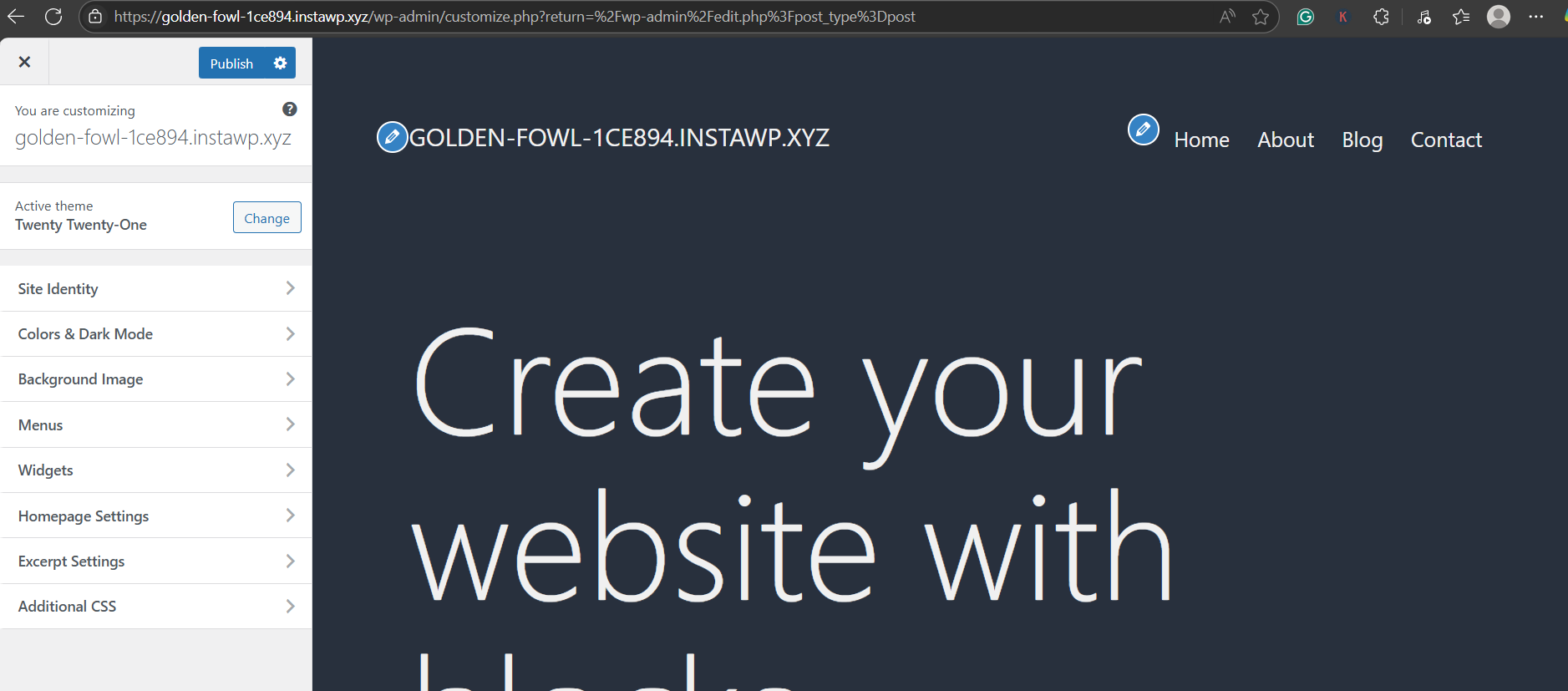
For instance, Twenty Twenty-One is one of the best WordPress hybrid themes we have around. From Site Identity to Dark Mode, it offers a variety of customization options.
2. WordPress Customizer Compatibility
Unlike block themes that rely entirely on the Site Editor, hybrid themes retain full support for the Customizer. That means you can still fine-tune headers, menus, and colors visually — no code required.
3. Widget Areas with Block Support
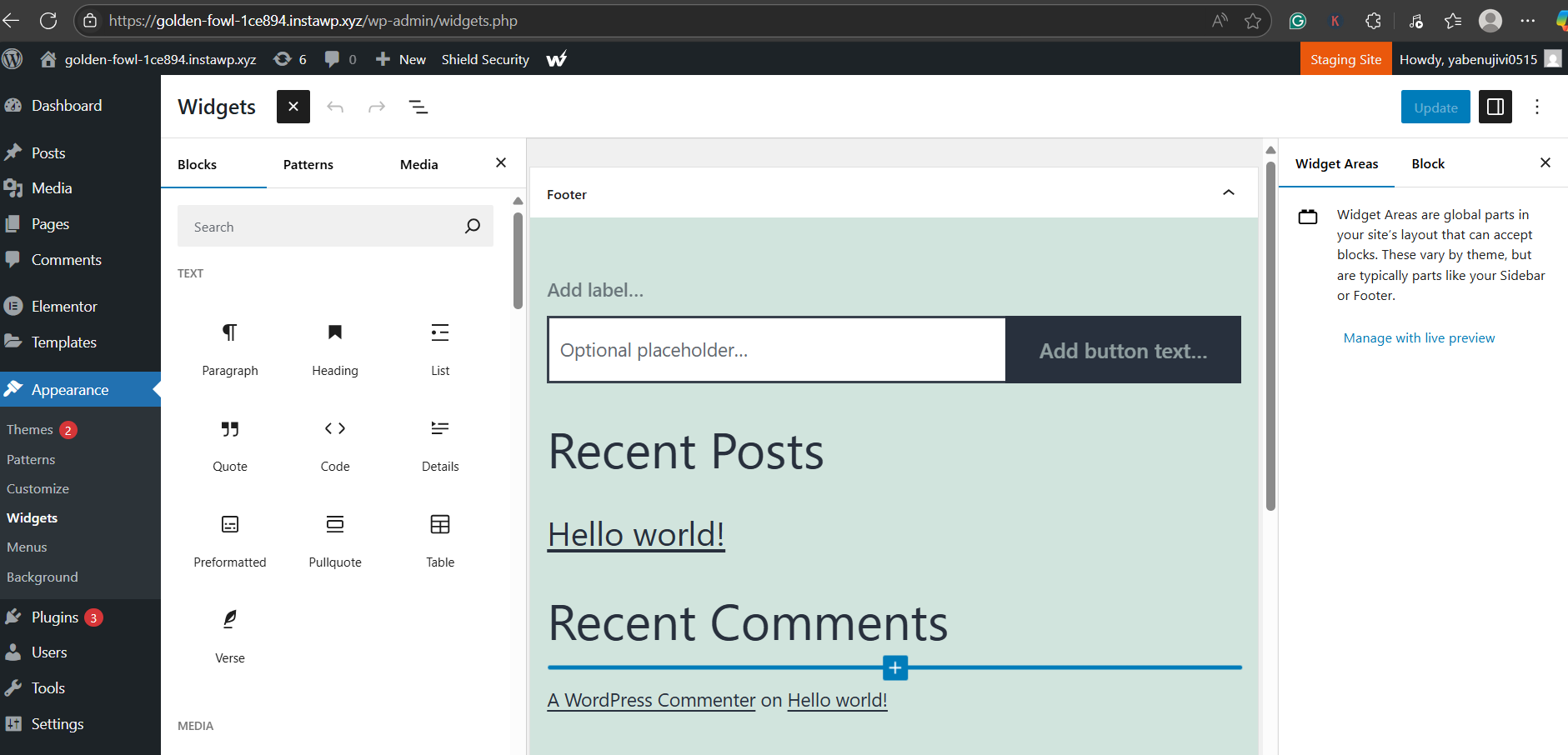
With hybrid themes, classic widget areas can be enhanced using the Block Widgets Editor. This provides a more intuitive experience while keeping legacy widget support intact.
4. Partial theme.json Integration
Want global style control without going all-in on FSE? Hybrid themes let you introduce theme.json progressively — starting with typography, colors, or spacing — without disrupting PHP-based layouts.
5. Access to Patterns and Block Variations
Hybrid themes support block patterns, style variations, and template parts — allowing developers to pre-design reusable sections, even inside classic templates.
6. Compatibility with Plugins
Whether you’re using Elementor or custom WooCommerce extensions, hybrid theme WordPress setups typically offer better compatibility than block themes, which may break legacy plugin interfaces.
In short, WordPress hybrid themes offer agencies the flexibility to modernize workflows at their own pace, without compromising functionality, user experience, or compatibility.
Structure of a Hybrid Theme (Developer View)
Understanding the hybrid theme structure is essential for developers who want to modernize their workflow while preserving control. A WordPress hybrid theme is fundamentally a classic theme that integrates selective features from block themes, and this dual architecture is reflected in its file system and logic.
Core Structure: The Classic Backbone
At its core, a hybrid theme retains these classic files:
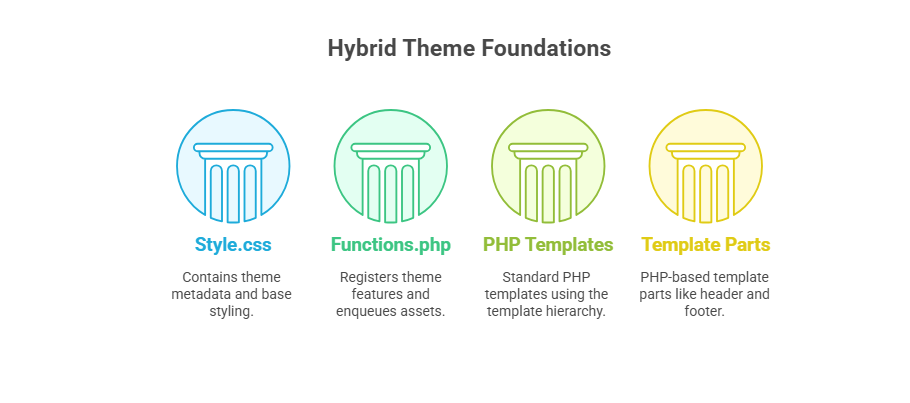
These files ensure compatibility with traditional plugins, menus, and widget logic.
Modern Enhancements: Block Integration
To bridge into block-based functionality, hybrid themes often include:
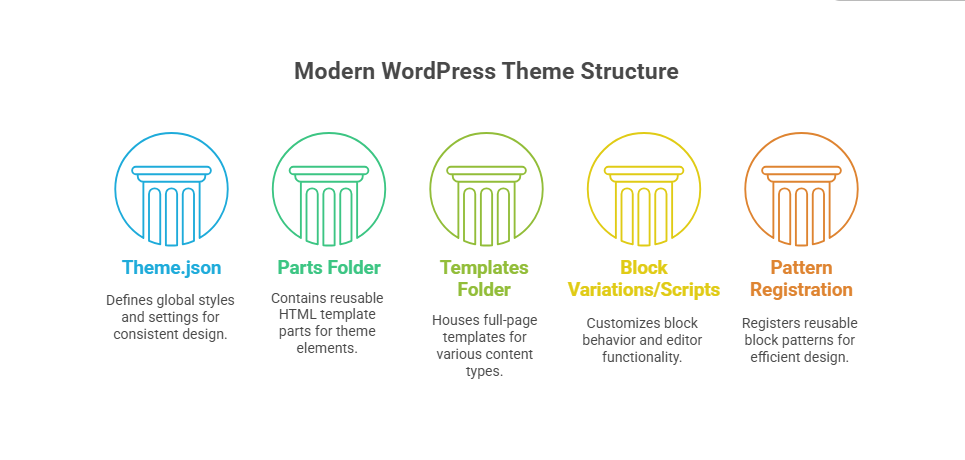
With the hybrid approach, you can mix classic PHP templates and block templates selectively. For instance:
- Use index.php + get_header() for legacy sections
- Use block_template_part( ‘footer’ ) to render a modern footer in HTML block format
This allows your team to progressively enhance a classic site with block features, without rewriting everything from scratch.
For agencies managing dozens of client sites, understanding and controlling the hybrid theme structure offers the best of both flexibility and stability.
How to Add Block Features to a Hybrid Theme
One of the biggest advantages of a WordPress hybrid theme is its ability to adopt modern block-based features gradually. Thanks to the theme.json file, developers can add global styles, layout settings, and more — all without rewriting the theme as a full block theme.
What is theme.json in WordPress?
The theme.json file is a configuration layer that allows you to define default settings for layout, colors, typography, spacing, and block behavior. When included in a hybrid theme, it empowers you to use block-based controls while retaining classic templates.
✅ Step-by-Step: How to Add Block Features via theme.json
1. Add a theme.json File
Place it at the root of your theme directory:
/wp-content/themes/your-theme/theme.json
2. Start with a Basic Structure
{
“$schema”: “https://schemas.wp.org/trunk/theme.json”,
“version”: 2,
“settings”: {
“layout”: {
“contentSize”: “720px”,
“wideSize”: “1080px”
},
“color”: {
“palette”: [
{ “slug”: “primary”, “color”: “#0073aa”, “name”: “Primary” },
{ “slug”: “accent”, “color”: “#f56a6a”, “name”: “Accent” }
],
“gradients”: [
{
“name”: “Ocean Fade”,
“slug”: “ocean-fade”,
“gradient”: “linear-gradient(45deg, #0073aa, #f56a6a)”
}
]
},
“typography”: {
“fontFamilies”: [
{
“slug”: “system”,
“name”: “System Font”,
“fontFamily”: “-apple-system, BlinkMacSystemFont, sans-serif”
}
],
“fontSizes”: [
{ “name”: “Small”, “slug”: “small”, “size”: “14px” },
{ “name”: “Large”, “slug”: “large”, “size”: “32px” }
]
},
“spacing”: {
“units”: [“px”, “em”, “rem”]
}
}
}
3. Register Block Supports in functions.php
Some features need PHP-based support:
add_theme_support( ‘editor-styles’ );
add_theme_support( ‘wp-block-styles’ );
add_editor_style( ‘style.css’ );
What You Can Enable in Hybrid Themes
- Global Typography: Font families, font sizes, and line height
- Color System: Custom palettes, gradients, duotones
- Spacing Control: Padding, margins, layout widths
- Block Variations & Styles: Registered via PHP or JSON
- Template Parts: Rendered using block_template_part() even inside classic themes
- Patterns: Add reusable sections with register_block_pattern()
Even better, you can test each feature individually, making WordPress theme.json the safest and cleanest way to modernize legacy themes incrementally.
When Should You Use a Hybrid WordPress Theme (With Examples)
While WordPress hybrid themes offer flexibility and control, they’re not always the default choice. So, when exactly should your agency choose this middle-ground approach over a full block theme or a classic one?
Let’s look at the most relevant use cases for agencies and developers in 2026.
✅ 1. When You’re Migrating from Classic Themes
Have long-standing client sites built with PHP templates? Instead of forcing a complete redesign, you can convert the classic theme to a hybrid theme by gradually introducing theme.json, block patterns, or partial template parts. This is ideal for reducing technical debt without disrupting the site experience.
✅ 2. When Plugin Compatibility Is Critical
Many widely used plugins — like ACF, WooCommerce, and older gallery tools — are still optimized for classic themes. Hybrid themes let you adopt new styling systems while retaining compatibility with older plugin architectures.
✅ 3. When You Need to Empower Content Editors
Clients may want to edit page sections without touching the code. Hybrid themes support Gutenberg blocks, block-based widgets, and even custom block styles, enabling a low-code editorial experience with minimal training.
✅ 4. When Full Site Editing (FSE) Feels Too Restrictive
FSE may still feel limiting for developers who rely on hooks, filters, or complex conditional logic. Hybrid themes let you keep your functions.php, custom post types, and meta logic intact, while layering on block-based UX enhancements.
✅ 5. When Performance Matters
Unlike block themes, which often load extra styles and scripts due to heavy block rendering, many hybrid themes (like Neve or Kadence) are highly optimized. You can serve lean pages while still using theme.json to control styles centrally.
Example Scenario
You’re an agency managing a WooCommerce site built in 2019 using a custom theme. The client wants to modernize the design and enable their marketing team to create landing pages visually. Instead of rebuilding everything in FSE, you:
- Add theme.json for color and typography controls
- Register reusable block patterns for CTAs and pricing tables
- Replace the footer with a block-based footer.html file
- Maintain WooCommerce compatibility through existing PHP templates
Result? A faster, more modern site — without compromising core logic or usability.
Benefits of WordPress Hybrid Themes for Agencies
For WordPress agencies juggling performance, customization, and client expectations, WordPress hybrid themes offer the perfect middle ground. They aren’t just a transitional solution — they’re a strategic advantage.
Here’s how agencies benefit from adopting hybrid themes in 2026:
1. Progressive Modernization Without Rebuilding
Hybrid themes allow agencies to bring older client sites into the modern WordPress ecosystem without full rewrites. Instead of jumping headfirst into Full Site Editing, you can incrementally adopt theme.json, patterns, and blocks — saving time and reducing risk.
2. Enhanced Developer Control
Unlike block themes that lean on no-code workflows, hybrid themes still allow the use of functions.php, hooks, and PHP logic. This means agencies can maintain advanced integrations — like custom post types or plugin filters — while improving the design experience.
3. Compatibility with Classic Plugins and Workflows
Many agency projects rely on plugins like ACF, WPML, and legacy WooCommerce setups. WordPress hybrid themes retain backward compatibility, ensuring nothing breaks when you introduce modern design elements.
4. Empowerment for Content Teams
With block-based editors, reusable patterns, and style variations, non-developers can visually update content without developer involvement, freeing up your technical team to focus on new features instead of content tweaks.
5. Rapid Testing and Prototyping with InstaWP
Using InstaWP, agencies can spin up sandbox versions of hybrid themes in seconds to test updates, apply new design elements, or review global style changes with stakeholders — all without touching the live site.
Example: Need to validate a new header block with theme.json typography? Just clone the client’s site in InstaWP, adjust, review, and sync.
6. Optimized Performance with Modern UX
Themes like Kadence and Neve prove that hybrid doesn’t mean bloated. You can achieve fast, interactive websites that perform well on Core Web Vitals, even while using modern block styles and responsive design systems.
7. Easier Maintenance with Centralized Controls
Once theme.json is introduced, global typography, colors, and spacing can be managed in one file, simplifying client revisions and standardizing branding across multiple sites or WaaS templates.
In short, WordPress hybrid themes enable agencies to serve both technical and non-technical stakeholders, without sacrificing speed, compatibility, or control.
Common Challenges with Hybrid Themes (And Workarounds)
While hybrid theme WordPress setups offer flexibility and control, they also come with unique challenges. For agencies managing multiple sites or scaling with templates, it’s important to understand these trade-offs and how to mitigate them.
Challenge 1: Increased Complexity for Junior Developers
Problem: Hybrid themes often mix classic PHP with newer block-based logic. For less-experienced developers, this dual structure can be confusing.
Workaround:
- Maintain internal documentation on theme structure
- Use InstaWP sandboxes to onboard and train devs
- Create modular templates (e.g., /parts/footer.html, /templates/page.html) with annotations
Challenge 2: Plugin Compatibility Isn’t Guaranteed
Problem: Not all plugins (especially older or niche ones) fully support block-based patterns or theme.json-driven styling.
Workaround:
- Always test plugins inside a staging or sandbox environment before production
- Use InstaWP’s Activity Log Viewer and Performance Scanner to catch conflicts early
- Stick to well-supported plugins with FSE/hybrid documentation
Challenge 3: Maintenance Can Get Messy
Problem: Hybrid themes can accumulate technical debt, with half of the site using PHP templates and the other half using block-based parts.
Workaround:
- Create a long-term roadmap for gradual transition (e.g., one block template per release cycle)
- Use InstaWP’s Site Versioning and Auto Update Scheduler to stay organized
- Use naming conventions like footer-classic.php and footer-block.html to avoid confusion
Challenge 4: No Visual Site Editor
Problem: Clients who expect the full Site Editor (like in a block theme) may be disappointed to find it’s unavailable in hybrid themes.
Workaround:
- Provide editable block patterns for key layout areas
- Use the Customizer for real-time previews where applicable
- Offer training on block-based widgets and Gutenberg for content flexibility
Challenge 5: Documentation Gaps
Problem: Most WordPress tutorials focus on either classic or full block themes, leaving hybrid themes in a gray area.
Workaround:
- Bookmark trusted sources like the WordPress Developer Blog and InstaWP blog
- Document internal hybrid theme implementations for reuse
- Follow WP core releases to track new hybrid-friendly features (like style variations via JSON)
Despite these challenges, agencies that embrace hybrid theme WordPress models early are better positioned to handle complex projects with diverse technical needs, all while delivering modern UX.
Ready to Embrace WordPress Hybrid Themes?
As WordPress continues evolving toward full-site editing, WordPress hybrid themes present a smart middle ground, offering agencies the performance and compatibility of classic PHP templates, with the flexibility and editor experience of modern block-based design.
Whether you’re modernizing legacy sites or building scalable templates for client projects, a hybrid theme allows you to adopt innovation incrementally, without the risks of going full FSE overnight.
✨ Want to experiment before you commit?
Launch a hybrid theme sandbox instantly with InstaWP.
Use versioning, theme.json testing, and performance scanning — all in one secure dev environment.
FAQs
1. What is a WordPress hybrid theme?
A WordPress hybrid theme combines classic PHP-based theme architecture with modern block-based features like theme.json, block patterns, and the block editor. It allows developers to integrate new features without fully switching to a block theme.
2. Can I use the block editor with hybrid themes?
Yes. Hybrid themes support the Gutenberg block editor for pages, posts, widgets, and even some template parts, while still allowing you to use PHP-based templates and the Customizer.
3. How do I convert a classic theme into a hybrid theme?
To start converting, add a theme.json file, gradually introduce block templates or parts, and use block variations or patterns. This allows you to modernize the theme without losing plugin compatibility or PHP logic.
4. Are hybrid themes faster than block themes?
Often, yes. Many hybrid themes are performance-optimized and use fewer block dependencies. With careful use of theme.json and selective block enhancements, hybrid themes can deliver lightweight, high-speed experiences.
5. Do hybrid themes work with all plugins?
Mostly yes — especially with classic plugins like ACF, Contact Form 7, and WooCommerce. However, it’s always best to test compatibility in a staging environment like InstaWP before deploying to production.