

Improve your WordPress SEO: Write better content and have a fully optimized WordPress site using the Yoast SEO…
About WPC Smart Wishlist for WooCommerce
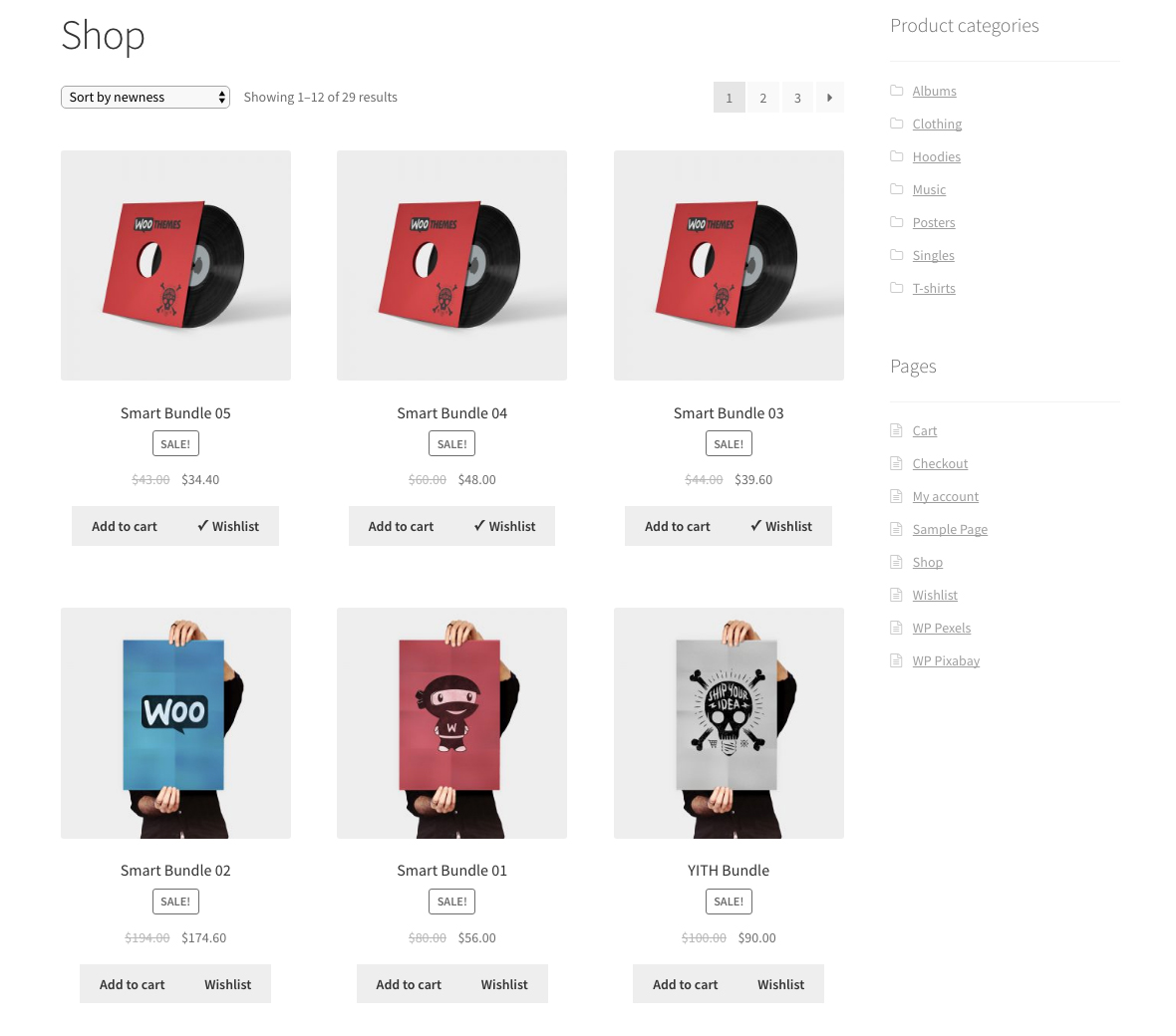
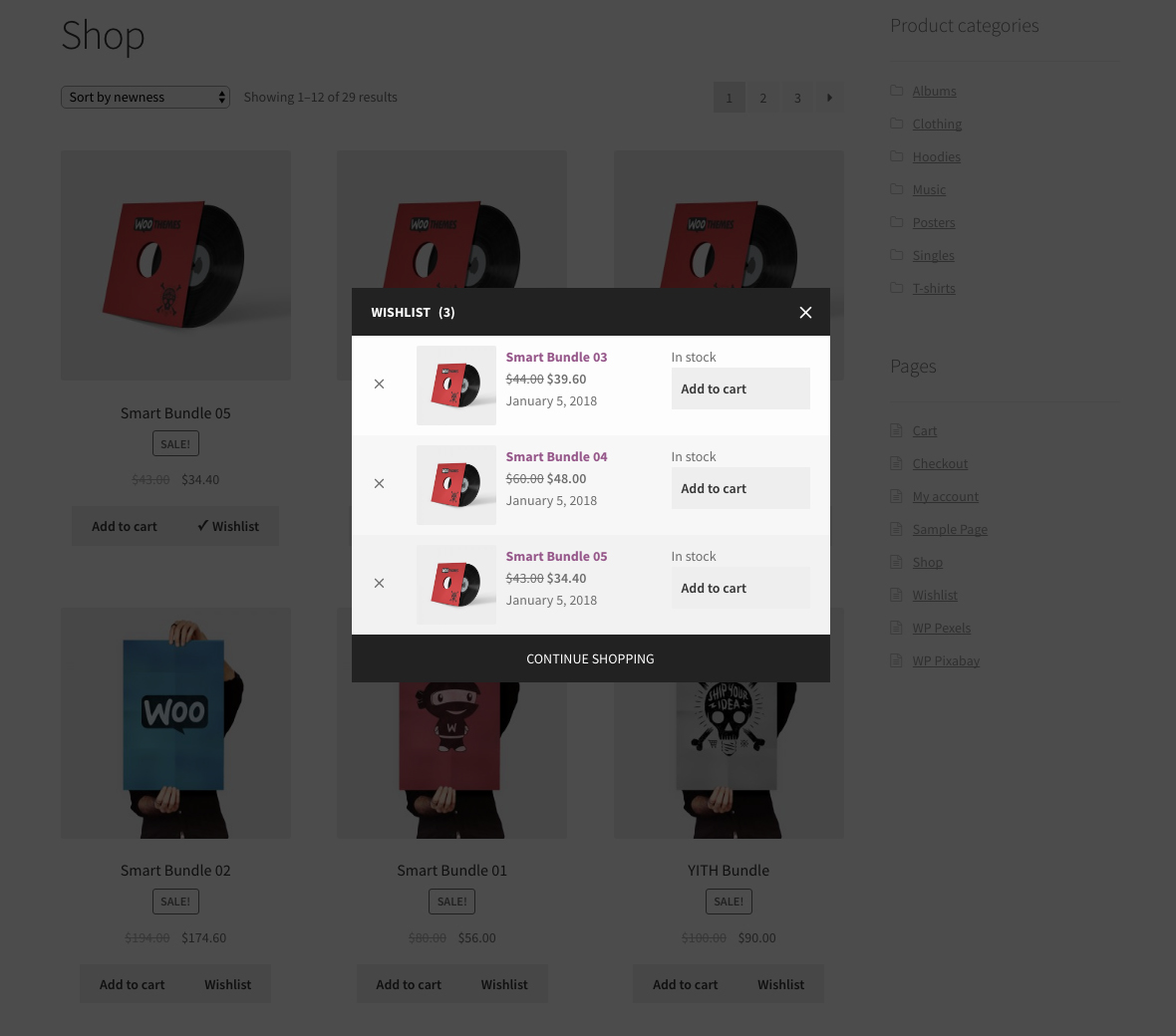
The WPC Smart Wishlist plugin is a powerful tool that allows customers to manage their to-buy list and save favorite items for later purchase. It improves the purchase flow on your site, saving time for customers and making the shopping experience more enjoyable. The plugin is highly customizable and compatible with other WPClever plugins, WooCommerce add-ons, and WordPress themes.Screenshots
Frequently asked questions
What is WPC Smart Wishlist?
WPC Smart Wishlist is a powerful yet intuitive plugin for helping your customers manage their to-buy list and save favorite items for later purchase. This helps the purchase flow on your site become more fluent and convenient while saving quite a great amount of time on searching for products and adding them to cart for buyers.
Is there a live demo available?
Yes, you can visit our live demo 01 or live demo 02 to see how this plugin works.
What are the features of WPC Smart Wishlist?
The features of WPC Smart Wishlist include: control the use of wishlist for unauthenticated users, smart display of product details, easy purchase flow, enable/disable auto-removal of products after adding to the cart, choose a page as the wishlist page, use the provided shortcode to display the wishlist on selected page, enable/disable wishlist sharing button, enable/disable copying of wishlist links for sharing, choose a wishlist type, edit the text for the wishlist button, choose an action triggered by wishlist button, edit the text and action triggered after adding an item to the wishlist, add extra classes for action button/link, customize the position of wishlist button on archive and single page, choose categories that allow wishlist button, unlimited colors for wishlist popup, edit the destination link for the Continue Shopping button, choose a menu to add the wishlist menu, choose an action triggered by the wishlist menu, RTL support, and premium features such as multiple wishlists per user, add note for each product, lifetime update, and dedicated support, and customization to match with your theme/site design.
Why is adding a Wishlist button important?
Adding a Wishlist button is important because it allows buyers to save products for later purchase, increases the possibility for buyers to purchase these items in the future, improves the shopping experience for customers, and helps to save Out-of-Stock products for purchasing when restocked.
How can WPC Smart Wishlist be customized?
WPC Smart Wishlist can be fully customized regarding the appearance, actions and links, type of wishlist, position of wishlist on different pages, and the text displayed for visitors. Premium users can also add a Wishlist button to any menu, customize the action triggered on these menus, and request customization to match the design scheme of their website.
Changelog
4.9.8
- Updated: Optimized the code
4.9.7
- Fixed: Minor JS issue on the frontend
- Updated: Compatible with WP 6.7 & Woo 9.5
4.9.6
- Fixed: Error on displaying price change
4.9.5
- Updated: Optimized the code
- Updated: Compatible with WP 6.7 & Woo 9.4
4.9.4
- Updated: Optimized the code
4.9.3
- Added: Option to open wishlist popup menu on My Account
- Fixed: Counter when having suggested products
4.9.2
- Added: Shortcode [woosw_link]
4.9.1
- Updated: Optimized the code
- Updated: Compatible with WP 6.6 & Woo 9.3
4.9.0
- Updated: Use WC_AJAX for frontend
4.8.9
- Added: Filter hook ‘woosw_get_ids’ and ‘woosw_get_items’
4.8.8
- Added: Option to reload the count
4.8.7
- Fixed: Minor CSS/JS issues in backend
4.8.6
- Updated: Optimized the code
- Updated: Compatible with WP 6.5 & Woo 8.8
4.8.5
- Added: Dropdown to switch between owned wishlist
- Updated: Compatible with WP 6.5 & Woo 8.7
4.8.4
- Updated: Compatible with WP 6.4 & Woo 8.7
4.8.3
- Fixed: Minor CSS/JS issues
4.8.2
- Fixed: Add note on the wishlist page
4.8.1
- Updated: Compatible with WP 6.4 & Woo 8.5
4.8.0
- Updated: Use wp_date instead of date_i18n
4.7.9
- Updated: Optimized the code
4.7.8
- Added: Filter hooks ‘woosw_page_share_html’ & ‘woosw_page_copy_html’
4.7.7
- Updated: Optimized the code
- Added: JS trigger ‘woosw_refresh_data’
4.7.6
- Fixed: Minor CSS/JS issue for the backend
- Added: Filter hook ‘woosw_button_rel’
4.7.5
- Added: Suggested products from WPC Smart Compare
4.7.4
- Updated: Compatible with WP 6.3 & Woo 8.0
4.7.3
- Updated: Optimized the code
4.7.2
- Fixed: CSRF vulnerability
4.7.1
- Fixed: Minor JS/CSS issues in the backend
4.7.0
- Added: Suggested products from related/upsells/cross-sells
4.6.9
- Fixed: Minor JS issue in the backend
4.6.8
- Added: Paging for previewing wishlists in the backend
4.6.7
- Added: “Above title” position
4.6.6
- Updated: Optimized the code
4.6.5
- Updated: Move wishlist menu on My Account page to before Logout
4.6.4
- Update: Use shortcode [woosw_list key=”xyz”] to show wishlist products on any page
4.6.3
- Updated: Settings for notes
4.6.2
- Fixed: Remove draft/deleted products from wishlist
4.6.1
- Fixed: Minor CSS issue
4.6.0
- Added: Show price change message for each product (increase or decrease)
4.5.3
- Fixed: Menu icon on some browsers
4.5.2
- Added: Compatible with WPC Smart Messages for WooCommerce
4.5.1
- Fixed: 404 error on the wishlist page
4.5.0
- Fixed: Wishlist overview in website backend
4.4.5
- Fixed: Minor JS issue in the backend
4.4.4
- Added: Function ‘get_settings’ & ‘get_setting’
4.4.3
- Updated: Optimized the code
4.4.2
- Updated: Optimized the code
4.4.1
- Added: Wishlist page on My Account
4.4.0
- Added: Icon for the button
4.3.2
- Fixed: Compatible with WPML
4.3.1
- Fixed: Minor JS for variable product
4.3.0
- Added: Filter hook ‘woosw_fragments’
4.2.3
- Fixed: Notice on settings page
4.2.2
- Fixed: Can’t change button position
4.2.1
- Fixed: Stock status of item product
- Added: Filter hook ‘woosw_item_stock’ & ‘woosw_item_add_to_cart’
4.2.0
- Fixed: Minor JS/CSS issues
4.1.0
- Added: Position left/right for the popup
4.0.0
- Added: New message interface
- Updated: Optimized the code
…
1.0
- Released

