

Site Kit is a one-stop solution for WordPress users to use everything Google has to offer to make…
About WebP Express
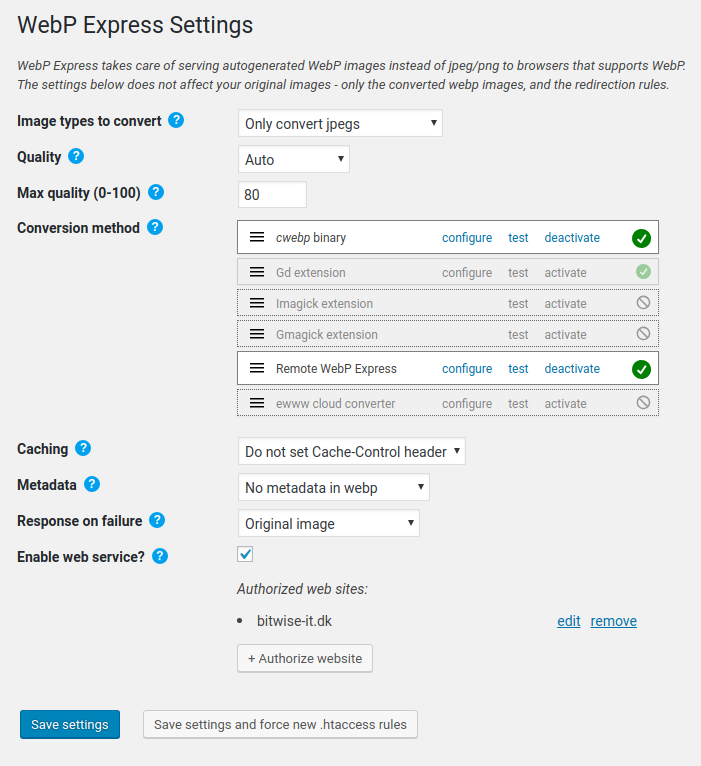
The WebP Express plugin helps WordPress admins serve webp images to browsers that support it, reducing bandwidth usage and improving load times. It uses various methods to convert images to webp and offers different ways to deliver webp images to supported browsers. By using this plugin, websites can benefit from faster load times, better user experience, improved search engine ranking, and reduced bandwidth consumption.Screenshots
Frequently asked questions
What does the plugin do?
The plugin helps reduce bandwidth usage by serving webp images to browsers that support it, while still serving jpeg and png files to browsers that do not support webp.
How does the plugin convert images to webp?
The plugin uses the WebP Convert library, which supports multiple conversion methods including imagick, cwebp, vips, and gd. If none of these methods work on the host, the plugin can connect to a WordPress site with WebP Express installed and use the web service functionality.
What are the different ways the plugin delivers webp images to supported browsers?
The plugin can route jpeg/png images to the corresponding webp or to the image converter if the image has not been converted yet. It can also alter the HTML by replacing image tags with picture tags or replacing image URLs to point to webp. Additionally, when used in combination with Cache Enabler, the plugin can achieve the same results with page caching. Another option is to deliver webp to all browsers and add the webpjs javascript for browsers that do not natively support webp.
What are the benefits of using this plugin?
The benefits of using this plugin include faster load times for images in webp-supported browsers, better user experience, improved ranking in Google searches, reduced bandwidth consumption, and positive environmental impact by reducing network traffic and electricity consumption.
What are the limitations of the plugin?
The plugin should work on Microsoft IIS servers, but it has not been thoroughly tested.
Changelog
0.25.9
(released 7 April 2024)
* Bugfix: Fixed ewww conversion method after ewww API change
0.25.8
(released 20 October 2023)
* Bugfix: Depreciation warning on PHP 8.2 with Alter HTML. Thanks to @igamingsolustions for reporting the bug
0.25.7
(released 19 October 2023)
* Bugfix: Removed depreciation warning on settings screen, which was showing in PHP 8.2. Thanks to Rob Meijerink from the Netherlands for providing the fix in a pull request
* Bugfix: Removed depreciation warning when converting, happening in PHP 8.2. Thanks to Sophie B for reporting and Rob Meijerink from the Netherlands for providing the fix in a pull request
* Bugfix: One of the Mime fallback methods did not work. Thanks to gerasart from Ukraine for providing the fix in a pull request
0.25.6
(released 15 April 2023)
* Bugfix: A bug in another plugin can cause delete file hook to be called with an empty string, which WebP Express was not prepared for (fatal exception). Thanks to Colin Frick from Liechtenstein for providing the fix in a pull request on github
* Bugfix: Bug when testing imagick converter from settings page (only PHP 8). Thanks to Sisir from Bangladesh for reporting and providing the fix in a pull request
0.25.5
(released 23 May 2022)
* When using the “Prevent using webps larger than original” with Alter HTML (picture tags) on images with srcset, those webps that where larger than the originals was picked out from the srcset for the webp. This could lead to bad quality images. In the fix, the image will only have a webp source alternative when ALL the webps are smaller than their originals (when the “prevent…” option is set).
* Bugfix: In rare cases, WebP Express could fail detecting mime type
0.25.4
(released 6 May 2022)
* AlterHTML (when using picture tags): Fixed charset problems for special characters in alt and title attributes. The bug was introduced in 0.25.2. Thanks to Cruglk for first pointing this out.
0.25.3
(released 4 May 2022)
* AlterHTML: Fixed BIG BUG introduced in 0.25.2 (the webp urls was wrong when using picture tags). So sorry! Thankfully, I was quickly made aware of this and quickly patched it.
0.25.2
(released 4 May 2022)
* AlterHTML did not skip existing picture tags when they contained newlines, resulting in picture tags inside picture tags, which is invalid markup. Thanks to Jonas for being very helpful in solving this.
0.25.1
(released 7 dec 2021)
* An innocent text file triggered Windows Defender. It has been removed. Thanks to Javad Naroogheh from Iran for notifying
0.25.0
(released 7 dec 2021, on my daughters 10 year birthday!)
* No exec()? – We don’t give up easily, but now emulates it if possible, using proc_open(), passthru() or other alternatives. The result is that the cwebp converter now is available on more systems. Quality detection of jpegs also works on more systems now. The fallback feature with the emulations is btw implemented in a new library, exec-with-fallback
* Bugfix: Our WP CLI command “webp-express” has a quality option, but it was not working
For older releases, check out changelog.txt

