

Improve your WordPress SEO: Write better content and have a fully optimized WordPress site using the Yoast SEO…
About Visibility Logic for Elementor
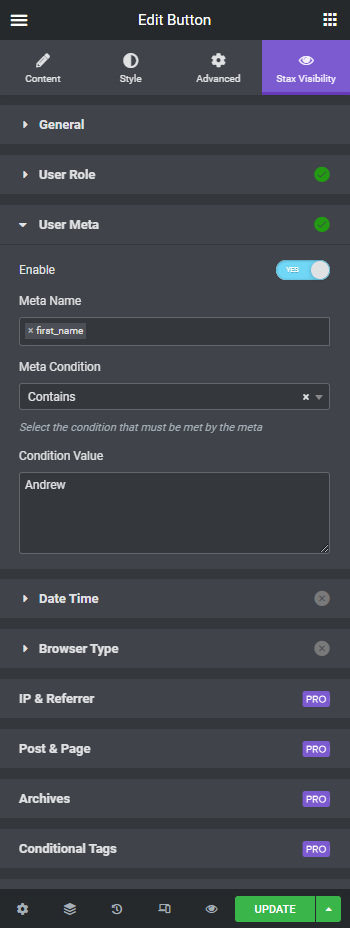
The Elementor Visibility Restrict plugin allows you to show or hide widgets or sections based on various conditions such as user login status, user meta, day of the week, time of day, and browser type. The visibility settings only affect the frontend of your website, so you can still see all the widgets while editing in Elementor. There are also additional features available in the Pro version, including Geo Location, Dynamic conditions, WooCommerce and Easy Digital Downloads restrictions, and more.Screenshots




Frequently asked questions
What is Visibility Logic for Elementor?
Visibility Logic for Elementor is a WordPress plugin that allows you to show or hide Elementor widgets or sections based on various conditions. These conditions include user role, user meta, and whether the user is logged in or not.
What are some free features of the plugin?
Free features include Flex container visibility restrictions, user meta content restriction, content restriction based on user browser, and date & time restrictions for content. It can also hide a whole section if all widgets inside it are hidden.
What are some PRO features of the plugin?
PRO features include Geo Location restrictions, dynamic conditions based on Elementor Pro Dynamic tags, and restrictions for WooCommerce and Easy Digital Downloads users. It also offers advanced user meta, post & page, taxonomy, URL parameter content restriction, and IP & Referrer restrictions.
How do visibility settings affect the Elementor editor?
The visibility settings only affect widgets rendering in the frontend. While you are inside the Elementor editor, you will be able to see all of them.
Changelog
2.3.9
- Fix compatibility with Elementor 3.12.0
- Latest WordPress compatibility
- Latest Elementor compatibility
- Fix PHP noticies
2.3.6
- Add compatibility with Elementor element caching experimental feature.
- Other fixes and improvements.
2.3.5.1
- Update readme.txt to include patchstack.com report bug link
2.3.5
- Add extra security checks when saving plugin options.
2.3.4
- Upgrade Appsero SDK
2.3.3
- Fix Elementor deprecation warnings
2.3.2
- Fix Datetime render
2.3.1
- Add support for Elementor’s experimental containers
2.2.9
- Fix user meta when selecting data from the user table; eq. email.
2.2.8
- Fix require plugin message display in admin page
2.2.7
- Register query control – use to register_control method for previuous Elementor versions compatibility.
2.2.6
- Fix state markers for applied options in Elementor editor
- Add support for new Pro options
2.2.5
- Fix css render for hiding sections
2.2.4
- Added new variation for Date & Time option – Weeks Days + Time
- Fixed a bug on Date & Time option where server time was not fetch correctly. fixed date-time condition over midnight
- Tested on WP 5.9
- Improved admin UI
2.2.3
- Fix error when using Elementor version older than 3.3.0
2.2.2
- New Section option: Hide section when all the widgets inside it are hidden
- Fix printed styles for hidden elements of the same type.
2.2.1
- Added extra compatibility with Visibility Logic Pro older versions
2.2.0
- Added Enabled/Disabled icons on all sections to inside Stax Visibility tab to see at a glance which options are in use.
- Added Dynamic conditions based on all Elementor Pro Dynamic tags (in PRO version)
2.1.7
- Date and time conditions UI improvement to show current server time in editor
2.1.6
- Fix Section restriction when used with Hide HTML option
- Fix integration with Paid Memberships Pro plugin for section restrictions
2.1.5
- Improved logic and fixed Condition type when set to “At least one” to match the restrictions
2.1.4
- Improvement: Added AJAX control for User meta select to improve editor speed
- Fix Fallback text so it shows correct escaped HTML
2.1.3
- Moving from version 1.2.0 is won’t change anything on your site. We added safe fallback settings for older setting from v1. Old settings are now being taken into consideration and are available in the Widget settings. You can switch to nee new settings if you like or just leave those in place.
2.1.2
- Added more User meta conditional operators
- Added icon next to Widgets and Sections with conditions enabled in Elementor editor
- Admin settings page improvements
2.1.1
- Update migration logic to be less memory demanding
2.1.0
- New free feature : User Meta content restriction
- New free feature: Restrict content based on User Browser(Chrome, Mozilla, Safari, etc)
- New free feature: Date & Time restrictions for content
2.0.3
- Old settings migration logic update for inner elements.
2.0.2
- Make the settings migration automatic on plugin update.
2.0.1
- Fix PHP version compatibility in Updates logic
2.0.0
- Code logic refactoring and introducing Pro features.
1.2.0
- Fixed the edge case when you combined hiding elements for guests and user role
1.1.0
- Made the selectors full width since there was a bug with Select2 control
1.0.4
- Made changes to the hiding logic and the element is fully hidden, no extra empty wrapping divs shown
1.0.3
- Visibility settings added for Section
1.0.2
- Added translation pot file
1.0.0
- Initial release
Be a contributor
If you want to contribute, go to our GitHub Repository.
You can also add a new language via translate.wordpress.org.

