

Just another contact form plugin. Simple but flexible.

About Search Exclude
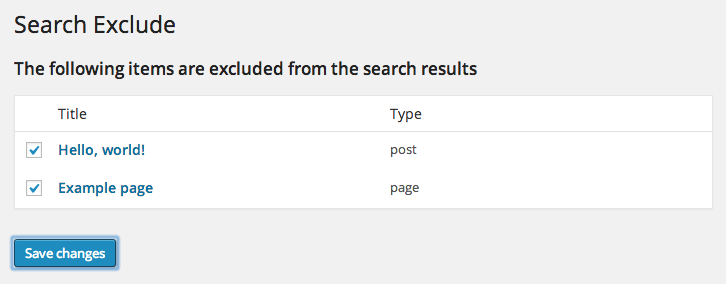
This plugin allows you to easily remove specific pages or posts from appearing in WordPress search results by checking a checkbox on the edit page. You can also view a list of all the items that have been hidden from search on the plugin settings page.Screenshots

Frequently asked questions
What does the Search Exclude plugin do?
The Search Exclude plugin allows you to hide any page, post, or other content from the WordPress search results. You can do this by checking a box on the post/page edit screen.
Does it support bulk editing?
Yes, the plugin supports quick and bulk editing for excluding content from search results.
Can I see what content is hidden from search?
Yes, on the plugin settings page, you can view a list of all items that have been hidden from search.
Who developed the Search Exclude plugin?
The Search Exclude plugin was developed by quadlayers.
Changelog
2.4.3
- fix: search exclude documentation url
2.4.2
- fix: update jetpack autoload
2.4.1
- fix: php errors
2.4.0
- fix: implement jetpack autoload
2.3.0
- fix: php errors
- fix: improve allowed screen logic
- fix: scripts in custom post types
- fix: advanced custom fields compatibility
2.2.0
- fix: php errors
2.1.9
- fix: php errors
- fix: compatibility with classic editor
2.1.8
- WordPress 6.7 compatibility
2.1.7
- fix: WordPress 6.1.3 compatibility
- fix: big queries
- Remove notification
2.1.6
- Refactor update
2.1.5
- Refactor
2.1.4
- WordPress compatibility
2.1.3
- WordPress compatibility
2.1.2
- WordPress compatibility
2.1.1
- Packages update
2.1.0
- WordPress compatibility
2.0.9
- fix: PHP errors
2.0.8
- Translation strings
2.0.7
- WordPress compatibility
2.0.6
- WordPress compatibility
2.0.5
- Update portfolio link
2.0.4
- WordPress compatibility
2.0.3
- fix: strings translations
2.0.2
- fix: strings translations
2.0.1
- fix: strings translations
2.0.0
- i18n implemented
- Composer implemented
- Autoload implemented
- Rename files to fit WordPress Development rules
- Rename classes to fit WordPress Development rules
- Rename variables to fit WordPress Development rules
1.3.1
- Author update.
1.3.0
- fix: and rework bulk edit: The
Bulk actionsdropdown now offers hide/show actions.
1.2.7
- This is a security release. All users are encouraged to upgrade.
- fix: possible XSS vulnerability.
1.2.6
- fix: compatibility with WordPress 5.5
1.2.5
- Security release. More protection added.
1.2.4
- Security release. All users are encouraged to update.
- Added filter searchexclude_filter_permissions.
1.2.2
- Added action searchexclude_hide_from_search
- Added filter searchexclude_filter_search
- Fixed Bulk actions for Firefox
1.2.1
- Fixed bug when unable to save post on PHP <5.5 because of boolval() usage
1.2.0
- Added quick and bulk edit support
- Tested up to WP 4.1
1.1.0
- Tested up to WP 4.0
- Do not show Plugin on some service pages in Admin
- Fixed conflict with bbPress
- Fixed deprecation warning when DEBUG is on
1.0.6
- Fixed search filtering for AJAX requests
1.0.5
- Not excluding items from search results on admin interface
1.0.4
- Fixed links on settings page with list of excluded items
- Tested up to WP 3.9
1.0.3
- Added support for excluding attachments from search results
- Tested up to WP 3.8
1.0.2
- Fixed: Conflict with Yoast WordPress SEO plugin
1.0.1
- Fixed: PHP 5.2 compatibility
1.0
- Initial release

