

Enables the previous "classic" editor and the old-style Edit Post screen with TinyMCE, Meta Boxes, etc. Supports all…
About StatCounter – Free Real Time Visitor Stats
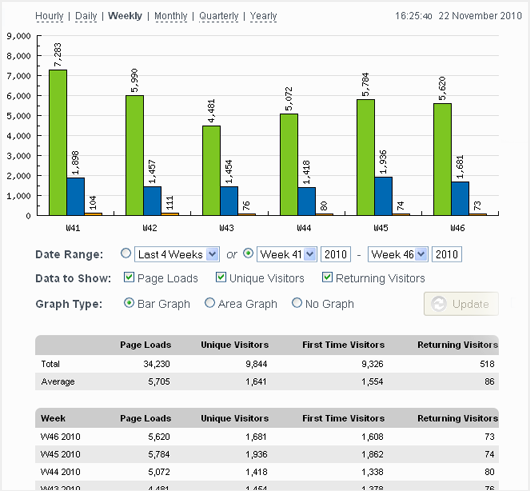
The Official StatCounter WordPress Plugin allows you to access all the powerful features of StatCounter on your WordPress blog. This includes features such as invisible counters, configurable stats, keyword analysis, visitor paths, and more. With this plugin, you can track and analyze the performance of your blog effectively.Screenshots
Frequently asked questions
What features does the Official StatCounter WordPress Plugin bring?
The Official StatCounter WordPress Plugin brings you all the powerful StatCounter features to your wordpress blog.
What are some of the features included in the plugin?
Some of the features included in the plugin are: Invisible Counter Option, Configurable Counter, Configurable Summary Stats, Magnify User, and Drill Down.
What are the popular page features?
The popular page features include Popular Pages, Entry Pages, Exit Pages, and Came From.
What are some of the keyword analysis features?
Some of the keyword analysis features include Keyword Analysis and Recent Keyword Activity.
What are some of the visitor activity features?
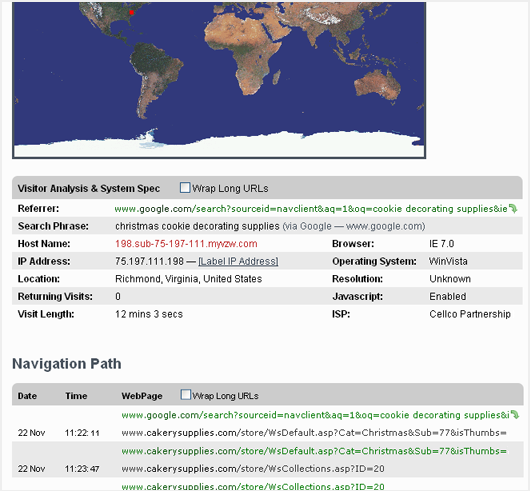
Some of the visitor activity features include Visitor Paths, Visit Length, Returning Visits, Recent Pageload Activity, and Recent Visitor Activity.
Changelog
2.0.9
Updated security checks
2.0.8
Added additional security checks
2.0.7
Added additional sanitation to prevent XSS attacks
2.0.6
Readme fix
2.0.5
Bug fix for async JS support
2.0.4
Async JS support
2.0.2
Compatibility enhancements
2.0.1
Security enhancements
2.0
StatCounter Tags supported.
1.7.1
Removed unnecessary type attribute from script element
1.7
Updated constant definitions to be case sensitive
1.6.9
Fixed small bug with form
1.6.8
Addd StatCounter https compatible code
1.6.7
Support https/http for wordpress admin section when viewing StatCounter stats
1.6.6
Removed deprecated function calls
1.6.5
Modified url used for dashboard to not include project id when it has not been set.
1.6.4
Improved UI to give error message in dashboard when no project id has been set
1.6.3
- Bug fix to prevent user entry of whitespace characters for Project ID and Security Code
1.6.2
- Bug fix for Upgrade with PayPal link.
1.6.1
- Correct incorrect spelling of ‘invisibility’
1.6
- Removed the ‘Logging Enabled/Disabled’ option (you can deactivate the plugin instead). Updated installation instructions.
1.5
- Removed option to set partition – no longer required.
1.4
- Added noscript to StatCounter code – allowing non-javascript enabled visitors to be tracked.
1.3
- Added counter position option. Allows you to specify the position of the counter in the header or footer.
- Added ‘forced invisibility’ option. Allows you to enable an invisible counter without logging into your StatCounter account.
1.2
- Fixed critical bug.
1.1
- Added ability to view StatCounter Stats from within the WordPress Admin.
