

Enables the previous "classic" editor and the old-style Edit Post screen with TinyMCE, Meta Boxes, etc. Supports all…
About HTML Editor Syntax Highlighter
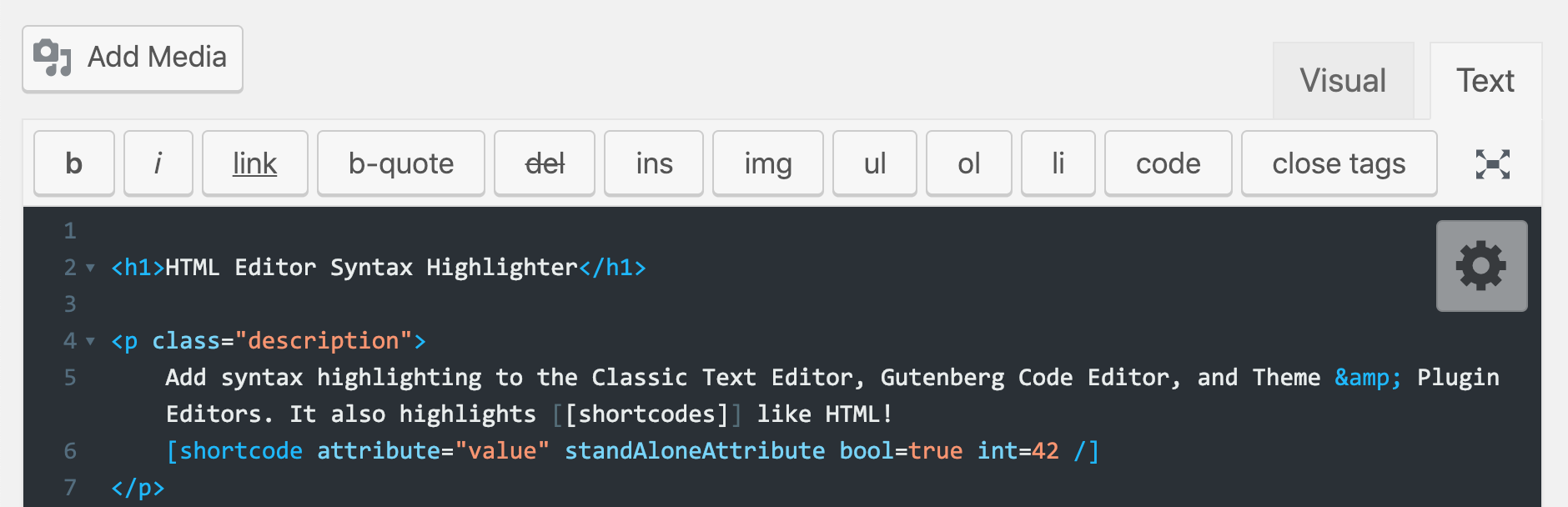
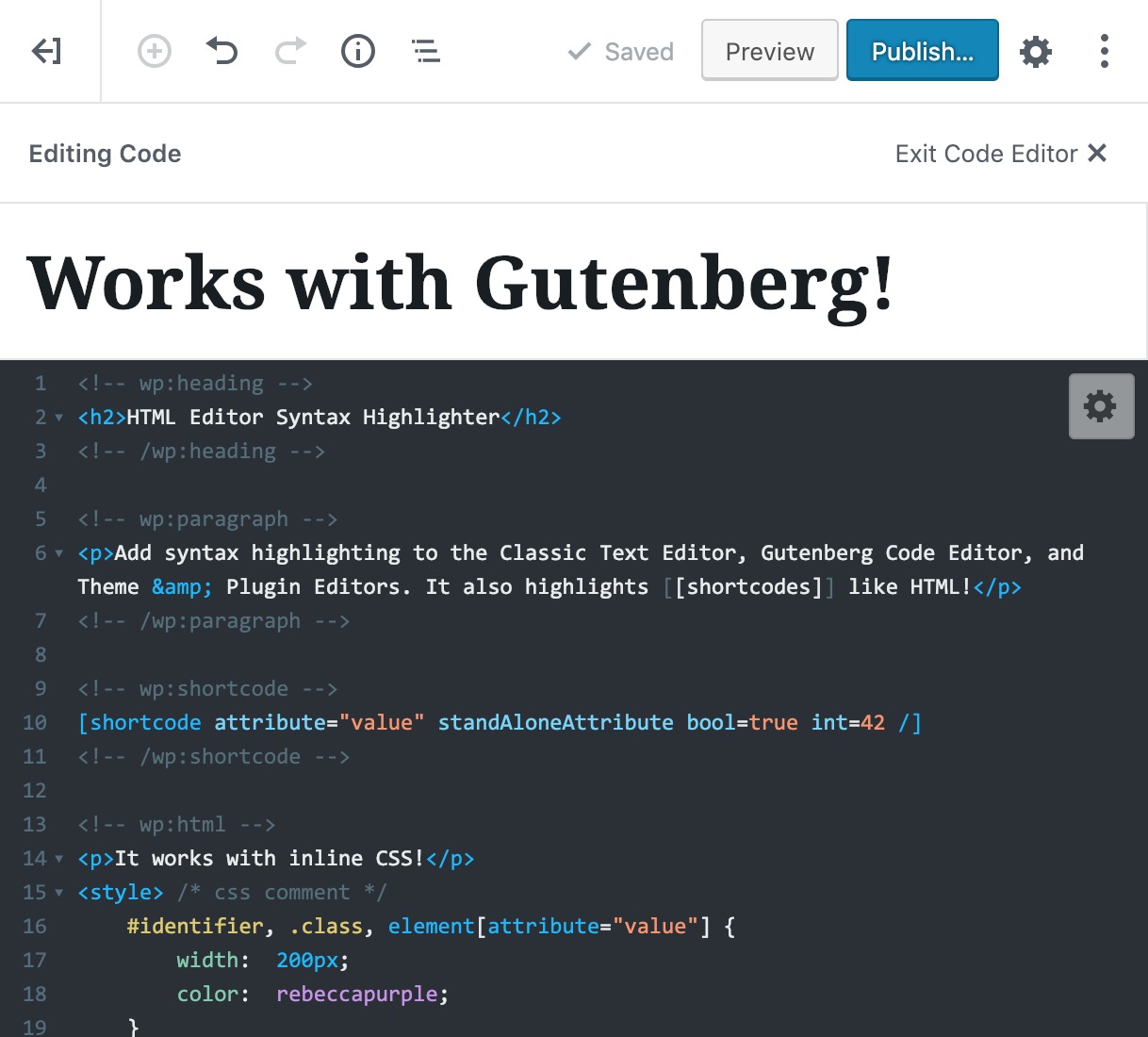
This plugin adds syntax highlighting to the HTML text editor in WordPress, including the Classic Post & Page editor, Gutenberg Code Editor, and Theme & Plugin editors. It also has features like saving posts with Ctrl+S, restoring cursor position after page reload, and a wide selection of themes and customization options. You can contribute to the plugin on GitHub and provide feedback through a user experience survey.Screenshots




Frequently asked questions
What are the features of the plugin?
The features of the plugin include syntax highlighting in the Post/Page HTML editor, syntax highlighting in the Gutenberg Code Editor, syntax highlighting in the Theme & Plugin editors, syntax highlighting for WordPress shortcodes, saving posts and pages with Ctrl+S (Cmd+S on Mac), restoring cursor position after page reload, a huge selection of themes and customization options, and fullscreen mode toggle with F11/Esc hotkeys.
Where can I contribute to the plugin?
You can contribute to the plugin by visiting the github repo at https://github.com/mukhortov/HESH-WordPress-Plugin.
Is there a User Experience Survey for regular users?
Yes, there is a User Experience Survey available for regular users of the plugin. You can participate in the survey by visiting https://goo.gl/forms/xvaHgd7sZEbBbFAL2.
Changelog
2.4.4
- Added about 15 new themes
2.4.3
- Updated css for wordpress v5.8
2.4.2
- removing survey notice
2.4.1
- fixed bug: notification would not dismiss if the visual editor was open
- fix bug: Setting Form can now submit from memory, not just when the dom is in the page.
2.4.0
- updating a major number so I can review downloads more accurately.
- reorganized the codebase
- Reverting the name-change of
hesh.php
This name-change ofhtml-editor-syntax-highlighter.phptohesh.phpcaused the plugin to deactivate itself because the php file was missing. Reverting the name-change ofhesh.phpwill cause this all over again, but hey.
2.3.5
- remove Github Updater headers
- testing WP update Process
2.3.4
- fixing typo
$this->$surveyLinkto$this->surveyLink
2.3.3
- Updated Release process
- Fix bug: #80 Only activate on pages where the editor will run
- Added UX survey notice.
2.3.2
- added a seventh screenshot
- removed
smartIndentbecause its annoying - fixed gulp watch task
- updated FAQ
2.3.1
- Fixing JS error in issue #81 (Hopefully?)
- Updating authorship so James can get a job. Will revert to Petr Later…
2.3.0
- Support for Gutenberg Code Editor!
- Added new themes: Codepen and WordPress (which is now the default).
- Created new screenshots for the plugin page.
- New Logo based on
<W/>. - Updated FAQ with Gutenberg info.
- Changed build steps to only export one
.cssand.jsfile
2.2.6
- added Gutenberg information after the update to WordPress version 5.0
2.2.5
- fixed bug: #75 removing
ftypo
2.2.4
- fixed bug: Allow Multiple Instances of CodeMirror on a page #71
- fixed bug: js error when custom post type does not support ‘editor’ feature #62
2.2.3
- A patch for WP 4.9. No more double editors in theme/plugin editors.
2.2.2
- fixed bug: github updater in production issue #52
- updated Codemirror to latest release version
2.2.1
- fixed bug: editor was not stopping when switching between visual editor and text editor
2.2.0
- added search & replace with dialog
- added highlighting options
- added auto-close tags and brackets option
- added code-folding option
- added scrollbars option
- added keyMap options
- added Default and None themes
- fixed bug: made tab management agnostic to tab count and names – #50
2.1.0
- added search
- add highlighting for
<!--nextpage--> - fixed bug: Theme and Plugin Editor not working
2.0.1
- fixed bug: esc key weirdness
- fixed bug: don’t steal editor focus from title on ‘Add New Post’
- fixed bug: scrollbar appears in middle of text editor
- fixed bug: toolbar can be too big
2.0.0
- now adjusts to the ‘Enable full-height editor and distraction-free functionality’ setting
- syntax highlighting on Theme and Plugin Editor pages
- fixed bug: native wp editor buttons work on content – no longer overwrites with emulating buttons
- Settings:
- added an extendable settings panel
- saves settings to WordPress user profile
- added more text customization settings
- basically rewrote the whole codebase
1.7.2
- fixed bug: pre v5.4 php was causing an error –
func_that_returns_array()['index']syntax is not allowed - fixed bug: CodeMirror not initializing properly when new user tries to edit post for the first time
- fixed bug: CodeMirror no longer trying to load on “All Posts” and “All Pages”
- fixed bug: Font and theme were reset to default when switching to the visual editor and back
1.7.1
- fixed bug: return key would create two new lines and ignore indent
- fixed bug: wp native “Add Media” button was not working
- added version string to .css and .js resources for cache-busting purposes
1.7.0
- Ctrl-S / Cmd-S saving will now select “Save Draft” if the post has not been published yet
- Switched to an npm and grunt.js based build so new versions of CodeMirror can be applied easier
- Updated CodeMirror to its latest version
- Fixed FireFox bug:
<select>drop-down would not display due to::activestatetransformproperty - Fixed bug: toolbar covering text at small screen width
- Fixed bug:
switchEditors is undefined - Updated Css for wp 4.5
- Added all available CodeMirror themes
- Added syntax highlighting:
- for WordPress shortcodes
- for
<!--more-->tags and their variants - NEW CodeMirror modes:
shortcode.js&wordpresspost.js
- Now calling
hesh.jsin an anonymous wrapper so it won’t pollute the global namespace - Now initializing
hesh.jsin an async compliant way - Refactored php to enqueue javascript in the WordPress friendly way
- Tested with WordPress 4.5.2
- Tested in all modern desktop browsers on OSX and Windows 10
1.6.9
- Fixed issues with switching editor modes in WP 4.3
1.6.7
- Added paragraph tag button, it’s visible only when the visual editor is disabled
- Added minimum editor window height for the full-height mode
1.6.6
- Added minimum editor window height for the full-height mode
1.6.5
- Fixes for full-height mode
- Fixed the issue with a hidden first line on smaller screens
1.6.4
- Fixed the issue with a hidden first line on smaller screens
1.6.3
- Fixed editor window height and resize handler
- “headers already sent” issue
1.6.2
- Compatibility with WP 4.0
- Fixed fullscreen mode
1.6.0
- You can change font size in the editor
- Fixed issue with restoring cursor position
- Updated CodeMirror library
- Some minor improvements
1.5.0
- Updated CodeMirror library
- Some minor improvements
1.4.8
- Add Link button now works with page selector window
- Some minor improvements
1.4.7
- You can now select Light or Dark editor colour theme
1.4.6
- Fixed issue when “Add Media” button stopped working
- Fixed editor resize bug in Visual mode.
1.4.5
- Bug fixing
1.4.4
- Add Media button now works correctly in Text mode
- Fixed jumping cursor issue when ‘:’, ‘{‘, ‘}’ keys are pressed
1.4.3
- Fixed jumping cursor issue when ‘/’ key is pressed.
1.4.2
- Fixed a focus bug
1.4.1
- Toggle fullscreen mode with F11/Esc hotkeys
- Publish Post/Page hotkeys Ctrl + S / Cmd + S
- Fixed some bugs for IE 8
- Added development files to the zip bundle
1.4.0
- New fullscreen mode
- Remembers tab state
- Editor resize handler
- Code refactoring and minification for better loading performance
1.3.2
- Updated CodeMirror library
- Increased loading performance
- Match brackets
1.3.0
- CodeMirror library updated to version 3.02
- Added quick-tags toolbar buttons
- Preserve the scroll position after update or page reload
1.2.1
- vertical resize for the editing box (works on FireFox, Chrome, Safari).
- not working buttons/tags was hidden
1.2
Bug fix:
* plugin does not work in new post/page.
1.1
Bug fix (thanks to collinprice):
* when user has the visual editor disabled this plugin does not show up.
1.0
Initial release.

