

Enables the previous "classic" editor and the old-style Edit Post screen with TinyMCE, Meta Boxes, etc. Supports all…
About Customizer Export/Import
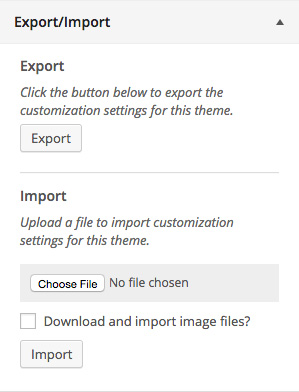
The Customizer Export/Import plugin allows you to easily export or import your WordPress customizer settings. It now also exports settings saved as options, making it even more versatile. You can use this plugin to transfer your customizer settings between themes or child themes.Screenshots
Frequently asked questions
What does the Customizer Export/Import plugin do?
The Customizer Export/Import plugin allows you to export or import your WordPress customizer settings from directly within the customizer interface!
How can I export customizer settings?
Exporting customizer settings is easy. Click the export button from within the customizer and a file will automatically begin downloading with your settings.
How can I import customizer settings?
Importing customizer settings is just as easy. Choose the export file you would like to import, select whether you would like to download and import images, and finally, click the import button.
Can developers export arbitrary options?
Developers can also have arbitrary options that aren't part of the customizer exported by using the cei_export_option_keys filter.
Does the plugin work for all themes?
This plugin currently only works for active themes, not themes that are being previewed with either the Theme Test Drive plugin or the new customizer theme preview.
Changelog
Version 0.1
- Initial release.
Version 0.2
- Added cei_export_option_keys filter for exporting custom options.
Version 0.3
- Customizer settings saved as options are now exported and imported.
Version 0.5
- Fixed an issue with uploads in WordPress 4.7.1.
Version 0.6
- Trying another fix for the issue with uploads in WordPress 4.7.1.
Version 0.7
- Added support for exporting and importing custom CSS.
Version 0.8
- Added support for option data that has an empty value.
Version 0.9
- Allow options with
widgetorsidebarin their key to be exported.
Version 0.9.1
- Fixed issue with slashes in plugin asset urls and S3. Props Huskynarr.
Version 0.9.4
- Added callout for Assistant
Version 0.9.5
- Fixed minor security issue
Version 0.9.6
- Restrict uploads to users that can install plugins for better security.
Version 0.9.7.1
- Fixed minor security issue
Version 0.9.7.2
- Fixed mime type error
Version 0.9.7.3
- Fixed mime type error again
- Fixed non SSL links in plugin headers
Version 0.9.8
- Trim unwanted whitespace from imported file.
